
TXT2EPUB
A simple tool for converting TXT books into EPUB.
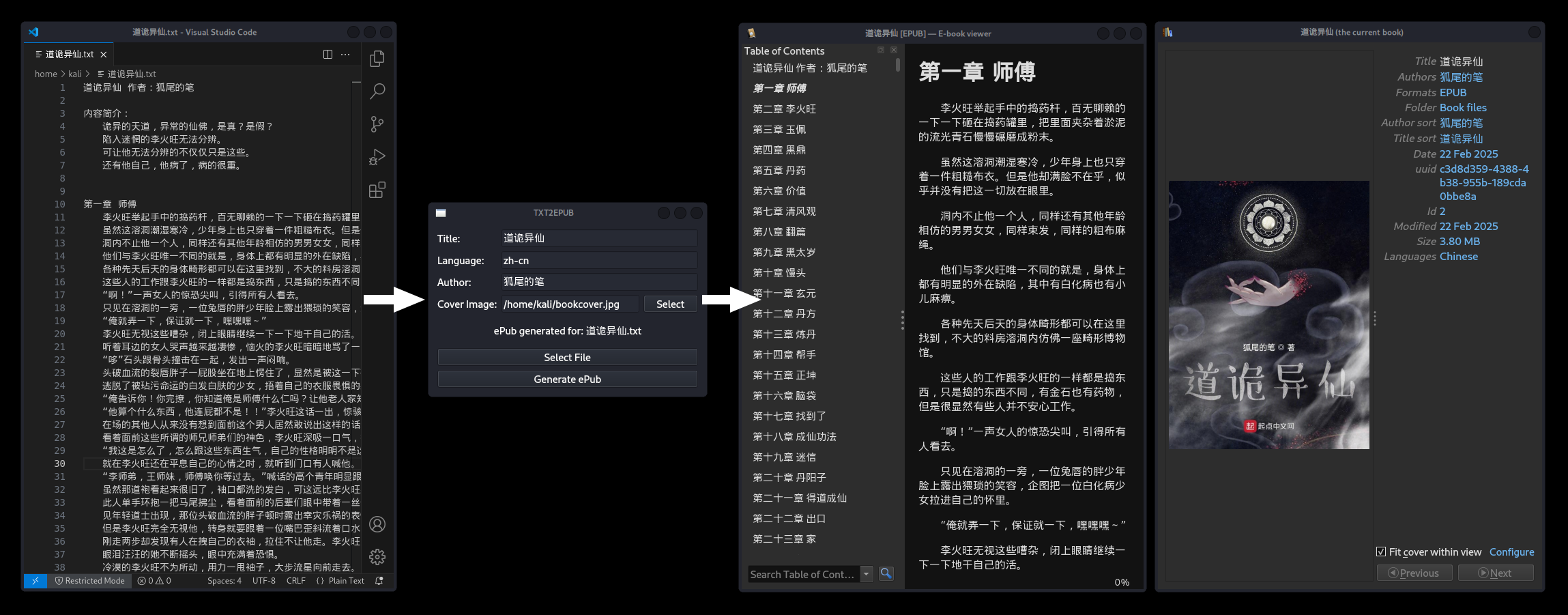
Installation
You'll first need to have Python3 and Pip installed. If you're using Windows, then the default Python installer will come with Pip. If you're using Linux, you may need to install an extra package like python3-pip. The exact package name depends on your distro.
Then, execute the following command to install TXT2EPUB.
pip install txt2epub
Usage
You may convert a file from the command line:
txt2epub convert -i <input> -o <output> -t <title> -a <author> -l <language> -c <cover>
...or using the GUI:
txt2epub gui
Chapter Detection
This program detects the book chapters and chapter titles following the standard TXT book format:
- Chapters are separated by three new lines (i.e.,
\n\n\n) - The first line in a new chapter is the chapter's title.
For example, in the text below, there are two chapters with titles "Chapter 1" and "Chapter 2."
Chapter 1

Lorem ipsum dolor sit amet, consectetur adipiscing elit. Donec at sapien ante.

Vestibulum ante ipsum primis in faucibus orci luctus et ultrices posuere cubilia curae.


Chapter 2

Lorem ipsum dolor sit amet, consectetur adipiscing elit. Donec at sapien ante.

Vestibulum ante ipsum primis in faucibus orci luctus et ultrices posuere cubilia curae.
1 maintainer

Metadata
1 maintainer
Release files for txt2epub 1.5.1
For a detailed explanation of source distributions (sdists) and built distributions (wheels), please see the package formats documentation.
Source distribution (sdist)
| File | Size | Uploaded | Provenance | |
|---|---|---|---|---|
| txt2epub-1.5.1.tar.gz | 68.3 kB | Without provenance | Details |
Built distribution (wheel)
| File | Interpreter | ABI | Platform | Reset |
|---|---|---|---|---|
| txt2epub-1.5.1-py3-none-any.whl | Python 3 | none | any | Details |
Total release size: 82.0 kB
Release files / txt2epub-1.5.1.tar.gz
| Download URL | txt2epub-1.5.1.tar.gz |
|---|---|
| Size | 68.3 kB |
| Tags | Source |
|
SHA-256 checksum How to use checksums |
be87bba35d6ec18838995d30670aed9b325b208b308d742e38789d1d91044268
|
|
BLAKE2b-256 checksum How to use checksums |
bd784c9bb938f58ffc05a2c64f2e05dcb4331490653acb453786890224e006f9
|
| Upload date | |
|
Uploaded using Trusted Publishing? What is trusted publishing? |
No |
| Uploaded via |
uv/0.10.6 {"installer":{"name":"uv","version":"0.10.6","subcommand":["publish"]},"python":null,"implementation":{"name":null,"version":null},"distro":{"name":"Arch Linux","version":null,"id":null,"libc":null},"system":{"name":null,"release":null},"cpu":null,"openssl_version":null,"setuptools_version":null,"rustc_version":null,"ci":null}
|
Release files / txt2epub-1.5.1-py3-none-any.whl
| Download URL | txt2epub-1.5.1-py3-none-any.whl |
|---|---|
| Size | 13.8 kB |
| Tags | Python 3 |
|
SHA-256 checksum How to use checksums |
95cc3df83a27340ef7b0226b5b5beaa2e025fddf7d1c489c49d42911128194eb
|
|
BLAKE2b-256 checksum How to use checksums |
8a69c656673f9eea91743cec70d91b4f31c6e075e32ab65eb57dabc5b7ad1276
|
| Upload date | |
|
Uploaded using Trusted Publishing? What is trusted publishing? |
No |
| Uploaded via |
uv/0.10.6 {"installer":{"name":"uv","version":"0.10.6","subcommand":["publish"]},"python":null,"implementation":{"name":null,"version":null},"distro":{"name":"Arch Linux","version":null,"id":null,"libc":null},"system":{"name":null,"release":null},"cpu":null,"openssl_version":null,"setuptools_version":null,"rustc_version":null,"ci":null}
|
Security for txt2epub 1.5.1
Provenance
Provenance describes where a file came from. On PyPI, provenance is shared via attestations, which provide a verifiable record of the build or publishing details. View details, limitations and caveats.
No provenance found
None of the files in this release were uploaded with provenance metadata.
A note on package security
PyPI is a repository for distributing packages, not a service for auditing them. While third-party security researchers and our staff do their best to detect and remove malicious packages, PyPI cannot guarantee the quality, security or suitability of any given package.














