
Build AI-powered semantic search applications

Project description

Build AI-powered semantic search applications






txtai executes machine-learning workflows to transform data and build AI-powered semantic search applications.

Traditional search systems use keywords to find data. Semantic search applications have an understanding of natural language and identify results that have the same meaning, not necessarily the same keywords.
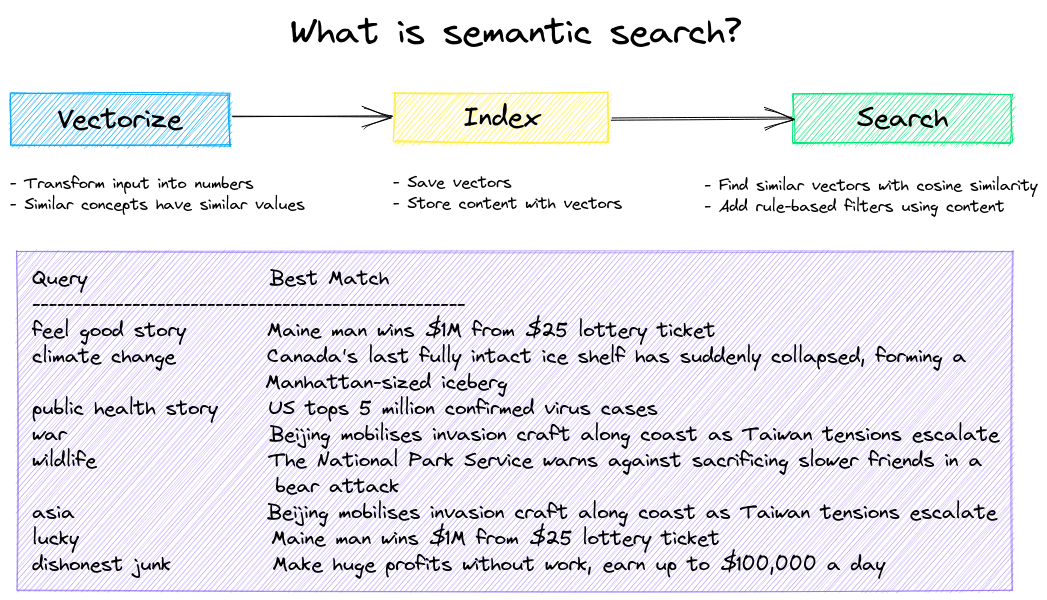
Backed by state-of-the-art machine learning models, data is transformed into vector representations for search (also known as embeddings). Innovation is happening at a rapid pace, models can understand concepts in documents, audio, images and video.
Summary of txtai features:
- 🔎 Large-scale similarity search with multiple index backends (Faiss, Annoy, Hnswlib) and support for external vector databases
- 📄 Create embeddings for text snippets, documents, audio, images and video
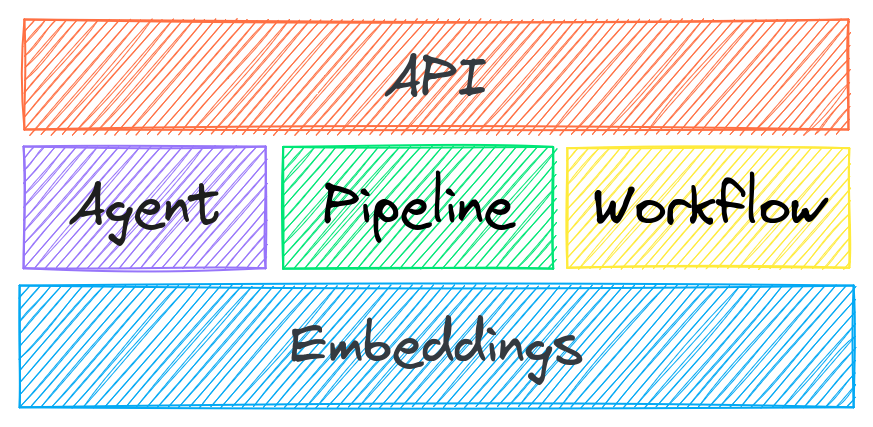
- 💡 Machine-learning pipelines that run question-answering, labeling, transcription, translation, summarization, LLM prompts and more
- ↪️️ Workflows to join pipelines together and aggregate business logic. txtai processes can be microservices or full-fledged indexing workflows.
- ⚙️ Build with Python or YAML. API bindings available for JavaScript, Java, Rust and Go.
- ☁️ Cloud-native architecture that scales out with container orchestration systems (e.g. Kubernetes)
Applications range from similarity search to NLP-driven data extractions that generate structured data. Semantic workflows transform and find data driven by user intent.

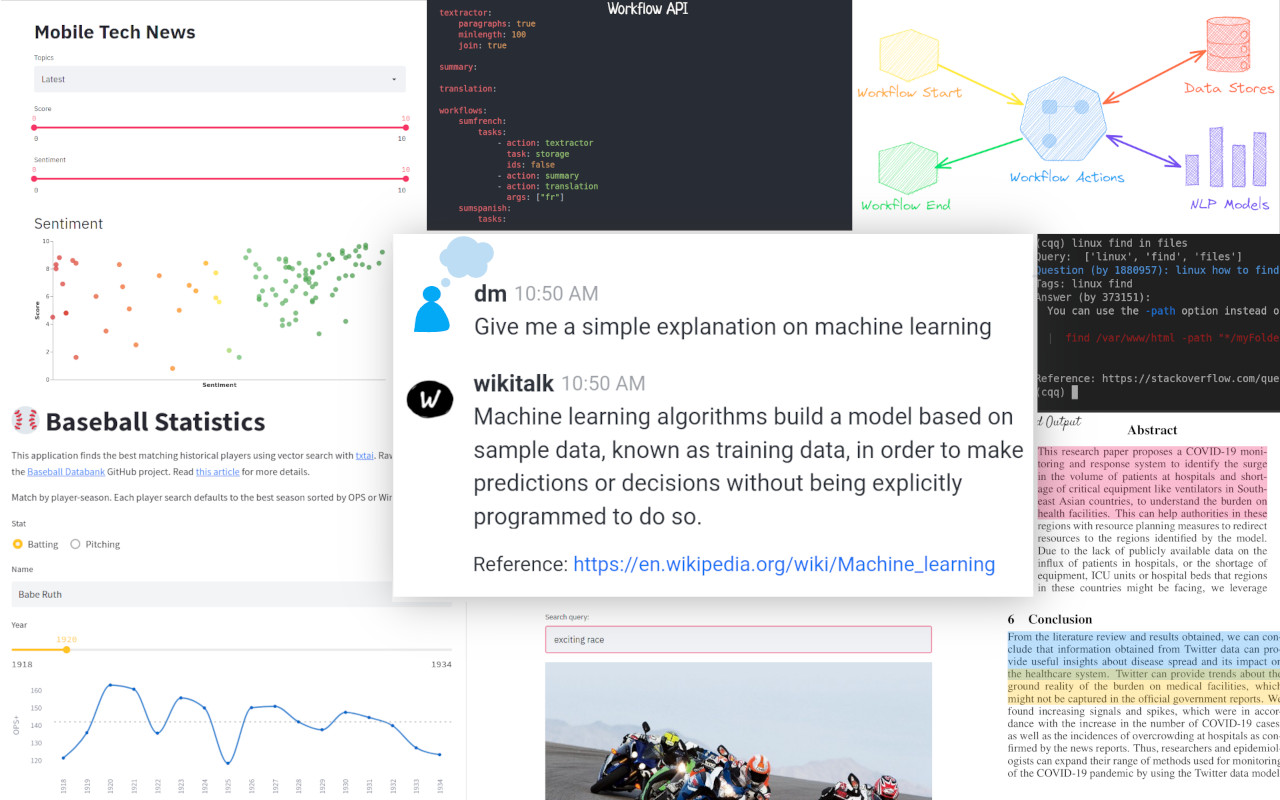
The following applications are powered by txtai.
| Application | Description |
|---|---|
| paperai | Semantic search and workflows for medical/scientific papers |
| codequestion | Semantic search for developers |
| tldrstory | Semantic search for headlines and story text |
| neuspo | Fact-driven, real-time sports event and news site |
txtai is built with Python 3.7+, Hugging Face Transformers, Sentence Transformers and FastAPI
Why txtai?
In addition to traditional search systems, a growing number of semantic search solutions are available, so why txtai?
# Get started in a couple lines
from txtai.embeddings import Embeddings

embeddings = Embeddings({"path": "sentence-transformers/all-MiniLM-L6-v2"})
embeddings.index([(0, "Correct", None), (1, "Not what we hoped", None)])
embeddings.search("positive", 1)
#[(0, 0.2986203730106354)]
- Build applications in your programming language of choice via the API
# app.yml
embeddings:
    path: sentence-transformers/all-MiniLM-L6-v2
CONFIG=app.yml uvicorn "txtai.api:app"
curl -X GET "http://localhost:8000/search?query=positive"
- Connect machine learning models together to build intelligent data processing workflows
- Works with both small and big data - scale when needed
- Supports micromodels all the way up to large language models (LLMs)
- Low footprint - install additional dependencies when you need them
- Learn by example - notebooks cover all available functionality
Installation

The easiest way to install is via pip and PyPI
pip install txtai
Python 3.7+ is supported. Using a Python virtual environment is recommended.
See the detailed install instructions for more information covering optional dependencies, environment specific prerequisites, installing from source, conda support and how to run with containers.
Examples

The examples directory has a series of notebooks and applications giving an overview of txtai. See the sections below.
Semantic Search
Build semantic/similarity/vector/neural search applications.
| Notebook | Description | |
|---|---|---|
| Introducing txtai ▶️ | Overview of the functionality provided by txtai |  |
| Build an Embeddings index with Hugging Face Datasets | Index and search Hugging Face Datasets | |
| Build an Embeddings index from a data source | Index and search a data source with word embeddings | |
| Add semantic search to Elasticsearch | Add semantic search to existing search systems | |
| Similarity search with images | Embed images and text into the same space for search | |
| Distributed embeddings cluster | Distribute an embeddings index across multiple data nodes | |
| What's new in txtai 4.0 | Content storage, SQL, object storage, reindex and compressed indexes | |
| Anatomy of a txtai index | Deep dive into the file formats behind a txtai embeddings index | |
| Custom Embeddings SQL functions | Add user-defined functions to Embeddings SQL | |
| Model explainability | Explainability for semantic search | |
| Query translation | Domain-specific natural language queries with query translation | |
| Build a QA database | Question matching with semantic search | |
| Embeddings components | Composable search with vector, SQL and scoring components | |
| Semantic Graphs | Explore topics, data connectivity and run network analysis | |
| Topic Modeling with BM25 | Topic modeling backed by a BM25 index | |
| Prompt-driven search with LLMs | Embeddings-guided and Prompt-driven search with Large Language Models (LLMs) | |
Pipelines
Transform data with NLP-backed pipelines.
| Notebook | Description | |
|---|---|---|
| Extractive QA with txtai | Introduction to extractive question-answering with txtai | |
| Extractive QA with Elasticsearch | Run extractive question-answering queries with Elasticsearch | |
| Extractive QA to build structured data | Build structured datasets using extractive question-answering | |
| Apply labels with zero shot classification | Use zero shot learning for labeling, classification and topic modeling | |
| Building abstractive text summaries | Run abstractive text summarization | |
| Extract text from documents | Extract text from PDF, Office, HTML and more | |
| Text to speech generation | Generate speech from text | |
| Transcribe audio to text | Convert audio files to text | |
| Translate text between languages | Streamline machine translation and language detection | |
| Generate image captions and detect objects | Captions and object detection for images | |
| Near duplicate image detection | Identify duplicate and near-duplicate images | |
| API Gallery | Using txtai in JavaScript, Java, Rust and Go | |
Workflows
Efficiently process data at scale.
| Notebook | Description | |
|---|---|---|
| Run pipeline workflows ▶️ | Simple yet powerful constructs to efficiently process data | |
| Transform tabular data with composable workflows | Transform, index and search tabular data | |
| Tensor workflows | Performant processing of large tensor arrays | |
| Entity extraction workflows | Identify entity/label combinations | |
| Workflow Scheduling | Schedule workflows with cron expressions | |
| Push notifications with workflows | Generate and push notifications with workflows | |
| Pictures are a worth a thousand words | Generate webpage summary images with DALL-E mini | |
| Run txtai with native code | Execute workflows in native code with the Python C API | |
Model Training
Train NLP models.
| Notebook | Description | |
|---|---|---|
| Train a text labeler | Build text sequence classification models | |
| Train without labels | Use zero-shot classifiers to train new models | |
| Train a QA model | Build and fine-tune question-answering models | |
| Train a language model from scratch | Build new language models | |
| Export and run models with ONNX | Export models with ONNX, run natively in JavaScript, Java and Rust | |
| Export and run other machine learning models | Export and run models from scikit-learn, PyTorch and more | |
Applications
Series of example applications with txtai. Links to hosted versions on Hugging Face Spaces also provided.
| Application | Description | |
|---|---|---|
| Basic similarity search | Basic similarity search example. Data from the original txtai demo. | 🤗 |
| Book search | Book similarity search application. Index book descriptions and query using natural language statements. | Local run only |
| Image search | Image similarity search application. Index a directory of images and run searches to identify images similar to the input query. | 🤗 |
| Summarize an article | Summarize an article. Workflow that extracts text from a webpage and builds a summary. | 🤗 |
| Wiki search | Wikipedia search application. Queries Wikipedia API and summarizes the top result. | 🤗 |
| Workflow builder | Build and execute txtai workflows. Connect summarization, text extraction, transcription, translation and similarity search pipelines together to run unified workflows. | 🤗 |
Documentation
Full documentation on txtai including configuration settings for pipelines, workflows, indexing and the API.
Further Reading

- Introducing txtai, AI-powered semantic search built on Transformers
- Tutorial series on Hashnode | dev.to
- What's new in txtai 5.0 | 4.0
- Getting started with semantic search | workflows
- Run machine-learning workflows to transform data and build AI-powered semantic search applications with txtai
- Semantic search on the cheap
- Serverless vector search with txtai
- Insights from the txtai console
- The big and small of txtai
Contributing
For those who would like to contribute to txtai, please see this guide.
Release history Release notifications | RSS feed


Download files
Download the file for your platform. If you're not sure which to choose, learn more about installing packages.
Source Distribution
Built Distribution
Filter files by name, interpreter, ABI, and platform.
If you're not sure about the file name format, learn more about wheel file names.
Copy a direct link to the current filters
File details
Details for the file txtai-5.3.0.tar.gz.
File metadata
- Download URL: txtai-5.3.0.tar.gz
- Upload date:
- Size: 109.5 kB
- Tags: Source
- Uploaded using Trusted Publishing? No
- Uploaded via: twine/3.2.0 pkginfo/1.5.0.1 requests/2.26.0 setuptools/42.0.2 requests-toolbelt/0.9.1 tqdm/4.62.3 CPython/3.7.16
File hashes
| Algorithm | Hash digest | |
|---|---|---|
| SHA256 |
36ae267cdc1204b467751a9f70464037bbb9c10908c993af444e331e27b88c17
|
|
| MD5 |
d72e334ad8250f706e3b4b1b5441a77c
|
|
| BLAKE2b-256 |
f826306259ab8d4ea908fbf5470a63b4b41e75acc43382cadb753be98010a57b
|
File details
Details for the file txtai-5.3.0-py3-none-any.whl.
File metadata
- Download URL: txtai-5.3.0-py3-none-any.whl
- Upload date:
- Size: 159.3 kB
- Tags: Python 3
- Uploaded using Trusted Publishing? No
- Uploaded via: twine/3.2.0 pkginfo/1.5.0.1 requests/2.26.0 setuptools/42.0.2 requests-toolbelt/0.9.1 tqdm/4.62.3 CPython/3.7.16
File hashes
| Algorithm | Hash digest | |
|---|---|---|
| SHA256 |
abf24bd4d29783d6f55268ed82e03f07ea37615b4ab42166aa07e0736b8c707c
|
|
| MD5 |
ad5c7c959171a0b7368d4ee43cb6404e
|
|
| BLAKE2b-256 |
12bef4b47276b1a523fd87258c1f3eb9c8c7ee041f47592002543104136decd0
|






