
从维基百科抽取中文语料
维基百科语料下载地址 : dumps.wikimedia.org/zhwiki
有很多链接,下载比如 https://dumps.wikimedia.org/zhwiki/20200701/zhwiki-20200701-pages-articles.xml.bz2
然后,用如下命令安装 txtcn_wiki ( 请用 python3 的 pip,有些系统上直接是 pip3)
pip install txtcn_wiki
安装成功后,用如下方式即可抽取。
txtcn_wiki /share/wiki/zhwiki-20200701-pages-articles.xml.bz2
小技巧:维基百科打包打包很大,但是不需要完全下载也可以运行以上命令(会报错,但能部分输出)。
会在bz2的同目录输出两个文件
- 条目正文:zhwiki-20200701-pages-articles.title.txt.zd
- 条目标题:zhwiki-20200701-pages-articles.txt.zd
这两个文件是Zstandard压缩后的纯文本文件 ( 参见 Zstandard:一种新的无损压缩算法 )
使用本软件包附带的 zdcat 命令可以查看, 比如:
zdcat /share/wiki/zhwiki-20200701-pages-articles.title.txt.zd
在条目正文中,条目的标题以 "➜ " 开头。
在程序中读取zd文件,可用如下方法(zd可以单独安装,比如pip install zd,源码见gitee.com/znlp/zd)
import zd

with zd.open(
  "/share/wiki/zhwiki-20200701-pages-articles.txt.zd"
) as f:
  for i in f:
    print(i)
如使用有问题请到 github.com/txtcn/wiki 发帖。
特别感谢
代码改编自 《获取并处理中文维基百科语料 - 科学空间|Scientific Spaces》
我的其他项目友情推荐
1. 中文语料库-每日自动更新版
网上有一些中文语料库,但是居然都不是自动更新的。
是可忍,孰不可忍。我想自动挖掘研究市场热点炒股票,没有新数据搞毛线。
于是,有了这个项目 : 《中文语料库-每日自动更新版》。
核心思想,通过RSS订阅,存档内容。
然后通过GitHub Actions来实现每日运行,这样就实现了一个无服务器的自动更新语料库。
2. 谷歌浏览器实用插件:六度空间 · 短链接
可以生成短链接(短网址)、二维码,一键复制标题和链接。
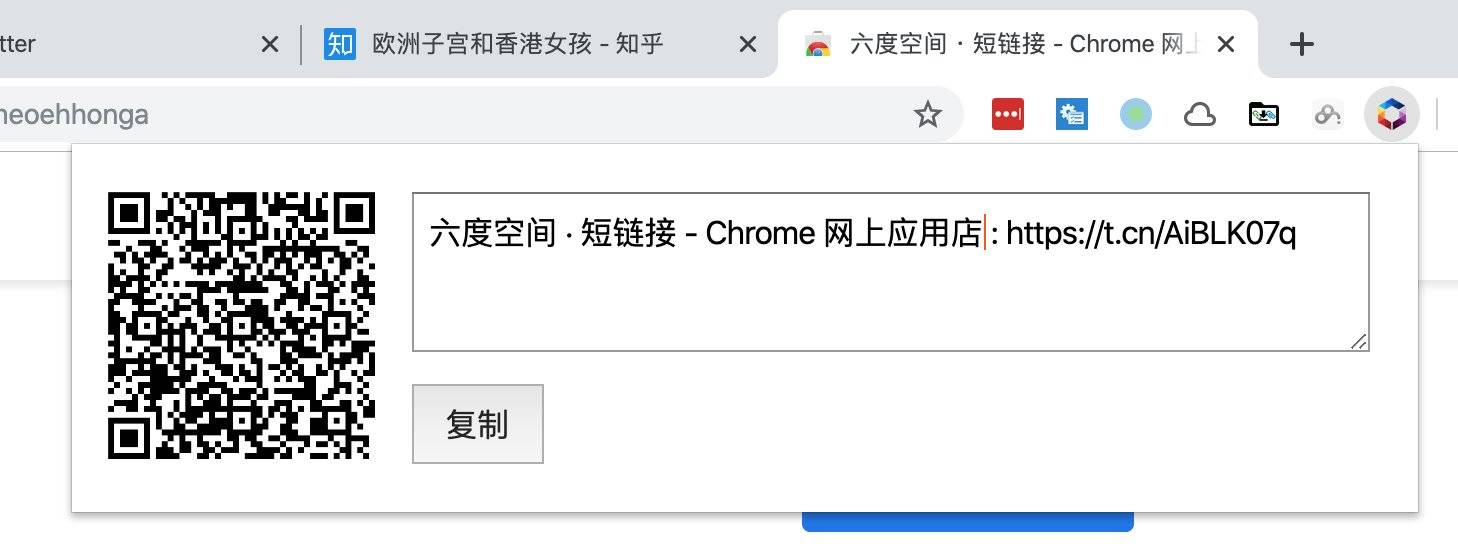
现有的chrome插件,没有一个能自动复制并带上标题的,所以自己写了一个,很实用,欢迎试用。
安装地址:Chrome 网上应用店
如果没法访问Chrome网上应用店,可以按照以下步骤安装。
点击这里下载源码 ,并解压
在Chrome浏览器中输入 chrome://extensions ,并开启开发者模式(点击右上角)
点击「加载已解压的扩展程序」选择刚刚解压的目录。
这是开源项目,欢迎参与改进。
关于作者
张沈鹏 ,欢迎扫码关注我的微信公众号。

1 maintainer

Metadata
1 maintainer
Release files for txtcn-wiki 0.0.2
For a detailed explanation of source distributions (sdists) and built distributions (wheels), please see the package formats documentation.
Source distribution (sdist)
| File | Size | Uploaded | Provenance | |
|---|---|---|---|---|
| txtcn_wiki-0.0.2.tar.gz | 3.9 kB | Without provenance | Details |
Built distribution (wheel)
| File | Interpreter | ABI | Platform | Reset |
|---|---|---|---|---|
| txtcn_wiki-0.0.2-py3-none-any.whl | Python 3 | none | any | Details |
Total release size: 13.9 kB
Release files / txtcn_wiki-0.0.2.tar.gz
| Download URL | txtcn_wiki-0.0.2.tar.gz |
|---|---|
| Size | 3.9 kB |
| Tags | Source |
|
SHA-256 checksum How to use checksums |
a51b51f09d1eb7ae21d064f7b8e12e09368b1f37884e612de66943f4b88766a1
|
|
BLAKE2b-256 checksum How to use checksums |
920a50b5637eeb4953a5e607ae0d8775e5bd8e0941baeb18c8f4d23a0f71826e
|
| Upload date | |
|
Uploaded using Trusted Publishing? What is trusted publishing? |
No |
| Uploaded via |
twine/3.2.0 pkginfo/1.5.0.1 requests/2.24.0 setuptools/49.2.0 requests-toolbelt/0.9.1 tqdm/4.48.0 CPython/3.7.8
|
Release files / txtcn_wiki-0.0.2-py3-none-any.whl
| Download URL | txtcn_wiki-0.0.2-py3-none-any.whl |
|---|---|
| Size | 10.0 kB |
| Tags | Python 3 |
|
SHA-256 checksum How to use checksums |
5a05a56bddf6603b9b449f06f69aac1a87df5f23fa23185aee36b391efd83086
|
|
BLAKE2b-256 checksum How to use checksums |
448ed8fd383720ba95f12c7fd77fa9e18aaa3e2dca9af986e9121a4d35acf954
|
| Upload date | |
|
Uploaded using Trusted Publishing? What is trusted publishing? |
No |
| Uploaded via |
twine/3.2.0 pkginfo/1.5.0.1 requests/2.24.0 setuptools/49.2.0 requests-toolbelt/0.9.1 tqdm/4.48.0 CPython/3.7.8
|
Security for txtcn-wiki 0.0.2
Provenance
Provenance describes where a file came from. On PyPI, provenance is shared via attestations, which provide a verifiable record of the build or publishing details. View details, limitations and caveats.
No provenance found
None of the files in this release were uploaded with provenance metadata.
A note on package security
PyPI is a repository for distributing packages, not a service for auditing them. While third-party security researchers and our staff do their best to detect and remove malicious packages, PyPI cannot guarantee the quality, security or suitability of any given package.














