
typed command line argument parser

Project description
typed-cap
Cap is a python Command-line Argument Parser that provides typing support. Using Cap requires less code to generate a more robust parser.
As you know python is a weakly typed programming language, and even if there is a typing module, its functionality is very weak compared to other languages like Typescript or Rust. We know it's ridiculous and pointless to compare python to any of these languages at the typing level, but properly handling these types in your code can really improve readability and reduce typing errors. And that gave us the motivation to write this package.
Usage
⚠️ typed_cap required python>=3.8
pip install typed_cap
Quick Example
from typed_cap import Cap, helpers
from typing import List, Optional, TypedDict


class T(TypedDict):
    verbose: bool
    message: List[str]
    size: Optional[float]


cap = Cap(T)
cap.default(
    {
        "verbose": False,
    }
)
cap.helper(
    {
        "verbose": {
            "alias": "v",
            "about": "verbose output",
        },
        "message": {"alias": "m", "about": "your messages"},
        "size": {
            "alias": "n",
            "about": "optional number",
        },
    }
)
helpers["arg_help"](cap, "help", None)
helpers["arg_version"](cap, "version", "V")
args = cap.parse()

print(args.args)
print(args.val)
python demo.py
# DEMO: option 'message':list[str] is required but it is missing

python demo.py -vv -m="msg1" --message "msg2" -m "msg3" -n=0.1 -n=10 ~/.config
# ['/home/local/.config']
# {'verbose': True, 'message': ['msg1', 'msg2', 'msg3'], 'size': 10.0}
Features
Flags
flags are bool fields defined in input type
class T(TypedDict):
    silent: bool
    yes: Optional[bool]
...
args = cap.parse()
yes = args.val['yes']
- alias for flags and options
adds short-version for convenient
cap.helper(
    { "ipv4": "4" }
)
-4equals to--ipv4 - supports combining alias
-zxvfequals to-z -x -v -f - supports multiple occurrences
-v -vor-vvhow to get occurrences of the argumentclass T(TypedDict): ... verbose: bool ... args.count('verbose') # -> int
Option Argument
named options which are take values
class T(TypedDict):
    integer: int
    floating: float
    strings: List[str]
- supports adding alias
cap.helper(
    {
        {"integer": {"alias": "i"}},
        {"floating": {"alias": "f"}},
        {"strings": {"alias": "s"}},
    }
)
-i 1-i=1--integer 1--integer=1 - supports multiple values
-m="msg1" --message "msg2" -m "msg3"will get{ 'message': ['msg1', 'msg2', 'msg3'] }
Typing
Cap accepts an arbitrary TypedDict instance T to get the values that satisfy the predefined parameters and their types via the built-in validator. After parser execution you will get a dict that strictly satisfies type T. The nice thing about this is that you can leverage features such as auto-completion and type checking from modern editors.
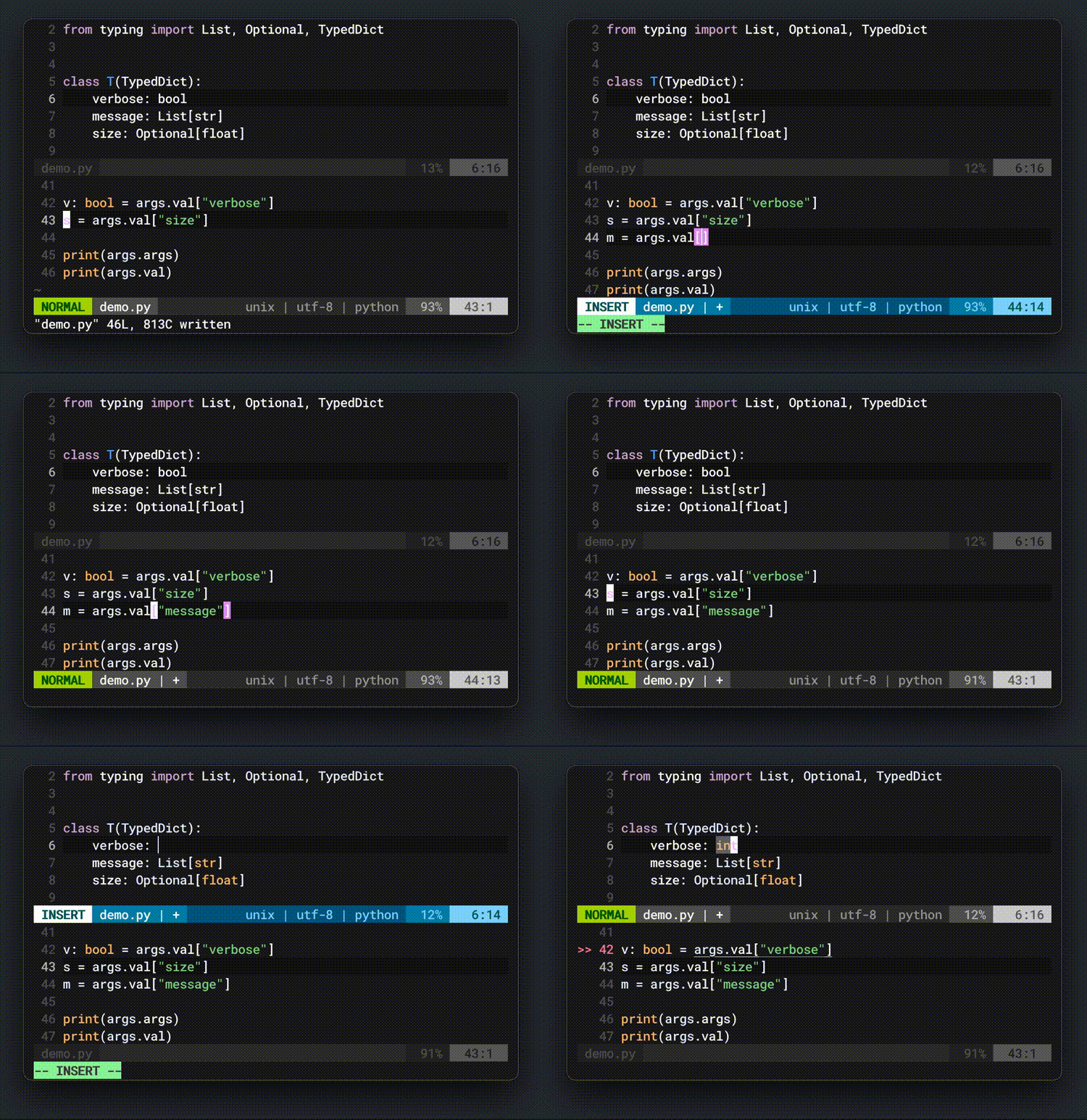
The preset validator currently supports:
boolintfloatstrNoneTypeUnionincludingOptional(e.g.Optional[int]equalsUnion[int, None])- queue
listandtuple Literal
Check the supported types in the preset validator from here.
Custom validator
TODO: build your validator with ValidVal
from typed_cap.typing import ValidVal
...
Helpers
Cap proviedes some useful argument helpers
-
helpgenerate help documents that automatically adapt to the terminal width usage:helpers["arg_help"]( cap: Cap, name: str, alias: Optional[VALID_ALIAS_CANDIDATES], ) -> None
example:
from typed_cap import Cap, helpers
... # code from quick example
cap.about("some descriptions") # optional
helpers["arg_help"](cap, "help", None)
args = cap.parse()
python demo.py --help
# some descriptions
#
# OPTIONS:
#     -v,--verbose    verbose output
#     -m,--message    your messages
#     -n,--size       optional number
#        --help       display the help text
-
versionusage:helpers["arg_help"]( cap: Cap, name: str, alias: Optional[VALID_ALIAS_CANDIDATES], ) -> None
example:
from typed_cap import Cap, helpers
... # code from quick example
cap.name("your-demo") # optional
cap.version("0.1.0")
helpers["arg_version"](cap, "version", "V")
args = cap.parse()
python demo.py -V # or
python demo.py --version
# your-demo 0.1.0
Others
using Cap.raw_exception to expose exceptions
Examples
Basic Example
from typed_cap import Cap
from typing import Optional, TypedDict


class T(TypedDict):
    all: Optional[bool]
    total: Optional[bool]
    max_depth: Optional[int]
    human_readable: Optional[bool]


cap = Cap(T)
args = cap.parse()

print(args.args)
print(args.val)
python demo.py --all --total /opt
# ['/opt']
# {'all': True, 'total': True, 'max_depth': None, 'human_readable': None}
Advance Example
from typed_cap import Cap, helpers
from typing import Optional, TypedDict


class T(TypedDict):
    all: bool
    total: bool
    max_depth: int
    human_readable: Optional[bool]


cap = Cap(T)
cap.default(
    {
        "all": False,
        "total": False,
        "max_depth": -1,
    }
)
cap.helper(
    {
        "all": {
            "alias": "a",
            "about": "write counts for all files, not just directories",
        },
        "total": {"alias": "c", "about": "produce a grand total"},
        "max_depth": {
            "alias": "d",
            "about": "print the total for a directory (or file, with --all) only if it is N or fewer levels below the command line argument;",
        },
        "human_readable": {
            "alias": "h",
            "about": "print sizes in human readable format (e.g., 1K 234M 2G)",
        },
    }
)
helpers["arg_help"](cap, 'help')
args = cap.parse()

print(args.args)
print(args.val)
python demo.py -ah --max-depth=1 /tmp
# ['/tmp']
# {'all': True, 'human_readable': True, 'max_depth': 1, 'total': False}


Download files
Download the file for your platform. If you're not sure which to choose, learn more about installing packages.
Source Distribution
Built Distribution
Filter files by name, interpreter, ABI, and platform.
If you're not sure about the file name format, learn more about wheel file names.
Copy a direct link to the current filters
File details
Details for the file typed_cap-0.2.0.tar.gz.
File metadata
- Download URL: typed_cap-0.2.0.tar.gz
- Upload date:
- Size: 17.4 kB
- Tags: Source
- Uploaded using Trusted Publishing? No
- Uploaded via: twine/3.7.1 importlib_metadata/4.10.0 pkginfo/1.8.2 requests/2.25.1 requests-toolbelt/0.9.1 tqdm/4.62.3 CPython/3.9.2
File hashes
| Algorithm | Hash digest | |
|---|---|---|
| SHA256 |
dcf08210751e8f2c7bd060123b0a11fce58229bf7734ea2d611f4e6df8575287
|
|
| MD5 |
e8197cd178818162333aca1d7cb72efa
|
|
| BLAKE2b-256 |
493a075e0f1ac1d05f37d4485b9d30256575c1043c15495f8f5197568aff24dc
|
File details
Details for the file typed_cap-0.2.0-py3-none-any.whl.
File metadata
- Download URL: typed_cap-0.2.0-py3-none-any.whl
- Upload date:
- Size: 17.0 kB
- Tags: Python 3
- Uploaded using Trusted Publishing? No
- Uploaded via: twine/3.7.1 importlib_metadata/4.10.0 pkginfo/1.8.2 requests/2.25.1 requests-toolbelt/0.9.1 tqdm/4.62.3 CPython/3.9.2
File hashes
| Algorithm | Hash digest | |
|---|---|---|
| SHA256 |
23b34dacfd71b055f2099d11b4fe6b82bd710358e28250295d4f425c68d76119
|
|
| MD5 |
a69e0e8268cb96449c9d82f910a2e673
|
|
| BLAKE2b-256 |
d17735b09f5185e86ca5ceeb4a3ee2909c39b690f1c22e420ee19dc2df877e45
|






