
Typed Evals
Evaluate responses. Guard actions.
A Python toolkit for checking LLM answers, evaluating agent runs, and reviewing tool calls before execution




Quickstart · Presets · Tool guards · Calibration · Examples & guides
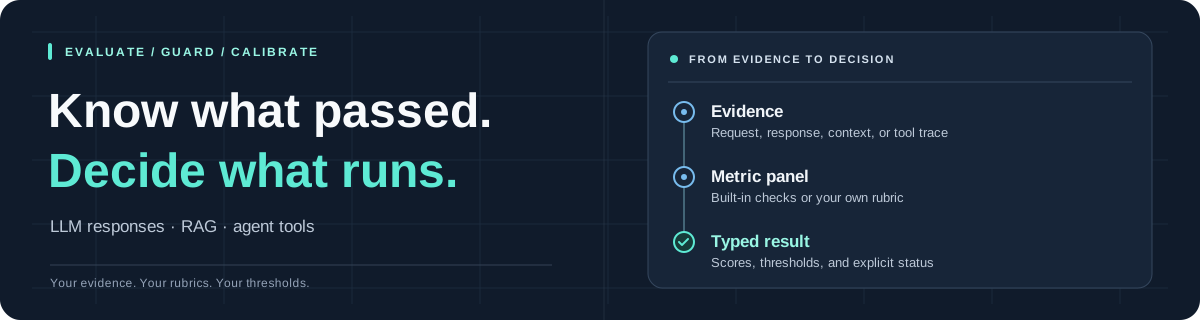
Give Typed Evals a request, a response, and the evidence used to produce it. Choose what to check, then get a score and pass/fail result for each check. You can also evaluate recorded agent runs and apply policy checks before tools execute.
Quickstart
Requires Python >= 3.12. The default Jev backend uses a TypeSafe API key; other providers are listed below.
pip install typed-evals
export TYPESAFE_API_KEY='your-key'
Check a response against retrieved evidence:
from typed_evals import evaluate

result = evaluate(
    input="What is the refund period?",
    response="You can request a refund within 30 days.",
    contexts=["Refunds are allowed within 30 days of purchase."],
    preset="rag",
)

print("All checks passed:", result.passed)
for name, metric in result.metrics.items():
    print(f"{name}: score={metric.score}, passed={metric.passed}")
The RAG preset checks whether the answer is supported by the context
(faithfulness), addresses the question (answer relevancy), covers every
essential requested part (answer completeness), retrieves an acceptable
fraction of useful source units (context relevance), and has evidence for the
entire question (context sufficiency). The other four checks share one judge
request; context relevance judges source units in separate bounded requests.
passed=True means all selected checks met their thresholds. Judge
results can be wrong; validate them against examples from your application.
This example makes API calls using your account. To explore without a key, start with the offline demo.
Choose your checks
A preset selects the metrics and the evidence they need:
| Preset | Checks | Evidence to supply |
|---|---|---|
"response" |
Answer relevancy, answer completeness | input, response |
"rag" |
Faithfulness, answer relevancy, answer completeness, context relevance, context sufficiency | input, response, contexts |
"agent" |
Task completion, tool grounding, answer relevancy, answer completeness | input, response, trace, expected_outcome |
Omitting both metrics and preset retains the single AnswerRelevancy() check.
Choose an explicit preset for the broader checks above.
Choose preset="rag" when you want answers checked against contexts. Passing
contexts alone leaves the default checks unchanged. Evaluation warns when supplied
contexts are unused by the active metrics.
Presets use a 0.5 threshold for each metric. Missing required evidence and judge
errors raise by default. See metric definitions and score meanings
for what each check measures, or customize your checks.
Choose a backend
| Backend | Install | Credentials |
|---|---|---|
JevBackend · default |
pip install typed-evals |
TYPESAFE_API_KEY |
OpenAIDecisionsBackend · OpenAI Decisions |
pip install 'typed-evals[openai]' |
OPENAI_API_KEY |
SystemOneBackend · Microsoft Foundry, Laya, Strands, and compatible servers |
pip install typed-evals |
API key / Azure Entra token, or optional server key |
Pass a backend to evaluate, Evaluator, or guard_tool to use it. See
provider setup for complete examples.
Microsoft-Decision-1 can judge evaluations through
Microsoft Foundry using SystemOneBackend,
or OpenRouter using JevBackend.
For Foundry, use your deployment name and resource endpoint plus
/providers/microsoft; supply the Azure key through an injected HTTP client's api-key header, or use an Entra bearer token. Keep image_mode="disabled" for Decision-1 on either provider.
SystemOneBackend connects to a deployed /v1/systemone server with an explicit
model and API root; local servers can run without a key. For a vision-capable
model on a server accepting SGLang's image extension, set image_mode="native";
see the runnable example. Images are disabled by
default for text-only servers and models.
For Jev image evidence, opt in with
JevBackend(model="jev-1.14.0", image_mode="experimental"); see the
image guide and
runnable example. The default model is jev-1.14.0,
with images disabled unless explicitly enabled.
All bundled backends extend the public BaseBackend API. Add a provider with a
different request protocol by extending BaseBackend and implementing its async
session. The base validates shared image inputs; each adapter supplies its image
transport and capability settings. Existing backends implementing the Backend
protocol also remain supported. See the
extension contract
and offline example.
CrewAI compatibility: the openai and crewai extras have conflicting OpenAI
SDK requirements. Install them in separate environments; combining
typed-evals[openai,crewai] fails dependency resolution. Details are in the
adapter guide.
Evaluate agent execution
Use preset="agent" with an observed trace and an expected_outcome to check
whether a run achieved its goal and reported tool results accurately. Capture the
trace from actual executions in your integration.
See the failed-ticket example for a run that claims success after its tool fails, and agent_evaluation.py for a runnable example.
Evaluate a dataset
Save one sample per line in samples.jsonl, then evaluate the file:
from typed_evals import evaluate

report = evaluate("samples.jsonl", preset="rag")
print(report.summary)
report.save("evaluation-report.json")
You can also pass a dictionary, an EvaluationSample, or a sequence of samples.
Use aevaluate in async applications. The dataset guide
covers file formats, return types, and async usage; CLI and CI
shows how to fail a build when checks fail.
Guard tool calls
Apply a policy check before a Python function runs:
from typed_evals import guard_tool


@guard_tool(
    policy="Only read tickets owned by Alice.",
    input="Read my ticket T-42.",
    contexts=["read_ticket(ticket_id) reads an existing support ticket."],
    authorization=["Authenticated customer: Alice. Alice owns T-42."],
)
def read_ticket(ticket_id: str) -> str:
    """Read a support ticket's complete text."""
    return ticket_store.read_authorized("Alice", ticket_id)


text = read_ticket("T-42")
Here, ticket_store is your application's ticket service. Supply current
application-owned authorization facts in authorization, and keep deterministic
permission checks inside the tool, as read_authorized does above.
By default, ToolSafety uses a 0.9 threshold. A failed or unavailable judgment
raises GuardrailViolation before the function executes. Successful calls return
the function's native output. The runtime guide
covers evidence callbacks, failure policies, and agent checkpoints.
Use your framework
| Integration | Install | Import guard_tool from |
|---|---|---|
| Plain Python | pip install typed-evals |
typed_evals |
| LangChain | pip install 'typed-evals[langchain]' |
typed_evals.adapters.langchain |
| CrewAI | pip install 'typed-evals[crewai]' |
typed_evals.adapters.crewai |
| Microsoft Agent Framework | pip install 'typed-evals[agent-framework]' |
typed_evals.adapters.agent_framework |
The adapter guide shows registration and evidence mapping for
each framework. Install CrewAI separately from the openai extra because their
SDK requirements conflict. CrewAI can use the default Jev backend.
Make the checks yours
Choose from eleven built-in metrics, select
thresholds with the metrics argument, or define a Metric with your own rubric.
For example, Faithfulness(threshold=0.8) requires a higher score to pass.
ContextRelevance() measures the fraction of retrieved source sentence units
judged useful: one relevant unit among ten scores 0.1. Use
granularity="passage" for a coarser passage fraction. unit_threshold=0.5
turns each unit's Noul probability into a boolean relevance decision;
threshold applies to the aggregate score. The judge returns typed probabilities,
with no generated explanation or rationale. Inspect source-span verdicts in the
result's details. This checks relevance, not the factual truth of retrieved
claims or their ranking. See the unit contract
for request costs and unavailable judgments.
See custom metrics for binary, categorical,
and ordered-score rubrics. Use Evaluator to reuse a configured metric panel.
Image evidence shows how to include images in
custom checks with a supported backend.
Calibration
A raw metric score of 0.8 does not necessarily mean humans would pass 80% of
similar examples. Opt-in calibration fits metric scores to representative human
pass/fail labels using EvaluationPipeline. Context relevance's raw fraction is
not a probability; its fitted curve estimates human acceptance of the retrieval.
CalibrationConfig(enabled=True) automatically uses Venn–Abers below 2,000
labeled training rows per metric, and isotonic at 2,000 or more. You can choose
an algorithm explicitly or change the cutoff. The cutoff is a heuristic; inspect
held-out Brier score and log loss because either algorithm can worsen performance.
The calibration guide covers algorithm choices, installation, labeling, validation, and saved artifacts. Included labels are synthetic demos; replace them with human-reviewed labels for your application.
Benchmark: TRIVIA+
On 645 test answers, isotonic calibration reduced Jev's expected calibration error (ECE) by 68.1%, from 0.0982 to 0.0313. Hallucination detection F1 remained similar (0.5833 → 0.5877). Read the full benchmark for the methodology, results, and limitations.
Try it offline
The offline demos use synthetic judges and need no API key or network calls. Run them from a repository checkout; examples are not included in the installed package:
git clone https://github.com/TrustifAI/typed_evals.git
cd typed_evals
python -m pip install -e '.[calibration]'
python examples/offline_demo.py
Try runtime_guardrails.py for enforcement or decorated_agent.py for agent integration.
Examples and guides
| Guide | What you'll learn |
|---|---|
| Evaluation | Providers, metrics, images, datasets, reports, and CLI usage. |
| Runtime guards | Tool guards, agent decorators, checkpoints, and failure behavior. |
| Framework adapters | LangChain, CrewAI, and Microsoft Agent Framework wiring. |
| Calibration | Human labels, algorithm selection, and reusable artifacts. |
| Architecture | Package structure and implementing a backend. |
| FAQ | Setup, notebook imports, and dependency troubleshooting. |
| Changelog | Changes and migration notes. |
Browse runnable examples and the introductory or advanced notebooks. For individual unsupported claims and retrieval noise, try the claim and source-unit example. See the FAQ for notebook dependencies.
Contribute
Open an issue or send a pull request. See CONTRIBUTING.md for development setup and checks, and SECURITY.md for vulnerability reporting.
Built by Aaryan Verma ·
MIT licensed
Useful for your next evaluation? Star the repo to keep it close.
1 maintainer

Metadata
1 maintainer
Release files for typed-evals 0.2.2
For a detailed explanation of source distributions (sdists) and built distributions (wheels), please see the package formats documentation.
Source distribution (sdist)
| File | Size | Uploaded | Provenance | Actions |
|---|---|---|---|---|
| typed_evals-0.2.2.tar.gz | 233.6 kB | With provenance | Details for typed_evals-0.2.2.tar.gz |
Built distribution (wheel)
| File | Interpreter | ABI | Platform | Actions Reset |
|---|---|---|---|---|
| typed_evals-0.2.2-py3-none-any.whl | Python 3 | none | any | Details for typed_evals-0.2.2-py3-none-any.whl |
Total release size: 319.8 kB
Release files / typed_evals-0.2.2.tar.gz
| Download URL | typed_evals-0.2.2.tar.gz |
|---|---|
| Size | 233.6 kB |
| Tags | Source |
|
SHA-256 checksum How to use checksums |
85b3e13bd22a9fb67224c3edb2c03aa23e3d0bccae275e4e4b67a9e8bd28ca14
|
|
BLAKE2b-256 checksum How to use checksums |
40c1478d5617303287b4e41f369137357efc004fcefb088a57ecbd75a1c6807a
|
| Upload date | |
|
Uploaded using Trusted Publishing? What is trusted publishing? |
Yes |
| Uploaded via |
twine/7.0.0 CPython/3.13.14
|
Provenance
Provenance describes where a file came from. On PyPI, provenance is shared via attestations, which provide a verifiable record of the build or publishing details. View details, limitations and caveats.


PyPI Publish Attestation
PyPI verified that this artifact, at this checksum, originated from the publisher listed below.
Signed by GitHub Actions, verified by PyPI on Oct 17, 2026.
Transparency logRelease files / typed_evals-0.2.2-py3-none-any.whl
| Download URL | typed_evals-0.2.2-py3-none-any.whl |
|---|---|
| Size | 86.1 kB |
| Tags | Python 3 |
|
SHA-256 checksum How to use checksums |
2df7188b0841fc6921f47d81d76a790b5d48e2de61e767e65a9e871c18370d55
|
|
BLAKE2b-256 checksum How to use checksums |
21c1588b81db40f1b50804ec1fb2d61625f74de3bdfbe767c9c6855ec0fa483f
|
| Upload date | |
|
Uploaded using Trusted Publishing? What is trusted publishing? |
Yes |
| Uploaded via |
twine/7.0.0 CPython/3.13.14
|
Provenance
Provenance describes where a file came from. On PyPI, provenance is shared via attestations, which provide a verifiable record of the build or publishing details. View details, limitations and caveats.
PyPI Publish Attestation
PyPI verified that this artifact, at this checksum, originated from the publisher listed below.
Signed by GitHub Actions, verified by PyPI on Oct 17, 2026.
Transparency logSecurity for typed-evals 0.2.2
Provenance
Provenance describes where a file came from. On PyPI, provenance is shared via attestations, which provide a verifiable record of the build or publishing details. View details, limitations and caveats.
Full provenance
All 2 files in this release have been uploaded with provenance metadata.
Attestation for typed_evals-0.2.2.tar.gz
PyPI Publish Attestation
PyPI verified that this artifact, at this checksum, originated from the publisher listed below.
Signed by GitHub Actions, verified by PyPI on Oct 17, 2026.
Transparency logA note on package security
PyPI is a repository for distributing packages, not a service for auditing them. While third-party security researchers and our staff do their best to detect and remove malicious packages, PyPI cannot guarantee the quality, security or suitability of any given package.
To learn more about protecting yourself from malicious actors, visit our package security documentation.














