
Updates
- 🚀 TypeLLM API is live: typed outputs without serving a model, $5 free credit. Try it · Quick start · Examples.
- [2026/10/05] Added objects and arrays: group typed properties into one value, or return a variable number of typed items.
- [2026/10/01] Added conditional fields: a field with
whenis answered only if its dependencies meet conditions. - [2026/10/01] Added thinking effort: set thinking by level, or let
"thinking": "auto"choose it on each call. - [2026/09/24] Added image input for vision-language models, tested with Qwen3.8-27B.
- [2026/09/23] Added JevBench results: TypeLLM scored 195/231 without thinking and 228/231 with thinking.
- [2026/09/23] Added permutation averaging to improve the predictive distribution. See the blog post.
- [2026/09/22] Added
depends_ondependency graphs with incremental prefix reuse. See the blog post. - [2026/09/19] Added optional thinking mode with a per-field budget.
- [2026/09/18] Added constrained
integerandnumberoutputs.
Introduction
TypeLLM brings type-safe generation to existing autoregressive LLMs without changing their architecture or weights. Inspired by TypeSafe AI's Jev, it lets models retain their native thinking and free-form generation while producing schema-guaranteed outputs through JSON Schema. Built on SGLang, TypeLLM also supports richer interaction patterns beyond independent typed decisions.
Supported output types
String · Integer · Number · Boolean · Enum choice · Object · Array — See schemas and examples.
Features
- No out-of-schema hallucinations — Choices stay within the allowed values.
- Negligible output-token cost — Single-token categorical selection and bounded numeric decoding; optional thinking adds tokens.
- Shared-prefix reuse — KV caching avoids reprocessing shared context.
- Dependency-aware execution — Independent fields run together; declare
depends_onto form a dependency graph. - Made for open autoregressive LLMs — Use compatible models you already serve with SGLang.
- Supports thinking mode — Enable reasoning before the final constrained answer.
- Image input — Pass images to vision-language models alongside the text context. See Image input.
- Permutation averaging — Reduce option-order bias on explicit enum questions with balanced, sampled or exhaustive orderings. See the docs.
JevBench results
Evaluated on 231 public JevBench tasks.
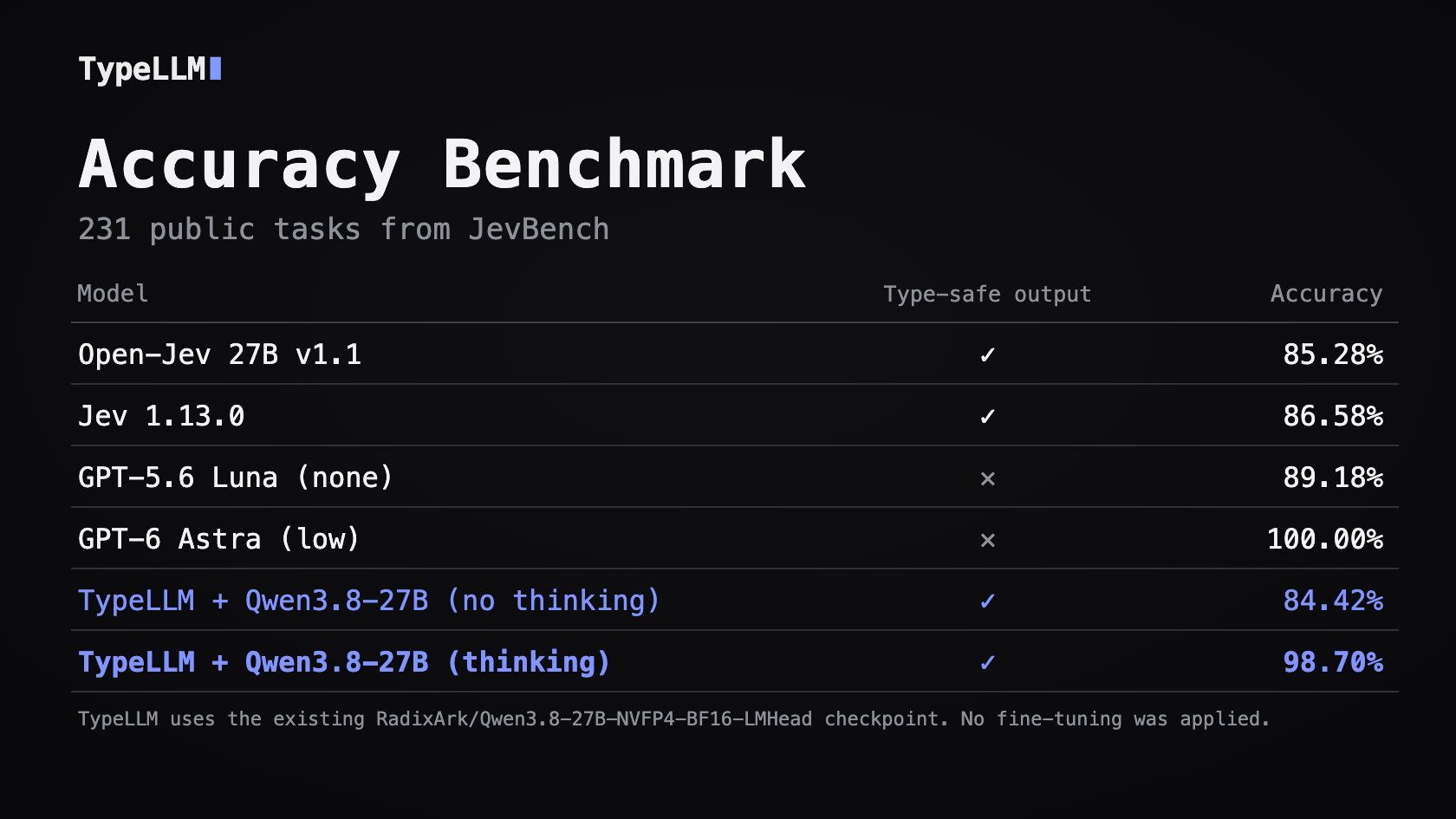
Full results and all per-task answers · Method and configuration
Quick start
pip install -U typellm
Call the hosted TypeLLM API, or run TypeLLM against a model you serve yourself. Both clients take the same requests.
TypeLLM API (cloud)
Sign in and create a key on the API keys page.
export TYPELLM_API_KEY="tl-sk-..."
import os
from typellm import TypeLLMClient

client = TypeLLMClient(api_key=os.environ["TYPELLM_API_KEY"])
See the API reference to call it over HTTP instead.
Self-hosted with SGLang
Use SGLang to configure and serve a compatible autoregressive model on your local GPU server. This example uses Qwen3.8-27B; follow the Qwen3.8-27B SGLang deployment guide to start it with prefix caching enabled.
See Supported models for tested checkpoints and thinking behavior.
Point TypeLLMClient at the SGLang server's HTTP endpoint:
from typellm import TypeLLMClient

client = TypeLLMClient(
    "http://127.0.0.1:30000",
    model="Qwen/Qwen3.8-27B",
)
Make a request
With either client:
response = client.generate(
    context="""
    Receipt from Hilton London
    Total: £324.50
    Employee travelled to London for a client meeting.
    """,
    questions={
        "merchant": {
            "type": "string",
            "instructions": "Return only the merchant name.",
        },
        "total": {
            "type": "number",
            "instructions": "Extract the total amount in GBP.",
        },
        "expense_type": {
            "type": "string",
            "enum": ["meal", "travel", "equipment"],
            "instructions": "What type of expense is this?",
        },
        "reimbursable": {
            "type": "boolean",
            "instructions": "Should this expense be reimbursed?",
        },
        "confidence": {
            "type": "number",
            "enum": [0.0, 0.25, 0.5, 0.75, 1.0],
            "instructions": "How confident are you?",
        },
    },
)

print(response.result)
generate() returns what the HTTP API does: the typed answers in .result, the
reasoning of each field that thought in .thinking, and the call's tokens in
.usage. Example .result:
{
    "merchant": "Hilton London",
    "total": 324.5,
    "expense_type": "travel",
    "reimbursable": True,
    "confidence": 0.75,
}
Output types
TypeLLM supports finite decisions, numeric fields, and free text:
| Field | Schema | Returned value |
|---|---|---|
| Text | {"type": "string"} |
str |
| Integer | {"type": "integer"} |
int |
| Number | {"type": "number"} |
float |
| Boolean | {"type": "boolean"} |
bool |
| Enum choice | {"type": "string", "enum": ["meal", "travel"]} |
Candidate type: str, int, or float |
| Object | {"type": "object", "properties": {...}} |
dict |
| Array | {"type": "array", "items": {...}} |
list |
Enum choices support string, integer, and number types, with at most 24 values. The declared type validates the candidate values.
A string without enum generates free text:
response = client.generate(
    context="The train ticket is for a client meeting.",
    questions={
        "summary": {"type": "string", "instructions": "Summarize in one sentence."},
    },
)
Free text stops after 128 tokens. Pass text_max_tokens= to the client for
longer answers, and ask for the length you want in the field's instructions.
maxLength is not supported.
Ask for a numeric answer without enumerating every possible value:
response = client.generate(
    context="Calculate the requested value accurately.",
    questions={
        "answer": {
            "type": "number",
            "instructions": "What is 17.5 multiplied by 4?",
        },
    },
)

print(response.result)
# {"answer": 70.0}
Numeric answers use plain decimal notation with at most 32 digits by default;
set TypeLLMClient(numeric_max_digits=...) to adjust this limit.
Use instructions to tell the model what decision to make:
{
    "type": "string",
    "enum": ["billing", "technical", "account"],
    "instructions": "Which team should handle this ticket?",
}
If instructions is omitted, TypeLLM uses description or an instruction
generated from the field name.
Nullable fields
Add "null" to the type to allow a missing value. The field returns None
when the input has no value for it:
response = client.generate(
    context="Read the attached receipt.",
    images=["receipt.jpg"],
    questions={
        "tip": {"type": ["number", "null"], "instructions": "Tip amount."},
        "table": {"type": ["string", "null"], "instructions": "Table number."},
        "paid_in_cash": {"type": ["boolean", "null"], "instructions": "Was the bill paid in cash?"},
        "card": {"type": ["string", "null"], "enum": ["VISA", "MASTERCARD", None],
                 "instructions": "Card network, if paid by card."},
    },
)
# {"tip": None, "table": "7A", "paid_in_cash": False, "card": None}
typetakes one type plus"null". A nullable boolean addsnullas a third choice. As in JSON Schema, a nullable enum returnsnullonly if itsenumlistsNone.return_probabilitiesworks for nullable booleans and enums, and its probabilities includeNone.
Objects and arrays
object groups multiple typed properties into one structured value:
"profile": {
    "type": "object",
    "properties": {
        "name": {"type": "string"},
        "age": {"type": "integer"},
    },
}
# {"profile": {"name": "Alice", "age": 32}}
array returns a variable number of typed items matching the items schema:
"skills": {
    "type": "array",
    "items": {"type": "string"},
    "instructions": "Return all relevant skills.",
}
# {"skills": ["Python", "CUDA", "PyTorch"]}
Items can be enum values, or objects:
"employees": {
    "type": "array",
    "items": {
        "type": "object",
        "properties": {
            "name": {"type": "string"},
            "role": {"type": "string"},
        },
    },
    "instructions": "Return all employees.",
}
# {"employees": [{"name": "Ada", "role": "CTO"}, {"name": "Lin", "role": "Engineer"}]}
- A property takes what a field takes:
instructions,enum,thinking, anddepends_onorwhenon other properties of the same object. Objects can hold objects. A field thatdepends_onan object or an array sees all of it. minItemsandmaxItemsbound an array. An array holds at most 50 items, each distinct from the others.- An object or an array can itself have
depends_onandwhen; skipped, it is listed once inresponse.skipped. A property awhenskipped is listed by its path, such as"person.employer". - Not supported: arrays of arrays, arrays inside objects,
return_probabilitiesinside arrays, andwhenconditions that test an object or an array.
For an input too long for one call, split it and carry the array on with
continue_from: each call starts from the items so far and returns the whole
array.
items = []
for part in parts:
    response = client.generate(context=part, questions={
        "employees": {**employees, "continue_from": items},
    })
    items = response.result["employees"]
- The items must match the
itemsschema. They come back first and are never changed; an item that repeats one of them is not added. minItemsandmaxItemscount them; the 50-item limit counts the items each call adds.
Thinking mode
Thinking is off by default. Turn it on for the fields that need it; the others answer at once, and the fields that think reason side by side:
response = client.generate(context=context, questions={
    "total": {"type": "number"},
    "category": {"type": "string", "enum": ["meal", "travel", "equipment"]},
    "policy_ok": {"type": "boolean", "instructions": "Does it meet the travel policy?",
                  "thinking": True, "thinking_budget": 1024},
})
thinking_budget caps a field's reasoning. Without one, a field may reason until
the model's context is full. When reasoning reaches the budget, TypeLLM closes it
and moves on to the typed answer.
response.thinking maps each field that thought to its reasoning, and
response.usage.thinking_tokens counts the reasoning tokens.
Thinking effort
thinking_effort sets the budget by level instead: "none" does not think,
"low" thinks up to 512 tokens, "medium" up to 2048 and "high" up to 4096.
With "thinking": "auto", TypeLLM picks the level on each call. It first asks
the model how much reasoning the field needs, without thinking, then answers the
field at that level. The field's own prompt is unchanged, and
response.thinking_effort reports the level each "auto" field got:
response = client.generate(context=context, questions={
    "category": {"type": "string", "enum": ["meal", "travel", "equipment"]},
    "policy_ok": {"type": "boolean", "instructions": "Does it meet the travel policy?",
                  "thinking": "auto"},
})
response.thinking_effort  # {"policy_ok": "low"}
"auto" adds one quick step after the field's dependencies and before the field;
that step sees the same dependency results. thinking_effort and
thinking_budget cannot be combined with "auto" or with each other.
Image input
Pass images with images= alongside the text context. The served model must be
a vision-language model, such as Qwen/Qwen3.8-27B.
response = client.generate(
    context="The customer says this receipt was charged twice.",
    images=["receipt.png"],
    questions={
        "total": {"type": "number", "instructions": "What is the receipt total?"},
        "paid": {"type": "boolean", "instructions": "Is the receipt marked as paid?"},
    },
)
Each image can be a local file path, an http(s) URL, a data: URI, raw bytes,
or a PIL image. Local files are read by the client, so the SGLang server does
not need access to your filesystem.
Dependency-aware generation
Fields run together by default, and each sees only the original context.
When a field needs earlier results, list them in depends_on:
response = client.generate(
    context="The payments service is returning errors after a deployment.",
    questions={
        "system": {
            "type": "string",
            "enum": ["payments", "accounts", "search"],
            "instructions": "Which system is affected?",
        },
        "severity": {
            "type": "string",
            "enum": ["low", "medium", "high"],
            "instructions": "Assess severity for the affected system.",
            "depends_on": ["system"],
        },
        "deployment_related": {
            "type": "boolean",
            "instructions": "Is the incident related to a deployment?",
            "depends_on": ["system"],
        },
        "rollback": {
            "type": "boolean",
            "instructions": "Based on the incident assessments, should we roll back?",
            "depends_on": ["severity", "deployment_related"],
        },
    },
)
This runs system, then severity and deployment_related, then rollback.
A field sees the results of its direct and transitive dependencies, and each
step reuses its parent's cached prompt. Unknown names and cycles raise
SchemaError.
Conditional fields
when runs a field only for some answers of its dependencies:
response = client.generate(context=ticket, questions={
    "category": {"type": "string", "enum": ["bug", "incident", "feature_request"]},
    "severity": {
        "type": "string",
        "enum": ["low", "medium", "high"],
        "when": {"category": ["bug", "incident"]},
    },
    "page_on_call": {"type": "boolean", "depends_on": ["severity"]},
})
# A feature request:
response.result   # {"category": "feature_request"}
response.skipped  # ["severity", "page_on_call"]
when maps other fields to a test of their answers. The fields it names are
dependencies, whether or not depends_on lists them, so the field also sees
their answers:
"when": {"category": "bug"}                            # equals
"when": {"category": ["bug", "incident"]}              # one of; also {"in": [...]}
"when": {"category": {"not_in": ["feature_request"]}}  # none of
"when": {"quantity": {"ne": 0}}                        # not equal
"when": {"amount": {"gte": 1000}}                      # gt, gte, lt and lte compare numbers
"when": {"score": {"gt": 0, "lte": 60}}                # several tests: all must pass
"when": {"tip": {"ne": None}}                          # not null
With several fields, every test must pass. Values are checked against the
field's type: an enum value, True or False, a number, or None for a
nullable field. gt, gte, lt and lte work on number fields only, and a
None answer fails them. Text fields cannot be tested, except for None.
These tests run in code on the typed answers, so they add no requests.
A skipped field is not run and has no key in result, even if a JSON Schema
required lists it; response.skipped lists it. Fields that depend on a
skipped field are skipped too, even when their other dependencies ran. A skipped
field sends no requests; only its definition counts toward the call's input
tokens.
Probabilities and sampling
Set return_probabilities on individual enum or boolean fields:
response = client.generate(
    context=context,
    questions={
        "expense_type": {
            "type": "string",
            "enum": ["meal", "travel", "equipment"],
            "return_probabilities": True,
        },
    },
)
{
    "expense_type": {
        "value": "travel",
        "probabilities": {
            "meal": 0.04,
            "travel": 0.93,
            "equipment": 0.03,
        },
    }
}
Only opted-in fields return value and probabilities; other fields return plain values.
The option is not supported on open Numeric or Text fields.
temperature is 0 by default: each field gets its most likely answer. Above 0,
TypeLLM samples at that temperature:
client = TypeLLMClient(
    "http://127.0.0.1:30000",
    temperature=0.8,
    seed=42,
)
Sampling applies to finite candidates for Choice fields and to token generation
for Numeric and Text fields. generate(temperature=...) sets it for one call.
The older mode="argmax" / mode="sample" still works for now but is deprecated.
A seed fixes TypeLLM's own random choices. SGLang's log probabilities can shift with its prefix cache and batching, so the same seed may still give different results.
For a one-off request, use the convenience function:
from typellm import run_schema

response = run_schema(
    context=context,
    questions=questions,
    base_url="http://127.0.0.1:30000",
    model="Qwen/Qwen3.8-27B",
)
Per-question permutation averaging
Add permutations to an enum question to reduce option-order bias. TypeLLM averages the probabilities and keeps the same return format.
response = client.generate(
    context="A single roll of a fair die.",
    questions={"roll": {
        "type": "string",
        "enum": ["one", "two", "three", "four", "five", "six"],
        "instructions": "What number will come up on this roll?",
        "permutations": "auto",
        "return_probabilities": True,
    }},
)
"auto"evaluates a balanced set of orderings: each option takes every position, and follows every other option, equally often. That isKorderings forKoptions (2KwhenKis odd), and the result does not depend on the order the enum was written in."all"evaluates every ordering (up to 720).- An integer greater than 1 samples that many distinct orderings at random.
Omit it or use 1 to keep the original behavior. Only explicit enum fields
support this option.
Serving
One TypeLLMClient can be shared by many threads. Each call keeps its own
prompts and usage, and connections to SGLang or the hosted API are reused.
import threading

cancel = threading.Event()
response = client.generate(
    context=context,
    questions=questions,
    seed=7,          # this call's random choices only
    timeout=30,      # seconds for the whole call; raises GenerationTimeout
    cancel=cancel,   # set it from another thread; raises GenerationCancelled
)
print(response.usage)
# Usage(input_tokens=410, thinking_tokens=0, requests=4, prompt_tokens=1830, cached_tokens=1504, completion_tokens=7)
usage reports the tokens of the call. When a call fails partway, the
exception's .usage holds what it spent. input_tokens is what you sent, each part
counted once: the context, the questions as JSON, and the images. The other
counts are SGLang's for the call's requests, where every prompt carries the
shared context. A timeout or cancel stops
the call before its next SGLang request.
Cost analysis
Enum and boolean fields use one output token each. Numeric, text, and optional thinking outputs use multiple tokens.
For a chain of D dependent fields, C original context tokens, and
roughly S new tokens per field, input prefill counts are:
without prefix reuse: O(D*C + D^2*S)
with prefix reuse:    O(C + D*S)
For independent fields, the shared context is prefilled once, followed by each field's question.
Supported models
The following models have been tested with TypeLLM on a live SGLang GPU server.
| Model / checkpoint | Thinking support |
|---|---|
Qwen/Qwen3.8-27B |
On / off |
Qwen/Qwen3.5-0.8B/4B/9B |
On / off |
Other sizes in the Qwen3.5 and Qwen3.8 families are expected to be compatible.
Image input has been tested with Qwen/Qwen3.8-27B.
Use the checkpoint ID as model=. TypeLLM loads the tokenizer from the server's
paths, then its served model name; if none of those loads locally, set
tokenizer= to the matching Hugging Face ID or local directory.
The tokenizer must load from standard artifacts without custom model code.
Comparison with Jev-style models
| Feature | TypeLLM | Jev | openjev-sglang | system-one-open | OpenJev DeBERTa |
|---|---|---|---|---|---|
| Enum selection | ✓ | ✓ | ✓ | ✓ | ✓ |
| Boolean decisions | ✓ | ✓ | ✓ | ✓ | ✓ |
| Rubric scoring | Numeric enum; no dedicated Score API | Score | Score | Score | Score |
| integer/decimal type | ✓ | — | — | — | — |
| string type | ✓ | — | — | — | — |
| Enable Thinking | ✓ | — | — | — | — |
| Image input | ✓ | Not documented | — | Not documented | — |
| Multi-field execution | Batch, DAG | Batch | Batch | Batch | Batch |
| Built-in field dependency graph | ✓ | — | — | — | — |
| KV prefix reuse | Shared context + dependency paths | Not disclosed | Shared context | Not documented | Not applicable |
© 2026 TypeLLM
1 maintainer

Metadata
1 maintainer
Release files for typellm 0.6.1
For a detailed explanation of source distributions (sdists) and built distributions (wheels), please see the package formats documentation.
Source distribution (sdist)
| File | Size | Uploaded | |
|---|---|---|---|
| typellm-0.6.1.tar.gz | 106.1 kB | Details |
Built distribution (wheel)
| File | Interpreter | ABI | Platform | Reset |
|---|---|---|---|---|
| typellm-0.6.1-py3-none-any.whl | Python 3 | none | any | Details |
Total release size: 168.0 kB
Release files / typellm-0.6.1.tar.gz
| Download URL | typellm-0.6.1.tar.gz |
|---|---|
| Size | 106.1 kB |
| Tags | Source |
|
SHA-256 checksum How to use checksums |
cbb408b4e85cd55e34816d8e97dcc6e4118dee0260665d756e5491edd6a2faa1
|
|
BLAKE2b-256 checksum How to use checksums |
cf8e8b44e4fcdb64e57208b4a85489efba6da900934c86db789fbaa64d063e97
|
| Upload date | |
|
Uploaded using Trusted Publishing? What is trusted publishing? |
Yes |
| Uploaded via |
twine/7.0.0 CPython/3.13.14
|
Provenance
Provenance describes where a file came from. On PyPI, provenance is shared via attestations, which provide a verifiable record of the build or publishing details. View details, limitations and caveats.


PyPI Publish Attestation
PyPI verified that this artifact, at this checksum, originated from the publisher listed below.
Signed by GitHub Actions, verified by PyPI on Oct 6, 2026.
Transparency logRelease files / typellm-0.6.1-py3-none-any.whl
| Download URL | typellm-0.6.1-py3-none-any.whl |
|---|---|
| Size | 62.0 kB |
| Tags | Python 3 |
|
SHA-256 checksum How to use checksums |
1463004c87d6377e940e51652c074ae8fbbae02e650ef50b661663f8bcd89d06
|
|
BLAKE2b-256 checksum How to use checksums |
79c96e07617e49fb71188b8622fe0ceed637b6effbf8b67736bf274956a1ec00
|
| Upload date | |
|
Uploaded using Trusted Publishing? What is trusted publishing? |
Yes |
| Uploaded via |
twine/7.0.0 CPython/3.13.14
|
Provenance
Provenance describes where a file came from. On PyPI, provenance is shared via attestations, which provide a verifiable record of the build or publishing details. View details, limitations and caveats.
PyPI Publish Attestation
PyPI verified that this artifact, at this checksum, originated from the publisher listed below.
Signed by GitHub Actions, verified by PyPI on Oct 6, 2026.
Transparency log













