
types-boto3-cloudwatch




Type annotations for boto3 CloudWatch 1.44.2 compatible with VSCode, PyCharm, Emacs, Sublime Text, mypy, pyright and other tools.
Generated with mypy-boto3-builder 8.12.0.
More information can be found on types-boto3 page and in types-boto3-cloudwatch docs.
See how it helps you find and fix potential bugs:
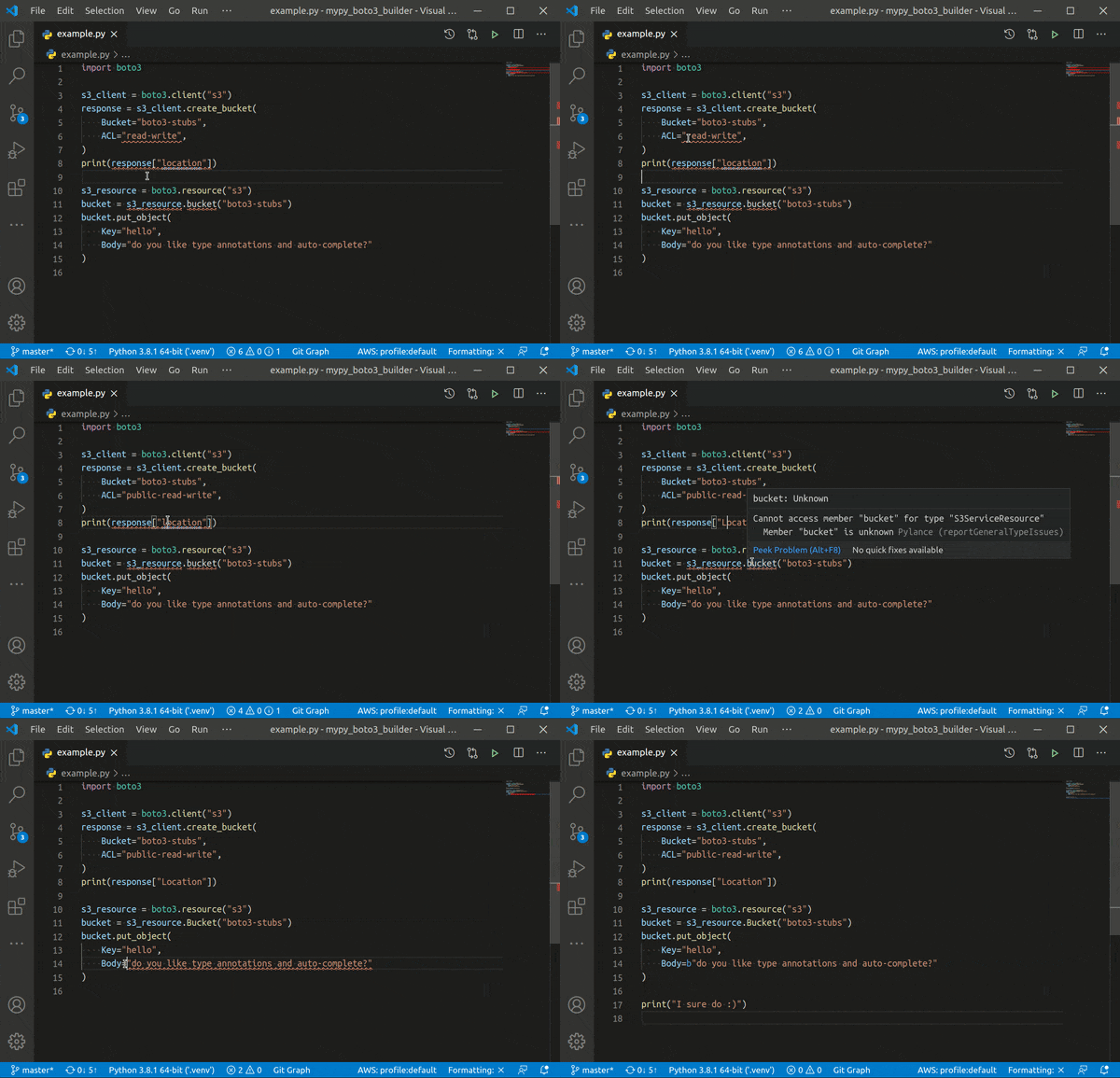
- types-boto3-cloudwatch
How to install
Generate locally (recommended)
You can generate type annotations for boto3 package locally with
mypy-boto3-builder. Use
uv for build
isolation.
- Run mypy-boto3-builder in your package root directory:
uvx --with 'boto3==1.44.2' mypy-boto3-builder - Select
boto3AWS SDK. - Add
CloudWatchservice. - Use provided commands to install generated packages.
VSCode extension
Add
AWS Boto3
extension to your VSCode and run AWS boto3: Quick Start command.
Click Modify and select boto3 common and CloudWatch.
From PyPI with pip
Install types-boto3 for CloudWatch service.
# install with boto3 type annotations
python -m pip install 'types-boto3[cloudwatch]'

# Lite version does not provide session.client/resource overloads
# it is more RAM-friendly, but requires explicit type annotations
python -m pip install 'types-boto3-lite[cloudwatch]'

# standalone installation
python -m pip install types-boto3-cloudwatch
How to uninstall
python -m pip uninstall -y types-boto3-cloudwatch
Usage
VSCode
- Install Python extension
- Install Pylance extension
- Set
Pylanceas your Python Language Server - Install
types-boto3[cloudwatch]in your environment:
python -m pip install 'types-boto3[cloudwatch]'
Both type checking and code completion should now work. No explicit type
annotations required, write your boto3 code as usual.
PyCharm
⚠️ Due to slow PyCharm performance on
Literaloverloads (issue PY-40997), it is recommended to use types-boto3-lite until the issue is resolved.
⚠️ If you experience slow performance and high CPU usage, try to disable
PyCharmtype checker and use mypy or pyright instead.
⚠️ To continue using
PyCharmtype checker, you can try to replacetypes-boto3with types-boto3-lite:
pip uninstall types-boto3
pip install types-boto3-lite
Install types-boto3[cloudwatch] in your environment:
python -m pip install 'types-boto3[cloudwatch]'
Both type checking and code completion should now work.
Emacs
- Install
types-boto3with services you use in your environment:
python -m pip install 'types-boto3[cloudwatch]'
- Install use-package, lsp, company and flycheck packages
- Install lsp-pyright package
(use-package lsp-pyright
  :ensure t
  :hook (python-mode . (lambda ()
                          (require 'lsp-pyright)
                          (lsp)))  ; or lsp-deferred
  :init (when (executable-find "python3")
          (setq lsp-pyright-python-executable-cmd "python3"))
  )
- Make sure emacs uses the environment where you have installed
types-boto3
Type checking should now work. No explicit type annotations required, write
your boto3 code as usual.
Sublime Text
- Install
types-boto3[cloudwatch]with services you use in your environment:
python -m pip install 'types-boto3[cloudwatch]'
- Install LSP-pyright package
Type checking should now work. No explicit type annotations required, write
your boto3 code as usual.
Other IDEs
Not tested, but as long as your IDE supports mypy or pyright, everything
should work.
mypy
- Install
mypy:python -m pip install mypy - Install
types-boto3[cloudwatch]in your environment:
python -m pip install 'types-boto3[cloudwatch]'
Type checking should now work. No explicit type annotations required, write
your boto3 code as usual.
pyright
- Install
pyright:npm i -g pyright - Install
types-boto3[cloudwatch]in your environment:
python -m pip install 'types-boto3[cloudwatch]'
Optionally, you can install types-boto3 to typings directory.
Type checking should now work. No explicit type annotations required, write
your boto3 code as usual.
Pylint compatibility
It is totally safe to use TYPE_CHECKING flag in order to avoid
types-boto3-cloudwatch dependency in production. However, there is an issue
in pylint that it complains about undefined variables. To fix it, set all
types to object in non-TYPE_CHECKING mode.
from typing import TYPE_CHECKING

if TYPE_CHECKING:
    from types_boto3_ec2 import EC2Client, EC2ServiceResource
    from types_boto3_ec2.waiters import BundleTaskCompleteWaiter
    from types_boto3_ec2.paginators import DescribeVolumesPaginator
else:
    EC2Client = object
    EC2ServiceResource = object
    BundleTaskCompleteWaiter = object
    DescribeVolumesPaginator = object

...
Explicit type annotations
Client annotations
CloudWatchClient provides annotations for boto3.client("cloudwatch").
from boto3.session import Session

from types_boto3_cloudwatch import CloudWatchClient

client: CloudWatchClient = Session().client("cloudwatch")

# now client usage is checked by mypy and IDE should provide code completion
Paginators annotations
types_boto3_cloudwatch.paginator module contains type annotations for all
paginators.
from boto3.session import Session

from types_boto3_cloudwatch import CloudWatchClient
from types_boto3_cloudwatch.paginator import (
    DescribeAlarmHistoryPaginator,
    DescribeAlarmsPaginator,
    DescribeAnomalyDetectorsPaginator,
    GetMetricDataPaginator,
    ListAlarmMuteRulesPaginator,
    ListDashboardsPaginator,
    ListMetricDataQueryDefinitionsPaginator,
    ListMetricsPaginator,
)

client: CloudWatchClient = Session().client("cloudwatch")

# Explicit type annotations are optional here
# Types should be correctly discovered by mypy and IDEs
describe_alarm_history_paginator: DescribeAlarmHistoryPaginator = client.get_paginator(
    "describe_alarm_history"
)
describe_alarms_paginator: DescribeAlarmsPaginator = client.get_paginator("describe_alarms")
describe_anomaly_detectors_paginator: DescribeAnomalyDetectorsPaginator = client.get_paginator(
    "describe_anomaly_detectors"
)
get_metric_data_paginator: GetMetricDataPaginator = client.get_paginator("get_metric_data")
list_alarm_mute_rules_paginator: ListAlarmMuteRulesPaginator = client.get_paginator(
    "list_alarm_mute_rules"
)
list_dashboards_paginator: ListDashboardsPaginator = client.get_paginator("list_dashboards")
list_metric_data_query_definitions_paginator: ListMetricDataQueryDefinitionsPaginator = (
    client.get_paginator("list_metric_data_query_definitions")
)
list_metrics_paginator: ListMetricsPaginator = client.get_paginator("list_metrics")
Waiters annotations
types_boto3_cloudwatch.waiter module contains type annotations for all
waiters.
from boto3.session import Session

from types_boto3_cloudwatch import CloudWatchClient
from types_boto3_cloudwatch.waiter import (
    AlarmExistsWaiter,
    AlarmMuteRuleExistsWaiter,
    CompositeAlarmExistsWaiter,
    LogAlarmExistsWaiter,
)

client: CloudWatchClient = Session().client("cloudwatch")

# Explicit type annotations are optional here
# Types should be correctly discovered by mypy and IDEs
alarm_exists_waiter: AlarmExistsWaiter = client.get_waiter("alarm_exists")
alarm_mute_rule_exists_waiter: AlarmMuteRuleExistsWaiter = client.get_waiter(
    "alarm_mute_rule_exists"
)
composite_alarm_exists_waiter: CompositeAlarmExistsWaiter = client.get_waiter(
    "composite_alarm_exists"
)
log_alarm_exists_waiter: LogAlarmExistsWaiter = client.get_waiter("log_alarm_exists")
Service Resource annotations
CloudWatchServiceResource provides annotations for
boto3.resource("cloudwatch").
from boto3.session import Session

from types_boto3_cloudwatch import CloudWatchServiceResource

resource: CloudWatchServiceResource = Session().resource("cloudwatch")

# now resource usage is checked by mypy and IDE should provide code completion
Other resources annotations
types_boto3_cloudwatch.service_resource module contains type annotations for
all resources.
from boto3.session import Session

from types_boto3_cloudwatch import CloudWatchServiceResource
from types_boto3_cloudwatch.service_resource import Alarm, Metric

resource: CloudWatchServiceResource = Session().resource("cloudwatch")

# Explicit type annotations are optional here
# Type should be correctly discovered by mypy and IDEs
my_alarm: Alarm = resource.Alarm(...)
my_metric: Metric = resource.Metric(...)
Collections annotations
types_boto3_cloudwatch.service_resource module contains type annotations for
all CloudWatchServiceResource collections.
from boto3.session import Session

from types_boto3_cloudwatch import CloudWatchServiceResource
from types_boto3_cloudwatch.service_resource import (
    ServiceResourceAlarmsCollection,
    ServiceResourceMetricsCollection,
)

resource: CloudWatchServiceResource = Session().resource("cloudwatch")

# Explicit type annotations are optional here
# Type should be correctly discovered by mypy and IDEs
alarms: cloudwatch_resources.ServiceResourceAlarmsCollection = resource.alarms
metrics: cloudwatch_resources.ServiceResourceMetricsCollection = resource.metrics
Literals
types_boto3_cloudwatch.literals module contains literals extracted from
shapes that can be used in user code for type checking.
Full list of CloudWatch Literals can be found in
docs.
from types_boto3_cloudwatch.literals import ActionsSuppressedByType


def check_value(value: ActionsSuppressedByType) -> bool: ...
Type definitions
types_boto3_cloudwatch.type_defs module contains structures and shapes
assembled to typed dictionaries and unions for additional type checking.
Full list of CloudWatch TypeDefs can be found in
docs.
# TypedDict usage example
from types_boto3_cloudwatch.type_defs import AlarmTagsPropagationOutputTypeDef


def get_value() -> AlarmTagsPropagationOutputTypeDef:
    return {
        "Enabled": ...,
    }
How it works
Fully automated
mypy-boto3-builder carefully
generates type annotations for each service, patiently waiting for boto3
updates. It delivers drop-in type annotations for you and makes sure that:
- All available
boto3services are covered. - Each public class and method of every
boto3service gets valid type annotations extracted frombotocoreschemas. - Type annotations include up-to-date documentation.
- Link to documentation is provided for every method.
- Code is processed by ruff for readability.
What's new
Implemented features
- Fully type annotated
boto3,botocore,aiobotocoreandaioboto3libraries mypy,pyright,VSCode,PyCharm,Sublime TextandEmacscompatibilityClient,ServiceResource,Resource,WaiterPaginatortype annotations for each service- Generated
TypeDefsfor each service - Generated
Literalsfor each service - Auto discovery of types for
boto3.clientandboto3.resourcecalls - Auto discovery of types for
session.clientandsession.resourcecalls - Auto discovery of types for
client.get_waiterandclient.get_paginatorcalls - Auto discovery of types for
ServiceResourceandResourcecollections - Auto discovery of types for
aiobotocore.Session.create_clientcalls
Latest changes
Builder changelog can be found in Releases.
Versioning
types-boto3-cloudwatch version is the same as related boto3 version and
follows
Python Packaging version specifiers.
Thank you
- Allie Fitter for boto3-type-annotations, this package is based on top of his work
- black developers for an awesome formatting tool
- Timothy Edmund Crosley for isort and how flexible it is
- mypy developers for doing all dirty work for us
- pyright team for the new era of typed Python
Documentation
All services type annotations can be found in boto3 docs
Support and contributing
This package is auto-generated. Please reports any bugs or request new features in mypy-boto3-builder repository.
1 maintainer

Metadata
1 maintainer
Release files for types-boto3-cloudwatch 1.44.2
For a detailed explanation of source distributions (sdists) and built distributions (wheels), please see the package formats documentation.
Source distribution (sdist)
| File | Size | Uploaded | Provenance | Actions |
|---|---|---|---|---|
| types_boto3_cloudwatch-1.44.2.tar.gz | 42.8 kB | Without provenance | Details for types_boto3_cloudwatch-1.44.2.tar.gz |
Built distribution (wheel)
| File | Interpreter | ABI | Platform | Actions Reset |
|---|---|---|---|---|
| types_boto3_cloudwatch-1.44.2-py3-none-any.whl | Python 3 | none | any | Details for types_boto3_cloudwatch-1.44.2-py3-none-any.whl |
Total release size: 95.0 kB
Release files / types_boto3_cloudwatch-1.44.2.tar.gz
| Download URL | types_boto3_cloudwatch-1.44.2.tar.gz |
|---|---|
| Size | 42.8 kB |
| Tags | Source |
|
SHA-256 checksum How to use checksums |
407ce3f18cc4adacbbfecdfd749729e685fb9948725063291a052ad13305e46d
|
|
BLAKE2b-256 checksum How to use checksums |
5646c8cc279d230145263c694e2ef0aa0727462f50ac61343b9d61ab9f1f2b10
|
| Upload date | |
|
Uploaded using Trusted Publishing? What is trusted publishing? |
No |
| Uploaded via |
twine/7.0.0 CPython/3.13.18
|
Release files / types_boto3_cloudwatch-1.44.2-py3-none-any.whl
| Download URL | types_boto3_cloudwatch-1.44.2-py3-none-any.whl |
|---|---|
| Size | 52.2 kB |
| Tags | Python 3 |
|
SHA-256 checksum How to use checksums |
a1c65cbea98c90da0518e062640b9e1149b3414b209fb9cf9a36e12406b6e04a
|
|
BLAKE2b-256 checksum How to use checksums |
1ac672d5055a3a5e0b5f325552649af36b7dcca071777edbfb4dee982f13e815
|
| Upload date | |
|
Uploaded using Trusted Publishing? What is trusted publishing? |
No |
| Uploaded via |
twine/7.0.0 CPython/3.13.18
|
Security for types-boto3-cloudwatch 1.44.2
Provenance
Provenance describes where a file came from. On PyPI, provenance is shared via attestations, which provide a verifiable record of the build or publishing details. View details, limitations and caveats.
No provenance found
None of the files in this release were uploaded with provenance metadata.
A note on package security
PyPI is a repository for distributing packages, not a service for auditing them. While third-party security researchers and our staff do their best to detect and remove malicious packages, PyPI cannot guarantee the quality, security or suitability of any given package.
To learn more about protecting yourself from malicious actors, visit our package security documentation.














