
typos
Source code spell checker
Finds and corrects spelling mistakes among source code:
- Fast enough to run on monorepos
- Low false positives so you can run on PRs




Dual-licensed under MIT or Apache 2.0
Documentation
- Installation
- Getting Started
- Reference
- FAQ
- Comparison with other spell checkers
- Projects using typos
- Benchmarks
- Design
- Contribute
- CHANGELOG
Install
Download a pre-built binary (installable via gh-install).
Or use rust to install:
$ cargo install typos-cli --locked
Or use Homebrew to install:
$ brew install typos-cli
Or use Conda to install:
$ conda install typos
Or use Pacman to install:
$ sudo pacman -S typos
Getting Started
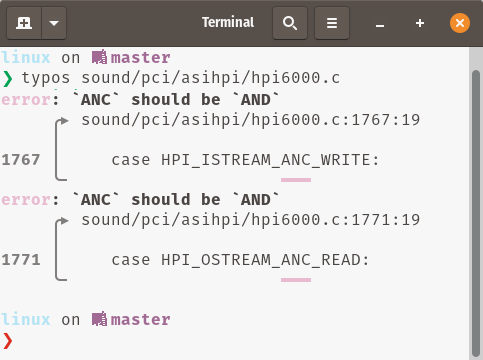
Most commonly, you'll either want to see what typos are available with
$ typos
Or have them fixed
$ typos --write-changes
$ typos -w
If there is any ambiguity (multiple possible corrections), typos will just report it to the user and move on.
False Positives
Sometimes, what looks like a typo is intentional, like with people's names, acronyms, or localized content.
To mark a word or an identifier (grouping of words) as valid, add it to your _typos.toml by declaring itself as the valid spelling:
[default]
extend-ignore-identifiers-re = [
    # *sigh* this just isn't worth the cost of fixing
    "AttributeID.*Supress.*",
]

[default.extend-identifiers]
# *sigh* this just isn't worth the cost of fixing
AttributeIDSupressMenu = "AttributeIDSupressMenu"

[default.extend-words]
# Don't correct the surname "Teh"
teh = "teh"
For more ways to ignore or extend the dictionary with examples, see the config reference.
For cases like localized content, you can disable spell checking of file contents while still checking the file name:
[type.po]
extend-glob = ["*.po"]
check-file = false
(run typos --type-list to see configured file types)
If you need some more flexibility, you can completely exclude some files from consideration:
[files]
extend-exclude = ["localized/*.po"]
Integrations
- GitHub Actions
- pre-commit
- 🐊Putout Processor
- Visual Studio Code
- typos-lsp (Language Server Protocol server)
- GitLab Code Quality
Custom
typos provides several building blocks for custom native integrations
-reads fromstdin,--write-changeswill be written tostdout--diffto provide a diff--format jsonto get jsonlines with exit code 0 on no errors, code 2 on typos, anything else is an error.
Examples:
$ # Read file from stdin, write corrected version to stdout
$ typos - --write-changes
$ # Creates a diff of what would change
$ typos dir/file --diff
$ # Fully programmatic control
$ typos dir/file --format json
Debugging
You can see what the effective config looks like by running
$ typos --dump-config -
You can then see how typos is processing your project with
$ typos --files
$ typos --identifiers
$ typos --words
If you need to dig in more, you can enable debug logging with -v
FAQ
Why was ... not corrected?
Does the file show up in typos --files?
If not, check your config with typos --dump-config -.
The [files] table controls how we walk files.
If you are using files.extend-exclude,
are you running into #593?
If you are using files.ignore-vcs = true,
is the file in your .gitignore but git tracks it anyways?
Prefer allowing the file explicitly (see #909).
Does the identifier show up in typos --identifiers or the word show up in typos --words?
If not, it might be subject to one of typos' heuristics for
detecting non-words (like hashes) or
unambiguous words (like words after a \ escape).
If it is showing up, likely typos doesn't know about it yet.
typos maintains a list of known typo corrections to keep the false positive
count low so it can safely run unassisted.
This is in contrast to most spell checking UIs people use where there is a known list of valid words. In this case, the spell checker tries to guess your intent by finding the closest-looking word. It then has a gauge for when a word isn't close enough and assumes you know best. The user has the opportunity to verify these corrections and explicitly allow or reject them.
For more on the trade offs of these approaches, see Design.
- To correct it locally, see also our False Positives documentation.
- To contribute your correction, see Contribute
1 maintainer

Metadata
1 maintainer
Release files for typos 1.52.2
For a detailed explanation of source distributions (sdists) and built distributions (wheels), please see the package formats documentation.
Source distribution (sdist)
| File | Size | Uploaded | Provenance | Actions |
|---|---|---|---|---|
| typos-1.52.2.tar.gz | 1.9 MB | Without provenance | Details for typos-1.52.2.tar.gz |
Built distributions (wheels)
Total release size: 43.9 MB
Release files / typos-1.52.2.tar.gz
| Download URL | typos-1.52.2.tar.gz |
|---|---|
| Size | 1.9 MB |
| Tags | Source |
|
SHA-256 checksum How to use checksums |
7eb832b2ec5d0459b721fcb1c832a428c6491b140c28765b62494e8ce0d560b0
|
|
BLAKE2b-256 checksum How to use checksums |
e79ac9a771d607af6741e2d75a202ea1fbf4e7e34d4f962a8738aceb51cc00a7
|
| Upload date | |
|
Uploaded using Trusted Publishing? What is trusted publishing? |
No |
| Uploaded via |
maturin/1.16.0
|
Release files / typos-1.52.2-py3-none-win_amd64.whl
| Download URL | typos-1.52.2-py3-none-win_amd64.whl |
|---|---|
| Size | 3.4 MB |
| Tags | Python 3 Windows x86-64 |
|
SHA-256 checksum How to use checksums |
2fb213ad10835bc5478db4a7609dd75f78daded00f7c983cd6c486225ccbf3c6
|
|
BLAKE2b-256 checksum How to use checksums |
55179a191774c43827b58e269bc935d5b19b23856efba5487eea5249b9afc9e6
|
| Upload date | |
|
Uploaded using Trusted Publishing? What is trusted publishing? |
No |
| Uploaded via |
maturin/1.16.0
|
Release files / typos-1.52.2-py3-none-musllinux_1_2_x86_64.whl
| Download URL | typos-1.52.2-py3-none-musllinux_1_2_x86_64.whl |
|---|---|
| Size | 8.3 MB |
| Tags | Linux musl 1.2+ x86-64 Python 3 |
|
SHA-256 checksum How to use checksums |
b6e2365d8c424a714e1256c64456b2d8b28bd3e13f77d885bc4a62d59e425410
|
|
BLAKE2b-256 checksum How to use checksums |
252c18b57f03fb40bd2d58d6ac13727bfa57029f15ffa07f0b188efc5f8b55d0
|
| Upload date | |
|
Uploaded using Trusted Publishing? What is trusted publishing? |
No |
| Uploaded via |
maturin/1.16.0
|
Release files / typos-1.52.2-py3-none-musllinux_1_2_aarch64.whl
| Download URL | typos-1.52.2-py3-none-musllinux_1_2_aarch64.whl |
|---|---|
| Size | 7.2 MB |
| Tags | Linux musl 1.2+ ARM64 Python 3 |
|
SHA-256 checksum How to use checksums |
6f391c2544b3f7b557bc546f24ebf598c0171457c0bec8edd9161b2e6e5fd7dc
|
|
BLAKE2b-256 checksum How to use checksums |
5f6bd7a6bdfab1d48d6a143269427853f3586b3426c9de2898979f723105b0fd
|
| Upload date | |
|
Uploaded using Trusted Publishing? What is trusted publishing? |
No |
| Uploaded via |
maturin/1.16.0
|
Release files / typos-1.52.2-py3-none-manylinux_2_17_x86_64.manylinux2014_x86_64.whl
| Download URL | typos-1.52.2-py3-none-manylinux_2_17_x86_64.manylinux2014_x86_64.whl |
|---|---|
| Size | 7.9 MB |
| Tags | Linux glibc 2.17+ x86-64 Python 3 |
|
SHA-256 checksum How to use checksums |
b49520a7b8daaec6956441c841bbf53bc1b221877db3891a363e32c5d4be48a1
|
|
BLAKE2b-256 checksum How to use checksums |
36e6c04bb9193cbf4b85fb0f2b5e7a24be4f156a45c8c33f8e94a32f73c8f4a4
|
| Upload date | |
|
Uploaded using Trusted Publishing? What is trusted publishing? |
No |
| Uploaded via |
maturin/1.16.0
|
Release files / typos-1.52.2-py3-none-manylinux_2_17_aarch64.manylinux2014_aarch64.whl
| Download URL | typos-1.52.2-py3-none-manylinux_2_17_aarch64.manylinux2014_aarch64.whl |
|---|---|
| Size | 8.4 MB |
| Tags | Linux glibc 2.17+ ARM64 Python 3 |
|
SHA-256 checksum How to use checksums |
bcf914c16e7e18ac905b2a87fb68cee0cf5d0c198d4457d79290475a49aa009b
|
|
BLAKE2b-256 checksum How to use checksums |
ba72539fe4da64c4a27148e8f05cec4f1b773b021a0bf1379f8f8d3b1dde9559
|
| Upload date | |
|
Uploaded using Trusted Publishing? What is trusted publishing? |
No |
| Uploaded via |
maturin/1.16.0
|
Release files / typos-1.52.2-py3-none-macosx_11_0_arm64.whl
| Download URL | typos-1.52.2-py3-none-macosx_11_0_arm64.whl |
|---|---|
| Size | 3.4 MB |
| Tags | Python 3 macOS 11.0+ ARM64 |
|
SHA-256 checksum How to use checksums |
aba39b3510062d0810c6dfbb7d9210712eb6b8928d8f454b9bf9fcca5b38e717
|
|
BLAKE2b-256 checksum How to use checksums |
5378181e0b94c1671a1df5f2135764425f36e5fe07a7c7aaa7fb6e5d8b2a9da4
|
| Upload date | |
|
Uploaded using Trusted Publishing? What is trusted publishing? |
No |
| Uploaded via |
maturin/1.16.0
|
Release files / typos-1.52.2-py3-none-macosx_10_12_x86_64.whl
| Download URL | typos-1.52.2-py3-none-macosx_10_12_x86_64.whl |
|---|---|
| Size | 3.5 MB |
| Tags | Python 3 macOS 10.12+ x86-64 |
|
SHA-256 checksum How to use checksums |
14d0c3cc8153a9336c61f14cd71076ba619d2a5aa0792f748133b4dbfb649782
|
|
BLAKE2b-256 checksum How to use checksums |
fad4d83e7d259afc4107770977cb04826cfd07da78e501ee25db7e7f9069b8a4
|
| Upload date | |
|
Uploaded using Trusted Publishing? What is trusted publishing? |
No |
| Uploaded via |
maturin/1.16.0
|
Security for typos 1.52.2
Provenance
Provenance describes where a file came from. On PyPI, provenance is shared via attestations, which provide a verifiable record of the build or publishing details. View details, limitations and caveats.
No provenance found
None of the files in this release were uploaded with provenance metadata.
A note on package security
PyPI is a repository for distributing packages, not a service for auditing them. While third-party security researchers and our staff do their best to detect and remove malicious packages, PyPI cannot guarantee the quality, security or suitability of any given package.
To learn more about protecting yourself from malicious actors, visit our package security documentation.














