
typst_pyimage
Extends Typst with inline Python code for generating content and figures.
Example
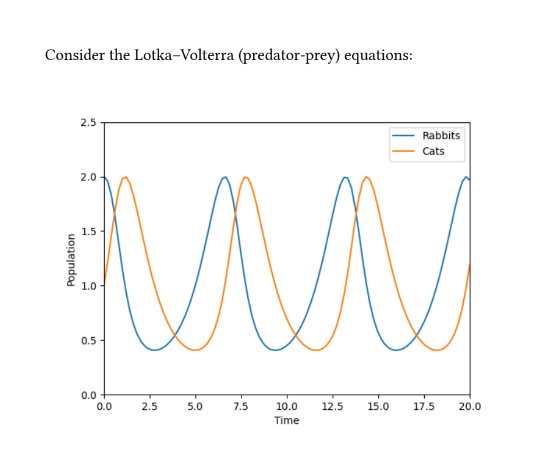
#import ".typst_pyimage/pyimage.typ": pyimage

Consider the Lotka--Volterra (predator-prey)
equations:

#pyimage("
import diffrax
import jax.numpy as jnp
import matplotlib.pyplot as plt

def func(t, y, args):
  rabbits, cats = y
  d_rabbits = rabbits - rabbits*cats
  d_cats = -cats + rabbits*cats
  return d_rabbits, d_cats

term = diffrax.ODETerm(func)
solver = diffrax.Tsit5()
y0 = (2, 1)
t0 = 0
t1 = 20
dt0 = 0.01
ts = jnp.linspace(t0, t1, 100)
saveat = diffrax.SaveAt(ts=ts)
sol = diffrax.diffeqsolve(term, solver, t0,
                          t1, dt0, y0,
                          saveat=saveat)

plt.plot(ts, sol.ys[0], label='Rabbits')
plt.plot(ts, sol.ys[1], label='Cats')
plt.xlim(0, 20)
plt.ylim(0, 2.5)
plt.xlabel('Time')
plt.ylabel('Population')
plt.legend()
", width: 70%)
(This example uses JAX and Diffrax to solve an ODE.)
Installation
pip install typst_pyimage
This requires that you're using Typst locally -- it won't work with the web app.
Usage
Usage is two steps. Write your content within the .typ file, and then run from the command line to build the content for Typst to actually import.
Within the .typ file:
Import like so (the .typst_pyimage/pyimage.typ file will be added in our next step):
#import ".typst_pyimage/pyimage.typ": pyinit, pycontent, pyimage
It provides the following functions:
-
pyinit(string). The positional string should be a Python program. This will be evaluated once before allpyimageorpycontentcalls, e.g. to perform imports or other setup. -
pycontent(string). The positional string should be a single Python expression. When evaluated with a Pythonstr(...), the result will treated as Typst markup. -
pyimage(string, ..arguments) -> content. The positional string should be a Python program that creates a single matplotlib figure. Any additional..argumentsare forwarded on to Typst's built-inimagefunction. You can use it just like the normalimagefunction, e.g.#align(center, pyimage("...")).
Each pycontent or pyimage call is assumed to be a deterministic function of its string input (and that of the string passed to pyinit if it is used). The result will be cached, and only re-evaluated if that input changes.
Call from the command line:
Now it's time to run things!
To one-off compile:
python -m typst_pyimage compile your_file.typ
typst compile your_file.typ
To watch (run these two commands at the same time):
python -m typst_pyimage watch your_file.typ
typst watch your_file.typ
Python scoping rules
Each #pyinit("..."), #pycontent("...") and #pyimage("...") block is executed as a fresh module (i.e. as if each was a separate Python file), but with the same Python interpreter.
Overall, this is essentially equivalent to the following Python code:
# main.py
import pyinit
import pyimage1
import pyimage2

# pyinit.py
...  # your #pyinit("...") code

# pyimage1.py
from pyinit import *
...  # your first #pyimage("...") code

# pyimage2.py
from pyinit import *
...  # your second #pyimage("...") code
This means that e.g. any global state will be shared across all #pyimage("...") calls.
1 maintainer

Metadata
1 maintainer
Release files for typst-pyimage 0.1.1
For a detailed explanation of source distributions (sdists) and built distributions (wheels), please see the package formats documentation.
Source distribution (sdist)
| File | Size | Uploaded | Provenance | Actions |
|---|---|---|---|---|
| typst_pyimage-0.1.1.tar.gz | 10.4 kB | Without provenance | Details for typst_pyimage-0.1.1.tar.gz |
Built distribution (wheel)
| File | Interpreter | ABI | Platform | Actions Reset |
|---|---|---|---|---|
| typst_pyimage-0.1.1-py3-none-any.whl | Python 3 | none | any | Details for typst_pyimage-0.1.1-py3-none-any.whl |
Total release size: 24.9 kB
Release files / typst_pyimage-0.1.1.tar.gz
| Download URL | typst_pyimage-0.1.1.tar.gz |
|---|---|
| Size | 10.4 kB |
| Tags | Source |
|
SHA-256 checksum How to use checksums |
595ea6ad33cb46ce46551a5afae0712cf253d9f5ceed36648cb043ac579540b3
|
|
BLAKE2b-256 checksum How to use checksums |
05eb9b3cbe8d129ad71b10e60d7c8a9a7a56eb0730fbd19f175688f6c6ace04a
|
| Upload date | |
|
Uploaded using Trusted Publishing? What is trusted publishing? |
No |
| Uploaded via |
twine/6.2.0 CPython/3.11.13
|
Release files / typst_pyimage-0.1.1-py3-none-any.whl
| Download URL | typst_pyimage-0.1.1-py3-none-any.whl |
|---|---|
| Size | 14.5 kB |
| Tags | Python 3 |
|
SHA-256 checksum How to use checksums |
27d52256918859b4df7bc3434d2c65d602b42e5948b30d7dbbe63db756c5d0f3
|
|
BLAKE2b-256 checksum How to use checksums |
657a34484c76983c63e62af1c164f4e45b9101a65bc2c815cac336351b0f2455
|
| Upload date | |
|
Uploaded using Trusted Publishing? What is trusted publishing? |
No |
| Uploaded via |
twine/6.2.0 CPython/3.11.13
|
Security for typst-pyimage 0.1.1
Provenance
Provenance describes where a file came from. On PyPI, provenance is shared via attestations, which provide a verifiable record of the build or publishing details. View details, limitations and caveats.
No provenance found
None of the files in this release were uploaded with provenance metadata.
A note on package security
PyPI is a repository for distributing packages, not a service for auditing them. While third-party security researchers and our staff do their best to detect and remove malicious packages, PyPI cannot guarantee the quality, security or suitability of any given package.
To learn more about protecting yourself from malicious actors, visit our package security documentation.














