
Tyrtulia TUI
Terminal client for Tyrtulia, the headless forum for small multi-user servers (tildes, pubnixes, club servers). Built with Textual.
The server, its API and how to run an instance are in the Tyrtulia repository (also on PyPI as tyrtulia).
- On the server itself it talks to Tyrtulia through its Unix socket: the operating system tells the forum who you are, so there is nothing to log in to.
- From anywhere else it logs in with your SSH key (a signed challenge) and keeps the session token in a private file. Before signing, it checks that the login message names the server it is talking to, so a malicious server cannot reuse your signature on another instance.
- It only knows
GET /and follows the links the forum returns: an action appears in the footer only when the forum offers it to you (reply, edit, pin, hide...). - Notifications arrive in real time over Server-Sent Events.
Requirements
- Python 3.14.
- OpenSSH client (
ssh-keygen), to sign the login challenge when you connect from outside the server. - A Tyrtulia instance, 1.0 or later (1.2 adds login messages bound to the instance). To set one up, follow its getting started guide for administrators.
Installation
With uv:
uv tool install tyrtulia-tui
With pip:
python3.14 -m venv ~/.local/share/tyrtulia-tui
~/.local/share/tyrtulia-tui/bin/pip install tyrtulia-tui
ln -s ~/.local/share/tyrtulia-tui/bin/tyrtulia-tui ~/.local/bin/tyrtulia-tui
Administrators can install it once for every user of the server, for example in /opt/tyrtulia-tui with a link in /usr/local/bin.
Usage
On the server, just run it. It finds the socket in /run/tyrtulia/tyrtulia.sock (or /var/run/tyrtulia/tyrtulia.sock on BSD):
tyrtulia-tui
From another machine, point it to the forum and give your username and SSH key. Your first SSH key is registered from the server itself (profile, k) or by the operator:
tyrtulia-tui --url https://forum.example.org --user alice --key ~/.ssh/id_ed25519
The key can also be the .pub file, to sign with ssh-agent. Without --user, you read as a guest and can log in later with l.
| Option | Meaning |
|---|---|
--socket PATH |
Unix socket of the server. |
--url URL |
URL of the server, for remote access. |
--user NAME |
Username for the SSH key login. |
--key FILE |
SSH private key (or its .pub with the agent). Defaults to ~/.ssh/id_ed25519, id_ecdsa or id_rsa. |
--editor COMMAND |
Your editor for Ctrl+O (see Writing in your own editor). Defaults to $VISUAL, $EDITOR or vi. |
--config FILE |
Configuration file. |
Configuration
Every key is optional; command line options win:
# ~/.config/tyrtulia-tui/config.toml
url = "https://forum.example.org"
username = "alice"
key = "~/.ssh/id_ed25519"
editor = "nvim"            # for Ctrl+O; also "emacs -nw", "nano", "code --wait"...
# socket = "/run/tyrtulia/tyrtulia.sock"
Session tokens are kept in ~/.local/state/tyrtulia-tui/tokens.json (mode 0600), and the last post you read in each thread in read.json next to it, to show how many posts are new. Both follow XDG_STATE_HOME.
Keys
| Where | Key | Action |
|---|---|---|
| Everywhere | q |
Quit |
i |
Notifications | |
/ |
Search (words, "a phrase", OR, NOT, prefix*) |
|
p |
Your profile and SSH keys | |
@ |
Open a user by name | |
l / o |
Log in / log out (remote access) | |
| Threads | Enter |
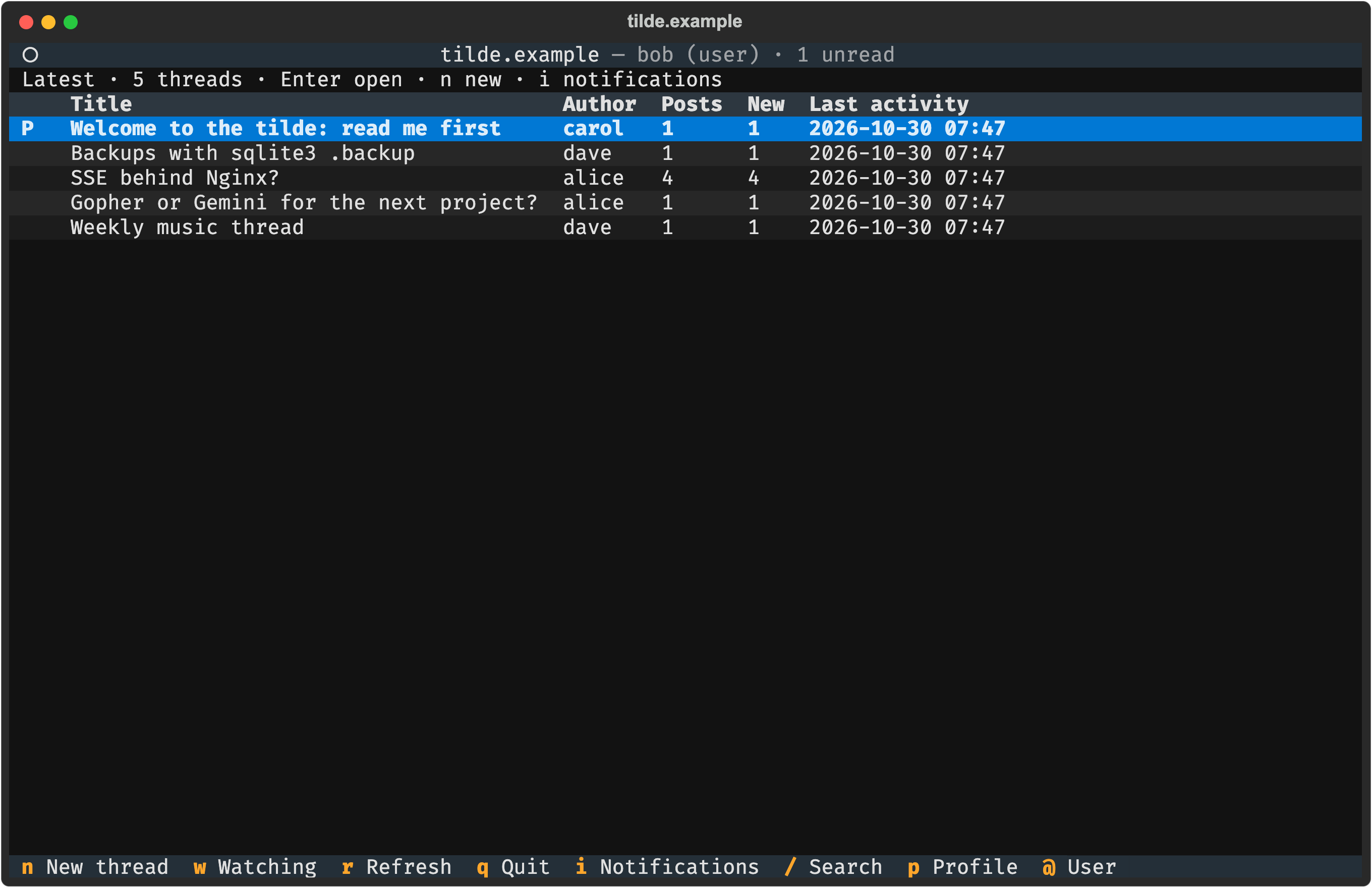
Open |
n |
New thread | |
w |
Latest or watching | |
r |
Refresh | |
] / [ |
Next / previous page | |
| Thread | ↑ ↓ (k j) |
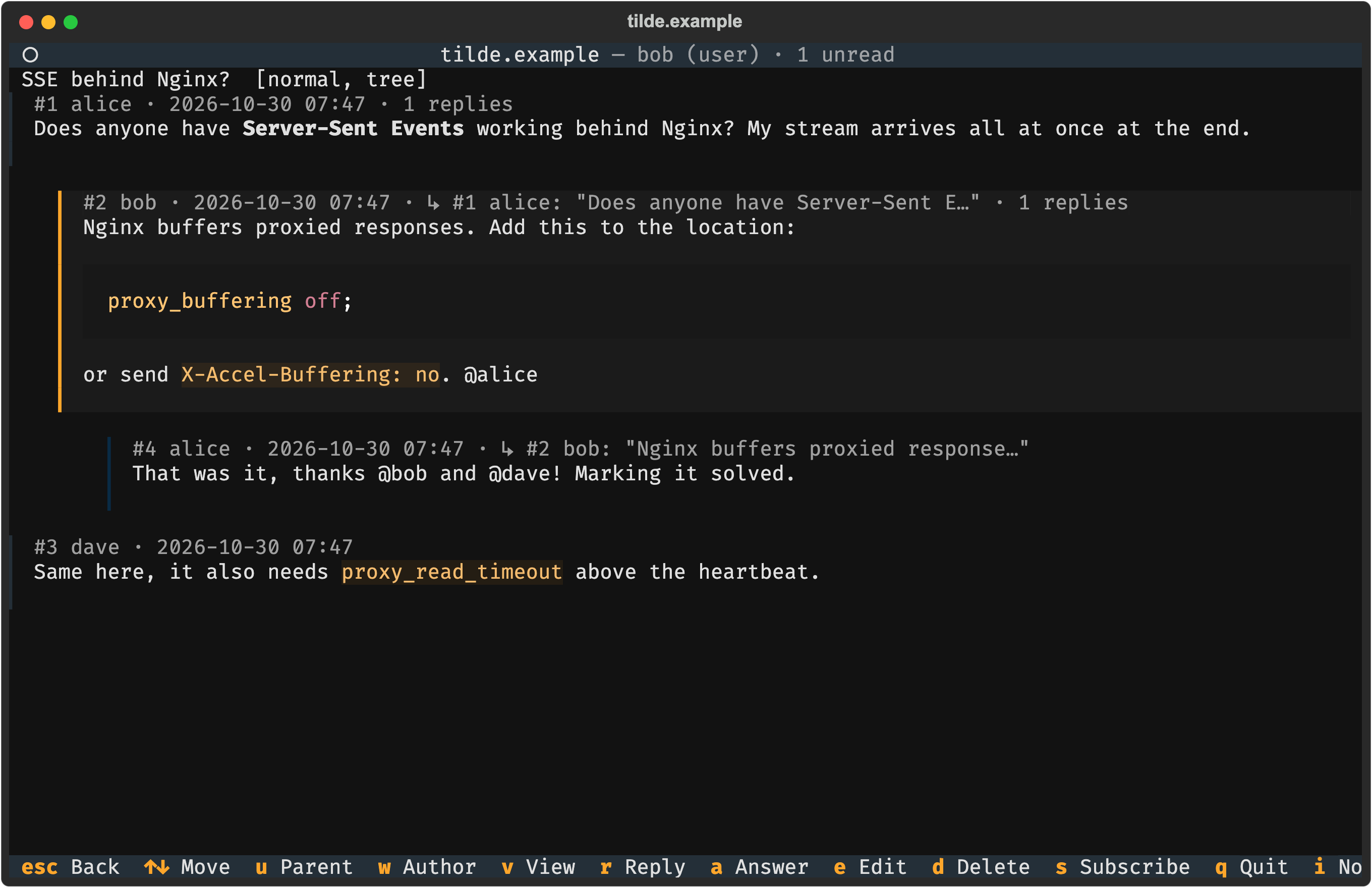
Move between posts (the selected one has an orange bar) |
u |
Go to the post the selected one answers | |
w |
Open the profile of the selected post's author | |
v |
Tree or linear view | |
r |
Reply to the thread | |
a |
Answer the selected post | |
e / d |
Edit / delete the selected post | |
s |
Subscription: watching, normal, muted | |
t |
Change the title | |
f |
Report the selected post | |
h, P, C |
Moderators: hide or unhide, pin, close | |
Esc |
Back | |
| Editor | Ctrl+S |
Send |
Ctrl+O |
Continue in your own editor | |
F7 |
Select all | |
Esc |
Cancel | |
| Notifications | Enter |
Open the post |
a |
Mark all as read | |
| Profile | e |
Edit your about |
k / x |
Add an SSH key from a .pub file / delete the selected key |
|
| User | f |
Report the user |
B, R |
Moderators: ban or unban, make read-only or remove it (a reason is asked and is public in the moderation log) | |
Esc |
Back |
Only the actions the forum allows you appear in the footer.
Writing in your own editor
You can write posts in your usual terminal editor instead of the built-in one:
- Open the editor of the TUI as usual:
nfor a new thread,rto reply,ato answer a post oreto edit one. For a new thread, type the title first. - Press
Ctrl+O. The TUI steps aside and your editor opens with the draft. - Write, save and quit (
:wqin vim,C-x C-sandC-x C-cin Emacs,Ctrl+OandCtrl+Xin nano). - You are back in the TUI with the text. Check it and press
Ctrl+Sto send, orCtrl+Oagain to keep editing.
The editor is, in this order: --editor on the command line, editor in the configuration, $VISUAL, $EDITOR and finally vi. Arguments are allowed:
# ~/.config/tyrtulia-tui/config.toml
editor = "nvim"
# editor = "emacs -nw"
# editor = "nano"
# editor = "hx"
# editor = "code --wait"     # graphical editors need their "wait" option
tyrtulia-tui --editor "emacs -nw"
- The draft is a temporary
.mdfile only you can read, removed when you come back. - If the editor exits with an error or cannot be found, the text in the TUI stays as it was and the reason is shown.
- The rules of the forum (lengths, too many mentions...) are checked when you send, as with the built-in editor; if the forum rejects the post, the editor opens again with your text.
- Notifications keep arriving while you write; you see them when you come back.
Development
Everything runs in Docker:
docker compose run --rm dev sh -c 'ruff format src tests && ruff check src tests && mypy && pytest'
The tests drive the client and the interface (Textual's Pilot) against a real Tyrtulia instance running in-process, plus a real tyrtulia serve with Unix users inside the container.
e2e/run.sh runs the end-to-end test: on Debian with systemd, ten people use the real TUI in tmux against one Tyrtulia instance installed from PyPI. Five Unix users go through the socket and five SSH key accounts log in over HTTP; they post, answer, mention, edit, moderate, report and search, and see each other's notifications in real time.
Contributing
Contributions are welcome! Please see the contribution guidelines for instructions on how to submit issues or pull requests. Changes to the forum itself (the API, the server) belong in the Tyrtulia repository.
License
Tyrtulia TUI is free software, released under the GNU General Public License v3.0 or later.
1 maintainer

Metadata
1 maintainer
Release files for tyrtulia-tui 1.4.0
For a detailed explanation of source distributions (sdists) and built distributions (wheels), please see the package formats documentation.
Source distribution (sdist)
| File | Size | Uploaded | Provenance | Actions |
|---|---|---|---|---|
| tyrtulia_tui-1.4.0.tar.gz | 42.3 kB | Without provenance | Details for tyrtulia_tui-1.4.0.tar.gz |
Built distribution (wheel)
| File | Interpreter | ABI | Platform | Actions Reset |
|---|---|---|---|---|
| tyrtulia_tui-1.4.0-py3-none-any.whl | Python 3 | none | any | Details for tyrtulia_tui-1.4.0-py3-none-any.whl |
Total release size: 90.6 kB
Release files / tyrtulia_tui-1.4.0.tar.gz
| Download URL | tyrtulia_tui-1.4.0.tar.gz |
|---|---|
| Size | 42.3 kB |
| Tags | Source |
|
SHA-256 checksum How to use checksums |
27bc688cb6842c4d0c738d614e3259045e30956705d8c4c79ffc97a3dac7502d
|
|
BLAKE2b-256 checksum How to use checksums |
6665ffd70bde1c9b4fbc2af4f3ed9beb0ad409329ec3a396cf60c03f1cd3c917
|
| Upload date | |
|
Uploaded using Trusted Publishing? What is trusted publishing? |
No |
| Uploaded via |
uv/0.13.3 {"installer":{"name":"uv","version":"0.13.3","subcommand":["publish"]},"python":null,"implementation":{"name":null,"version":null},"distro":{"name":"macOS","version":null,"id":null,"libc":null},"system":{"name":null,"release":null},"cpu":null,"openssl_version":null,"setuptools_version":null,"rustc_version":null,"ci":null}
|
Release files / tyrtulia_tui-1.4.0-py3-none-any.whl
| Download URL | tyrtulia_tui-1.4.0-py3-none-any.whl |
|---|---|
| Size | 48.3 kB |
| Tags | Python 3 |
|
SHA-256 checksum How to use checksums |
711d073c4f5c953186ff9156387e79b504cecf424b0796861fcf1e66e172a7d4
|
|
BLAKE2b-256 checksum How to use checksums |
592daf46ff6f0a4a77ae1b1b2a86b4f9196fb37e1569a53276324d2c866549a4
|
| Upload date | |
|
Uploaded using Trusted Publishing? What is trusted publishing? |
No |
| Uploaded via |
uv/0.13.3 {"installer":{"name":"uv","version":"0.13.3","subcommand":["publish"]},"python":null,"implementation":{"name":null,"version":null},"distro":{"name":"macOS","version":null,"id":null,"libc":null},"system":{"name":null,"release":null},"cpu":null,"openssl_version":null,"setuptools_version":null,"rustc_version":null,"ci":null}
|
Security for tyrtulia-tui 1.4.0
Provenance
Provenance describes where a file came from. On PyPI, provenance is shared via attestations, which provide a verifiable record of the build or publishing details. View details, limitations and caveats.
No provenance found
None of the files in this release were uploaded with provenance metadata.
A note on package security
PyPI is a repository for distributing packages, not a service for auditing them. While third-party security researchers and our staff do their best to detect and remove malicious packages, PyPI cannot guarantee the quality, security or suitability of any given package.
To learn more about protecting yourself from malicious actors, visit our package security documentation.














