
A Python library for Twitch & Youtube Stream Notification.

Project description







TYStream
TYStream is A Python library for Twitch & Youtube Stream Notification.
安裝套件
# Windows
pip install tystream

# Linux/MacOS

python3 -m pip install tystream
註冊API
Twitch
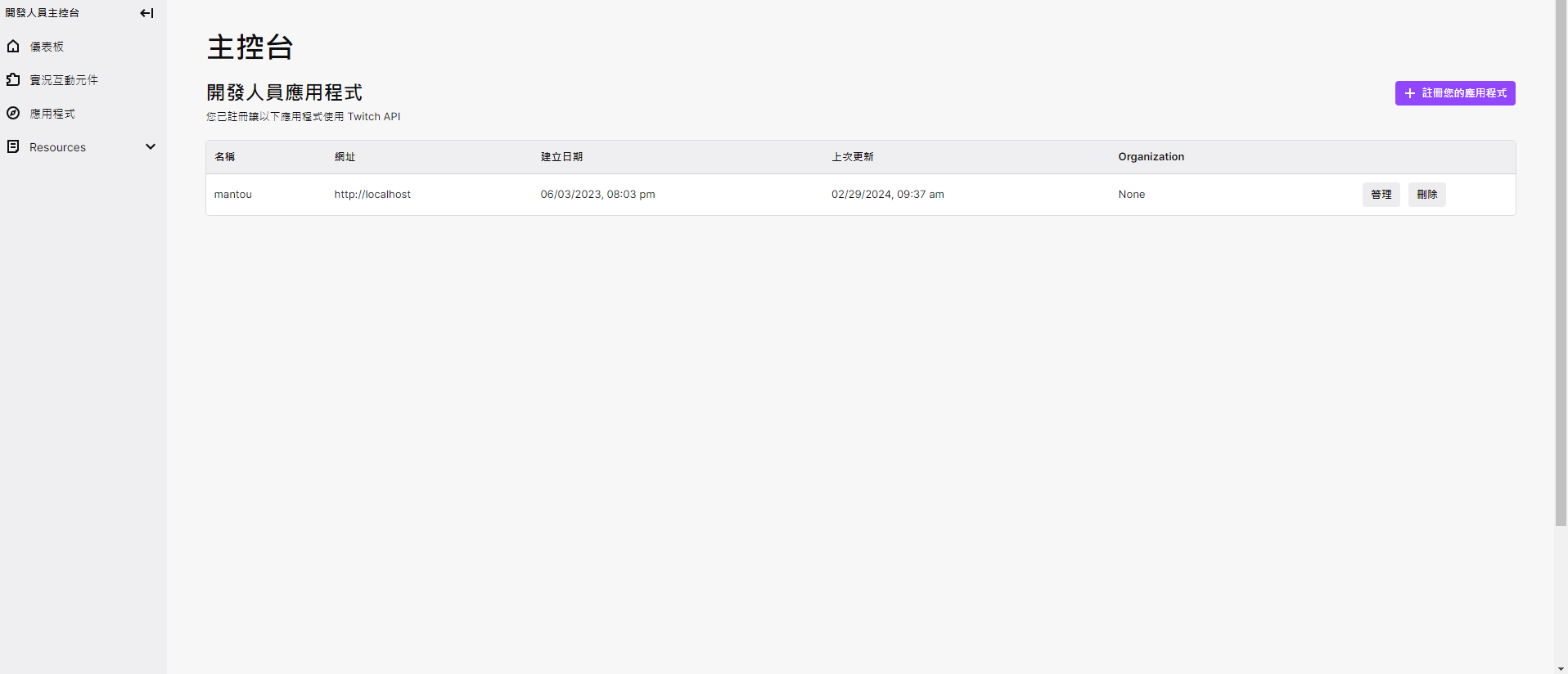
- 前往 Twitch Developers 並登入你的帳號,接著點擊右上角的
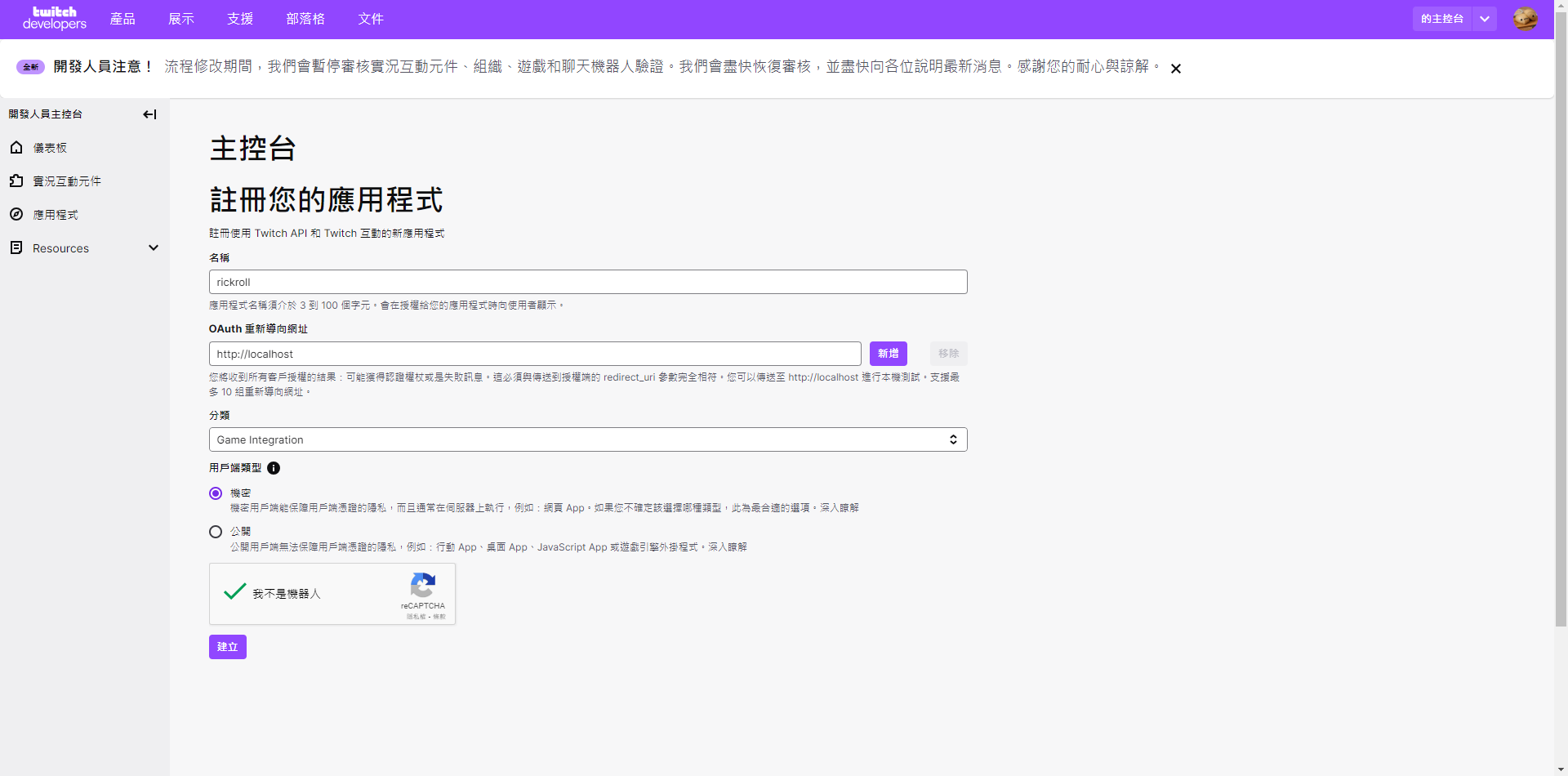
Your Console。 - 點選左側欄位的應用程式,再點選
註冊您的應用程式。 - 為你的應用程式取一個自己的名字!其餘的照圖填入並按下
建立即可。 - 回到第三步驟的畫面後,點選剛建立好的應用程式最右側按鈕
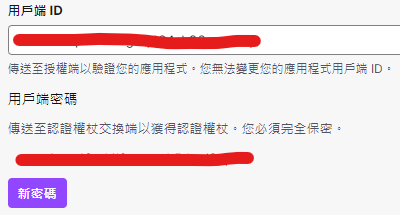
管理再點選最底下的新密碼底下便會多出用戶端ID和用戶端密碼兩個欄位的金鑰。
- 很好,你已經完成了所有步驟!請將剛拿到的兩組金鑰記好,不要隨意外洩!

Youtube
- 前往 Google Cloud Platform 並登入你的帳號。
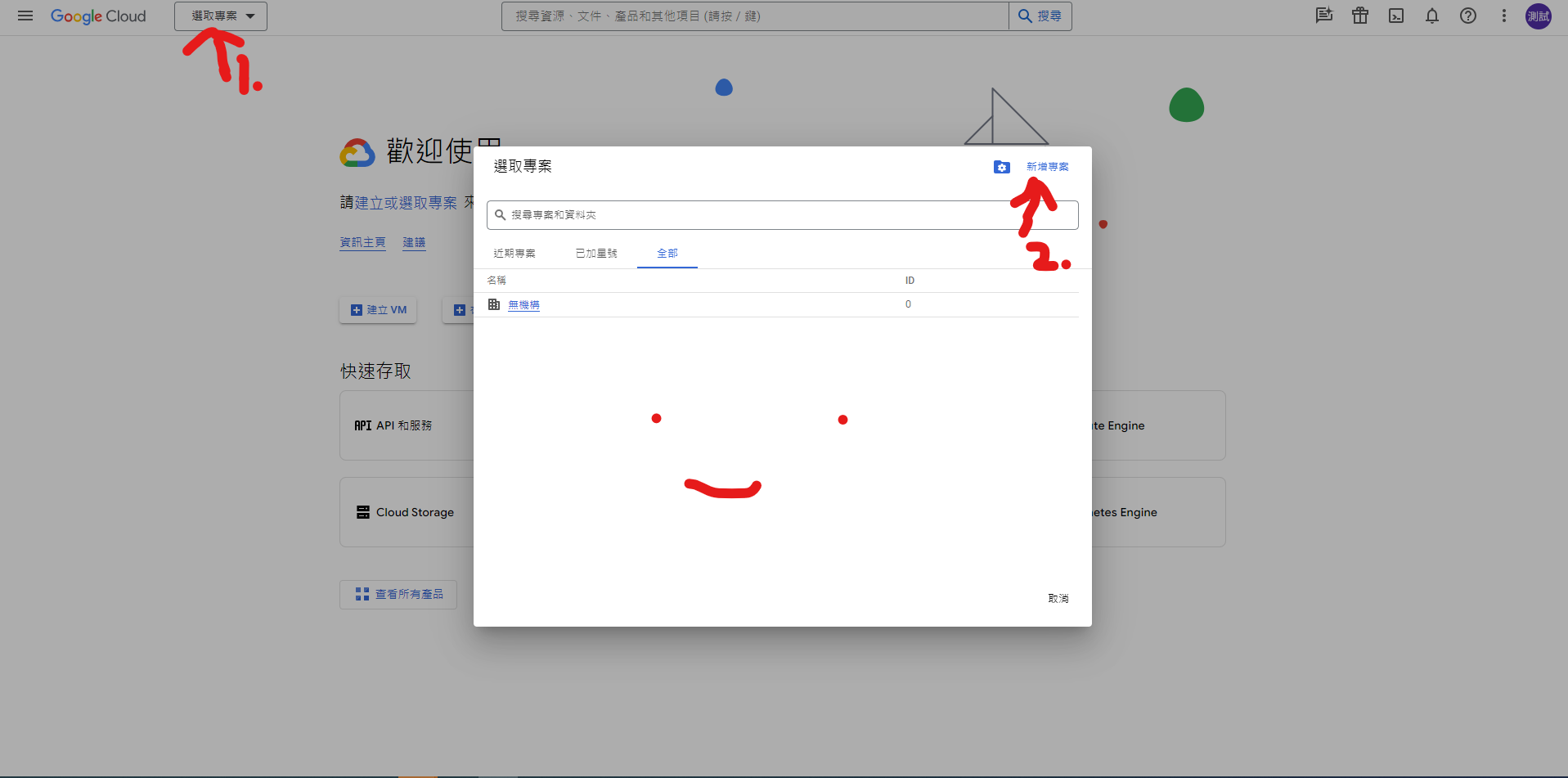
- 點選最上方欄位的
選取專案,再點選右上角的新增專案。 - 按下
建立後,依照圖片的搜尋方法找到YouTube Data API v3
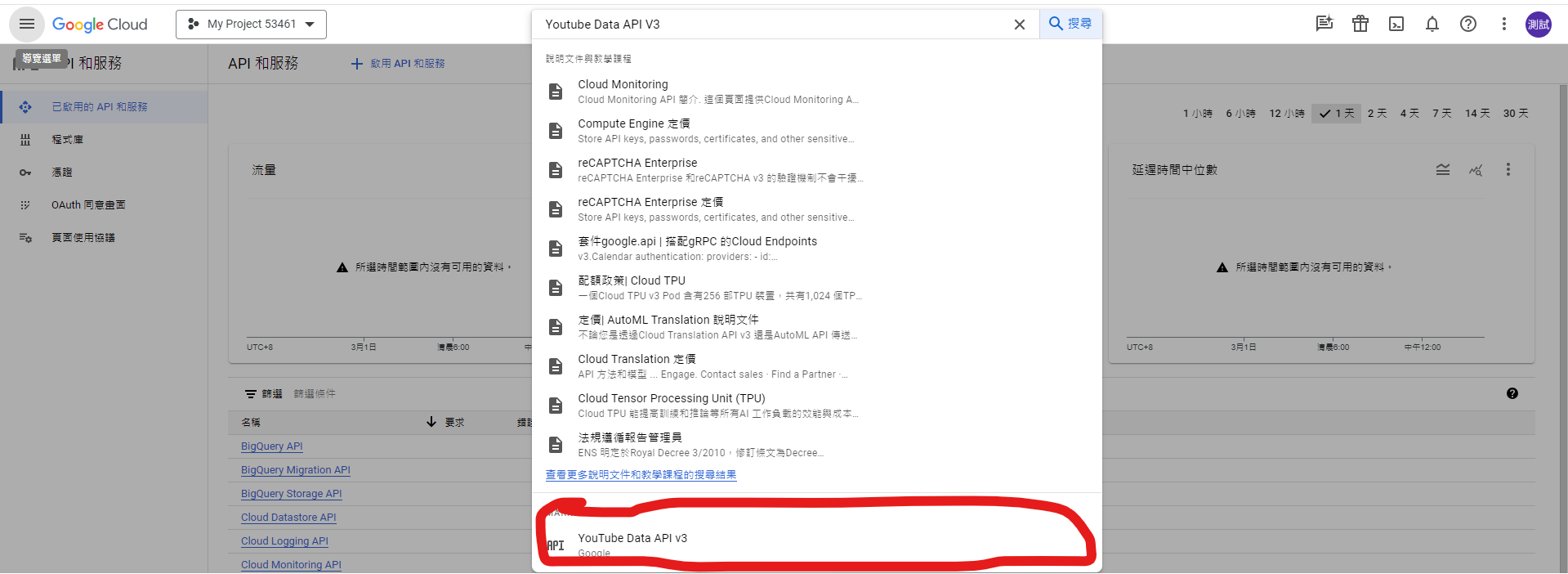
[!WARNING] 如果這步驟沒有正確啟用,那麼在使用套件的途中就會出現狀況。
-
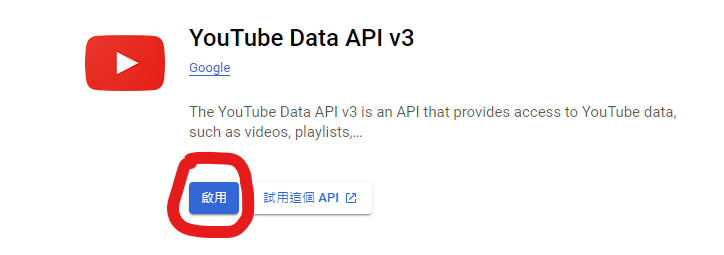
點選
啟用 -
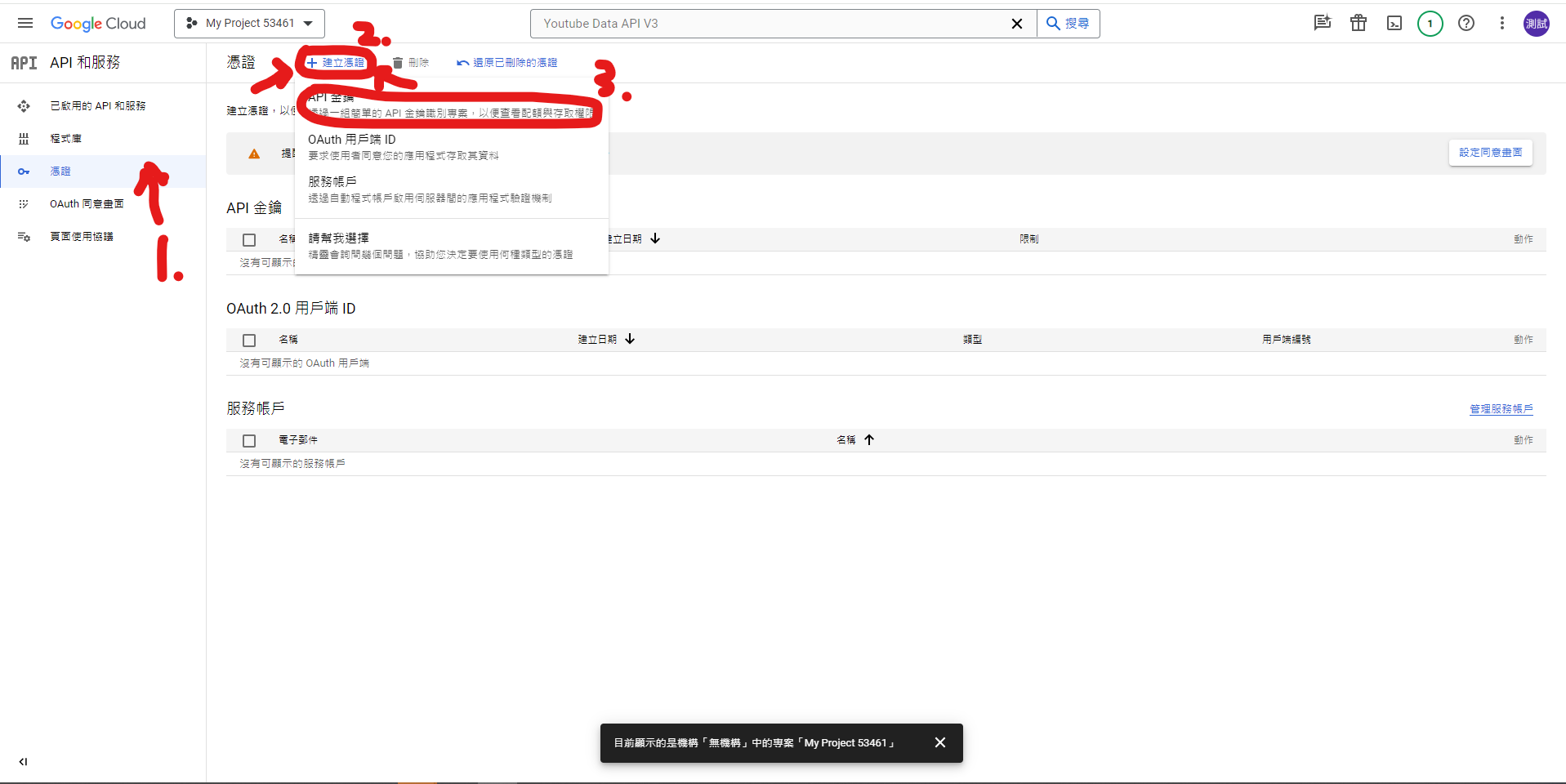
啟用完成後,點選左側欄位中的
憑證,再點選上方的建立憑證,選擇API 金鑰 -
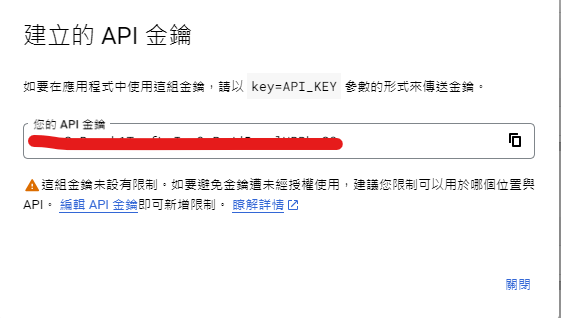
複製彈出視窗的API金鑰,並將此金鑰記下來,大功告成(ノ>ω<)ノ
如何使用
Twitch
client_id 和 client_secret 分別為你在 註冊API教學 (Twitch) 中拿到的 用戶端ID和用戶端密碼
streamer_name 為 twitch.tv/... 後的名稱
同步方法
from tystream import Twitch
twitch = Twitch("client_id", "client_secret")
stream = twitch.check_stream_live("streamer_name")
print(stream)
非同步方法
from tystream.async_api import AsyncTwitch
import asyncio

async def main():
    twitch = AsyncTwitch("client_id", "client_secret")
    stream = await twitch.check_stream_live("streamer_name")
    print(stream)

asyncio.run(main())
Youtube
api_key 為你在 註冊API教學 (Youtube) 中拿到的 API金鑰
streamer_name 為實況主頻道網址 https://www.youtube.com/... 後的名稱 (有無@都亦可)
同步方法
from tystream import Youtube
youtube = Youtube("api_key")
stream = youtube.check_stream_live("streamer_name")
print(stream)
非同步方法
from tystream.async_api import AsyncYoutube
import asyncio

async def main():
    youtube = AsyncYoutube("")
    stream = await youtube.check_stream_live("streamer_name")
    print(stream)

asyncio.run(main())
Release history Release notifications | RSS feed


Download files
Download the file for your platform. If you're not sure which to choose, learn more about installing packages.
Source Distribution
Built Distribution
Filter files by name, interpreter, ABI, and platform.
If you're not sure about the file name format, learn more about wheel file names.
Copy a direct link to the current filters
File details
Details for the file tystream-1.5.2.tar.gz.
File metadata
- Download URL: tystream-1.5.2.tar.gz
- Upload date:
- Size: 10.3 kB
- Tags: Source
- Uploaded using Trusted Publishing? No
- Uploaded via: twine/6.1.0 CPython/3.13.2
File hashes
| Algorithm | Hash digest | |
|---|---|---|
| SHA256 |
9e5764eef9e664698403b11d6eb82f3d3b62a1cf3f83b228fd823511c95fd287
|
|
| MD5 |
ab7db6b348938b6f5d20d338f6ed55ea
|
|
| BLAKE2b-256 |
0dc5e882e3a0f4a765674696022d44ab767043e976010dc5ff6efa5bec62ae6e
|
File details
Details for the file tystream-1.5.2-py3-none-any.whl.
File metadata
- Download URL: tystream-1.5.2-py3-none-any.whl
- Upload date:
- Size: 9.7 kB
- Tags: Python 3
- Uploaded using Trusted Publishing? No
- Uploaded via: twine/6.1.0 CPython/3.13.2
File hashes
| Algorithm | Hash digest | |
|---|---|---|
| SHA256 |
d76ec82860dba48871f21b79aad256b51d6b7edba45334c2a481de2fc927b074
|
|
| MD5 |
507ed00b050ee037d27afd0d3c367d7b
|
|
| BLAKE2b-256 |
f55ca0a09ed618dd9c32c87a75d4d54915c4efc22a83fd08335ee01701fc6114
|






