
tytable
A small Python library that turns Polars DataFrames into Typst tables, inspired by R's tinytable package. Most of tinytable's styling power, including image/sparkline support and a Jupyter HTML preview.
Install
Install the latest release from PyPI:
uv add tytable
Or with pip:
pip install tytable
Tytable-generated .typ fragments require Typst 0.11.1 or newer to compile. The published documentation PDF is built with Typst 0.15.0.
For generated plots and sparklines, install the optional extra. Embedding existing image files with .images() needs no additional Python dependencies:
uv add "tytable[images]"
From a cloned checkout, run:
uv sync --all-extras
make test
Quickstart
import polars as pl
from tytable import tt
from tytable.formatters import number

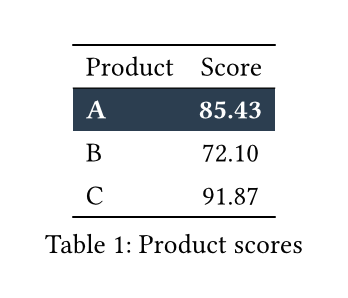
df = pl.DataFrame({
    "Product": ["A", "B", "C"],
    "Score": [85.43, 72.10, 91.87],
})

tab = (
    tt(df, caption="Product scores", label="product-scores")
    .fmt(j="Score", fn=number(digits=2))
    .style(j="Score", align="c")
    .style(i=0, bold=True, background="#2c3e50", color="white")
)

# Save in a script, or let `tab` be the last line of a Jupyter cell for a preview.
tab.save("report_assets/products.typ")
tab
Common number, scientific, currency, percentage, date, duration, and unit conventions are available from tytable.formatters, including German output such as 1.023,87 €. Pass them to .fmt(fn=...); see the full guide for options and rendered examples.
For scientific measurements, use .fmt(j="Measurement", fn=scientific(digits=2)) after from tytable.formatters import scientific. Typst and HTML display values such as 1.23 × 10⁶ with native superscripts; ASCII uses 1.23e+6.
Create a standalone PDF, PNG, or SVG directly when the Typst CLI is installed:
tab.compile("products.pdf")
tab.compile("products.png", ppi=200)
Use tab.save("products.typ") instead when the table will be #included in a larger Typst report. See Saving and using a table in Typst for project roots, fonts, page selection, and image handling.
Conventions
- Semantic row selection: non-negative
ivalues are stable 0-based source DataFrame positions, even after row groups are inserted. Omittingi(or usingi="data") selects all source rows. Usei="header",i="groupi",i="groupj", ori="all"for explicit structural selections;groupi(label="A")selects row-group separators by their exact registered label,rowgroup(label="A")selects their member data rows, andgroupj(level=0)selects the first-created, innermost column-group header level. Styling supports every grid row. Formatting and targeted notes support data, row-group, and column-name rows; plots and images support data and row-group rows. Unsupported structural targets raise a clear error when rendered. - Column selection: use original DataFrame names (
j="Score"), 0-based positions (j=0), Polars selectors,regex(pattern)for fail-loud Python regular-expression matching, orcolgroup(label="Results", level=0)for the source columns belonging to registered column groups; display names are presentation-only. - Method chaining:
.style(),.fmt(),.group(), and the.theme_*()methods all returnself..render(),.save(), and.compile()are terminal. - Reusable variants:
.clone()creates an independently configurable table while cheaply sharing Polars' immutable data buffers. - Readable defaults: text columns are left-aligned and numeric columns are right-aligned, including their headers. Explicit
.style(align=...)calls override these dtype-based defaults. - Lazy evaluation: styling, formatting, grouping, and plotting are recorded as intent and replayed in a fixed order at render time.
- Figure wrapping: Typst tables are figures by default, enabling captions, numbering, and labels such as
label="product-scores". Usefigure=Falsefor an unnumbered table; captions and labels cannot be combined with it.
Documentation
A practical guide with rendered examples (source followed by result) from easy to complex, a task-oriented API reference, and an R-tinytable comparison table live in the PDF built from docs/main.typ:
- Always-current build (HEAD): https://einmaulwurf.github.io/tytable/
- Versioned (latest release): https://github.com/EinMaulwurf/tytable/releases/latest/download/tytable-docs.pdf
Build locally (requires the Typst and Typstyle CLIs):
make docs
# → docs/tytable-docs.pdf
make docs formats the hand-written .typ sources with Typstyle before compiling them. It uses Tinymist's defaults: a 120-column print width and no prose wrapping. Run make format-docs to format without building the PDF.
Documented public APIs remain backward compatible throughout each major release series. Breaking changes are reserved for major releases.
Coming from R tinytable
tt(df) ↔ tt(data), .style() ↔ style_tt(), .fmt() ↔ format_tt(), .group() ↔ group_tt(), and .theme_striped() / .theme_grid() correspond to theme_tt(). Indexing is 0-based (vs R's 1-based) and columns are selected by name (preferred). The full comparison table is in the PDF above.
1 maintainer

Metadata
1 maintainer
Release files for tytable 4.1.0
For a detailed explanation of source distributions (sdists) and built distributions (wheels), please see the package formats documentation.
Source distribution (sdist)
| File | Size | Uploaded | Provenance | Actions |
|---|---|---|---|---|
| tytable-4.1.0.tar.gz | 358.0 kB | With provenance | Details for tytable-4.1.0.tar.gz |
Built distribution (wheel)
| File | Interpreter | ABI | Platform | Actions Reset |
|---|---|---|---|---|
| tytable-4.1.0-py3-none-any.whl | Python 3 | none | any | Details for tytable-4.1.0-py3-none-any.whl |
Total release size: 449.5 kB
Release files / tytable-4.1.0.tar.gz
| Download URL | tytable-4.1.0.tar.gz |
|---|---|
| Size | 358.0 kB |
| Tags | Source |
|
SHA-256 checksum How to use checksums |
d24e21f0ca1897231123b0e8f3f4f243f6e7c00a08ee5b945b3de45ed45526cc
|
|
BLAKE2b-256 checksum How to use checksums |
7b621ed077fc3e11fc95ad3f8ab31d6b9ba8de0e01629a2d8aee5a01e31fa673
|
| Upload date | |
|
Uploaded using Trusted Publishing? What is trusted publishing? |
Yes |
| Uploaded via |
twine/7.0.0 CPython/3.13.14
|
Provenance
Provenance describes where a file came from. On PyPI, provenance is shared via attestations, which provide a verifiable record of the build or publishing details. View details, limitations and caveats.


PyPI Publish Attestation
PyPI verified that this artifact, at this checksum, originated from the publisher listed below.
Signed by GitHub Actions, verified by PyPI on Oct 19, 2026.
Transparency logRelease files / tytable-4.1.0-py3-none-any.whl
| Download URL | tytable-4.1.0-py3-none-any.whl |
|---|---|
| Size | 91.5 kB |
| Tags | Python 3 |
|
SHA-256 checksum How to use checksums |
1b989254568aedb7ad26fb1b17e847a6e2d17e2356ef55a566a83c6d2ee922fe
|
|
BLAKE2b-256 checksum How to use checksums |
4195e0b54570c43b1bf6dcc716504fa50d60c3f33406afdd7ca35098315a5e04
|
| Upload date | |
|
Uploaded using Trusted Publishing? What is trusted publishing? |
Yes |
| Uploaded via |
twine/7.0.0 CPython/3.13.14
|
Provenance
Provenance describes where a file came from. On PyPI, provenance is shared via attestations, which provide a verifiable record of the build or publishing details. View details, limitations and caveats.
PyPI Publish Attestation
PyPI verified that this artifact, at this checksum, originated from the publisher listed below.
Signed by GitHub Actions, verified by PyPI on Oct 19, 2026.
Transparency logSecurity for tytable 4.1.0
Provenance
Provenance describes where a file came from. On PyPI, provenance is shared via attestations, which provide a verifiable record of the build or publishing details. View details, limitations and caveats.
Full provenance
Both files in this release have been uploaded with provenance metadata.
Attestation for tytable-4.1.0.tar.gz
PyPI Publish Attestation
PyPI verified that this artifact, at this checksum, originated from the publisher listed below.
Signed by GitHub Actions, verified by PyPI on Oct 19, 2026.
Transparency logA note on package security
PyPI is a repository for distributing packages, not a service for auditing them. While third-party security researchers and our staff do their best to detect and remove malicious packages, PyPI cannot guarantee the quality, security or suitability of any given package.
To learn more about protecting yourself from malicious actors, visit our package security documentation.














