
Telegram bot making without any line of code.

Project description
# TyTg: Thank You Telegram!
Create a telegram bot for any purpose, or remotely control your pc with one. TyTg is written in Python3 and should work on any linux distribution.
TyTg allows users to navigate in a folder in a hosting pc. Directories are shown as Telegram buttons, allowing the creation of custom bots. Also, *.txt files are sent as messages, *.png &co are sent as images. You can also create *.tgfile containing a Telegram ID to send files. This allows to create bots by simply managing directories.
You can also sort directories by putting {number} in their names. The {number} won't be showed in the button, but it'll be used to sort directories. If directory names ends with numbers, they'll be automatically sorted too.
TyTg will soon add support to change the directories and files remotely using the bot. It will allow to edit text, upload images, files, and so on. You'll also be able to run bash commands. TyTg also support inserting python scripts in the folders that allows making even more complex bots by adding features such as searching files by writing their names.
Finally, TyTg supports adding modules/ that get called on certain commands by admins. A built-in example is announce.py, that allows annuncing a message to every user by replying to that message with /announce. Also, TyTg saves what every user downloads, how many downloads he did, how many total downloads has a certain file, and so on.
## Example:
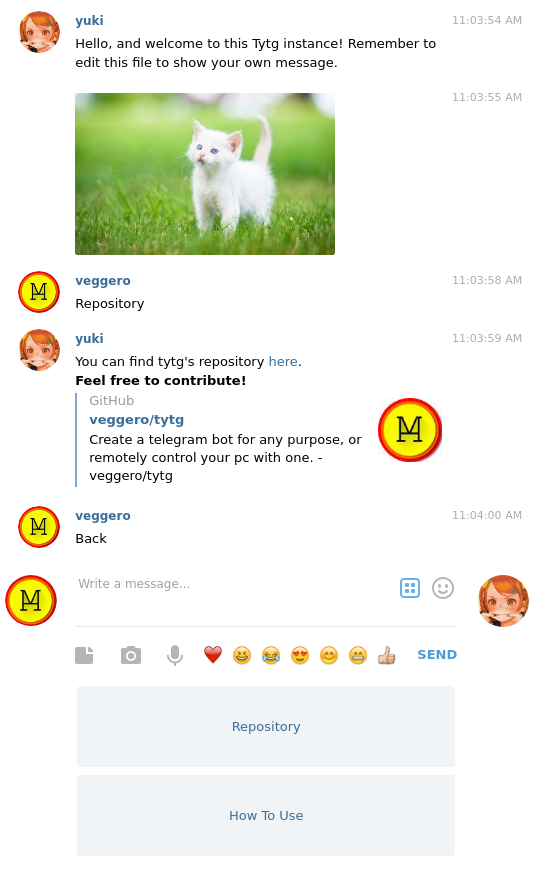
Just look into the "main" folder:
[<3] tree main
main
|-- How\ To\ Use\ {1}
| `-- instructions.html
|-- Repository\ {0}
| `-- link.html
|-- cat.jpg
`-- hello.txt
This will become:
And:
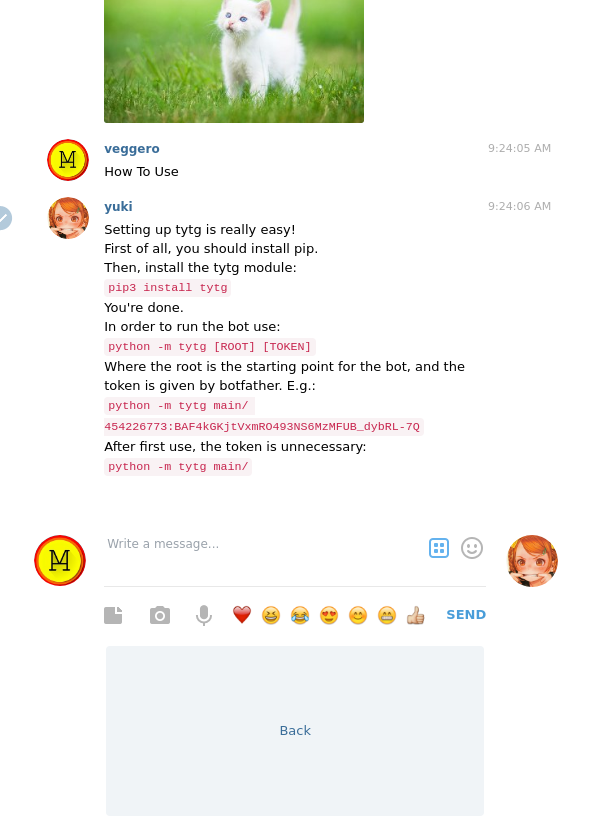
Setting up is quite easy:
python -m tytg main/ TOKEN
After the first time, the token will be saved, toghether with all the arguments, to a .data.json file inside main/, making it unnecessary:
python -m tytg main/
If you're using the tytg.py file instead of installing with pip, you can use:
python tytg.py main/ [TOKEN]
Create a telegram bot for any purpose, or remotely control your pc with one. TyTg is written in Python3 and should work on any linux distribution.
TyTg allows users to navigate in a folder in a hosting pc. Directories are shown as Telegram buttons, allowing the creation of custom bots. Also, *.txt files are sent as messages, *.png &co are sent as images. You can also create *.tgfile containing a Telegram ID to send files. This allows to create bots by simply managing directories.
You can also sort directories by putting {number} in their names. The {number} won't be showed in the button, but it'll be used to sort directories. If directory names ends with numbers, they'll be automatically sorted too.
TyTg will soon add support to change the directories and files remotely using the bot. It will allow to edit text, upload images, files, and so on. You'll also be able to run bash commands. TyTg also support inserting python scripts in the folders that allows making even more complex bots by adding features such as searching files by writing their names.
Finally, TyTg supports adding modules/ that get called on certain commands by admins. A built-in example is announce.py, that allows annuncing a message to every user by replying to that message with /announce. Also, TyTg saves what every user downloads, how many downloads he did, how many total downloads has a certain file, and so on.
## Example:
Just look into the "main" folder:
[<3] tree main
main
|-- How\ To\ Use\ {1}
| `-- instructions.html
|-- Repository\ {0}
| `-- link.html
|-- cat.jpg
`-- hello.txt
This will become:

And:

Setting up is quite easy:
python -m tytg main/ TOKEN
After the first time, the token will be saved, toghether with all the arguments, to a .data.json file inside main/, making it unnecessary:
python -m tytg main/
If you're using the tytg.py file instead of installing with pip, you can use:
python tytg.py main/ [TOKEN]
Release history Release notifications | RSS feed


Download files
Download the file for your platform. If you're not sure which to choose, learn more about installing packages.
Source Distribution
tytg-0.2.6.1.tar.gz
(5.8 kB
view details)
Built Distribution
Filter files by name, interpreter, ABI, and platform.
If you're not sure about the file name format, learn more about wheel file names.
Copy a direct link to the current filters
File details
Details for the file tytg-0.2.6.1.tar.gz.
File metadata
- Download URL: tytg-0.2.6.1.tar.gz
- Upload date:
- Size: 5.8 kB
- Tags: Source
- Uploaded using Trusted Publishing? No
- Uploaded via: twine/1.12.1 pkginfo/1.4.2 requests/2.20.0 setuptools/40.5.0 requests-toolbelt/0.8.0 tqdm/4.28.1 CPython/3.6.6
File hashes
| Algorithm | Hash digest | |
|---|---|---|
| SHA256 |
e341b399ff9d3fbb6ee3dab4fbb141f9929023cf13aa46f09999b19b898d0c2f
|
|
| MD5 |
db91b84f81407f510975bcfb956e5026
|
|
| BLAKE2b-256 |
f42bd4d581b94324e214eef8265b93fbb3a614702a2d104304af8725bbadf787
|
File details
Details for the file tytg-0.2.6.1-py3-none-any.whl.
File metadata
- Download URL: tytg-0.2.6.1-py3-none-any.whl
- Upload date:
- Size: 7.9 kB
- Tags: Python 3
- Uploaded using Trusted Publishing? No
- Uploaded via: twine/1.12.1 pkginfo/1.4.2 requests/2.20.0 setuptools/40.5.0 requests-toolbelt/0.8.0 tqdm/4.28.1 CPython/3.6.6
File hashes
| Algorithm | Hash digest | |
|---|---|---|
| SHA256 |
e7dfa867d4cdeac2f0cce85ab9bdfbda119bec87ceaf157123aab5b859e92966
|
|
| MD5 |
8a1e8ad3a74aee5c548c03b4eb9888a5
|
|
| BLAKE2b-256 |
7d10dbe71b1334075889333bde3a8102b592f90ac0268bf41997458e605e3d66
|






