
Microprint generator

Project description
μPrintGen
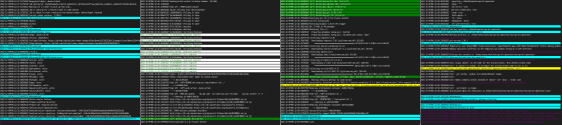
Creates a microprint representation of text or a text file, with rules set by a configuration file. These rules highlight rows with different background and text colors depending on the rules added.
Usage
Console command
Installing the package through pip makes the command generate_microprint available through the terminal. It accepts three parameters.
-iThe text file to generate as a microprint. Required-cThe configuration file pathname. Optional, default:config.json-oThe name of the file to be saved. Optional, default:microprint.svg
Example
generate_microprint -i log.txt -o test2.svg -c config_2.json
As a package
At the same time, the package can be imported from a Python program and used in two ways:
From text_file
from uprintgen import SVGMicroprintGenerator

svg = SVGMicroprintGenerator.from_text_file(
    file_path="example.txt", config_file_path="config.json", output_filename="microprint.svg"
    )

svg.render_microprint()
Which will save the microprint with the defined name and configuration file.
From text
from uprintgen import SVGMicroprintGenerator

example= "blablablabla..."

svg = SVGMicroprintGenerator(text=example, config_file_path="config.json",
    output_filename="microprint.svg")

svg.render_microprint()
Configuration file
The generator accepts a JSON configuration file with a set of settings that it can change, those settings and their default values are as follows
Visual configurations
| Rule | Description | Default |
|---|---|---|
scale |
Changes the scale of the font in the generated microprint. | 1 |
vertical_spacing |
Changes the vertical spacing between each row. | 1 |
microprint_width |
Changes the width of the microprint (or each column if there's more than one). | 120 |
max_microprint_height |
Changes the max height of the microprint. If "number_of_columns" is set, this parameter is not used. The microprint will be divided in columns to fulfill the desired height. | Total log height. No limit |
number_of_columns |
Changes the number of columns to render. If this parameter is set, "max_microprint_height" is not used. The height of the microprint will be set automatically to fulfill the desired number of columns. | 1 |
column_gap_size |
Changes the size of the gap between columns. | 0.2 |
column_gap_color |
Changes the color of the gap between columns. | white |
default_colors |
These define the default colors that are used in case no color was defined for a certain rule. If this section is not present, both colors will be the default ones. |
|
font-family |
This sets the font-family of the svg. If the first font is not available or cannot be loaded in the system, the next one is going to be used. | monospace |
Additional fonts (inside additional_fonts)
This section contains fonts to be embedded to the svg.
If the fonts work natively in the place where you want to see the svg, there's no need todo this. Monospace fonts recommended.
It has two subsections. google_fonts and truetype_fonts.
Google fonts (inside google_fonts)
This sub-section contains fonts to be loaded from google fonts.
| Rule | Description | Default |
|---|---|---|
name |
The name to assign the embedded font. This name is the one that needs to be used when setting the font-family of the microprint. | Required |
google_font_url |
The url from where to load the google font. | Required |
TrueType fonts (inside truetype_fonts)
This sub-section contains fonts to be loaded from the repo, as a TrueType font file.
| Rule | Description | Default |
|---|---|---|
name |
The name to assign the embedded font. This name is the one that needs to be used when setting the font-family of the microprint. | Required |
truetype_file |
The path to the truetype font file. Includes the name of the file with the extension. | Required |
Line rules (inside line_rules)
This section contains all the rules for the colors of the microprint
| Rule | Description | Default |
|---|---|---|
includes |
If the row matches any of the rules inside this array, it uses this rule's colors. As long as no excludes match. Can be strings or regex. | [] |
excludes |
If the row matches any of the rules inside this array, the rule will not be used. | [] |
text_color |
Text color the rule will use in case the rule is matched. | The default text color defined in the configuration file |
background_color |
Background color the rule will use in case the rule is matched. | The default background color defined in the configuration file |
Example
{
  "scale": 2,
  "vertical_spacing": 1.4,
  "microprint_width": 140,
  "max_microprint_height": 300,
  "number_of_columns": 4,
  "column_gap_size": 0.3,
  "column_gap_color": "red",
  "default_colors": {
    "background_color": "rgb(30, 30, 30)",
    "text_color": "white"
  },
  "line_rules":  [
    {
      "includes": [
        "(?:^|\\W)error(?:$|\\W)(?!code)",
        "panicked",
        "failed",
        "stacktrace"
      ],
      "excludes": [
        "checking",
        "compiling",
        "(?:^|\\W)0(?:$|\\W)",
        "info"
      ],
      "text_color": "red",
      "background_color": "#910404"
    },
    {
      "includes": [
        "installing"
      ],
      "text_color": "white",
      "background_color": "green"
    },
    {
      "includes": [
        "warning"
      ],
      "text_color": "black",
      "background_color": "yellow"
    }
  ],
  "additional_fonts": {
    "google_fonts": [
      {
        "name": "Anton",
        "google_font_url": "https://fonts.googleapis.com/css?family=Anton"
      },
      {
        "name": "Acme",
        "google_font_url": "https://fonts.googleapis.com/css?family=Acme"
      }
    ],
    "truetype_fonts": [
      {
        "name": "NotoSans",
        "truetype_file": "./fonts/NotoSans-Regular.ttf"
      }
    ]
  },
  "font-family": "Acme, Anton, NotoSans, Sans, Cursive"
}


Download files
Download the file for your platform. If you're not sure which to choose, learn more about installing packages.
Source Distribution
Built Distribution
Filter files by name, interpreter, ABI, and platform.
If you're not sure about the file name format, learn more about wheel file names.
Copy a direct link to the current filters
File details
Details for the file uPrintGen-1.2.0.tar.gz.
File metadata
- Download URL: uPrintGen-1.2.0.tar.gz
- Upload date:
- Size: 45.4 kB
- Tags: Source
- Uploaded using Trusted Publishing? No
- Uploaded via: twine/4.0.2 CPython/3.10.8
File hashes
| Algorithm | Hash digest | |
|---|---|---|
| SHA256 |
6735b78ddc560ca84542b9f86894f841d633855315b3db3109f994f4ca6c00d2
|
|
| MD5 |
17fabdf9b843811fed8404330492e906
|
|
| BLAKE2b-256 |
0ca564cd5d5188c0b82749c0274c586c5cbbd11b385718af12852ce4057fa048
|
File details
Details for the file uPrintGen-1.2.0-py3-none-any.whl.
File metadata
- Download URL: uPrintGen-1.2.0-py3-none-any.whl
- Upload date:
- Size: 32.5 kB
- Tags: Python 3
- Uploaded using Trusted Publishing? No
- Uploaded via: twine/4.0.2 CPython/3.10.8
File hashes
| Algorithm | Hash digest | |
|---|---|---|
| SHA256 |
aa47d03946ecff79ded466844e022120eb2e6cbd565bd3d6d87b03a652ee1729
|
|
| MD5 |
a04d65165ce8c8cd0a3ab262bcfcb36d
|
|
| BLAKE2b-256 |
dc18f31e5959d0b31b100dff2b0fce4fe4c9074c140013fcf0ef459197cd34f6
|






