
Browser-based live dashboard for the UNICORN Binance DepthCache Cluster (UBDCC).
Verified details
These details have been verified by PyPIProject links
GitHub Statistics
Maintainers

Project description
⚠️ Security Warning: There are currently fraudulent repositories (e.g., under the user gesine1541ro7) impersonating this project to distribute malware. Please ensure you are only using the official source: oliver-zehentleitner/unicorn-binance-websocket-api. Read the full technical analysis and campaign details here!











UBDCC Dashboard
Browser-based live dashboard for the UNICORN Binance DepthCache Cluster (UBDCC) — monitor every depth cache in your cluster at a glance, spot out-of-sync caches instantly, and add or remove caches on the fly.
Part of the UNICORN Binance Suite.
Features
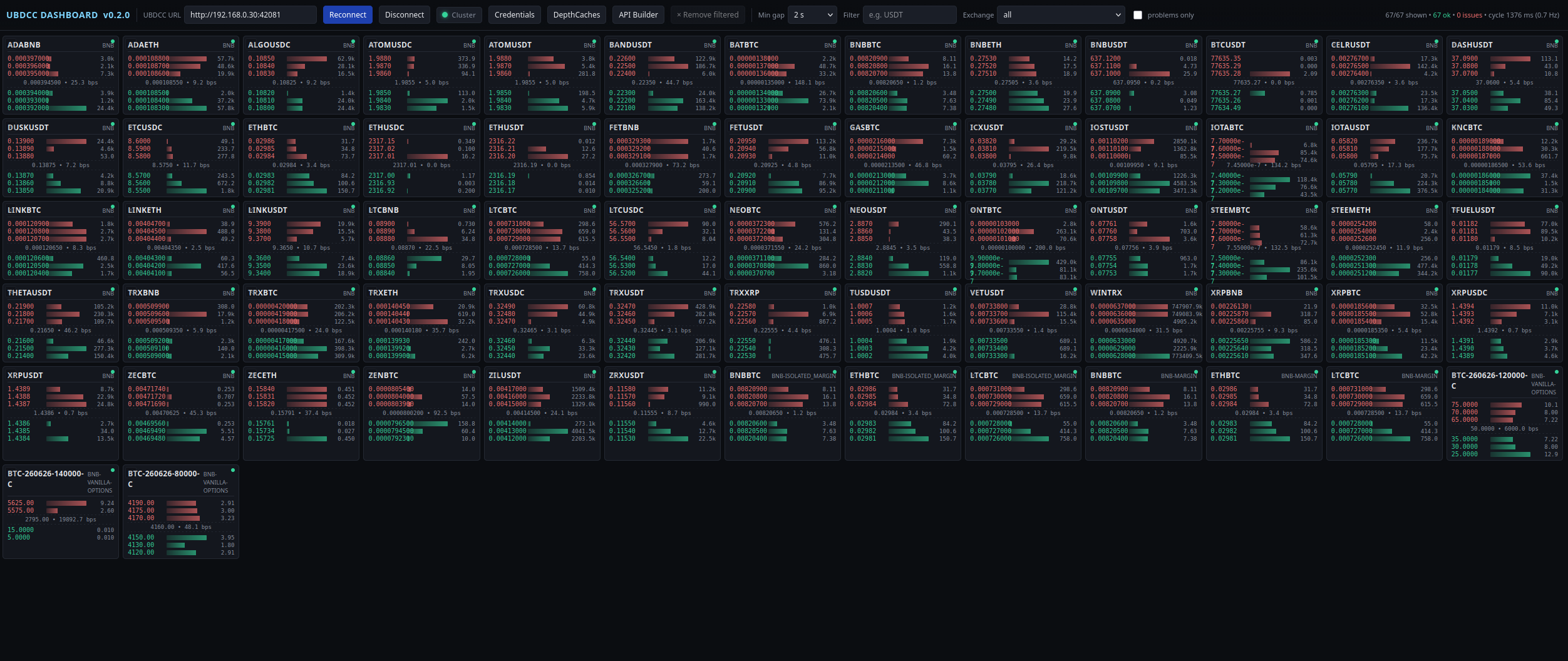
- Compact mini-orderbook tiles per depth cache — top-3 asks/bids with quantity bars and spread in bps.
- Continuous, low-overhead polling:
IntersectionObserver+ filter gate means only on-screen, matching tiles hit the cluster. - Status colouring per tile: out-of-sync (
error_id #6000) turns red, other errors yellow with a compact error message. - Cluster Status header button with a live health dot (green /
yellow / red) driven by a 30 s
/get_cluster_infopoll. Click for a full breakdown — pods grouped by role, node topology, per-DepthCache replica donut with distribution state and (when available) sync state, credentials summary. - Credentials Manager — add / remove / list Binance API key pairs
on a running cluster right from the dashboard.
api_secretinput is masked, stored keys show only a preview, remove requires two-click confirm. - API Builder — onboarding helper for developers. Pick a task
(create DepthCache, get asks/bids, add credentials, ...), fill in
the form, copy a ready-to-paste snippet in curl, HTTPie, Python
(using the official UBLDC
Clusterclient), JavaScript, Go, C#, Java or Rust. "Try it" runs GET-safe tasks through the dashboard's CORS proxy and shows the pretty-printed JSON response. - Version badge next to the title. On load, the dashboard asks
PyPI for the latest release of
ubdcc-dashboard. Up to date → badge stays in the accent colour. Outdated → animated rainbow gradient with apip install -Uhint in the hover tooltip. Backed by a local/versionendpoint on the launcher HTTP server. - Add DepthCaches modal with live
exchangeInfosymbol lookup for spot, cross / isolated margin, futures, options (incl. testnets). Shows only actively tradable symbols. Free-text fallback for exchanges without a publicexchangeInfo. - Bulk
× Remove filteredwith two-click confirmation — only active when a filter is set, so you can never accidentally remove every DC. - Per-tile
×remove with two-click confirmation and 3 s auto-disarm. - Disconnect button to stop polling and cut load on the cluster.
- Refresh-rate throttle from
maxdown to10 s. Default2 sis polite to the cluster; crank it up tomaxfor live feel, or drop down to5 s/10 sfor gentler polling on lightly-used clusters. - Dark theme, tabular-numeric fonts, no framework, no tracking — a single HTML file served by a minimal stdlib HTTP server.
Screenshot
The dashboard provides a compact live view of your UBDCC cluster in the browser: mini-orderbook tiles, sync/error state
visibility, and quick DepthCache management in one place.
Authorship & License
Author / Maintainer: Oliver Zehentleitner (https://github.com/oliver-zehentleitner) License: MIT — free for commercial and private use. No paid license, no subscription, no commercial tier.
Installation and Upgrade
pip install -U ubdcc-dashboard
Requires Python 3.9+. No external dependencies — uses only the standard library.
Cluster target: UBDCC ≥ 0.7.0 (with UBLDC ≥ 2.14.0 for margin / isolated-margin support). Older clusters work for the orderbook view but reject the renamed credential endpoints used by the Credentials manager and the API Builder.
Quick Start
ubdcc-dashboard start
The server binds to 127.0.0.1:8080 (localhost only) by default and opens
the dashboard in your browser. Enter the URL of your UBDCC MGMT node
(typical: http://<cluster-host>:42081) and hit Connect.
CLI options
ubdcc-dashboard start [--host HOST] [--port PORT] [--no-browser]
                      [--proxy-timeout SECONDS] [--batch-workers N]
| Flag | Default | Description |
|---|---|---|
--host |
127.0.0.1 |
Interface to bind. Localhost only by default — secure. Use --host 0.0.0.0 to expose the dashboard on your network. |
--port |
8080 |
TCP port to listen on. |
--no-browser |
off | Do not auto-open the browser on start. |
--proxy-timeout |
10.0 |
Timeout (seconds) for the CORS proxy's outbound fetches. |
--batch-workers |
32 |
Worker threads used for /proxy_batch fan-out. |
Exposing on the network
ubdcc-dashboard start --host 0.0.0.0 --port 8080
Note: The proxy is unauthenticated. Only expose the dashboard on a trusted network.
How it works
The dashboard is a single index.html (vanilla JS, no framework) served by
a small stdlib HTTP server. The server also acts as a tiny CORS proxy so
the browser can query a remote UBDCC cluster that does not send
Access-Control-Allow-Origin headers.
Under the hood:
GET /proxy?url=…— passes a single GET through.POST /proxy {url, body}— passes a single JSON POST through.POST /proxy_batch {base, requests}— fans out a list of GETs over a thread pool (default 32 workers) for snappy orderbook refreshes.GET /version— returns{"version": "..."}read fromubdcc_dashboard.__version__. Used by the header version badge and usable as a health-check target.
The unicorn-binance-depth-cache-cluster project is the server side of this
story — the dashboard just paints what the cluster already exposes via its
REST API.
Change Log
https://oliver-zehentleitner.github.io/ubdcc-dashboard/changelog.html
Documentation
Related Articles
Project Homepage
https://github.com/oliver-zehentleitner/ubdcc-dashboard
Wiki
https://github.com/oliver-zehentleitner/ubdcc-dashboard/wiki
Social
Receive Notifications
To receive notifications on available updates you can watch the repository on GitHub, or subscribe to the releases discussion category.
To receive news (like inspection windows/maintenance) about the Binance API's subscribe to their telegram groups:
- https://t.me/binance_api_announcements
- https://t.me/binance_api_english
- https://t.me/Binance_USA
- https://t.me/TRBinanceTR
- https://t.me/BinanceExchange
How to report Bugs or suggest Improvements?
List of planned features — give a 👍 if you need one of them, or suggest a new feature!
Before you report a bug, try the latest release. If the issue still exists, provide the error trace, OS, Python version, browser, and explain how to reproduce the error. A minimal reproduction (commands + cluster setup) is appreciated.
If you don't find an issue related to your topic, please open a new issue!
Contributing
UBDCC Dashboard is an open source project which welcomes contributions which can be anything from simple documentation fixes and reporting dead links to new features. To contribute follow this guide.
Contributors

We ❤ open source!
AI Integration
This project provides a llms.txt file for AI tools (ChatGPT, Claude, Copilot, etc.) with structured usage instructions, CLI reference and architecture notes.
Disclaimer
This project is for informational purposes only. You should not construe this information or any other material as legal, tax, investment, financial or other advice. Nothing contained herein constitutes a solicitation, recommendation, endorsement or offer by us or any third party provider to buy or sell any securities or other financial instruments in this or any other jurisdiction in which such solicitation or offer would be unlawful under the securities laws of such jurisdiction.
If you intend to use real money, use it at your own risk!
Under no circumstances will we be responsible or liable for any claims, damages, losses, expenses, costs or liabilities of any kind, including but not limited to direct or indirect damages for loss of profits.
Project details
Verified details
These details have been verified by PyPIProject links
GitHub Statistics
Maintainers
Release history Release notifications | RSS feed


Download files
Download the file for your platform. If you're not sure which to choose, learn more about installing packages.
Source Distribution
Built Distribution
Filter files by name, interpreter, ABI, and platform.
If you're not sure about the file name format, learn more about wheel file names.
Copy a direct link to the current filters
File details
Details for the file ubdcc_dashboard-0.2.0.tar.gz.
File metadata
- Download URL: ubdcc_dashboard-0.2.0.tar.gz
- Upload date:
- Size: 45.9 kB
- Tags: Source
- Uploaded using Trusted Publishing? Yes
- Uploaded via: twine/6.1.0 CPython/3.13.12
File hashes
| Algorithm | Hash digest | |
|---|---|---|
| SHA256 |
2ac030ec7b687ea383cb42af454c5b13c56b1f87623bd144734a17add8e170ff
|
|
| MD5 |
33d8b4e28bd6f3925dd0c8976181631f
|
|
| BLAKE2b-256 |
9afae338ed2b798e25c56f9c1e000f658d2aed6b84434c7f83874da8b1eb6ba6
|
Provenance
The following attestation bundles were made for ubdcc_dashboard-0.2.0.tar.gz:
Publisher:
build_wheels.yml on oliver-zehentleitner/ubdcc-dashboard
-
Statement:
-
Statement type:
https://in-toto.io/Statement/v1 -
Predicate type:
https://docs.pypi.org/attestations/publish/v1 -
Subject name:
ubdcc_dashboard-0.2.0.tar.gz -
Subject digest:
2ac030ec7b687ea383cb42af454c5b13c56b1f87623bd144734a17add8e170ff - Sigstore transparency entry: 1372756092
- Sigstore integration time:
-
Permalink:
oliver-zehentleitner/ubdcc-dashboard@213ba226a6d55233b0669ab7cbddb4e9a7a3d076 -
Branch / Tag:
refs/heads/master - Owner: https://github.com/oliver-zehentleitner
-
Access:
public
-
Token Issuer:
https://token.actions.githubusercontent.com -
Runner Environment:
github-hosted -
Publication workflow:
build_wheels.yml@213ba226a6d55233b0669ab7cbddb4e9a7a3d076 -
Trigger Event:
workflow_dispatch
-
Statement type:
File details
Details for the file ubdcc_dashboard-0.2.0-py3-none-any.whl.
File metadata
- Download URL: ubdcc_dashboard-0.2.0-py3-none-any.whl
- Upload date:
- Size: 37.5 kB
- Tags: Python 3
- Uploaded using Trusted Publishing? Yes
- Uploaded via: twine/6.1.0 CPython/3.13.12
File hashes
| Algorithm | Hash digest | |
|---|---|---|
| SHA256 |
06b3a44378e49cd28f095805df200c28ea44f0ded2b9e69c7897390a4b760303
|
|
| MD5 |
71098ee2ff1f16c9bc0265921a969da6
|
|
| BLAKE2b-256 |
b9fcf3dc781aec5a68a242339a55c4aa1f9d33dad16f833af146ca282963c6e1
|
Provenance
The following attestation bundles were made for ubdcc_dashboard-0.2.0-py3-none-any.whl:
Publisher:
build_wheels.yml on oliver-zehentleitner/ubdcc-dashboard
-
Statement:
-
Statement type:
https://in-toto.io/Statement/v1 -
Predicate type:
https://docs.pypi.org/attestations/publish/v1 -
Subject name:
ubdcc_dashboard-0.2.0-py3-none-any.whl -
Subject digest:
06b3a44378e49cd28f095805df200c28ea44f0ded2b9e69c7897390a4b760303 - Sigstore transparency entry: 1372756235
- Sigstore integration time:
-
Permalink:
oliver-zehentleitner/ubdcc-dashboard@213ba226a6d55233b0669ab7cbddb4e9a7a3d076 -
Branch / Tag:
refs/heads/master - Owner: https://github.com/oliver-zehentleitner
-
Access:
public
-
Token Issuer:
https://token.actions.githubusercontent.com -
Runner Environment:
github-hosted -
Publication workflow:
build_wheels.yml@213ba226a6d55233b0669ab7cbddb4e9a7a3d076 -
Trigger Event:
workflow_dispatch
-
Statement type:






