
g2o: A General Framework for Graph Optimization (Python bindings)

Project description
g2o - General Graph Optimization
Ubicoders g2opy edition




This project is based on the original g2o maintainer as below.
This porject provide windows and linux off the shelf packge including .dll and .so files as well as the types of the apis for intellisense.
Otherthan that, same as g2o's pymem branch
Latest Commit base:
- 70f058fde4516505ecb3b392b25bd66b2f4fdf47 (Sep 21, 2025)
How it works
Built the .whl with damn .dll and .so files for god xxxxing sake.
The pip packge name is pyg2o. But import with import g2opy as g2o
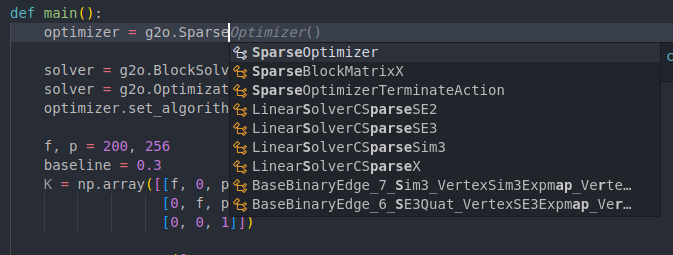
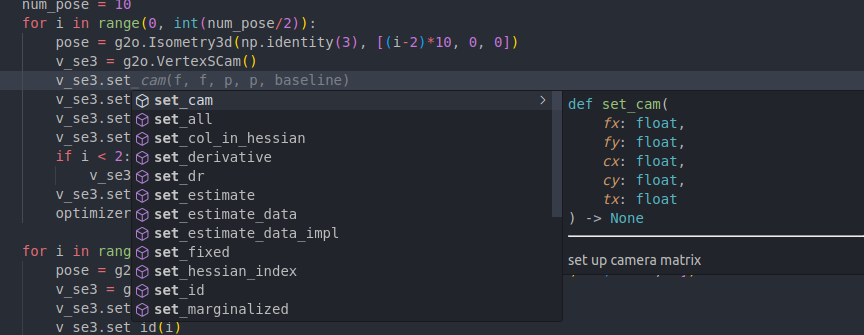
Intellisense Enhanced
Supported Python Versions
- 3.10 ⬜
- 3.11 ⬜
- 3.12 ✅
Supproted Numpy Version
- numpy 1 ⬜
- numpy 2 ✅
Tested OS and Python
- Windows 11 ✅
- Ubuntu 20 ⬜
- Ubuntu 22 ⬜
- Ubuntu 24 ✅
- Ubuntu 25 ✅
ubuntu dependencies
sudo apt-get install -qq qtdeclarative5-dev qt5-qmake libqglviewer-dev-qt5 libsuitesparse-dev libeigen3-dev -y
pip install "numpy>=2.0"
For the new conda env
conda install -y -c conda-forge "libstdcxx-ng>=12" "libgcc-ng>=12" libgomp
Test the installaton
import numpy as np
import g2opy as g2o
np.set_printoptions(precision=3)
np.set_printoptions(suppress=True)
from collections import defaultdict

def showCameraPoses(optim, idx, N):
    for i in range(idx, idx + N):
        T = optim.vertex(i).estimate().matrix()
        trans = T[:3, 3]
        print('camera pose at ', i, ': ', trans)

def calcSSE(optim, idx, wPts):
    sse = 0
    N = wPts.shape[0]
    for i in range(idx, idx + N):
        guessedWpt = optim.vertex(i)
        error = guessedWpt.estimate() - wPts[i-idx]
        sse += np.sum(error ** 2)
    return sse

def showWpts(optim, idx, N):
    for i in range(idx, idx + N):
        T = optim.vertex(i).estimate()
        #T = np.round(T, 0)
        print('guessed wPt at ', i-idx, ': ', T)

def main():
    optimizer = g2o.SparseOptimizer()
    solver = g2o.BlockSolverSE3(g2o.LinearSolverCSparseSE3())
    solver = g2o.OptimizationAlgorithmLevenberg(solver)
    optimizer.set_algorithm(solver)

    f, p = 200, 256
    baseline = 0.3
    K = np.array([[f, 0, p],
                  [0, f, p],
                  [0, 0, 1]])

    wPts = np.array([
        [0, 0, 10],
        [-1, 3, 30],
        [2, 2, 37.2],
    ])

    num_pose = 10
    for i in range(0, int(num_pose/2)):
        pose = g2o.Isometry3d(np.identity(3), [(i-2)*10, 0, 0])
        v_se3 = g2o.VertexSCam()
        v_se3.set_cam(f, f, p, p, baseline)
        v_se3.set_id(i)
        v_se3.set_estimate(pose)
        if i < 2:
            v_se3.set_fixed(True)
        v_se3.set_all() # sets transfrom, projection, dR (angle)
        optimizer.add_vertex(v_se3)

    for i in range(int(num_pose/2), num_pose):
        pose = g2o.Isometry3d(np.identity(3), [0, (i - int(num_pose/2)- 2) * 10, 0])
        v_se3 = g2o.VertexSCam()
        v_se3.set_cam(f, f, p, p, baseline)
        v_se3.set_id(i)
        v_se3.set_estimate(pose)
        v_se3.set_fixed(False)
        v_se3.set_all() # sets transfrom, projection, dR (angle)
        optimizer.add_vertex(v_se3)

    point_id = 0

    for i, wpt in enumerate(wPts):
        guessed_wPt = g2o.VertexPointXYZ()
        guessed_wPt.set_id(num_pose + point_id)
        guessed_wPt.set_marginalized(True)
        guessed_wPt.set_estimate(wpt + np.random.randn(3) )
        optimizer.add_vertex(guessed_wPt)

        for j in range(num_pose):
            z = optimizer.vertex(j).map_point(wpt)
            if i > 1:
                z +=  np.random.randn(3)
            edge = g2o.EdgeXyzVsc()
            edge.set_vertex(0, guessed_wPt)
            edge.set_vertex(1, optimizer.vertex(j))
            edge.set_measurement(z)
            edge.set_information(np.identity(3))
            optimizer.add_edge(edge)

        point_id += 1

    sse0 = calcSSE(optimizer, num_pose, wPts)
    print('\nRMSE (inliers only):')
    print('before optimization:', np.sqrt(sse0 / wPts.shape[0]))
    showCameraPoses(optimizer, 0, num_pose)
    showWpts(optimizer, num_pose, 3)


    print('Performing full BA:')
    optimizer.initialize_optimization()
    optimizer.set_verbose(False)
    optimizer.optimize(100)

    sse1 = calcSSE(optimizer, num_pose, wPts)

    print('\nRMSE (inliers only):')
    print('after  optimization:', np.sqrt(sse1 / wPts.shape[0]))
    showCameraPoses(optimizer, 0, num_pose)
    showWpts(optimizer, num_pose, 3)


if __name__ == '__main__':
    main()
Linux/Mac: 




g2o is an open-source C++ framework for optimizing graph-based nonlinear error functions. g2o has been designed to be easily extensible to a wide range of problems and a new problem typically can be specified in a few lines of code. The current implementation provides solutions to several variants of SLAM and BA.
A wide range of problems in robotics as well as in computer-vision involve the minimization of a non-linear error function that can be represented as a graph. Typical instances are simultaneous localization and mapping (SLAM) or bundle adjustment (BA). The overall goal in these problems is to find the configuration of parameters or state variables that maximally explain a set of measurements affected by Gaussian noise. g2o is an open-source C++ framework for such nonlinear least squares problems. g2o has been designed to be easily extensible to a wide range of problems and a new problem typically can be specified in a few lines of code. The current implementation provides solutions to several variants of SLAM and BA. g2o offers a performance comparable to implementations of state-of-the-art approaches for the specific problems (02/2011).
Python and updated memory management
The branch pymem contains a python wrapper and switches to smart pointer instead of RAW pointers. It is currently experimental but PRs and improvements are welcome - as always.
See g2o-python for the pypi release of g2o's python bindings. See below for how to install the python bindings from this repository directly.
Papers Describing the Approach
Rainer Kuemmerle, Giorgio Grisetti, Hauke Strasdat, Kurt Konolige, and Wolfram Burgard g2o: A General Framework for Graph Optimization IEEE International Conference on Robotics and Automation (ICRA), 2011
Documentation
A detailed description of how the library is structured and how to use and extend it can be found in /doc/g2o.pdf The API documentation can be generated as described in doc/doxygen/readme.txt
License
g2o is licensed under the BSD License. However, some libraries are available under different license terms. See below.
The following parts are licensed under LGPL v2.1+:
- csparse_extension
The following parts are licensed under GPL3+:
- g2o_viewer
- g2o_incremental
- slam2d_g2o (example for 2D SLAM with a QGLviewer GUI)
Please note that some features of CHOLMOD (which may be used by g2o, see libsuitesparse below) are licensed under the GPL. To avoid the GPL, you may have to re-compile CHOLMOD without including its GPL features. The CHOLMOD library distributed with, for example, Ubuntu or Debian includes the GPL features. For example, the supernodal factorization that is licensed under GPL is considered by g2o if it is available.
Within sub-folders we include software not written by us to guarantee easy compilation and integration into g2o itself.
-
ceres: BSD (see g2o/autodiff/LICENSE) Extracted headers to perform Automatic Differentiation.
-
freeglut: X-Consortium (see g2o/EXTERNAL/freeglut/COPYING) Copyright (c) 1999-2000 Pawel W. Olszta We use a stripped down version for drawing text in OpenGL.
See the doc folder for the full text of the licenses.
g2o is distributed in the hope that it will be useful, but WITHOUT ANY WARRANTY; without even the implied warranty of MERCHANTABILITY or FITNESS FOR A PARTICULAR PURPOSE. See the licenses for more details.
Requirements
- C++17 compiler (CI pipeline runs with gcc, clang and MSVC)
- cmake http://www.cmake.org
- Eigen3 http://eigen.tuxfamily.org
On Ubuntu / Debian these dependencies are resolved by installing the following packages.
- cmake
- libeigen3-dev
Optional requirements
- spdlog https://github.com/gabime/spdlog
- suitesparse http://faculty.cse.tamu.edu/davis/suitesparse.html
- Qt5 http://qt-project.org
- libQGLViewer http://www.libqglviewer.com
- JSON for Modern C++ https://github.com/nlohmann/json
On Ubuntu / Debian these dependencies are resolved by installing the following packages.
- libspdlog-dev
- libsuitesparse-dev
- libcereal-dev
- qtdeclarative5-dev
- qt5-qmake
- libqglviewer-dev-qt5
You can install those packages with the following command
sudo apt install libeigen3-dev libspdlog-dev libsuitesparse-dev qtdeclarative5-dev qt5-qmake libqglviewer-dev-qt5
Mac OS X
If using Homebrew, then
brew install g2o
will install g2o together with its required dependencies. In this case no manual compilation is necessary.
Windows
If using vcpkg, then
script\install-deps-windows.bat
or for full dependencies installation
script\install-additional-deps-windows.bat
will build and install the dependencies. The location of vcpkg and required
triplet can be passed as cli arguments respectively. Note that usually vcpkg
will auto detect the triplet. Set it only if your are not using the default
build for your OS.
Compilation
Our primary development platform is Linux. Experimental support for Mac OS X, Android and Windows (MinGW or MSVC). We recommend a so-called out of source build which can be achieved by the following command sequence.
mkdir build
cd build
cmake ../
make
The binaries will be placed in bin and the libraries in lib which are both located underneath cmake's build folder.
On Windows with vcpkg the following commands will generate build scripts (please change the Visual Studio version number in accordance with your system):
mkdir build
cd build
cmake -DG2O_BUILD_APPS=ON -DG2O_BUILD_EXAMPLES=ON-DVCPKG_TARGET_TRIPLET="%VCPKG_DEFAULT_TRIPLET%" -DCMAKE_TOOLCHAIN_FILE="%VCPKG_ROOT_DIR%\scripts\buildsystems\vcpkg.cmake" ..`
cmake --build . --target ALL_BUILD
If you are compiling on Windows and you are for some reasons not using vcpkg please download Eigen3 and extract it.
Within cmake-gui set the variable EIGEN3_INCLUDE_DIR to that directory.
mkdir build
cd build
cmake .. -DG2O_BUILD_APPS=ON -DG2O_BUILD_EXAMPLES=ON -DEIGEN3_INCLUDE_DIR="<THE_PATH_WHERE_YOU_PLACED_EIGEN3_AND_THE_EIGEN3_CMakeLists.txt>"
Cross-Compiling for Android
mkdir build`
cd build`
cmake -DCMAKE_TOOLCHAIN_FILE=../script/android.toolchain.cmake -DANDROID_NDK=<YOUR_PATH_TO_ANDROID_NDK_r10d+> -DCMAKE_BUILD_TYPE=Release -DANDROID_ABI="armeabi-v7a with NEON" -DEIGEN3_INCLUDE_DIR="<YOUR_PATH_TO_EIGEN>" -DEIGEN3_VERSION_OK=ON ..
cmake --build .
Installing the python wrapper
If you want to install g2opy, i.e., the python bindings for g2o, you can use pip preferably in a virtual env.
Preparing the virtual env
python3 -m venv ~/.venvs/g2opy
source ~/.venvs/g2opy/bin/activate
Installing via pip
pip install -v .
Afterwards you should be able to run the examples. For example, by running python3 python/examples/ba_demo.py.
Acknowledgments
We thank the following contributors for providing patches:
- Simon J. Julier: patches to achieve compatibility with Mac OS X and others.
- Michael A. Eriksen for submitting patches to compile with MSVC.
- Mark Pupilli for submitting patches to compile with MSVC.
Projects using g2o
- g2o-python: Python binding which is also installable via
pip - .Net wrapper


Download files
Download the file for your platform. If you're not sure which to choose, learn more about installing packages.
Source Distributions
Built Distributions
Filter files by name, interpreter, ABI, and platform.
If you're not sure about the file name format, learn more about wheel file names.
Copy a direct link to the current filters
File details
Details for the file ubicoders_g2opy-2.1.0-cp312-cp312-win_amd64.whl.
File metadata
- Download URL: ubicoders_g2opy-2.1.0-cp312-cp312-win_amd64.whl
- Upload date:
- Size: 9.5 MB
- Tags: CPython 3.12, Windows x86-64
- Uploaded using Trusted Publishing? No
- Uploaded via: twine/6.2.0 CPython/3.12.11
File hashes
| Algorithm | Hash digest | |
|---|---|---|
| SHA256 |
c9ffb7125f33dbbb29315dd75166fef884c849bbef38a6a81d14f9170f687889
|
|
| MD5 |
8921e9775b1485e7b3fe89a6e8be7009
|
|
| BLAKE2b-256 |
c70ebd9cacc035312769ba8b5c605e013afdfae441ca884f9a8fffdc411eb132
|
File details
Details for the file ubicoders_g2opy-2.1.0-cp312-cp312-manylinux_2_39_x86_64.whl.
File metadata
- Download URL: ubicoders_g2opy-2.1.0-cp312-cp312-manylinux_2_39_x86_64.whl
- Upload date:
- Size: 17.4 MB
- Tags: CPython 3.12, manylinux: glibc 2.39+ x86-64
- Uploaded using Trusted Publishing? No
- Uploaded via: twine/6.2.0 CPython/3.12.11
File hashes
| Algorithm | Hash digest | |
|---|---|---|
| SHA256 |
3f96482223671d6d5432f018845be9e7fa449c87f8218ff6cd96b6b8dc237b2e
|
|
| MD5 |
d8c09c0047b997302059bd75d35748c4
|
|
| BLAKE2b-256 |
6f20af5e449d873c2e10c17bc59ebb791988eff96b1f7f30dbbc3da44576db55
|






