
UCDMCMC
Markov Chain Monte Carlo (MCMC) fitting code for low-temperature stars, brown dwarfs and extrasolar planet spectra, tuned particularly to the near-infrared. This code is continually being updated, so please suggest fixes, features, and/or improvements.
INSTALLATION NOTES
ucdmcmc can be installed from pip:
pip install ucdmcmc
or from git:
git clone https://github.com/aburgasser/ucdmcmc.git
cd ucdmcmc
python -m setup.py install
It is recommended that you install in a conda environment to ensure the dependencies do not conflict with your own installation
conda create -n ucdmcmc python=3.13
conda activate ucdmcmc
pip install ucdmcmc
A check that this worked is that you can import ucdmcmc into python/jupyter noteobook, and that the ucdmcmc.MODEL_FOLDER points to the models folder that was downloaded
ucdmcmc uses the following external packages:
astropy: https://www.astropy.org/astroquery: https://astroquery.readthedocs.io/en/latest/corner: https://corner.readthedocs.io/en/latest/emcee: https://emcee.readthedocs.io/en/stable/matplotlib: https://matplotlib.org/numpy<2.0: https://numpy.org/pandas: https://pandas.pydata.org/(py)tables: https://www.pytables.org/requests: https://requests.readthedocs.io/en/latest/scipy: https://scipy.org/spectres: https://spectres.readthedocs.io/en/latest/statsmodels: https://www.statsmodels.org/stable/index.htmltqdm: https://tqdm.github.io/
Optionally install SPLAT
To generate new model sets using the built-in generateModels() function, you will need to install SPLAT (note: this is not necessary for the other functionality in this code). SPLAT is not automatically installed on setup. The instructions are essentially the same:
git clone https://github.com/aburgasser/splat.git
cd splat
python -m pip install .
See https://github.com/aburgasser/splat for additional instructions
Models
ucdmcmc comes with a starter set of models that play nicely with the code. An extended set can be downloaded from https://spexarchive.coolstarlab.ucsd.edu/ucdmcmc/. These should be placed in the folder .ucdmcmc_models in your home directory (i.e., /home/adam/.ucdmcmc_models). If it doesn't already exist, this directory will be created on the first call to ucdmcmc. In addition, models that exist on this website and not present in this folder will be downloaded directly when getModelSet()`` is called. You can also generate your own set of models using the generateModels()` function (see note above).
ucdmcmc has been successfully run with the following models:
- ATMO2020: Phillips et al. (2020) https://ui.adsabs.harvard.edu/abs/2020A%26A...637A..38P/abstract
- ATMO2020++: Meisner et al. (2023) https://ui.adsabs.harvard.edu/abs/2023AJ....166...57M/abstract
- BT Cond: Allard et al. (2012) https://ui.adsabs.harvard.edu/abs/2012RSPTA.370.2765A/abstract
- BT Dusty: Allard et al. (2012) https://ui.adsabs.harvard.edu/abs/2012RSPTA.370.2765A/abstract
- BT Settl 2008: Allard et al. (2012) https://ui.adsabs.harvard.edu/abs/2012RSPTA.370.2765A/abstract
- BT Settl 2015: Allard et al. (2015) https://ui.adsabs.harvard.edu/abs/2015A%26A...577A..42B/abstract
- Burrows et al. (2006) https://ui.adsabs.harvard.edu/abs/2006ApJ...640.1063B/abstract
- Drift: Witte et al. (2011) https://ui.adsabs.harvard.edu/abs/2011A%26A...529A..44W/abstract
- Exo-REM: Blain et al. (2021) https://ui.adsabs.harvard.edu/abs/2021A%26A...646A..15B/abstract
- Helios: Kitzmann et al. (2020) https://ui.adsabs.harvard.edu/abs/2020ApJ...890..174K/abstract
- Lacy & Burrows (2023) https://ui.adsabs.harvard.edu/abs/2023ApJ...950....8L/abstract
- LOWZ: Meisner et al. (2021) https://ui.adsabs.harvard.edu/abs/2021ApJ...915..120M/abstract
- Madhusudhan et al. (2011) https://ui.adsabs.harvard.edu/abs/2011ApJ...737...34M/abstract
- Morley et al. (2012) https://ui.adsabs.harvard.edu/abs/2012ApJ...756..172M/abstract
- Morley et al. (2014) https://ui.adsabs.harvard.edu/abs/2014ApJ...787...78M/abstract
- Phoenix New Era: Hauschildt et al. (2025) https://ui.adsabs.harvard.edu/abs/2025A%26A...698A..47H/abstract
- SAND: Alvarado et al. (2024) https://ui.adsabs.harvard.edu/abs/2024RNAAS...8..134A/abstract
- Saumon et al. (2012) https://ui.adsabs.harvard.edu/abs/2012ApJ...750...74S/abstract
- Sonora Bobcat: Marley et al. (2021) https://ui.adsabs.harvard.edu/abs/2021ApJ...920...85M/abstract
- Sonora Cholla: Karalidi et al. (2021) https://ui.adsabs.harvard.edu/abs/2021ApJ...923..269K/abstract
- Sonora Diamondback: Morley et al. (2024) https://ui.adsabs.harvard.edu/abs/2024ApJ...975...59M/abstract
- Sonora Elfowl: Mukherjee et al. (2024) https://ui.adsabs.harvard.edu/abs/2024ApJ...963...73M/abstract
- Sonora Elfowl + PH3: Beiler et al. (2024) https://ui.adsabs.harvard.edu/abs/2024ApJ...973...60B/abstract
- Sonora Elfowl + CO2: Wogan et al. (2025) https://ui.adsabs.harvard.edu/abs/2025RNAAS...9..108W/abstract
- SPHINX: Iyer et al. (2023) https://ui.adsabs.harvard.edu/abs/2023ApJ...944...41I/abstract
- SPHINX 2: Iyer et al. (2025) https://ui.adsabs.harvard.edu/abs/2025arXiv251202269I/abstract
- Tremblin et al. (2015): https://ui.adsabs.harvard.edu/abs/2015ApJ...804L..17T/abstract
Additional models are continuously being added, please let us know if there are models you'd like to see included!
Spectra
ucdmcmc comes with a starter set of spectra for the following instruments:
- OIR: Generic optical and infrared grid 0.3-30 µm at resolution = 300
- NIR: TRAPPIST1 spectrum from Davoudi et al. (2024) https://ui.adsabs.harvard.edu/abs/2024ApJ...970L...4D/abstract
- EUCLID: EUCLID J0359-4740 from Dominguez-Tagle et al. (2025) https://ui.adsabs.harvard.edu/abs/2025ApJ...991...84D/abstract
- JWST-NIRSPEC-PRISM: Wolf 1130C from Burgasser et al. (2025) https://ui.adsabs.harvard.edu/abs/2025Sci...390..697B/abstract
- JWST-NIRSPEC-G395H: Wolf 1130C from Burgasser et al. (2025) https://ui.adsabs.harvard.edu/abs/2025Sci...390..697B/abstract
- JWST-MIRI-LRS: SDSS J1624+0029 from Beiler et al. (2024) https://ui.adsabs.harvard.edu/abs/2024ApJ...973..107B/abstract
- JWST-NIRSPEC-MIRI: Combined NIRSpec/PRISM and MIRI/LRS of SDSS J1624+0029 from Beiler et al. (2024) https://ui.adsabs.harvard.edu/abs/2024ApJ...973..107B/abstract
- KECK-NIRES: UGPC J0722-0540 from Theissen et al. (2022) https://ui.adsabs.harvard.edu/abs/2022RNAAS...6..151T/abstract
- FIRE-PRISM: Ross 458C from Burgasser et al. (2010) https://ui.adsabs.harvard.edu/abs/2010ApJ...725.1405B/abstract
- FIRE-PRISM: UGPC J0722-0540 from Bochanski et al. (2011) https://ui.adsabs.harvard.edu/abs/2011AJ....142..169B/abstract
- SPEX-PRISM: 2MASS J0559-1404 from Burgasser et al. (2006) https://ui.adsabs.harvard.edu/abs/2006ApJ...637.1067B/abstract
- SPEX-SXD: 2MASS J0559-1404 from Cushing et al. (2005) https://ui.adsabs.harvard.edu/abs/2005ApJ...623.1115C/abstract
User spectra can be read in using ucdmcmc.Spectrum("filename"). Files can be .fits, .csv, .txt (space-delimited), or .tsv (tab-delimited), and should have wavelength, flux, and uncertainty arrays. You can also read in these files separately and create a Spectrum object using the call ucdmcmc.Spectrum(wave=[wave array,flux=[flux array],noise=[uncertainty array]). See the docstring for ucdmcmc.Spectrum for further details.
Usage
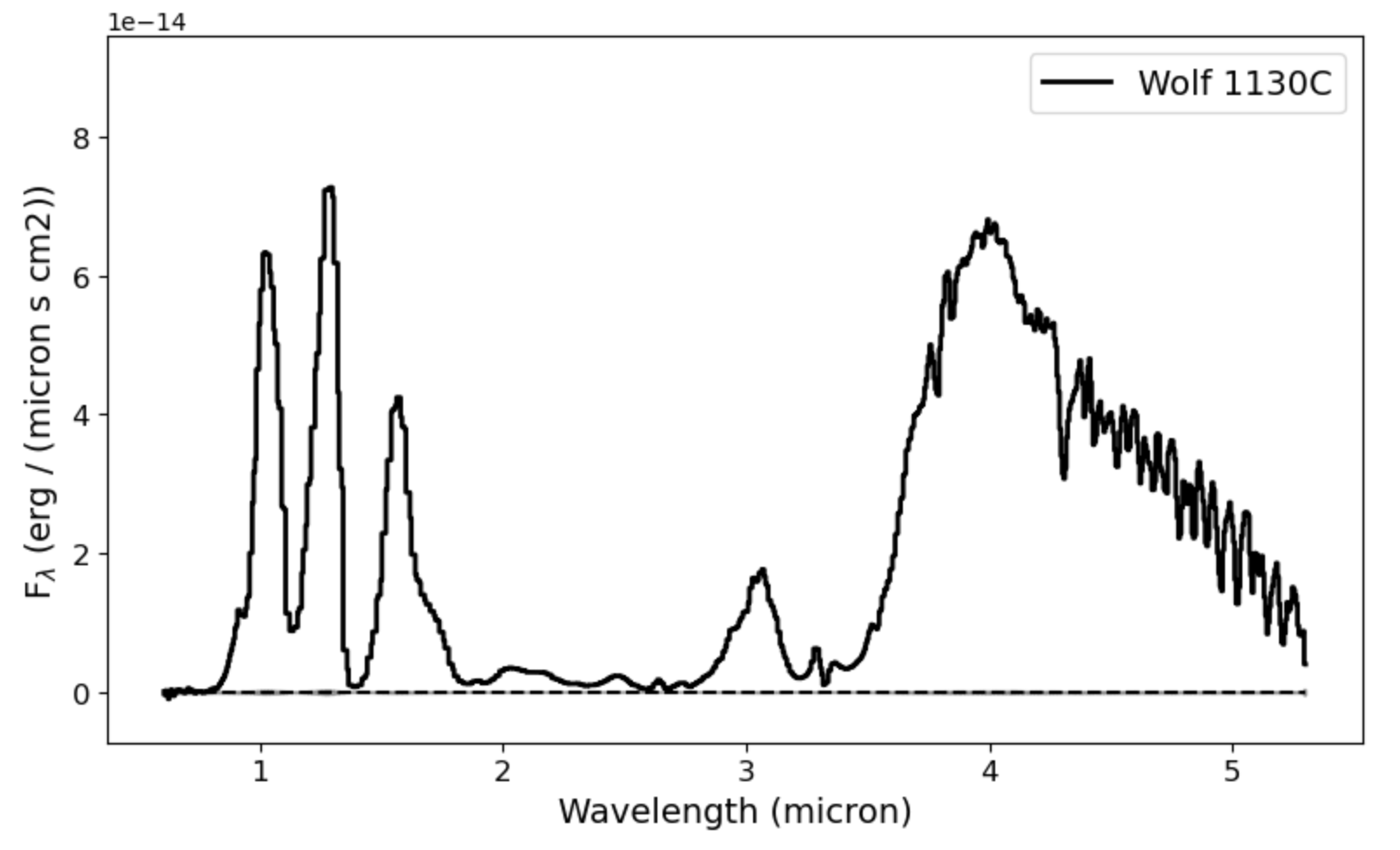
ucdmcmc comes with samples to help you test the code which you can read in with the function ucdmcmc.getSample():
import ucdmcmc
sp = ucdmcmc.getSample('JWST-NIRSPEC-PRISM')
sp.plot()
Fitting requires reading in a model set; for existing sets specify the model name and the instrument:
models,wave = ucdmcmc.getModelSet('elfowl24','JWST-NIRSPEC-PRISM')
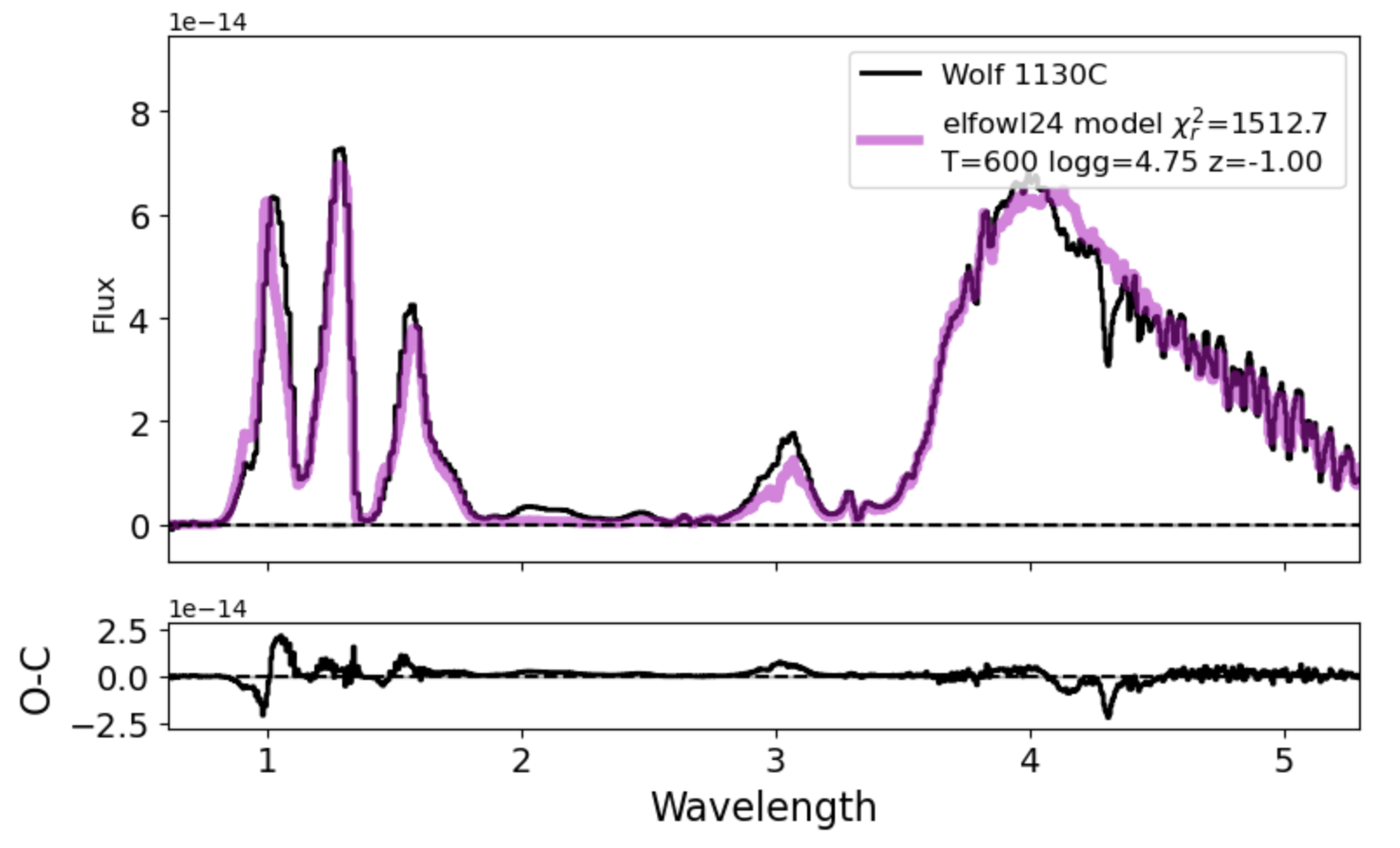
We map our spectrum to the model wave grid, then we can conduct a grid fit to find the single best fitting model using ucdmcmc.fitGrid():
sp.toWavelengths(wave)
par = ucdmcmc.fitGrid(sp,models)
Output:
Best parameters:
	model = elfowl24
	co = 0.5
	kzz = 7.0
	logg = 4.75
	teff = 600.0
	z = -1.0
	scale = 1.616424519232685e-20
	chis = 1290354.449246344
	radius = 0.056390540414855445
	dof = 853.0
	rchi = 1512.7250284247878
These grid parameters can be used to initiate an MCMC fit using using ucdmcmc.fitMCMC():
npar = ucdmcmc.fitMCMC(sp,models,par,nstep=100,burn=0.25,absolute=True,verbose=False)
Output:
Best parameters:
	model: elfowl24
	co: 0.580211857460554
	kzz: 7.3919278336945515
	logg: 5.365954958490183
	teff: 633.8145781129864
	z: -0.9388765775373868
	scale: 1.328342456515958e-20
	chis: 1328254.9586724846
	radius: 0.05111914351717615
	dof: 848
	rchi: 1512.7250284247878
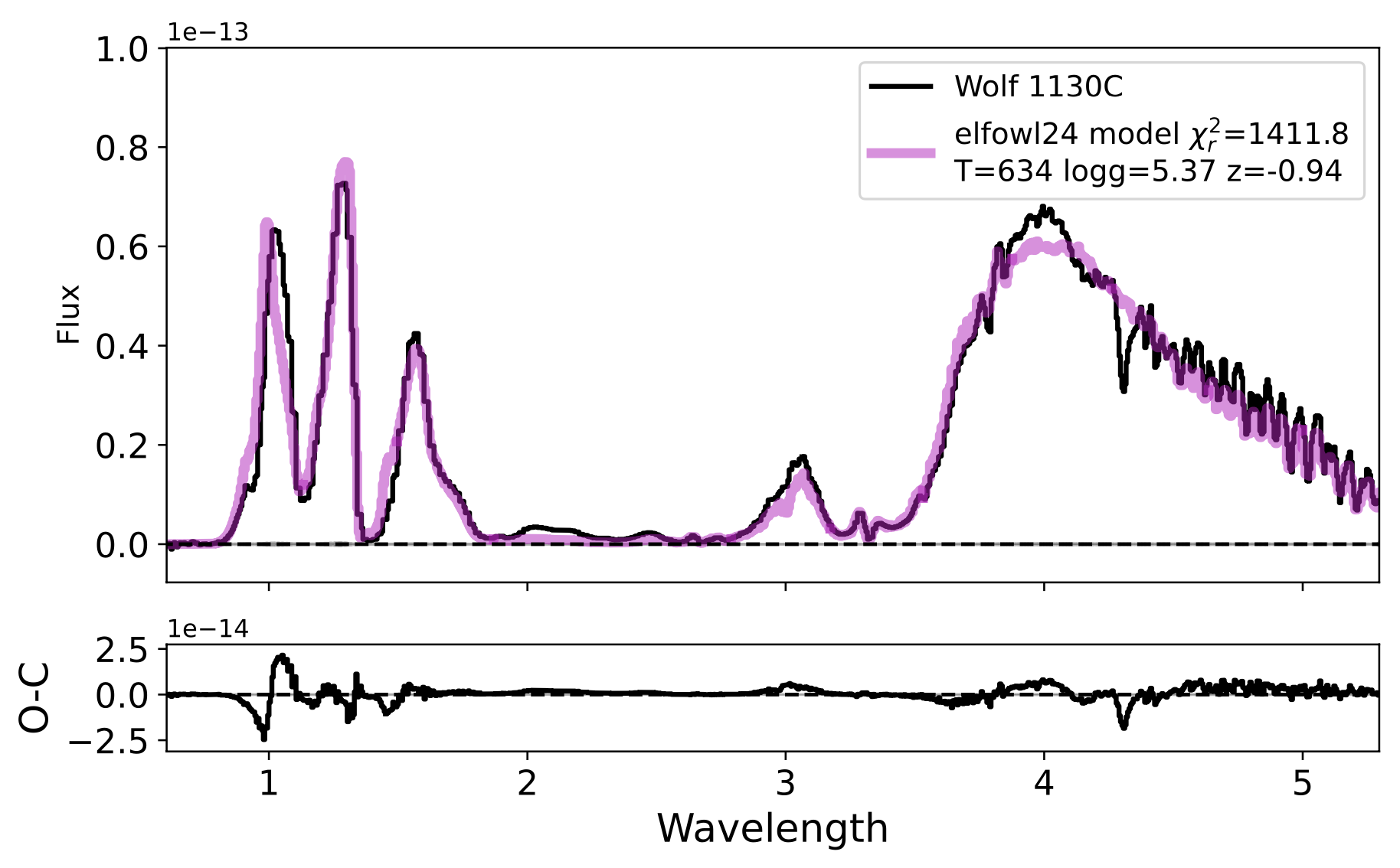
(note: it is recommended to run with more than 100 steps!)
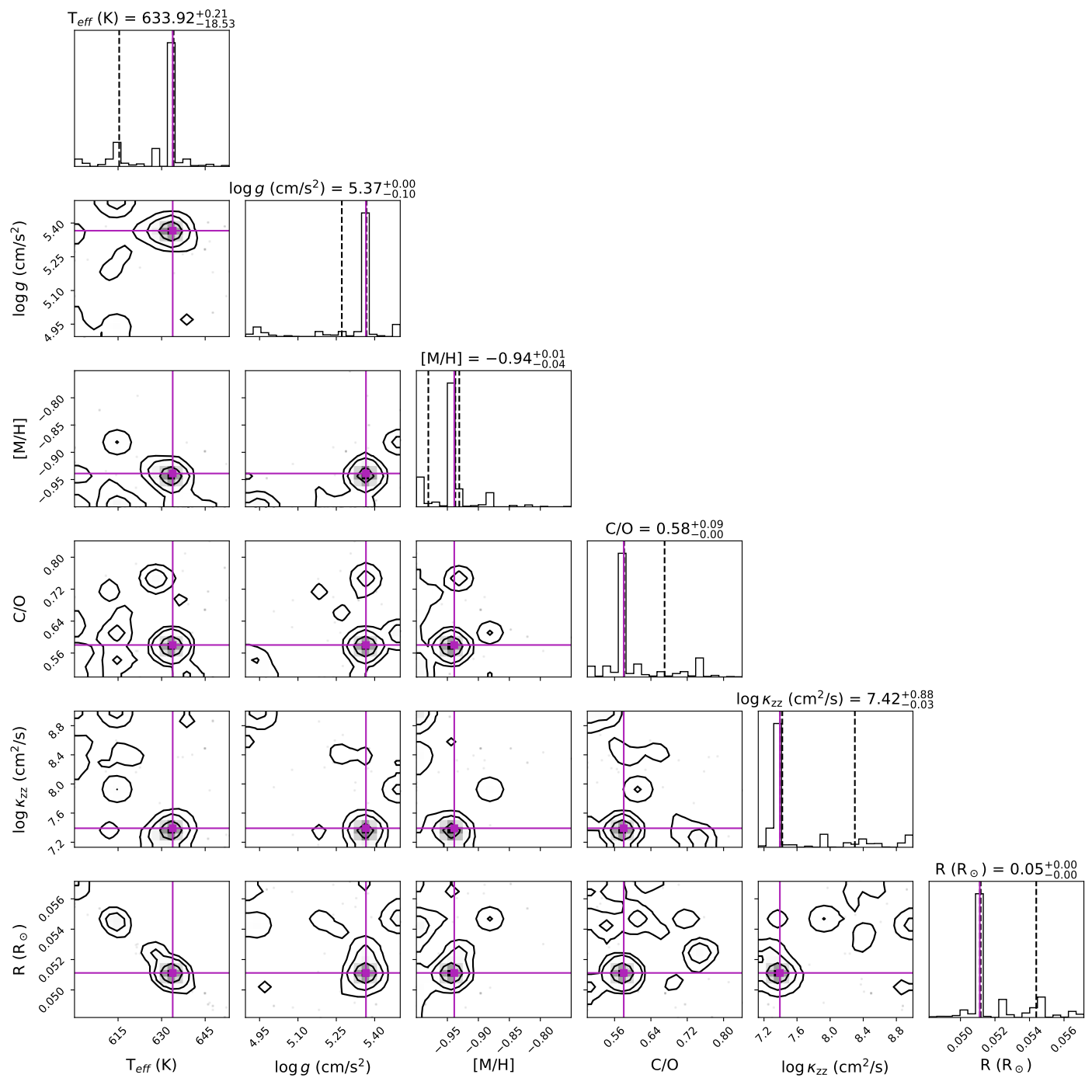
You can visualize the parameter distributions using ucdmcmc.plotCorner():
ucdmcmc.plotCorner(npar)
There are many variations to these fits, as well as secondary parameters (e.g., RV, vsini, line broadening, reddening, etc) that can be explored. Please see the help files associated with the specific functions.
Opacities
[TBD]
Citing the code
If you use this code in your research, publications, or presentations, please include the following citation:
Burgasser, Brooks, Morrissey, Haynes, & Liou (2025). aburgasser/ucdmcmc (vXXX). Zenodo. https://doi.org/10.5281/zenodo.16921710
or in bibtex:
@software{adam_burgasser_2026_16921710,
  author       = {Adam Burgasser and
                  Brooks, Hunter and
                  Morrissey, Sara and
                  Haynes, Julia and
                  Liou, Tiffany},
  title        = {aburgasser/ucdmcmc: vXXXX},
  month        = jan,
  year         = 2026,
  publisher    = {Zenodo},
  version      = {v1.4},
  doi          = {10.5281/zenodo.16921710},
  url          = {https://doi.org/10.5281/zenodo.16921710},
}
where (vXXX) corresponds to the version used.
ucdmcmc and its antecedents has been used in the following publications:
- Burgasser et al. (2024, ApJ 962, 177): https://ui.adsabs.harvard.edu/abs/2024ApJ...962..177B/abstract
- Burgasser et al. (2025, ApJ 982, 79): https://ui.adsabs.harvard.edu/abs/2025ApJ...982...79B/abstract
- Lueber & Burgasser (2025, ApJ 988, 31): https://ui.adsabs.harvard.edu/abs/2025ApJ...988...31L/abstract
- Burgasser et al. (2025, Science, 390, 697): https://ui.adsabs.harvard.edu/abs/2025Sci...390..697B/abstract
- Morrissey et al. (2026, AJ, in press): https://ui.adsabs.harvard.edu/abs/2025arXiv251101167M/abstract
Please let me know if you make use of the code so we can include your publication in the list above!
1 maintainer

Metadata
1 maintainer
Release files for ucdmcmc 1.4.5
For a detailed explanation of source distributions (sdists) and built distributions (wheels), please see the package formats documentation.
Source distribution (sdist)
| File | Size | Uploaded | Provenance | |
|---|---|---|---|---|
| ucdmcmc-1.4.5.tar.gz | 62.1 MB | With provenance | Details |
Built distribution (wheel)
| File | Interpreter | ABI | Platform | Reset |
|---|---|---|---|---|
| ucdmcmc-1.4.5-py3-none-any.whl | Python 3 | none | any | Details |
Total release size: 123.5 MB
Release files / ucdmcmc-1.4.5.tar.gz
| Download URL | ucdmcmc-1.4.5.tar.gz |
|---|---|
| Size | 62.1 MB |
| Tags | Source |
|
SHA-256 checksum How to use checksums |
7533b3dc53bd364daacc85897ffa27ef980f8e103e726e7386d8f36bd3d29f36
|
|
BLAKE2b-256 checksum How to use checksums |
6bf3af0071354f15fd88f40a40f26e84427b0926c18a960cab3413d30ec99a0c
|
| Upload date | |
|
Uploaded using Trusted Publishing? What is trusted publishing? |
Yes |
| Uploaded via |
twine/7.0.0 CPython/3.13.14
|
Provenance
Provenance describes where a file came from. On PyPI, provenance is shared via attestations, which provide a verifiable record of the build or publishing details. View details, limitations and caveats.


PyPI Publish Attestation
PyPI verified that this artifact, at this checksum, originated from the publisher listed below.
Signed by GitHub Actions, verified by PyPI on Aug 2, 2026.
Transparency logRelease files / ucdmcmc-1.4.5-py3-none-any.whl
| Download URL | ucdmcmc-1.4.5-py3-none-any.whl |
|---|---|
| Size | 61.4 MB |
| Tags | Python 3 |
|
SHA-256 checksum How to use checksums |
2b3917776fd4986de201034650ce0f110c6372b108a855af6bc432f18388e9cf
|
|
BLAKE2b-256 checksum How to use checksums |
c601647d9f9cb42958cd3a5f41d56abc647a36266746a66c749ce8c0ea094cb6
|
| Upload date | |
|
Uploaded using Trusted Publishing? What is trusted publishing? |
Yes |
| Uploaded via |
twine/7.0.0 CPython/3.13.14
|
Provenance
Provenance describes where a file came from. On PyPI, provenance is shared via attestations, which provide a verifiable record of the build or publishing details. View details, limitations and caveats.
PyPI Publish Attestation
PyPI verified that this artifact, at this checksum, originated from the publisher listed below.
Signed by GitHub Actions, verified by PyPI on Aug 2, 2026.
Transparency logSecurity for ucdmcmc 1.4.5
Provenance
Provenance describes where a file came from. On PyPI, provenance is shared via attestations, which provide a verifiable record of the build or publishing details. View details, limitations and caveats.
Full provenance
All 2 files in this release have been uploaded with provenance metadata.
Attestation for ucdmcmc-1.4.5.tar.gz
PyPI Publish Attestation
PyPI verified that this artifact, at this checksum, originated from the publisher listed below.
Signed by GitHub Actions, verified by PyPI on Aug 2, 2026.
Transparency logA note on package security
PyPI is a repository for distributing packages, not a service for auditing them. While third-party security researchers and our staff do their best to detect and remove malicious packages, PyPI cannot guarantee the quality, security or suitability of any given package.
To learn more about protecting yourself from malicious actors, visit our package security documentation.














