
uchimata-py
This repository contains code for a widget version of the uchimata library. Made with anywidget, this allows people to visualize 3D genome models in Python-based computational notebooks, such as Jupyter Notebook.
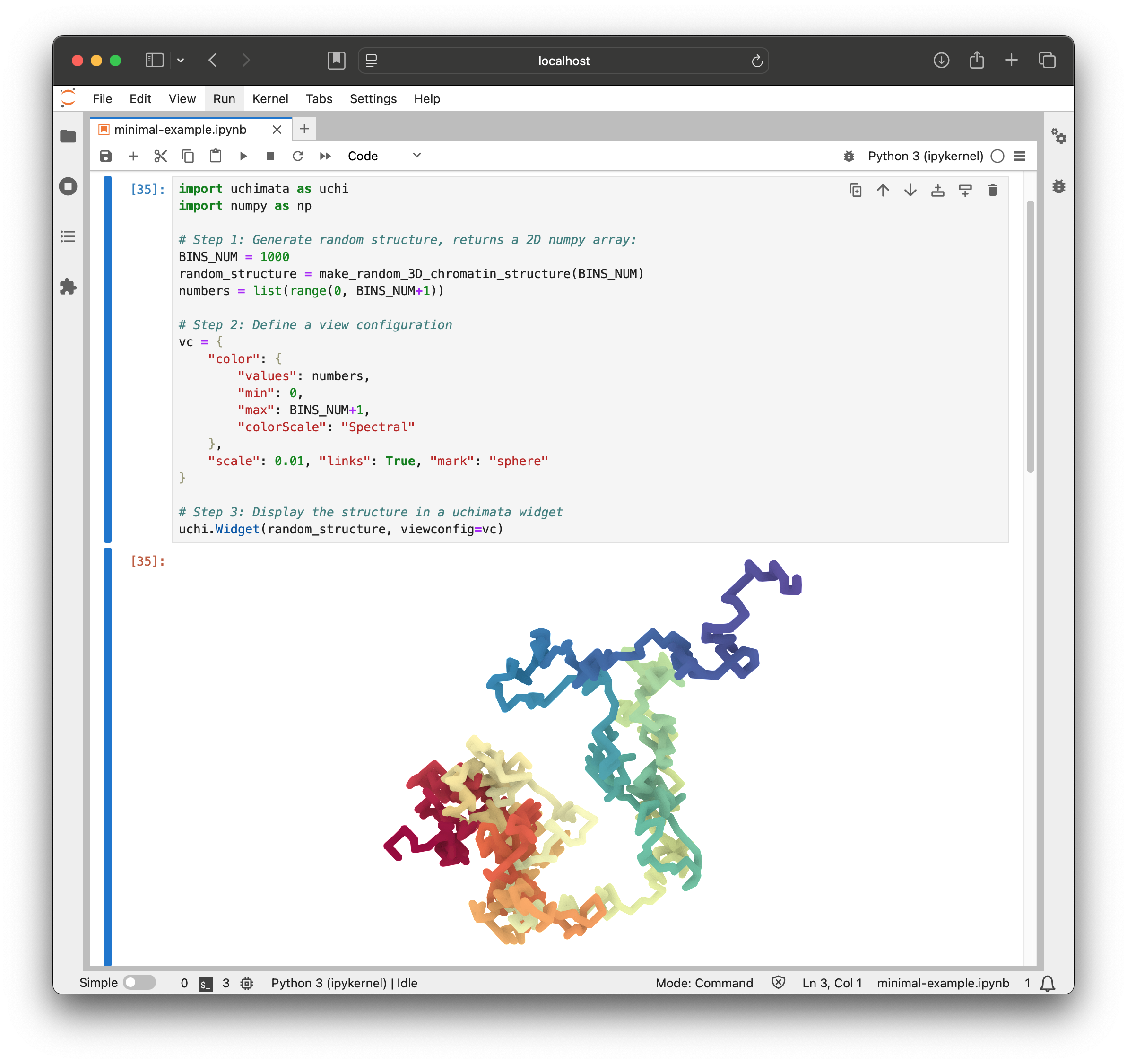
Basic usage
uchimata is available on PyPI:
pip install uchimata
We like to use uv to manage project dependencies:
uv add uchimata
import uchimata as uchi
import numpy as np

BINS_NUM = 1000

# Step 1: Generate random structure, returns a 2D numpy array:
def make_random_3D_chromatin_structure(n):
    position = np.array([0.0, 0.0, 0.0])
    positions = [position.copy()]
    for _ in range(n):
        step = np.random.choice([-1.0, 0.0, 1.0], size=3)  # Randomly choose to move left, right, up, down, forward, or backward
        position += step
        positions.append(position.copy())
    return np.array(positions)

random_structure = make_random_3D_chromatin_structure(BINS_NUM)

# Step 2: Display the structure in an uchimata widget
numbers = list(range(0, BINS_NUM+1))
vc = {
    "color": {
        "values": numbers,
        "min": 0,
        "max": BINS_NUM,
        "colorScale": "Spectral"
    },
    "scale": 0.01,
    "links": True,
    "mark": "sphere"
}
uchi.Widget(random_structure, vc)
Run the example in Google Colab.
The API is still frequently changing. The main feature of the widget right now is the ability to display 3D chromatin models and we're working on capabilities to integrate with other bioinformatics tools.
The underlying JS library only supports data in the Apache Arrow format.
In the widget version, on the other hand, we provide interface to load data in
many notebook-native formats, such as 2D numpy arrays, or pandas dataframe
(with columns named 'x', 'y', 'z').
Quickly test out uchimata with uv:
uv run --with uchimata --with numpy --with pyarrow --with jupyterlab jupyter lab- make a new notebook
- copy and paste the code above into an empty cell
Contributing
Running tests:
uv run pytest
1 maintainer

Metadata
1 maintainer
Release files for uchimata 0.4.0
For a detailed explanation of source distributions (sdists) and built distributions (wheels), please see the package formats documentation.
Source distribution (sdist)
| File | Size | Uploaded | |
|---|---|---|---|
| uchimata-0.4.0.tar.gz | 216.8 kB | Details |
Built distribution (wheel)
| File | Interpreter | ABI | Platform | Reset |
|---|---|---|---|---|
| uchimata-0.4.0-py3-none-any.whl | Python 3 | none | any | Details |
Total release size: 223.3 kB
Release files / uchimata-0.4.0.tar.gz
| Download URL | uchimata-0.4.0.tar.gz |
|---|---|
| Size | 216.8 kB |
| Tags | Source |
|
SHA-256 checksum How to use checksums |
4ee8dd35f5f9007f68b7cf309474b9b9d0a75c0a371a9613b613d2aa2c141abe
|
|
BLAKE2b-256 checksum How to use checksums |
4a5bb15a476d5f4bcced084047878a5e1f45009c87cf1384d60a7474f07d447c
|
| Upload date | |
|
Uploaded using Trusted Publishing? What is trusted publishing? |
No |
| Uploaded via |
uv/0.8.3
|
Release files / uchimata-0.4.0-py3-none-any.whl
| Download URL | uchimata-0.4.0-py3-none-any.whl |
|---|---|
| Size | 6.5 kB |
| Tags | Python 3 |
|
SHA-256 checksum How to use checksums |
3a22cb368c22589e6f93e10677e6532deb52f459c02d62bd2d80634a79bc0070
|
|
BLAKE2b-256 checksum How to use checksums |
e919dec3143b45dab56a66afa886ef84d41d0ec2e0ce37470c2da271f665c1f4
|
| Upload date | |
|
Uploaded using Trusted Publishing? What is trusted publishing? |
No |
| Uploaded via |
uv/0.8.3
|














