


Easier access to UCUM from Python
Feedback welcome! Currently only the conversion direction from UCM to pint is supported. Please review the definitions before you trust them. While we have many tests in place and reviewed the mappings carefully, bugs may still be present.
UCUM (Unified Code for Units of Measure) is a code system intended to cover all units of measures.
It provides a formalism to express units in an unambiguous way suitable for electronic communication.
Note that UCUM does not provide a canonical representation, e.g. m/s and m.s-1 are expressing the same unit in two ways.
ucumvert is a pip-installable Python package. Features:
- Parser for UCUM unit strings that implements the full grammar.
- Converter for creating pint units from UCUM unit strings.
- A pint unit definition file pint_ucum_defs.txt that extends pint´s default units with UCUM units. All UCUM units from the new version 2.2 of the specification (June 2024) are included.
ucumvert generates the UCUM grammar by filling a template with unit codes, prefixes etc. from the official ucum-essence.xml file (a copy is included in this repo). So updating the parser for new UCUM releases is straight forward. The parser is built with the great lark parser toolkit. The generated lark grammar file for case-sensitive UCUM codes is included in the repository, see ucum_grammar.lark.
Some of the UCUM unit atoms are invalid unit names in pint, for example cal_[15], m[H2O], 10*, [in_i'H2O].
For all of them we define mappings to valid pint unit names in ucum_pint.py, e.g. {"cal_[15]": "cal_15"}.
Install
ucumvert is available as Python package from PyPi and can be pip-installed in the usual way.
pip install ucumvert
To install the most recent code from git in developer mode including creation of a virtual environment use:
Linux
git clone https://github.com/dalito/ucumvert.git
cd ucumvert
python -m venv .venv
source .venv/bin/activate
python -m pip install --upgrade pip
pip install -e .[dev]
Windows
git clone https://github.com/dalito/ucumvert.git
cd ucumvert
py -m venv .venv
.venv\Scripts\activate.bat
py -m pip install --upgrade pip
pip install -e .[dev]
Optionally you can visualize the parse trees with Graphviz as shown below. It requires the additional package pydot; install by running pip install pydot.
Demo
We provide a basic command line interface.
(.venv) $ ucumvert
It has an interactive mode to test parsing UCUM codes:
(.venv) $ ucumvert -i
Enter UCUM unit code to parse, or 'q' to quit.
> m/s2.kg
Created visualization of parse tree (parse_tree.png).
main_term
  term
    term
      simple_unit       m
      /
      annotatable
        simple_unit     s
        2
    .
    simple_unit
      k
      g
--> Pint <Quantity(1.0, 'kilogram * meter / second ** 2')>
> q
So the intermediate result is a tree which is then traversed to convert the elements to pint quantities (or pint-compatible strings):
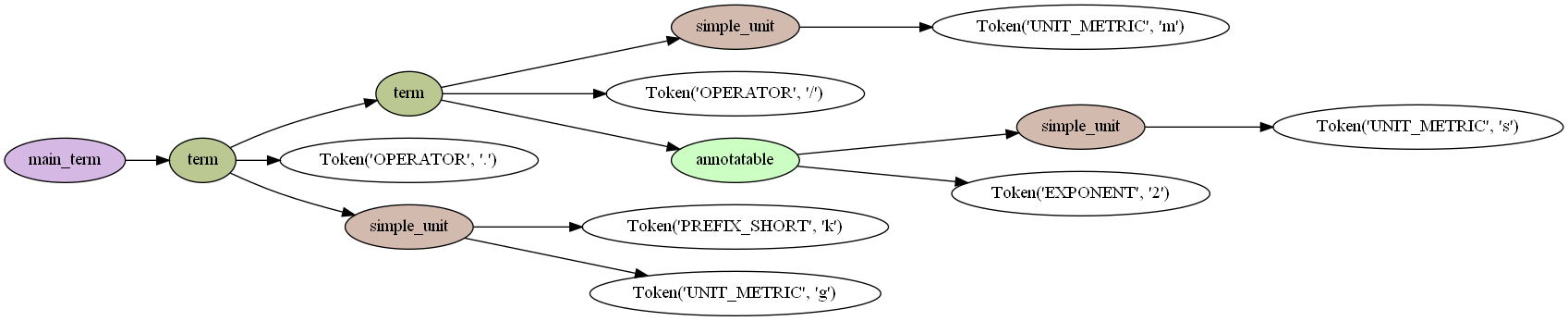
The package includes an UCUM-aware pint UnitRegistry which loads all definitions for UCUM units on instantiation.
It comes with an additional method from_ucum to convert UCUM codes to pint.
>>> from ucumvert import PintUcumRegistry
>>> ureg = PintUcumRegistry()
>>> ureg.from_ucum("m/s2.kg")
<Quantity(1.0, 'kilogram * meter / second ** 2')>
>>> ureg.from_ucum("m[H2O]{35Cel}")  # UCUM code with annotation
<Quantity(1, 'm_H2O')>
>>> _.to("mbar")
<Quantity(98.0665, 'millibar')>
>>> ureg("degC")   # a standard pint unit
<Quantity(1, 'degree_Celsius')>
>>>
Tests
The unit tests include parsing and converting all common UCUM unit codes from the official repo. Run the test suite by:
pytest
The common UCUM unit codes are available only in binary form (xlsx, docs, pdf).
Here we keep a copy in tsv-format ucum_examples.tsv.
To (re)generate this tsv-file from the official xlsx-file in the UCUM repository run
pip install openpyxl
python src/ucumvert/vendor/get_ucum_example_as_tsv.py
Useful links
- UCUM online-validator
- Issue in pint that motivated this work: To what extent is pint compatible with UCUM?
License
The code in this repository is distributed under MIT license with the exception of the ucum-*.* files in the directory src/ucumvert/vendor
that fall under the UCUM Copyright Notice and License (Version 1.0).
We consider ucumvert according to §1.3 not as "Derivative Works" of UCUM because ucumvert only "interoperates with an unmodified instance of the Work".
1 maintainer

Metadata
1 maintainer
Release files for ucumvert 0.3.2
For a detailed explanation of source distributions (sdists) and built distributions (wheels), please see the package formats documentation.
Source distribution (sdist)
| File | Size | Uploaded | Provenance | |
|---|---|---|---|---|
| ucumvert-0.3.2.tar.gz | 53.2 kB | With provenance | Details |
Built distribution (wheel)
| File | Interpreter | ABI | Platform | Reset |
|---|---|---|---|---|
| ucumvert-0.3.2-py3-none-any.whl | Python 3 | none | any | Details |
Total release size: 107.4 kB
Release files / ucumvert-0.3.2.tar.gz
| Download URL | ucumvert-0.3.2.tar.gz |
|---|---|
| Size | 53.2 kB |
| Tags | Source |
|
SHA-256 checksum How to use checksums |
a3708a38120cf6617e792ac2eb3d610f269cd7b8e8ce52fd2f15a4e3fd76f9fb
|
|
BLAKE2b-256 checksum How to use checksums |
98e6e8b7156399642c12ba9e5975d4481d827d0b67bc8574e9d89ff0fcfa3750
|
| Upload date | |
|
Uploaded using Trusted Publishing? What is trusted publishing? |
Yes |
| Uploaded via |
twine/6.1.0 CPython/3.13.13
|
Provenance
Provenance describes where a file came from. On PyPI, provenance is shared via attestations, which provide a verifiable record of the build or publishing details. View details, limitations and caveats.


PyPI Publish Attestation
PyPI verified that this artifact, at this checksum, originated from the publisher listed below.
Signed by GitHub Actions, verified by PyPI on Jun 4, 2026.
Transparency logRelease files / ucumvert-0.3.2-py3-none-any.whl
| Download URL | ucumvert-0.3.2-py3-none-any.whl |
|---|---|
| Size | 54.2 kB |
| Tags | Python 3 |
|
SHA-256 checksum How to use checksums |
b1c3c5b875843642f52f5f015fc8728ff997ce9c337b64bd25141ae44848bdd0
|
|
BLAKE2b-256 checksum How to use checksums |
753f103f0c229a34c109e163abca0028daaf2ce91fb39b0240680d2053feb189
|
| Upload date | |
|
Uploaded using Trusted Publishing? What is trusted publishing? |
Yes |
| Uploaded via |
twine/6.1.0 CPython/3.13.13
|
Provenance
Provenance describes where a file came from. On PyPI, provenance is shared via attestations, which provide a verifiable record of the build or publishing details. View details, limitations and caveats.
PyPI Publish Attestation
PyPI verified that this artifact, at this checksum, originated from the publisher listed below.
Signed by GitHub Actions, verified by PyPI on Jun 4, 2026.
Transparency logSecurity for ucumvert 0.3.2
Provenance
Provenance describes where a file came from. On PyPI, provenance is shared via attestations, which provide a verifiable record of the build or publishing details. View details, limitations and caveats.
Full provenance
All 2 files in this release have been uploaded with provenance metadata.
Attestation for ucumvert-0.3.2.tar.gz
PyPI Publish Attestation
PyPI verified that this artifact, at this checksum, originated from the publisher listed below.
Signed by GitHub Actions, verified by PyPI on Jun 4, 2026.
Transparency logA note on package security
PyPI is a repository for distributing packages, not a service for auditing them. While third-party security researchers and our staff do their best to detect and remove malicious packages, PyPI cannot guarantee the quality, security or suitability of any given package.














