
uefi_structs
A pure Python library for low-level encoding / decoding of UEFI global variables and related structures.
Looks like nobody else has written this other than efibootmgr (and its C library), but even that only implements a very specific, even if common, subset of boot options. Other load options are parsed but AFAIK manipulation of those is not implemented.
Currently only the following is implemented (enough to implement pretty much all functionality that efibootmgr has to offer):
-
variables: general EFI variable services definitions (attributes mostly), abstract class for variable stores, utilities
-
boot_manager: parsers for boot manager structures, including load options and most other globally defined variables
-
device_path: parsers for the device path protocol: generic layer, and parsers for some but far from all node types
-
stores.efivarfs: variable store backend for efivarfs on Linux systems
API tries to be as idiomatic as possible while preserving low-level control and avoiding doing too much "magic". It also tries to be composable. One limitation is that structures are currently parsed using native endianness, see utils.
- Fully typed
- Needs Python 3.12+
- Zero-dependency
- Multiplatform (except for obviously the efivarfs module)
- MIT licensed
It's strongly recommended to make use of the types (no validation is done to ensure passed values are of correct types, and weird behavior may occur if that's not the case).
Usage
Manipulating variables
The first step is usually to open a handle to your EFI variable store. Currently the only implemented backend is efivarfs:
from uefi_structs.stores.efivarfs import Efivarfs

store = Efivarfs()
Stores implement variables.VariableStore, which is pretty much just a dictionary from VariableKey to Variable. Because of this, we could also use a plain dict for an in-memory store (and e.g. serialize it once we're done working with it).
Variable keys are basically (vendor_guid: UUID, name: str) tuples, and variable contents are (attrs: Attributes, data: bytes):
for key, var in store.items():
    print(key, '->', var)
VariableKey(vendor_guid=UUID('37d3e8e0-8858-4b84-a106-244bb8cbfdc3'), name='LenovoLogging') -> Variable(attributes=<Attributes.NON_VOLATILE|BOOTSERVICE_ACCESS|RUNTIME_ACCESS: 7>, data=b'\x00\x00\x00\x00\xd9\x04\x00\x00\x00\x00\x00\x00\x00\x00\x00\x00\x00\x00\x00\x00')
VariableKey(vendor_guid=UUID('eb704011-1402-11d3-8e77-00a0c969723b'), name='MTC') -> Variable(attributes=<Attributes.NON_VOLATILE|BOOTSERVICE_ACCESS|RUNTIME_ACCESS: 7>, data=b'\xd3\x03\x00\x00')
VariableKey(vendor_guid=UUID('8be4df61-93ca-11d2-aa0d-00e098032b8c'), name='ConIn') -> Variable(attributes=<Attributes.NON_VOLATILE|BOOTSERVICE_ACCESS|RUNTIME_ACCESS: 7>, data=b'\x02\x01\x0c\x00\xd0A\x03\n\x00\x00\x00\x00\x01\x01\x06\x00\x00\x1f\x02\x01\x0[...]')
[...]
As with any dictionary we can use store[key] to get or set a variable, key in store to check for existence of a variable, and del store[key] to delete a variable from the store.
If (for example) we're only interested in standard variables, we can use a convenience VendorStoreView class that wraps the store and filters for our selected vendor GUID. The API is very much the same, except that keys are now bare strings:
from uefi_structs.variables import VendorStoreView
from uefi_structs.boot_manager import GLOBAL_VARIABLE

bm_store = VendorStoreView(store, GLOBAL_VARIABLE)
print(sorted(bm_store))
['Boot0000', 'Boot0001', 'Boot001A', 'BootCurrent', 'BootOptionSupport', 'BootOrder', 'ConIn', 'ConInDev', 'ConOut', 'ConOutDev', 'ErrOutDev', 'KEK', 'Key0000', 'Key0001', 'Key0002', 'OsIndications', 'OsIndicationsSupported', 'PK', 'PlatformLang', 'PlatformLangCodes', 'SecureBoot', 'SetupMode', 'SignatureSupport', 'Timeout', 'VendorKeys']
Boot manager variables
The boot_manager module implements parsers for many of the variables we saw earlier. We can pass the appropriate parser class to Variable.parse() and if successful we'll get a ParsedVariable object, which is also an (attrs, data) tuple where data is an instance of the class:
from uefi_structs.boot_manager import OptOrder

print('BootOrder:', bm_store['BootOrder'].parse(OptOrder))
BootOrder: ParsedVariable(attributes=<Attributes.NON_VOLATILE|BOOTSERVICE_ACCESS|RUNTIME_ACCESS: 7>, data=(0x0001, 0x001A, 0x0000))
But boot_manager also provides a StoreView class for convenience, which does that for us:
from uefi_structs.boot_manager import StoreView

bm_store = StoreView(store)
print('BootOrder:', bm_store.BootOrder)
As you can see the class exposes attributes of an appropriate type for every known variable. If the variable doesn't exist, fetching the attribute raises KeyError. Like in the dict-like objects, we can use del bm_store.BootOrder to delete the variable from the underlying store.
For sets of variables with a hexadecimal suffix, like Boot####, there's an attribute named after the prefix (Boot) exposing a dictionary with int keys:
print('Boot001A:', bm_store.Boot[0x1A])
Boot001A: ParsedVariable(attributes=<Attributes.NON_VOLATILE|BOOTSERVICE_ACCESS|RUNTIME_ACCESS: 7>, data=LoadOption(attributes=<FlagAttributes.ACTIVE: 1>, category=<Category.BOOT: 0>, description='NixOS with shim', file_path_list=b'\x04\x01*\x0[...]4\x00', optional_data=b'\\\x00E\x00F\x0[...]00f\x00i\x00\x00\x00'))
Note that if we iterate the keys on bm_store.Boot and similar attributes, we'll get instances of boot_manager.OptKey, which is a subclass of int that overrides formatting for convenience.
This library tries not to parse more than one layer at a time. Here the file_path_list can be parsed further into a tuple of DevicePath by accessing the file_paths attribute. The first of these tells the boot manager where to find the EFI image to load:
load_option = bm_store.Boot[0x1A].data
print(load_option.file_paths[0])
(DevicePathNode(type=<DevicePathType.MEDIA: 4>, sub_type=1, data=b'\x04\x0[...]2'), DevicePathNode(type=<DevicePathType.MEDIA: 4>, sub_type=4, data=b'\\\x00E\x00F\x00I\x0[...]0'))
Manipulating device paths
Device paths (like the one we just saw) are implemented in the device_path module. A device path is a series of nodes (DevicePathNode), each of which have a type, sub_type and data payload. The path is always terminated by a node of type DevicePathType.END and sub-type 0xFF, but this node is stripped when parsing.
device_path implements parsers for several of the possible type + subtype combinations, and we can invoke the appropriate one by accessing the parsed attribute on a node:
for node in load_option.file_paths[0]:
    print(node.parsed)
HardDriveMedia(partition_number=4, partition_start=195702784, partition_size=2097152, partition_signature=UUID('3ecc780a-a4f1-4a3f-ab0c-82f891066a07'), partition_format=<PartitionFormat.GPT: 2>)
FilePathMedia(path='\\EFI\\shimx64.efi')
Note that if no parser is registered for the node's type/subtype, ValueError will be raised. The parse(cls) method can be used to check if a node is of the type/subtype denoted by the parser class cls, and if so, return a parsed instance. None is returned otherwise. To turn a parsed instance into a serialized DevicePathNode, call format() on it.
Further resources
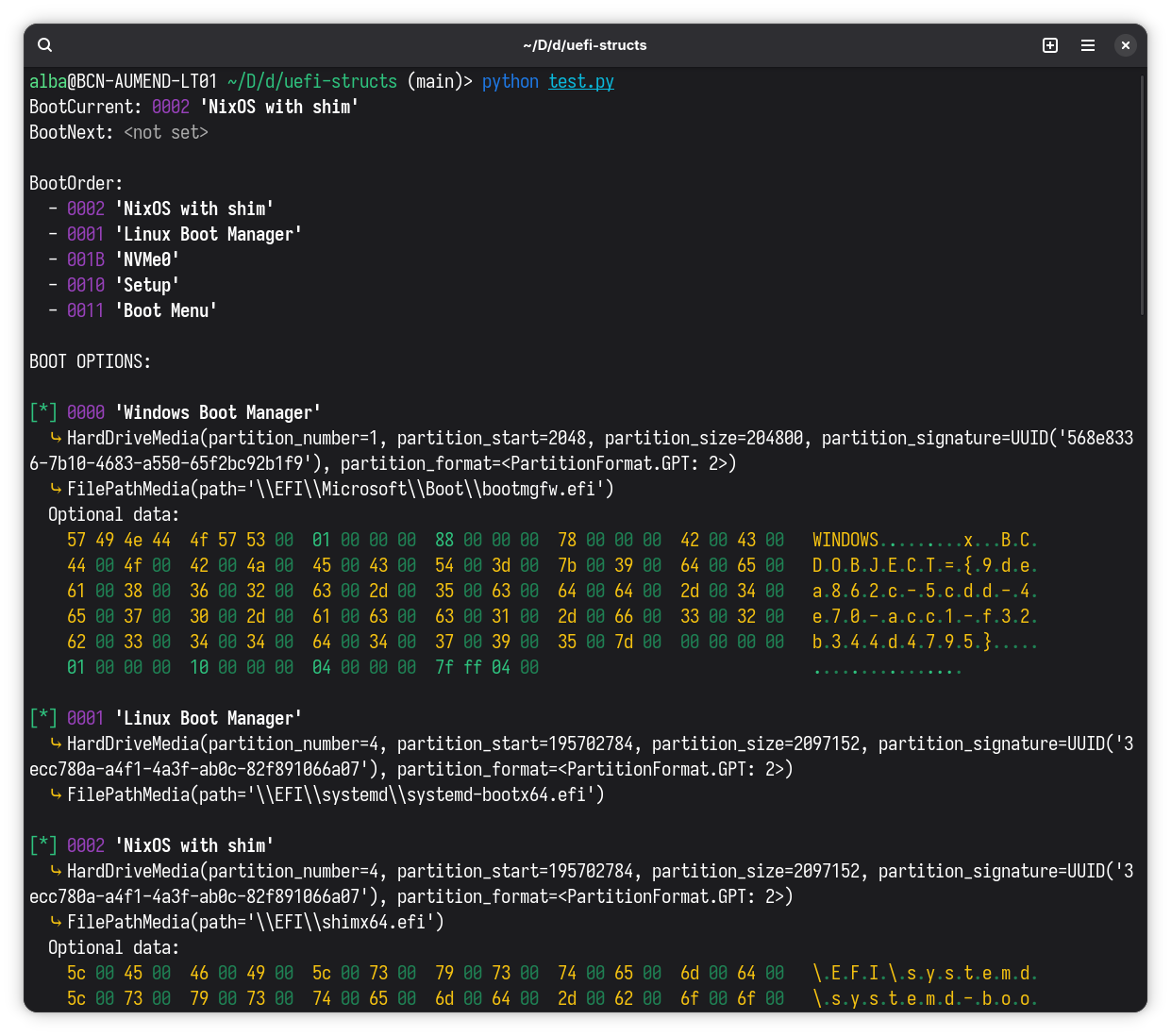
Although I've tried to write basic docstrings for everything, that's currently all documentation there is. For a decently complete example you can look at dump_boot.py which implements the same functionality as efibootmgr when run without arguments:
1 maintainer

Metadata
1 maintainer
Release files for uefi-structs 1.0.0
For a detailed explanation of source distributions (sdists) and built distributions (wheels), please see the package formats documentation.
Source distribution (sdist)
| File | Size | Uploaded | |
|---|---|---|---|
| uefi_structs-1.0.0.tar.gz | 21.9 kB | Details |
Built distribution (wheel)
| File | Interpreter | ABI | Platform | Reset |
|---|---|---|---|---|
| uefi_structs-1.0.0-py3-none-any.whl | Python 3 | none | any | Details |
Total release size: 43.0 kB
Release files / uefi_structs-1.0.0.tar.gz
| Download URL | uefi_structs-1.0.0.tar.gz |
|---|---|
| Size | 21.9 kB |
| Tags | Source |
|
SHA-256 checksum How to use checksums |
c5da5fb235a2ca1f8b114ee8691c19292e3801ad505b462410b29e0fcf091872
|
|
BLAKE2b-256 checksum How to use checksums |
c4aaa93907fd195758afd90f85821d077ecdcb5375c325c887712e30b139f757
|
| Upload date | |
|
Uploaded using Trusted Publishing? What is trusted publishing? |
Yes |
| Uploaded via |
twine/6.1.0 CPython/3.13.7
|
Provenance
Provenance describes where a file came from. On PyPI, provenance is shared via attestations, which provide a verifiable record of the build or publishing details. View details, limitations and caveats.


PyPI Publish Attestation
PyPI verified that this artifact, at this checksum, originated from the publisher listed below.
Signed by GitHub Actions, verified by PyPI on Feb 27, 2026.
Transparency logRelease files / uefi_structs-1.0.0-py3-none-any.whl
| Download URL | uefi_structs-1.0.0-py3-none-any.whl |
|---|---|
| Size | 21.1 kB |
| Tags | Python 3 |
|
SHA-256 checksum How to use checksums |
caf025442dcd282e6e63ccbc90815fc5e125846d596063d61d91a4267f21f953
|
|
BLAKE2b-256 checksum How to use checksums |
2f8a1b8c3f21c00aa78808bab5a646b6b88d2b3882fa85ee10163989cd9b0029
|
| Upload date | |
|
Uploaded using Trusted Publishing? What is trusted publishing? |
Yes |
| Uploaded via |
twine/6.1.0 CPython/3.13.7
|
Provenance
Provenance describes where a file came from. On PyPI, provenance is shared via attestations, which provide a verifiable record of the build or publishing details. View details, limitations and caveats.
PyPI Publish Attestation
PyPI verified that this artifact, at this checksum, originated from the publisher listed below.
Signed by GitHub Actions, verified by PyPI on Feb 27, 2026.
Transparency log












