







ufodiff is a command line UFO source file diff tool for collaborative typeface development projects.
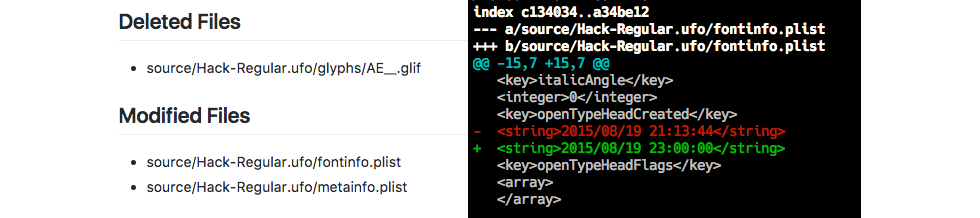
It examines git repositories for changes to files that are part of the UFO source spec only (i.e. all file changes in the repository external to the UFO source code are not considered by the tool). It supports reporting of UFO source file additions, deletions, and modifications as well as colored and uncolored text diffs for UFO source files that were modified between branches or across one or more commits.
UFO versions 2 and 3 are fully supported in the current release.
Contents
Install
Installation with pip is recommended:
$ pip install ufodiff
Upgrade a previous installation with:
$ pip install --upgrade ufodiff
Quickstart Examples
List UFO source file additions, deletions, and modifications
Plain Text
For the last two commits:
$ ufodiff delta all commits:2
For the last five commits:
$ ufodiff delta all commits:5
For the last five commits, only from the Test-Regular.ufo source directory (note: not a filepath to source, only include UFO directory name):
$ ufodiff delta all commits:5 Test-Regular.ufo
Between the current branch and the development branch
# ufodiff delta all branch:development
Markdown
For the last two commits in current branch:
$ ufodiff deltamd all commits:2
For the last five commits in current branch:
$ ufodiff deltamd all commits:5
For the last five commits in current branch, only from the Test-Regular.ufo source directory (note: not a filepath to source, only include UFO directory name):
$ ufodiff deltamd all commits:5 Test-Regular.ufo
Between the current branch and the development branch
# ufodiff deltamd all branch:development
JSON
For the last two commits in current branch:
$ ufodiff deltajson all commits:2
For the last five commits in current branch:
$ ufodiff deltajson all commits:5
For the last five commits in current branch, only from the Test-Regular.ufo source directory (note: not a filepath to source, only include UFO directory name):
$ ufodiff deltajson all commits:5 Test-Regular.ufo
Between the current branch and the development branch
# ufodiff deltajson all branch:development
Text diff UFO source files
Colored text diff
For terminals with ANSI color code support
All modified UFO files, last two commits:
$ ufodiff diff commits:2
All modified UFO files, last five commits:
$ ufodiff diff commits:5
All modified files, current branch vs. development branch:
$ ufodiff diff branch:development
Uncolored text diff
All modified UFO files, last two commits:
$ ufodiff diffnc commits:2
All modified UFO files, last five commits:
$ ufodiff diffnc commits:5
All modified files, current branch vs. development branch:
$ ufodiff diffnc branch:development
Usage
ufodiff is a command line executable. Application features are accessed via subcommands to the ufodiff executable.
Execute ufodiff inside the git repository where you develop your typeface. It will recursively test for the repository root from up to 4 levels of repository directory depth. If you are receiving exceptions due to inability to instantiate your git repository object, try bumping your working directory
up a few levels closer to the root. There are otherwise no restrictions to where ufodiff is executed inside the repository. The source directory does not need to be the current working directory.
View Results in Terminal
By default, data are displayed in your terminal. Use one of the following approaches to either pipe data to another application or write data to a file.
Piping Data to Other Applications
On Unix/Linux/OS X platforms, use the | idiom to pipe the standard output stream from ufodiff to another application for further processing like this:
$ ufodiff deltajson all commits:3 | anotherapp --dosomething-with-json
File Writes
On Unix/Linux/OS X platforms, use the > idiom to write the data in the standard output stream to a filepath like this:
$ ufodiff delta all commits:1 > myfont_delta.txt
ufodiff Subcommands
Subcommand List
The commit history for all commands is compared with the HEAD~N git idiom. The branch comparisons across all commands are performed with the test_branch..current_branch git idiom.
delta
ufo delta generates file modification, addition, and deletion reports over a user specified number of commits or across git branches. The data are streamed in plain text format through standard output with indicators for the type of file change.
The file change indicators include:
- [A] file added
- [D] file deleted
- [M] file modified
For Markdown formatted data, see the deltamd command. For JSON formatted data, see the deltajson subcommand.
The syntax is:
ufodiff delta [all] [commits:[N] | branch:[name]] <optional UFO filter>
where N is an integer value that represents the number of commits in the git commit history to examine and name is the name of an existing git branch in the repository. These are mutually exclusive arguments.
Examples:
$ ufodiff delta all commits:3
$ ufodiff delta all commits:5
$ ufodiff delta all commits:3 Test-Regular.ufo
$ ufodiff delta all branch:development
$ ufodiff delta all branch:development Test-Regular.ufo
Increase or decrease the integer value after the commits: argument to change the depth of the git commit history that you want to examine. Include an existing git branch name following the branch: argument to perform a branch vs. branch comparison.
Add one or more optional UFO source base directory names (e.g. Font-Regular.ufo) as last positional arguments in your command to filter the delta analysis by individual source directories.
deltajson
ufo deltajson generates file modification, addition, and deletion reports over a user specified number of commits or across git branches. The data are streamed in JSON format through standard output.
For plain text formatted data, see the delta subcommand. For Markdown formatted data, see the deltamd command.
The syntax is:
ufodiff deltajson [all] [commits:[N] | branch:[name]] <optional UFO filter>
where N is an integer value that represents the number of commits in the git commit history to examine and name is the name of an existing git branch in the repository. These are mutually exclusive arguments.
Examples:
$ ufodiff deltajson all commits:3
$ ufodiff deltajson all commits:5
$ ufodiff deltajson all commits:3 Test-Regular.ufo
$ ufodiff deltajson all branch:development
$ ufodiff deltajson all branch:development Test-Regular.ufo
JSON data for commit history analyses are formatted as:
{
  "commits": ["25087a1ab", "27fdb2e48", "6edab459e"],
  "added": ["filepath 1", "filepath 2", "filepath 3"],
  "deleted": ["filepath 1", "filepath 2", "filepath 3"],
  "modified": ["filepath 1", "filepath 2", "filepath 3"]
}
JSON data for branch vs. branch analyses are formatted as:
{
  "branches": ["branch 1", "branch 2"],
  "added": ["filepath 1", "filepath 2", "filepath 3"],
  "deleted": ["filepath 1", "filepath 2", "filepath 3"],
  "modified": ["filepath 1", "filepath 2", "filepath 3"]
}
Increase or decrease the integer value after the commits: argument to change the depth of the git commit history that you want to examine. Include an existing git branch name following the branch: argument to perform a branch vs. branch comparison.
Add one or more optional UFO source base directory name (e.g. Font-Regular.ufo) as last positional arguments in your command to filter the delta analysis by individual source directories.
deltamd
ufodiff deltamd generates file modification, addition, and deletion reports over a user specified number of commits or across git branches. The data are streamed in Github flavored Markdown format through standard output.
For plain text formatted data, see the delta command. For JSON formatted data, see the deltajson command.
The syntax is:
ufodiff deltamd [all] [commits:[N] | branch:[name]] <optional UFO filter>
where N is an integer value that represents the number of commits in the git commit history to examine and name is an existing git branch name for a branch vs. branch comparison.
Examples:
$ ufodiff deltamd all commits:3
$ ufodiff deltamd all commits:5
$ ufodiff deltamd all commits:3 Test-Regular.ufo
Increase or decrease the integer value after the commits: argument to change the depth of the git commit history that you want to examine. Include an existing git branch name following the branch: argument to perform a branch vs. branch comparison.
Add one or more optional UFO source base directory name (e.g. Font-Regular.ufo) as last positional arguments in your command to filter the delta analysis by individual source directories.
diff
ufodiff diff provides colored text diffs for all UFO files that were modified across one or more commits in the working branch, or between the HEAD of the working branch and any other branch in the repository.
For uncolored diffs, see the diffnc command.
The command syntax is:
ufodiff diff [commits:[N] | branch:[name]]
where N is an integer value that represents the number of commits in the git commit history to examine and name is the name of an existing git branch in the repository. These are mutually exclusive arguments.
Examples:
$ ufodiff diff commits:2
$ ufodiff diff branch:master
diffnc
ufodiff diffnc provides uncolored text diffs for all UFO files that were modified across one or more commits in the working branch, or between the HEAD of the working branch and any other branch in the repository.
For colored diffs intended for use in terminals that support ANSI color codes, see the diff command.
The command syntax is:
ufodiff diffnc [commits:[N] | branch:[name]]
where N is an integer value that represents the number of commits in the git commit history to examine and name is the name of an existing git branch in the repository. These are mutually exclusive arguments.
Examples:
$ ufodiff diffnc commits:2
$ ufodiff diffnc branch:master
Issues
Please submit bug reports and feature requests as an issue report on our Github repository.
License
1 maintainer

Metadata
1 maintainer
Release files for ufodiff 1.0.3
For a detailed explanation of source distributions (sdists) and built distributions (wheels), please see the package formats documentation.
Source distribution (sdist)
| File | Size | Uploaded | |
|---|---|---|---|
| ufodiff-1.0.3.tar.gz | 18.6 kB | Details |
Built distribution (wheel)
| File | Interpreter | ABI | Platform | Reset |
|---|---|---|---|---|
| ufodiff-1.0.3-py3-none-any.whl | Python 3 | none | any | Details |
Total release size: 35.3 kB
Release files / ufodiff-1.0.3.tar.gz
| Download URL | ufodiff-1.0.3.tar.gz |
|---|---|
| Size | 18.6 kB |
| Tags | Source |
|
SHA-256 checksum How to use checksums |
ec2a066af62254adad0baa5f8b8b75b0ed89755808211aa063a30eb18027293d
|
|
BLAKE2b-256 checksum How to use checksums |
f5401b3f90fb13a6af42d4ae822343a667d352844f6bc6a8ccc5f57bb2961cc7
|
| Upload date | |
|
Uploaded using Trusted Publishing? What is trusted publishing? |
No |
| Uploaded via |
twine/3.2.0 pkginfo/1.6.0 requests/2.24.0 setuptools/50.3.2 requests-toolbelt/0.9.1 tqdm/4.51.0 CPython/3.8.6
|
Release files / ufodiff-1.0.3-py3-none-any.whl
| Download URL | ufodiff-1.0.3-py3-none-any.whl |
|---|---|
| Size | 16.8 kB |
| Tags | Python 3 |
|
SHA-256 checksum How to use checksums |
f3c08102d00c4a8841977298a9dda16d6d0f68026db4458f09bfd4519ca08b87
|
|
BLAKE2b-256 checksum How to use checksums |
c9d476893edd1ccc2fff13b2a458ff2cd40ae31c86ddb4295f419f692c5d022b
|
| Upload date | |
|
Uploaded using Trusted Publishing? What is trusted publishing? |
No |
| Uploaded via |
twine/3.2.0 pkginfo/1.6.0 requests/2.24.0 setuptools/50.3.2 requests-toolbelt/0.9.1 tqdm/4.51.0 CPython/3.8.6
|














