
UForm
Pocket-Sized Multimodal AI
For Content Understanding and Generation





Multimodal Embeddings from 64 to 768 Dimensions • 1B Parameter Chat
Short Texts • Images • 🔜 Video Clips • 🔜 Long Documents
ONNX • CoreML • PyTorch
Python
•
JavaScript
•
Swift
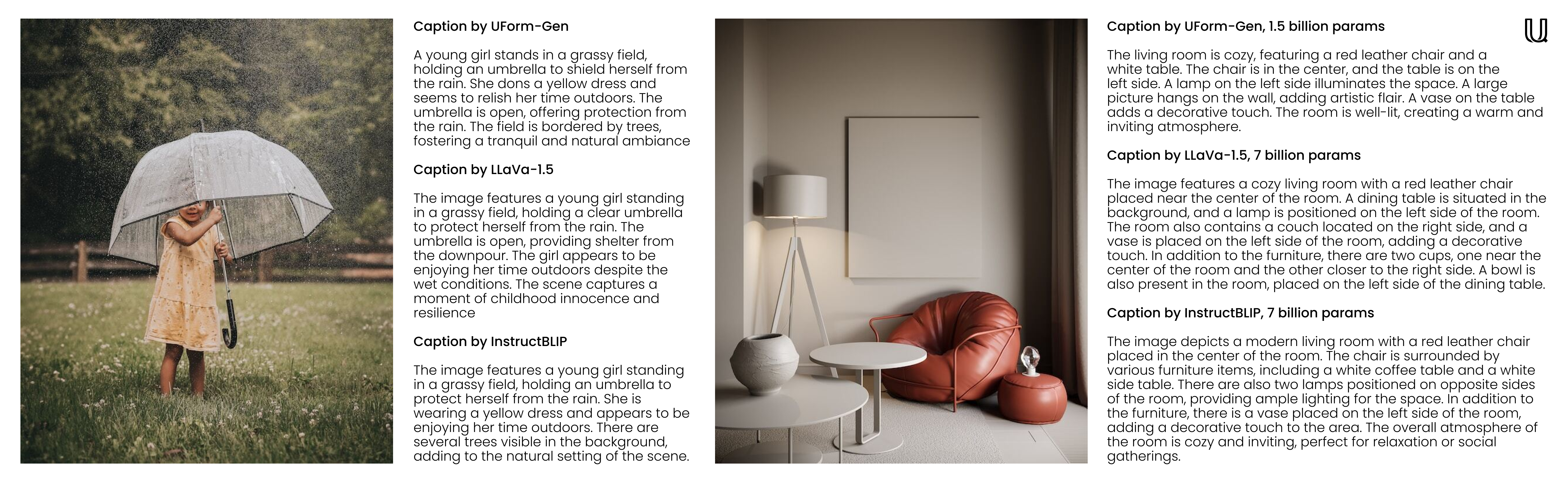
Welcome to UForm, a multimodal AI library that's as versatile as it is efficient. UForm tiny embedding models will help you understand and search visual and textual content across various languages. UForm small generative models, on the other hand, don't only support conversational and chat use-cases, but are great for fast image captioning and Visual Question Answering (VQA). With compact custom pre-trained transformer models, this can run anywhere from your server farm down to your smartphone.
Features
- Tiny Embeddings: 64-dimensional Matryoshka-style embeddings for extremely fast search.
- Throughput: Thanks to the small size, the inference speed is 2-4x faster than competitors.
- Portable: Models come with native ONNX support, making them easy to deploy on any platform.
- Quantization Aware: Down-cast embeddings from
f32toi8without losing much recall. - Multilingual: Trained on a balanced dataset, the recall is great across over 20 languages.
Models
For accuracy and speed benchmarks refer to the evaluation page.
Embedding Models
| Model | Parameters | Languages | Architecture |
|---|---|---|---|
uform3-image-text-english-large 🆕 |
365 M | 1 | 12 layer BERT, ViT-L/14 |
uform3-image-text-english-base |
143 M | 1 | 4 layer BERT, ViT-B/16 |
uform3-image-text-english-small 🆕 |
79 M | 1 | 4 layer BERT, ViT-S/16 |
uform3-image-text-multilingual-base |
206M | 21 | 12 layer BERT, ViT-B/16 |
Generative Models
| Model | Parameters | Purpose | Architecture |
|---|---|---|---|
uform-gen2-dpo 🆕 |
1.2 B | Chat, Image Captioning, VQA | qwen1.5-0.5B, ViT-H/14 |
uform-gen2-qwen-500m |
1.2 B | Chat, Image Captioning, VQA | qwen1.5-0.5B, ViT-H/14 |
uform-gen ⚠️ |
1.5 B | Image Captioning, VQA | llama-1.3B, ViT-B/16 |
Quick Start Examples
Embedding Models
First, pip install uform.
Then, load the model:
from uform import get_model, Modality

processors, models = get_model('unum-cloud/uform3-image-text-english-small')

model_text = models[Modality.TEXT_ENCODER]
model_image = models[Modality.IMAGE_ENCODER]
processor_text = processors[Modality.TEXT_ENCODER]
processor_image = processors[Modality.IMAGE_ENCODER]
Embed images:
import requests
from io import BytesIO
from PIL import Image

image_url = 'https://media-cdn.tripadvisor.com/media/photo-s/1b/28/6b/53/lovely-armenia.jpg'
image = Image.open(BytesIO(requests.get(image_url).content))
image_data = processor_image(image)
image_features, image_embedding = model_image.encode(image_data, return_features=True)
Embed queries:
text = 'a cityscape bathed in the warm glow of the sun, with varied architecture and a towering, snow-capped mountain rising majestically in the background'
text_data = processor_text(text)
text_features, text_embedding = model_text.encode(text_data, return_features=True)
For more details check out:
- Python docs on embedding models in python/README.md
- JavaScript docs on embedding models in javascript/README.md
- Swift docs on embedding models in swift/README.md
Generative Models
The generative models are natively compatible with
from transformers import AutoModel, AutoProcessor

model = AutoModel.from_pretrained('unum-cloud/uform-gen2-dpo', trust_remote_code=True)
processor = AutoProcessor.from_pretrained('unum-cloud/uform-gen2-dpo', trust_remote_code=True)

prompt = 'Question or Instruction'
image = Image.open('image.jpg')

inputs = processor(text=[prompt], images=[image], return_tensors='pt')

with torch.inference_mode():
     output = model.generate(
        **inputs,
        do_sample=False,
        use_cache=True,
        max_new_tokens=256,
        eos_token_id=151645,
        pad_token_id=processor.tokenizer.pad_token_id
    )
prompt_len = inputs['input_ids'].shape[1]
decoded_text = processor.batch_decode(output[:, prompt_len:])[0]
For more details check out:
- Python docs on generative models in python/README.md
- JavaScript docs on generative models 🔜
- Swift docs on generative models 🔜
Technical Details
Down-casting, Quantization, Matryoshka, and Slicing
Depending on the application, the embeddings can be down-casted to smaller numeric representations without losing much recall.
Switching from f32 to f16 is recommended in almost all cases, unless you are running on very old hardware without half-precision support.
Switching to i8 with linear scaling is also possible, but will be noticeable in the recall on larger collections with millions of searchable entries.
Similarly, for higher-dimensional embeddings (512 or 768), a common strategy is to quantize them into single-bit representations for faster search.
import numpy as np

f32_embedding: np.ndarray = model.encode_text(text_data, return_features=False)
f16_embedding: np.ndarray = f32_embedding.astype(np.float16)
i8_embedding: np.ndarray = (f32_embedding * 127).astype(np.int8)
b1_embedding: np.ndarray = np.packbits((f32_embedding > 0).astype(np.uint8))
Alternative approach to quantization is to use the Matryoshka embeddings, where the embeddings are sliced into smaller parts, and the search is performed in a hierarchical manner.
import numpy as np

large_embedding: np.ndarray = model.encode_text(text_data, return_features=False)
small_embedding: np.ndarray = large_embedding[:, :256]
tiny_embedding: np.ndarray = large_embedding[:, :64]
Both approaches are natively supported by the USearch vector-search engine and the SimSIMD numerics libraries. When dealing with small collections (up to millions of entries) and looking for low-latency cosine distance calculations, you can achieve 5x-2500x performance improvement over Torch, NumPy, SciPy, and vanilla Python using SimSIMD.
from simsimd import cosine, hamming

distance: float = cosine(f32_embedding, f32_embedding) # 32x SciPy performance on Apple M2 CPU
distance: float = cosine(f16_embedding, f16_embedding) # 79x SciPy performance on Apple M2 CPU
distance: float = cosine(i8_embedding, i8_embedding) # 133x SciPy performance on Apple M2 CPU
distance: float = hamming(b1_embedding, b1_embedding) # 17x SciPy performance on Apple M2 CPU
Similarly, when dealing with large collections (up to billions of entries per server) and looking for high-throughput search, you can achieve 100x performance improvement over FAISS and other vector-search solutions using USearch. Here are a couple of examples:
from usearch.index import Index

f32_index = Index(ndim=64, metric='cos', dtype='f32') # for Matryoshka embeddings
f16_index = Index(ndim=64, metric='cos', dtype='f16') # for Matryoshka embeddings
i8_index = Index(ndim=256, metric='cos', dtype='i8') # for quantized embeddings
b1_index = Index(ndim=768, metric='hamming', dtype='b1') # for binary embeddings
Compact Packaging
PyTorch is a heavy dependency to carry, especially if you run on Edge or IoT devices. Using vanilla ONNX runtime, one can significantly reduce memory consumption and deployment latency.
$ conda create -n uform_torch python=3.10 -y
$ conda create -n uform_onnx python=3.10 -y
$ conda activate uform_torch && pip install -e ".[torch]" && conda deactivate
$ conda activate uform_onnx && pip install -e ".[onnx]" && conda deactivate
$ du -sh $(conda info --envs | grep 'uform_torch' | awk '{print $2}')
> 5.2G    ~/conda/envs/uform_torch
$ du -sh $(conda info --envs | grep 'uform_onnx' | awk '{print $2}')
> 461M    ~/conda/envs/uform_onnx
Most of that weight can be further reduced down to 100 MB for both the model and the runtime. You can pick one of many supported ONNX execution providers, which includes XNNPACK, CUDA and TensorRT for Nvidia GPUs, OpenVINO on Intel, DirectML on Windows, ROCm on AMD, CoreML on Apple devices, and more to come.
Multimodal Chat in CLI
The generative models can be used for chat-like experiences in the command line.
For that, you can use the uform-chat CLI tool, which is available in the UForm package.
$ pip install uform
$ uform-chat --model unum-cloud/uform-gen2-dpo --image=zebra.jpg
$ uform-chat --model unum-cloud/uform-gen2-dpo \
>     --image="https://bit.ly/3tIVg9M" \
>     --device="cuda:0" \
>     --fp16
1 maintainer

Metadata
1 maintainer
Release files for uform 3.1.3
For a detailed explanation of source distributions (sdists) and built distributions (wheels), please see the package formats documentation.
Source distribution (sdist)
| File | Size | Uploaded | |
|---|---|---|---|
| uform-3.1.3.tar.gz | 28.0 kB | Details |
Built distribution (wheel)
| File | Interpreter | ABI | Platform | Reset |
|---|---|---|---|---|
| uform-3.1.3-py3-none-any.whl | Python 3 | none | any | Details |
Total release size: 54.0 kB
Release files / uform-3.1.3.tar.gz
| Download URL | uform-3.1.3.tar.gz |
|---|---|
| Size | 28.0 kB |
| Tags | Source |
|
SHA-256 checksum How to use checksums |
c9cafc0efdb7702a78fdca3c9d74392d8b67f1f4102f324ce01d59647c1c9cc1
|
|
BLAKE2b-256 checksum How to use checksums |
54e07c0d8cc16ad964fc91aa60cae29bc9289e1434d929b9a47d27c0c00c163a
|
| Upload date | |
|
Uploaded using Trusted Publishing? What is trusted publishing? |
Yes |
| Uploaded via |
twine/6.1.0 CPython/3.12.9
|
Provenance
Provenance describes where a file came from. On PyPI, provenance is shared via attestations, which provide a verifiable record of the build or publishing details. View details, limitations and caveats.


PyPI Publish Attestation
PyPI verified that this artifact, at this checksum, originated from the publisher listed below.
Signed by GitHub Actions, verified by PyPI on Sep 3, 2025.
Transparency logRelease files / uform-3.1.3-py3-none-any.whl
| Download URL | uform-3.1.3-py3-none-any.whl |
|---|---|
| Size | 26.0 kB |
| Tags | Python 3 |
|
SHA-256 checksum How to use checksums |
00cc8f840f997b007959df36c24cf2ff123a3f5a7c36e4b63a3b50d4955d329d
|
|
BLAKE2b-256 checksum How to use checksums |
5dac9efa1c3143c83a4b9b3d3726d309429dff20fb9074f4b5e9e45adc02d57d
|
| Upload date | |
|
Uploaded using Trusted Publishing? What is trusted publishing? |
Yes |
| Uploaded via |
twine/6.1.0 CPython/3.12.9
|
Provenance
Provenance describes where a file came from. On PyPI, provenance is shared via attestations, which provide a verifiable record of the build or publishing details. View details, limitations and caveats.
PyPI Publish Attestation
PyPI verified that this artifact, at this checksum, originated from the publisher listed below.
Signed by GitHub Actions, verified by PyPI on Sep 3, 2025.
Transparency log













