


UH — Universal Harness
A provider-agnostic agent harness in Python: a console, a local web UI, tool use,
persisted sessions, and one runtime dependency (httpx). Local-first, no
account, no API key on first launch.
Quickstart
pip install uh-harness          # Python 3.10+
uh                              # console: picks a local model, starts chatting
pip install "uh-harness[web]" && uh web   # optional: the browser UI
That is the whole setup. UH finds an Ollama model you already have, pulls
qwen2.5:0.5b automatically when Ollama is running with none installed, falls
back to a local OpenAI-compatible router, and only asks for a key if nothing
local answers — in which case uh doctor and the guided setup tell you exactly
what to do. Nothing is sent anywhere until you type a prompt.
Why UH?
Four ideas that each solved one problem, combined in one small package:
- A real agent loop, not a chat wrapper (from Hermes Agent).
run_turnruns synchronously, executes the tools the model asks for, feeds the results back, and stops at a hardmax_iterationsbudget instead of looping forever. - A contract, not a framework (from OpenClaw). Toolsets declare their schema, refuse unknown arguments and return errors the model can read; the dangerous toolset is off unless you enable it.
- Deterministic routing with a traced fallback (from UHB). Ollama first, then Cloudflare, then DeepSeek, then the local gateway and the free router — and the fallback is printed, never silent. A dead provider is an error message, not a mystery.
- Sessions and a browser UI that stay local (from Harness Maxxing's feature
set, reimplemented from scratch). Sessions live in SQLite with full-text
search; the web UI is served from
127.0.0.1behind a per-process token.
The CLI is universal. UH makes no assumption about a vendor: it drives any
local or free provider (Ollama on 127.0.0.1:11434, a local router such as
OmniRouter/Nemotron) and never requires an API key on first launch. A paid
provider is an opt-in, never a prerequisite.
- Requires Python ≥ 3.10 (
tomliis installed automatically on 3.10) - Single runtime dependency:
httpx([ui]addsrich,[web]addsfastapi+uvicorn) - Installable on its own: no dependency on
hermes-home-visionoruhb - MIT licence; the web UI is an original implementation (see docs/WEB_DESIGN.md)
Install (development)
python -m venv .venv
source .venv/bin/activate      # Windows: .venv\Scripts\activate
pip install -e ".[dev]"
uh --version
uh doctor
What 1.0.0 contains
- Agent core and toolsets. A synchronous
run_turnloop, toolsets with JSON-schema contracts (file,terminal,memory,web_search), a hardmax_iterationsbudget,uh chat. - Local model layer and fallback chain. Streamed chat (
--no-streamto disable),uh model pullwith progress, providersollama,cloudflare,deepseek,omnirouterand the free-provider router. The chain isollama → cloudflare → deepseek → omnirouter → router; a provider without a key is skipped, every switch is printed on stderr, and/web <query>runs a search without going through the model (/webalone opens the browser UI). - Sessions and configuration. SQLite FTS5 store (
uh sessions list|show|search|delete|resume), layered configuration (uh config show|get|set|path),uh memory migrate|show, extendeduh doctor. - Console. Banner, status bar, slash commands (
docs/SLASH_COMMANDS.md), zero-config onboarding (automaticqwen2.5:0.5bpull when Ollama is up but empty, local router, or a guided free key),uh providers add|removewith keys in$UH_HOME/keys.toml(0600), UTF-8 stdio on Windows. - Web UI.
uh webserves a local interface (sessions column, streaming chat, collapsible tool cards, context gauge, per-session model, full-text search, command palette, stop button, light/dark themes) plus an API-key panel for Cloudflare, DeepSeek and OmniRoute with masked hints, from three static files with no build step and no third-party JavaScript. - Free-provider router. Catalogue verified per entry
(
uh/router/catalog.toml), key rotation, cooldowns, circuit breaker, tool-capable-model filter, traced failover, opt-in remote access with recorded consent and--local-only. - Local gateway.
uh router serve: an OpenAI-compatible endpoint on127.0.0.1behind its own token, so other tools can use UH's pool, with a byte-based body cap, streaming slots and a per-request trace. - One service layer.
uh/providers_admin.pyshared by the console, the CLI and the web panel;docs/API.mdguarded by a drift test.
The web interface is an original design: it borrows the feature list of Harness Maxxing (public README) and none of its code, which is under a Fair Source Licence. UH stays MIT.
638 tests, 1 skipped locally (Windows, Python 3.11, measured 2026-11-13); the CI matrix runs the suite on Linux, macOS and Windows across Python 3.10 to 3.13. The number is a measurement with a date, not a promise: it moves with every commit that adds a test.
Roadmap
docs/ROADMAP_UH_V2.md is the source of truth for the order of work — phases P0 to P5, each with the contract that must be true before the next one starts. Two things worth knowing from it:
- UHB integration shipped in 1.1.0 (
uhb_status,uhb_modes,uhb_route): the second brain is a toolset, gated onGET /modesanswering, loopback only; - web-session fallback parity is still open: a browser session binds one
provider, while the chain applies to
uh chatand the console.
CLI surface
uh                      # interactive console (piped: help, unchanged)
uh --version            # print the version
uh doctor               # environment report (python, httpx, git, ollama, store, disk, config, keys)
uh model list           # list models served by Ollama, exit 1 if Ollama is down
uh model pull <name>    # download a model with progress on stderr
uh chat [prompt]        # agent loop with file/terminal/memory tools (streamed, saved)
uh sessions list        # recent sessions (id, date, provider, messages, title)
uh sessions show <id>   # one session and its messages
uh sessions search <q>  # full-text search across every message
uh sessions resume <id> # continue a session (--fork copies it into a new one)
uh config show|get|set  # layered configuration
uh memory migrate|show  # one-shot import of the flat memory file
uh providers list       # registered providers and their state
uh providers add <name> # store a provider (key from a prompt, stdin or UH_PROVIDER_KEY)
uh providers test <name># one 'ping' to a provider, no session content
uh providers remove <name>
uh keys list            # presence and count per provider (values never shown)
uh keys add <name>      # add a key without exposing it
uh keys remove <name> 1 # delete by index, never by value
uh router status        # chain, keys, cooldowns, last error
uh router serve         # OpenAI-compatible endpoint on 127.0.0.1:8780
uh router token show    # the token local clients must use (rotate: token rotate)
uh docs [--open]        # local documentation, no network
uh upgrade [--restart]  # pip install --upgrade uh-harness (--user, --dry-run), then re-exec uh
uh upgrade reports the running and installed version, refuses to touch a system
interpreter outside a virtualenv unless --user is passed, keeps the old version
when pip fails, and only re-execs uh when --restart is given.
uh chat reads stdin or takes a prompt argument; --once (or any non-TTY
stdin) answers one line and exits. Answers stream by default, --no-stream
waits for the whole message. Conversations are persisted unless --no-save;
--session <id> resumes (full id, unique prefix, or the short form shown by
uh sessions list). Tool activity goes to stderr, the answer to stdout.
Web interface
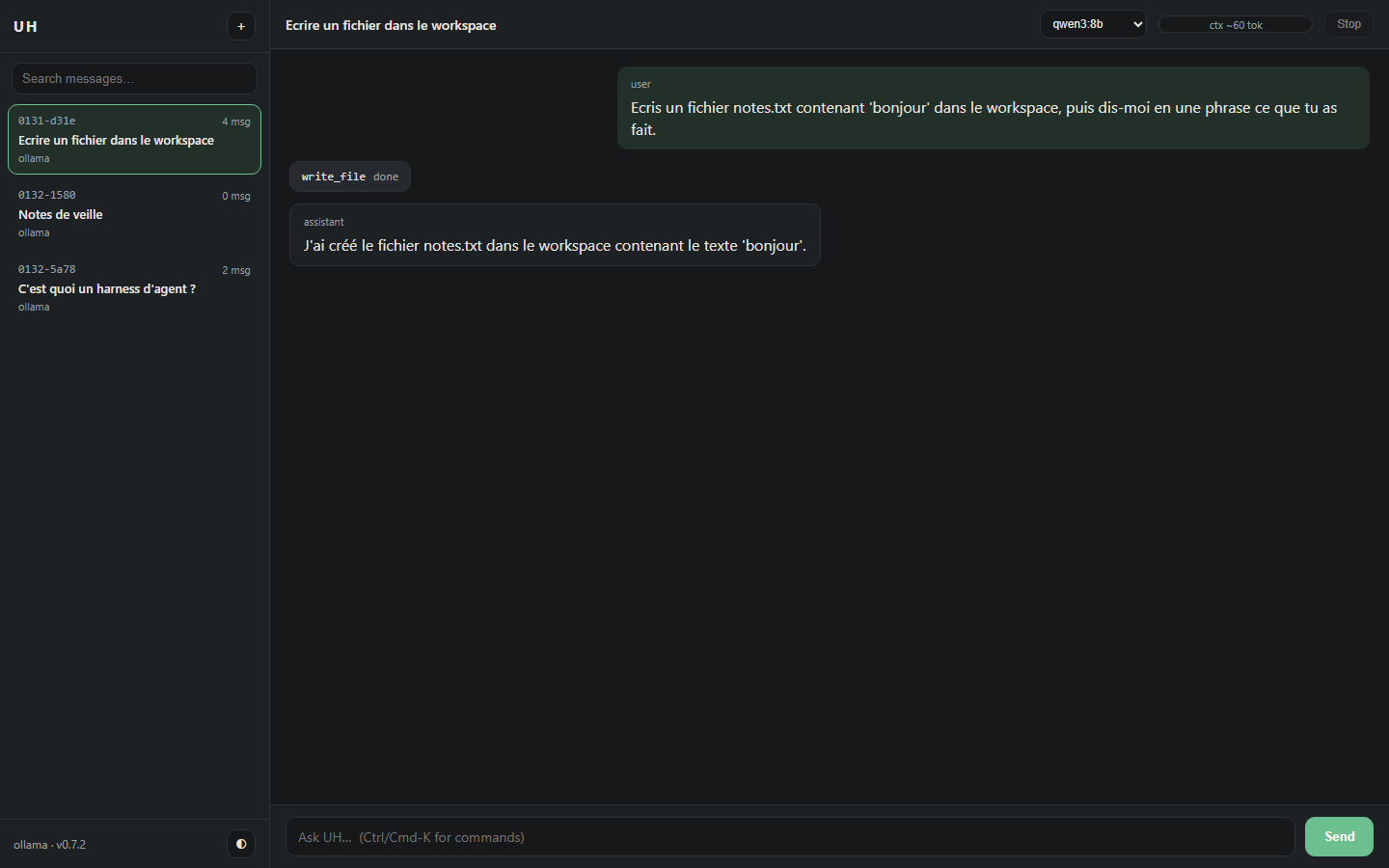
A real session, not a mockup: the assistant called write_file, the card is the
tool call, the gauge is the context estimate for that conversation.
Served locally, never exposed by default:
pip install "uh-harness[web]"
uh web                      # http://127.0.0.1:8765/?token=...
uh web --port 9000 --no-open
uh web --allow-terminal     # enable the shell toolset in the browser (off by default)
uh web --no-uhb             # do not start UHB alongside the UI
uh install-shortcut         # Windows: a Desktop shortcut that runs `uh web`
uh web starts UHB itself when it can find a checkout — UH_UHB_URL for the
address (loopback only), UH_UHB_PATH for an unusual folder; the public
UHB-Universal-Harness-Backend and hermes-home-vision/uhb next to the home
directory are probed otherwise. The child runs without a console window, writes
to $UH_HOME/uhb.log, is waited for on GET /status (5 s), and is killed with
the UI — including when the window is closed rather than interrupted (a job
object, so the shim's grandchild goes too). A failure is one warning line: the
UI runs, the uhb tools are simply absent. Nothing is started if something
already listens on the port.
uh web without the extra prints the exact install command and exits 1. The
core package stays on httpx; fastapi/uvicorn only exist in [web].
uh install-shortcut is Windows-only and refuses elsewhere with one line. It
writes uh-web.ps1 and uh-web.ico into $UH_HOME, then creates UH web.lnk
on the Desktop through WScript.Shell: no admin rights, no registry key, no
autostart. The icon is generated (zlib PNG in an ICO, standard library) in the
site colours — ink #284543, accent #fdc502 — and the launcher prints its
banner in the same two 24-bit colours, falling back to the nearest console
colours when the terminal refuses virtual-terminal processing.
Security, because a local server is still a server:
- binds
127.0.0.1; any other--hostprints a warning before starting; - a 43-character token is generated at startup, accepted once as
?token=and then kept in anHttpOnly; SameSite=Strictcookie; every/apiroute answers 401 without it (curl: send the token as a bearerAuthorizationheader); HostandOriginare checked (DNS-rebinding / CSRF), no CORS is enabled;- strict CSP without
unsafe-inline, so no inline script or style exists in the HTML;X-Frame-Options: DENY; - the terminal toolset is disabled unless
--allow-terminal; file tools stay inside--workspace; - no provider key is ever returned by the API.
Design notes and the feature-by-feature rationale live in docs/WEB_DESIGN.md.
Use UH from another app (uh router serve)
uh router serve exposes the chain on loopback, OpenAI-compatible, with its own
token (uh router token show). Editors and scripts then use your stored keys
without reconfiguring anything:
uh router serve --port 8780
export OPENAI_BASE_URL=http://127.0.0.1:8780/v1
export OPENAI_API_KEY="$(cat ~/.uh/router-token)"
Details, client examples and the threat model: docs/ROUTER_SERVE.md.
Tools
Every toolset declares an OpenAI-style JSON schema, refuses unknown arguments and returns errors the model can read — an error is a message, not a crash.
| Toolset | Tools | Notes |
|---|---|---|
file |
read_file, write_file, patch, search_files, read_pdf |
confined to the workspace. read_pdf(path, pages?) extracts a PDF's text (50 pages / 10 KB per call, ranges like 2-7) and is only offered when pypdf is installed — absent, it simply does not appear in /tools |
terminal |
run_command |
blacklist plus timeout, not a sandbox; off in the web UI unless --allow-terminal |
memory |
memory_read, memory_write |
one flat file, sections |
web_search |
web_search(query, max_results) |
DuckDuckGo HTML endpoint, no API key, up to 5 results (title, url, snippet); max_results is capped, parse failures are reported as throttling |
uhb |
uhb_status(), uhb_modes(), uhb_route(prompt, mode?, complexity?) |
UHB control plane, loopback only (UH_UHB_URL, default http://127.0.0.1:8101); the toolset exists only when GET /modes answers within 1 s, so a UHB older than that contract contributes nothing. uhb_status returns version, mode, harness plus provider and mode names; uhb_modes returns each mode's read/write globs, denied paths and tools; uhb_route returns the plan UHB would follow (complexity, reason, ordered failover chain) without running it — no token is spent. Errors carry a kind: invalid_request (400), unroutable (409), configuration (500), transport, invalid_response |
/web <query> runs the search toolset directly from the console, without a
model call and without touching the session history. The toolset returns
{"error": ...} on network/HTTP failures and a note when the page looks
throttled, so the model (or you) can tell the two apart.
/web with no argument is the other half of the same intent: it serves the web
UI of uh web in a background thread, on the session's workspace and on the
same tokenised loopback URL, and the console keeps answering prompts while it
runs. A second /web reports the URL already served instead of binding the
port twice; /exit (or EOF, or Ctrl+C) stops the server, so no orphan process
keeps port 8765. A missing [web] extra, or a busy port, is one line on stderr
— never a traceback.
Second brain (UHB)
UHB is the
control plane: it owns the modes (what may be read, written, called) and the
model policy (which model answers, in which order). While it runs, UH gains
three read-only tools — uhb_status, uhb_modes, uhb_route — and none of
them spends a token.
# terminal 1 - the control plane, default port 8101
cd UHB-Universal-Harness-Backend
python -m uhb.entrypoints.server --port 8101 --mode dev

# terminal 2 - UH, in the project you want to work on
uh
you> which model would UHB use for "refactor the parser"?   # -> uhb_route
UH looks for UHB on http://127.0.0.1:8101 by default. For any other port,
point it there explicitly — in PowerShell:
$env:UH_UHB_URL = "http://127.0.0.1:8188"
uh
Loopback only: a remote URL is refused, never contacted. The toolset is built
only when GET /modes answers within one second — a UHB that is down, or older
than that contract, contributes no tool at all rather than tools that fail when
called.
Console and slash commands
uh on a terminal starts the console; piped, it still prints help (scriptable
unchanged). The console opens with the logo (the ASCII art takes over only when
the console encoding cannot carry the box-drawing characters), then a dim header
in three lines: provider · model · stream, workspace · session, and
messages · context estimate. A blank line separates the question from the
answer and precedes every you> prompt. After each turn a dim line reports the
model that really answered (a gateway may route auto/best-free to a
concrete model) and what it cost:
omnirouter qwen3:8b 1234 tok (in 312 / out 922) total session 3456 tok.
A provider that reports no counters prints tokens non rapportés; /status
repeats both numbers. The startup block ends with one discoverable line naming
uh web, uh providers add <name> and /help; UH_QUIET=1 silences the
banner, the header and that tip (answers, tool activity and metrics stay).
/help lists everything; the full
inventory and the reason each Hermes command was kept or dropped lives in
docs/SLASH_COMMANDS.md.
The release process (Trusted Publishing, TestPyPI then PyPI, yanking) is in docs/RELEASING.md.
/help, /model, /provider, /key, /router, /local-only, /tools,
/web, /clear, /new, /sessions, /resume, /history, /retry,
/title, /save, /export, /status, /config, /doctor, /memory,
/version, /exit (aliases /h, /?, /reset, /quit, /q, /v). An
unknown command is never sent to the model: it is refused with the closest
match suggested.
First run with nothing configured, in order: an installed Ollama model; else,
when Ollama is running with no model, qwen2.5:0.5b is pulled automatically
(~400 MB, the smallest tool-capable model); else a local OmniRouter gateway;
else a provider you already added; else a guided setup that explains where to
get a free key and stores it in $UH_HOME/keys.toml (0600). UH ships no
key: a published key is a stolen key.
The console can use rich when installed
(pip install "uh-harness[ui]"); without it, or off a TTY, everything falls
back to plain text with the same output contract.
echo "list the python files here" | uh chat --once --model qwen3:8b --workspace .
uh chat --session 1829-9474 "et ensuite ?"           # resume
uh sessions search clavier                            # FTS5 across all messages
uh memory migrate                                     # MEMORY.md -> one session, once
Where does UH write?
The workspace is the root. uh starts in, in order of precedence:
-
--workspace <path>on the command line; -
UH_WORKSPACE; -
the current directory — unless it is a system directory (
C:\Windows,C:\Program Files,C:\ProgramData,/usr,/etc,/bin,/sbin,/System,/Library), in which case UH uses~/uh-workspace(created on first use) and says so:[WARN] cwd is a system directory; using ~/uh-workspace instead. Use /workspace <path> to switch.
Writes may leave the workspace, but only into declared paths. Beside the workspace, these are writable by default:
~/Desktop,~/Documents,~/Downloads,~/uh-workspace.
Add more with UH_ALLOWED_PATHS (os.pathsep-separated, the supported
persistent switch), or by editing config.toml by hand:
[providers.file]
allowed_paths = ["/srv/partage", "~/projets"]
That table is read-only: UH's configuration writer is flat (scalars only) on
purpose, so [providers.file] is a hand-written escape hatch. uh config set
refuses to rewrite a file that contains one rather than silently dropping it.
System directories are never writable, whatever the list says: putting
/etc in UH_ALLOWED_PATHS does not make it a destination.
Moving during a session. /workspace prints the workspace and the writable
paths; /workspace <path> moves the session and the file/terminal toolsets
(the sandbox follows). memory stays in $UH_HOME: MEMORY.md is UH's own
state, not project data.
Refusals say what to do. A refused write carries the list and the two exits:
refused: '~/secret.txt' is outside the workspace and outside the allowed paths
(~/Desktop, ~/Documents, ~/Downloads, ~/uh-workspace). Use /workspace <path> to
switch. (hint: /workspace <path> or `uh --workspace <path>`)
The shell is a seatbelt, not a sandbox. terminal checks the obvious write
shapes (>, >>, mkdir, md, touch, tee, and the destination of
cp/copy/mv/move/install/ln) against the same rule before spawning
anything. A program that writes on its own — python -c "open(...)", a script
the model creates and runs, an editor, cmd /c — still goes through. The file
toolset is the enforced path; the shell guard stops accidents, not a determined
author.
Use absolute paths in a shell command: cmd.exe does not expand ~ (a
POSIX shell does), so > ~/Desktop/x passes the guard and then fails in the
shell. The file toolset expands ~; in the terminal, write the resolved path or
use %USERPROFILE%.
Sessions, store and configuration
- Store:
$UH_HOME/uh.db(~/.uh/uh.db), schema v1, WAL, foreign keys ON. Deleting a session cascades to its messages and to the FTS index. - Two tables (
sessions,messages) plus an external-content FTS5 index kept in sync by triggers;searchreturns a snippet and abm25rank. - A database written by a newer build is refused (
StoreError), never downgraded silently. No FTS5 in the SQLite build means no store at all. - Configuration, lowest to highest: defaults,
~/.uh/config.toml,./uh.toml,UH_*environment, CLI flags.uh config showprints the source of every value. Unknown keys warn and are ignored; the writer handles flat keys only (booleans, integers, strings) and refuses anything else. uh memory migratecopiesMEMORY.mdinto akind=memorysession after writing a timestamped.bak; it is idempotent and leaves the flat file in place (the memory toolset still reads and writes it).
Recommended local models (measured, not quoted)
UH has no preferred model, but two are worth knowing for a 8 GB GPU:
| Model | Pull | Context | Tools | Measured in UH |
|---|---|---|---|---|
qwen3:8b |
5.2 GB | 32K | yes | slower, better at reasoning |
lfm3 |
1.1 GB | 262 144 | yes (native) | read_file, terminal, memory_write all called correctly, ~1.5 s per turn |
lfm3 (Liquid AI, 1.7B) is the cheap option for tool routing: it emits native
tool_calls through Ollama's /api/chat (the tag carries renderer lfm3 /
parser lfm3, which is what converts its XML calls into JSON). Requires Ollama
0.40.13+; measured here on 0.40.16 with ollama pull lfm3.
ollama pull lfm3
uh chat --model lfm3 --once "combien de lignes fait notes.txt ? utilise read_file"
uh config set default_model lfm3 --user     # optional, applies to new sessions
Two honest caveats: its licence is the LFM Open License v1.0, not MIT — free for commercial use below $10M annual revenue, above which you need Liquid's permission (check it before monetising); and its own model card says it is not meant for agentic coding or long multi-step reasoning. Use it as a router or an extractor, keep a bigger model for the rest.
Popular providers
UH ships with Ollama, OmniRoute, Cloudflare and DeepSeek natively. Any OpenAI-compatible provider can be added in one command:
| Provider | Base URL | Example model |
|---|---|---|
| OpenAI | https://api.openai.com/v1 |
gpt-4o-mini |
| Mistral | https://api.mistral.ai/v1 |
mistral-small-latest |
| Kimi (Moonshot) | https://api.moonshot.ai/v1 |
kimi-k2 |
| Google Gemini | https://generativelanguage.googleapis.com/v1beta/openai/ |
gemini-2.0-flash |
| Groq | https://api.groq.com/openai/v1 |
llama-3.3-70b-versatile |
| Together | https://api.together.xyz/v1 |
meta-llama/Llama-3.3-70B-Instruct-Turbo |
uh providers add openai --base-url https://api.openai.com/v1 --model gpt-4o-mini
# then paste your key when prompted (it is stored in $UH_HOME/keys.toml, 0600)
Claude is not natively OpenAI-compatible: point UH at a gateway (LiteLLM,
OpenRouter, or OmniRoute) that exposes /v1/chat/completions.
The uh web panel has the same presets behind a dropdown in its API keys
tab: picking one fills the base URL and the default model, you paste the key
and save.
Providers and fallback
| Provider | Transport | Endpoint | Streaming |
|---|---|---|---|
ollama |
httpx, NDJSON | POST /api/chat, GET /api/tags, POST /api/pull |
yes |
cloudflare |
httpx, SSE | POST /v1/chat/completions (OpenAI-compatible, per-account URL) |
yes |
deepseek |
httpx, SSE | POST /chat/completions (OpenAI-compatible) |
yes |
omnirouter |
httpx, SSE | POST /v1/chat/completions (OpenAI-compatible) |
yes |
Without --provider, uh chat builds the chain ollama, then cloudflare
(when its account id and token are configured), then deepseek (when a key is
configured), then the OmniRoute gateway and the free-provider router (when
they are configured). A provider whose key is missing is skipped, never
attempted. Every switch is printed on stderr, never silent, and never goes into
the answer:
fallback: ollama -> cloudflare (reason: no local model installed)
fallback: cloudflare -> deepseek (reason: 429 rate limit)
--provider <kind> disables the fallback: one provider, its errors surface as
they are. Model namespaces are not shared, so each backup uses its own model:
UH_OMNIROUTER_MODEL (default auto/best-free), deepseek-flash for DeepSeek,
@cf/meta/llama-3.3-70b-instruct-fp8-fast for Cloudflare.
Free providers, opt-in and local-first
UH ships no key: a key in a public package is a stolen key. Instead, uh providers free lists the free, OpenAI-compatible providers (endpoint, free
model ids, documented limits, where to get your own key, and the date each fact
was checked), and stores the key you obtain in $UH_HOME/keys.toml (0600 where
the OS allows).
uh providers free          # catalogue, then (in a terminal) store a key
uh router status           # per provider: keys, ready/cooling, last error kind
uh --local-only chat ...   # one command, guaranteed local
uh config set allow_remote true
Remote access is off by default. The first remote call asks for an explicit
consent, because free tiers routinely keep requests and may train on them —
Ollama still answers first whenever a model is installed. Off a terminal, UH
refuses rather than guessing. Multiple keys per provider are rotated, a 429
parks the key for its Retry-After, and three failures open a circuit breaker
that re-probes after a backoff; none of that is silent: the provider and model
that really answered are shown by uh router status and stored in the trace.
Catalogue entries carry a verification status and the date they were checked;
the partial ones are labelled UNVERIFIED, kept out of the automatic chain,
and only used after uh config set router_extra_providers <name>. What is verified, what is not, and why no key is ever
shipped: docs/ROUTER.md.
OmniRouter discovery (measured, not guessed)
uh doctor and uh providers list find a local OmniRoute gateway from these
sources, first hit wins:
UH_OMNIROUTER_URL(explicit)OMNIROUTE_BASE_URL(the OmniRoute CLI's own variable)BASE_URL=in~/.omniroute/.envhttp://{HOST}:{PORT}from that dotenv (PORTdefaults to 20128)- otherwise: "not configured" - nothing is invented
API key: UH_OMNIROUTER_API_KEY, then OMNIROUTE_API_KEY, then the same
dotenv. The key is only ever sent as an Authorization header, never printed.
What the installed gateway actually looks like (OmniRoute 3.8.52):
- data dir
~/.omniroute, configuration is a dotenv file plus a SQLite database - no YAML/TOML, so UH needs no parser dependency; - server on
http://127.0.0.1:20128,GET /v1/modelsandPOST /v1/chat/completionsanswer with aBearerkey (1632 model ids on the machine this was measured on, includingauto/*combos); - streaming is SSE (
data: {...}chunks,data: [DONE]terminator).
License
MIT — see LICENSE.
1 maintainer

Metadata
1 maintainer
Release files for uh-harness 1.2.0
For a detailed explanation of source distributions (sdists) and built distributions (wheels), please see the package formats documentation.
Source distribution (sdist)
| File | Size | Uploaded | Provenance | Actions |
|---|---|---|---|---|
| uh_harness-1.2.0.tar.gz | 301.7 kB | With provenance | Details for uh_harness-1.2.0.tar.gz |
Built distribution (wheel)
| File | Interpreter | ABI | Platform | Actions Reset |
|---|---|---|---|---|
| uh_harness-1.2.0-py3-none-any.whl | Python 3 | none | any | Details for uh_harness-1.2.0-py3-none-any.whl |
Total release size: 521.1 kB
Release files / uh_harness-1.2.0.tar.gz
| Download URL | uh_harness-1.2.0.tar.gz |
|---|---|
| Size | 301.7 kB |
| Tags | Source |
|
SHA-256 checksum How to use checksums |
4ac7bdf3e8446638c9b254c24c30c0932279e37d0add2449fb9841b6bc127749
|
|
BLAKE2b-256 checksum How to use checksums |
49c707bdd0544db8f5f01cae8aa5d32ee5fa0f40da61391351c4c04df00d1fe4
|
| Upload date | |
|
Uploaded using Trusted Publishing? What is trusted publishing? |
Yes |
| Uploaded via |
twine/7.0.0 CPython/3.13.16
|
Provenance
Provenance describes where a file came from. On PyPI, provenance is shared via attestations, which provide a verifiable record of the build or publishing details. View details, limitations and caveats.


PyPI Publish Attestation
PyPI verified that this artifact, at this checksum, originated from the publisher listed below.
Signed by GitHub Actions, verified by PyPI on Nov 13, 2026.
Transparency logRelease files / uh_harness-1.2.0-py3-none-any.whl
| Download URL | uh_harness-1.2.0-py3-none-any.whl |
|---|---|
| Size | 219.3 kB |
| Tags | Python 3 |
|
SHA-256 checksum How to use checksums |
febfccbd5f9223684c717ae720635ca3e444489edd0a3ecefeaacf4163dfcd95
|
|
BLAKE2b-256 checksum How to use checksums |
720ab84cbf08c9d582aa509926197327e4119128f3aad6713ebf133206c599ea
|
| Upload date | |
|
Uploaded using Trusted Publishing? What is trusted publishing? |
Yes |
| Uploaded via |
twine/7.0.0 CPython/3.13.16
|
Provenance
Provenance describes where a file came from. On PyPI, provenance is shared via attestations, which provide a verifiable record of the build or publishing details. View details, limitations and caveats.
PyPI Publish Attestation
PyPI verified that this artifact, at this checksum, originated from the publisher listed below.
Signed by GitHub Actions, verified by PyPI on Nov 13, 2026.
Transparency logSecurity for uh-harness 1.2.0
Provenance
Provenance describes where a file came from. On PyPI, provenance is shared via attestations, which provide a verifiable record of the build or publishing details. View details, limitations and caveats.
Full provenance
Both files in this release have been uploaded with provenance metadata.
Attestation for uh_harness-1.2.0.tar.gz
PyPI Publish Attestation
PyPI verified that this artifact, at this checksum, originated from the publisher listed below.
Signed by GitHub Actions, verified by PyPI on Nov 13, 2026.
Transparency logA note on package security
PyPI is a repository for distributing packages, not a service for auditing them. While third-party security researchers and our staff do their best to detect and remove malicious packages, PyPI cannot guarantee the quality, security or suitability of any given package.
To learn more about protecting yourself from malicious actors, visit our package security documentation.














