
UI Design Workbench
Explore an application's screens and navigation in an interactive HTML preview built from its source code. No application build or launch is needed.
Use it to understand a project, inspect supported UI states, or request a separate UI/UX review. Parsing does not execute application logic or guarantee the same pixels as the running application.
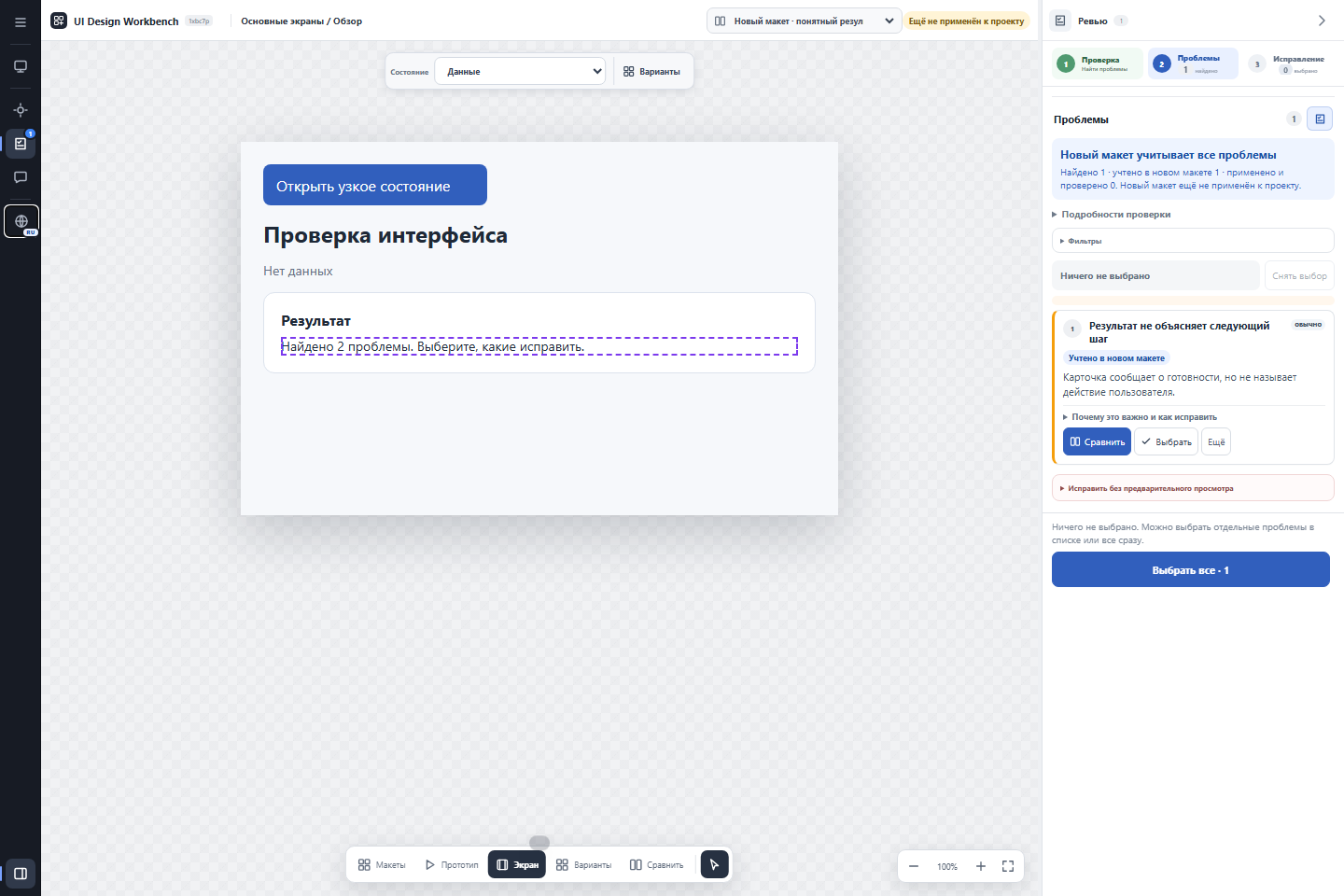
Review view of the bundled demonstration fixture. Findings belong to the separate review workflow.
Install
For source analysis and basic checks, install Python 3.10+ and pipx, then run:
pipx install ui-design-workbench-cli
uidw --version
uidw doctor
doctor reports dependencies and cache settings. Full browser checks additionally need Node.js 22+ and Chrome, Edge or Chromium. Basic --level quick checks do not need them. To view the generated HTML, use a browser.
CLI use does not require an agent or MCP. For Codex and other agents, follow agent setup.
First preview
Open a terminal in your application's root directory. These commands work in PowerShell and a POSIX shell:
uidw config setup --detail medium
uidw workbench --output-dir ../ui-preview --level quick --open
This example selects representative preview data (medium). Run uidw config setup without the option to choose interactively. The first command stores settings; the second writes ../ui-preview/ui-preview.html and opens it. Check reports are under ../ui-preview/validation/.
Look for проверка pass in the CLI output. If checks fail, HTML may still exist as a diagnostic preview: read the reports before treating reconstruction as complete. CLI messages are primarily Russian; the HTML interface supports English and Russian. Add --lang en to select English in the preview.
For absolute paths, Windows examples, detail levels and recovery steps, see first run.
Choose the task
| Task | Command, from the application root |
|---|---|
| Explore screens without a UI/UX audit | uidw workbench --output-dir ../ui-preview --level quick --open |
| Include browser checks | uidw workbench --output-dir ../ui-preview --level full --open |
| Request a UI/UX review | uidw review --output-dir ../ui-review --level full |
| Check translation limits | uidw fidelity report |
| Inspect available adapters | uidw fidelity capabilities |
| Diagnose installation | uidw doctor |
workbench and check validate reconstruction. review requests UI/UX findings. Detail (low/medium/high) controls preview content; --level quick/full controls validation. No detail level starts a UI/UX audit.
See using the preview, uidw --help and uidw help advanced for further commands.
Source support and accuracy
Each adapter supports a subset of its framework. Evidence below concerns small fixtures, not every platform configuration or application.
| Source | Supported examples | Limits and validation evidence |
|---|---|---|
| HTML/CSS | Elements, simple selectors, spacing, linked stylesheets | Dynamic scripts and complex CSS limited; plain HTML fixture compared in a browser |
| React, Vue, Svelte, React Native | Recognized components, literal properties and supported styles | Arbitrary JavaScript not evaluated; source tests, not framework-wide runtime comparisons |
| Android Compose | Local components, literal themes/resources, preview arguments | Runtime Kotlin and custom drawing limited; selected YaDonor preview compared with Android capture |
| Android Views XML | Layouts, resources, navigation | Custom views and dynamic bindings limited; source tests |
| SwiftUI on iOS/macOS | Local views, literal values, ordered layout modifiers | Dynamic branches and some SF Symbols unresolved; source-only tests, no Apple runtime comparison |
| Storyboard/XIB | Recognized XML views and attributes | Runtime UIKit/AppKit behavior limited; source tests |
| WPF / WinUI XAML | Grid placement, literal thickness, colors and states | Complex templates/bindings limited; WPF fixture compared through WPF, WinUI not natively verified |
| Flutter | Nested widgets, literal constructors, insets and text styles | Arbitrary Dart and runtime state limited; fixture compared with the Flutter test engine |
Missing values and unsupported constructs are reported as gaps. Fonts, system controls and runtime data can change the result. Optional native Android/Apple discovery never launches an emulator or simulator automatically. See accuracy details and native rendering.
Files and application source
Preview and review leave application source unchanged. Applying an accepted proposal is a separate action. The default cache lives outside the application repository; an explicit output directory receives HTML and reports. Export browser review state before moving the preview or clearing browser storage.
Upgrade
For a pipx installation:
pipx upgrade ui-design-workbench-cli
uidw --version
For a managed skill copy, also run uidw install-skill codex (or your agent name) and start a new agent session. Linked development skills and separate MCP environments have different steps: see agent upgrades.
Documentation
User guides: First run · Using the preview · Agent setup · Troubleshooting.
Technical references (English): Fidelity · Native rendering · Cache · Components · IR schema · Review contract.
Current CLI version: 0.6.10.
1 maintainer

Metadata
1 maintainer
Release files for ui-design-workbench-cli 0.6.10
For a detailed explanation of source distributions (sdists) and built distributions (wheels), please see the package formats documentation.
Source distribution (sdist)
| File | Size | Uploaded | |
|---|---|---|---|
| ui_design_workbench_cli-0.6.10.tar.gz | 348.2 kB | Details |
Built distribution (wheel)
| File | Interpreter | ABI | Platform | Reset |
|---|---|---|---|---|
| ui_design_workbench_cli-0.6.10-py3-none-any.whl | Python 3 | none | any | Details |
Total release size: 988.4 kB
Release files / ui_design_workbench_cli-0.6.10.tar.gz
| Download URL | ui_design_workbench_cli-0.6.10.tar.gz |
|---|---|
| Size | 348.2 kB |
| Tags | Source |
|
SHA-256 checksum How to use checksums |
dd33234ba6dd8af94aec8979760d816ab600a3651492a5b002862f96f5dc0c3a
|
|
BLAKE2b-256 checksum How to use checksums |
ffb650b31b0737fd8c2e3960d8d4b42801304795c68b3f5d36cd32d1b3b781ad
|
| Upload date | |
|
Uploaded using Trusted Publishing? What is trusted publishing? |
Yes |
| Uploaded via |
twine/7.0.0 CPython/3.13.14
|
Provenance
Provenance describes where a file came from. On PyPI, provenance is shared via attestations, which provide a verifiable record of the build or publishing details. View details, limitations and caveats.


PyPI Publish Attestation
PyPI verified that this artifact, at this checksum, originated from the publisher listed below.
Signed by GitHub Actions, verified by PyPI on Sep 10, 2026.
Transparency logRelease files / ui_design_workbench_cli-0.6.10-py3-none-any.whl
| Download URL | ui_design_workbench_cli-0.6.10-py3-none-any.whl |
|---|---|
| Size | 640.2 kB |
| Tags | Python 3 |
|
SHA-256 checksum How to use checksums |
1f471c0749c69089ddb49ea8bcdfb5b09f6381ad2be42cf5ce843b5a03edb11b
|
|
BLAKE2b-256 checksum How to use checksums |
abae072681a378048927bcf855734bbb50e586813aca4dda3ddd81c5ca2e038c
|
| Upload date | |
|
Uploaded using Trusted Publishing? What is trusted publishing? |
Yes |
| Uploaded via |
twine/7.0.0 CPython/3.13.14
|
Provenance
Provenance describes where a file came from. On PyPI, provenance is shared via attestations, which provide a verifiable record of the build or publishing details. View details, limitations and caveats.
PyPI Publish Attestation
PyPI verified that this artifact, at this checksum, originated from the publisher listed below.
Signed by GitHub Actions, verified by PyPI on Sep 10, 2026.
Transparency log













