
UI-Markdown (UMD)
Interactive Notion-Style Visual Documents in Pure Plain Text




Combine fluid Markdown writing with reactive UI blocks, data charts, and pipeline architectures — stored cleanly in a single .umd file with zero companion files.
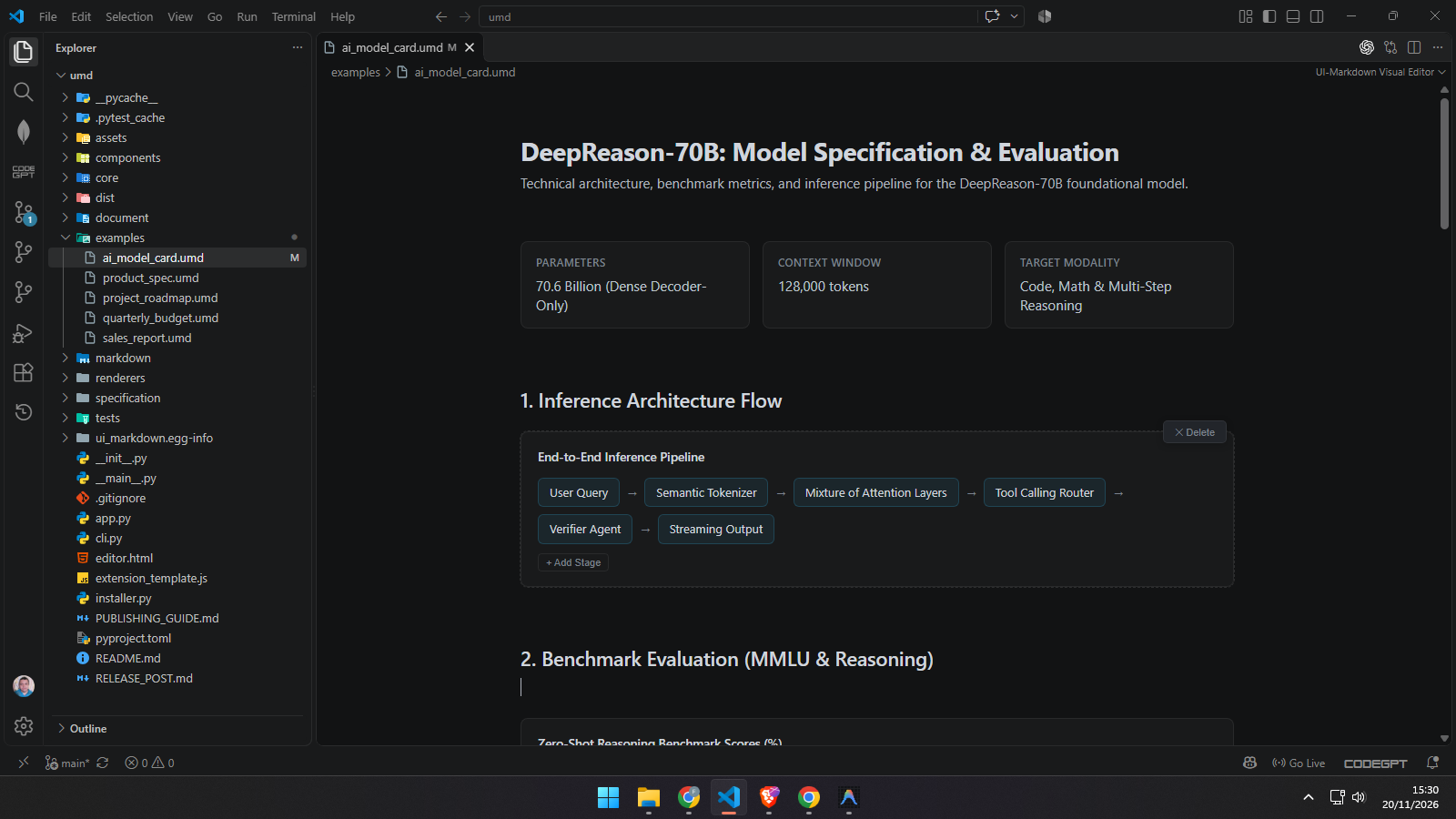
🌟 Overview
UI-Markdown (.umd) bridges the gap between readable plain-text Markdown and rich visual workspace editors like Notion.
Traditional documentation tools often force you to choose between:
- Plain Markdown: Lightweight and Git-friendly, but visually plain with limited interactivity and no structured visual components.
- Proprietary Workspace Apps: Visually rich, but stored in proprietary databases or accompanied by messy multi-file bundles (
.html,.json, folder companions).
UMD solves this. Every document is stored entirely in pure human-readable text under the .umd extension, with an AST-backed parser guaranteeing 100% lossless roundtrip preservation.
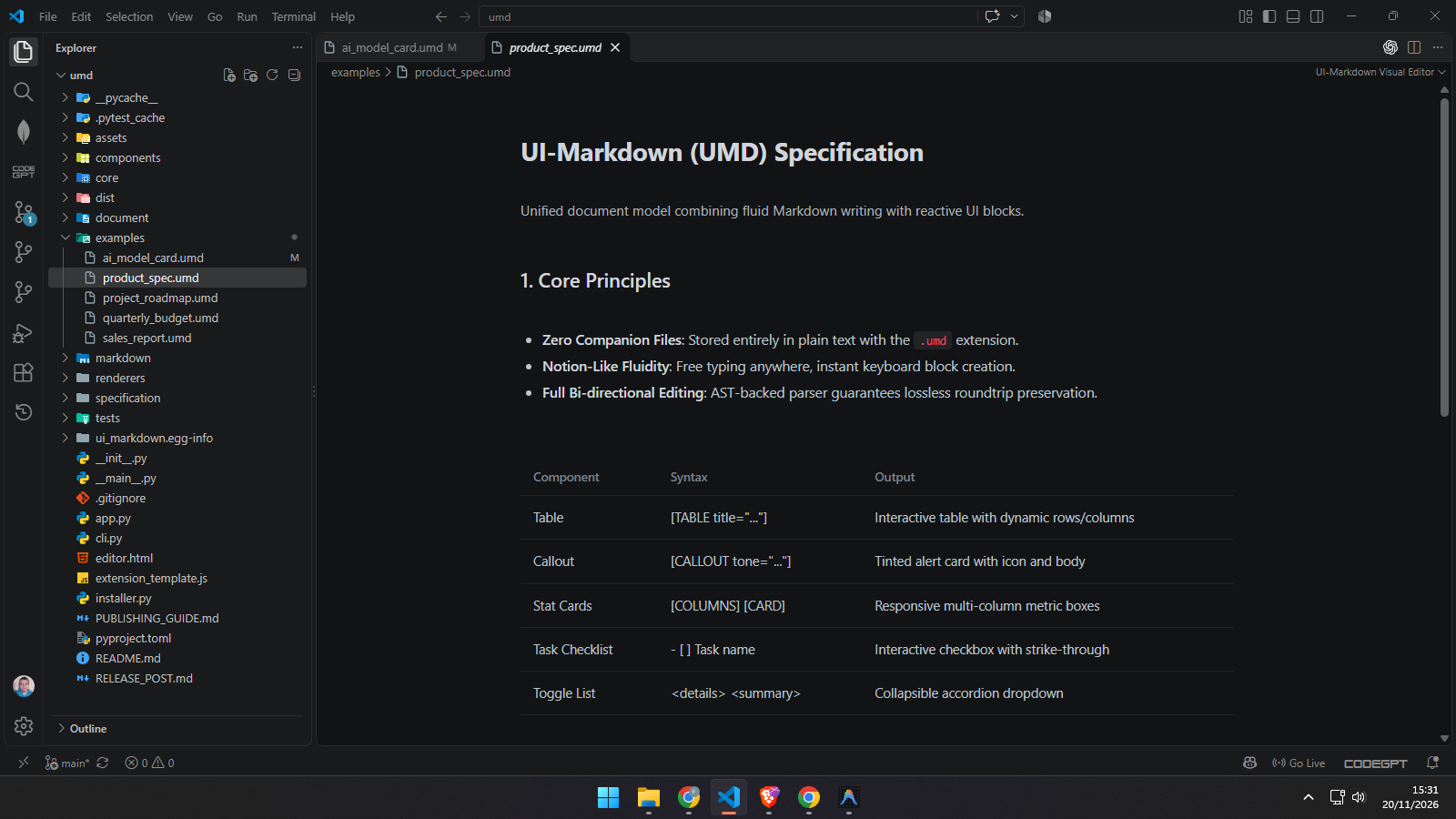
✨ Key Features
- 📄 Zero Companion Files: Everything — text, metrics, bar charts, pie charts, pipelines, callouts, and tables — lives inside one plain
.umdtext file. - 🎨 Interactive Visual Editor: Seamless WYSIWYG editor built for Antigravity IDE and VS Code, featuring full keyboard navigation, right-click component menus, and real-time live preview.
- 🔄 Lossless Bi-Directional Roundtrip: Visual changes immediately sync back to clean Markdown without reordering, mangling comments, or breaking formatting.
- 📊 AI & Data Graphics Built-In:
- Horizontal Bar Charts: Benchmark comparisons with proportional bars.
- Vertical Column Charts: Latency, batch sizes, and context profiles.
- Pie / Donut Charts: Dataset mixture and token distributions.
- AI Pipeline Architecture: End-to-end model workflows (
Prompt -> Tokenizer -> Transformer -> Output). - Progress Cards: Multi-stage fine-tuning and alignment tracking.
- 🛡️ Security-First Core: Built-in XSS defense, attribute breakout protection, sanitized URLs (
javascript:/vbscript:neutralization), and resilient fuzz handling. - ⚡ Zero External Dependencies: Core engine is 100% standard-library Python with lightning-fast execution (<1ms parse time).
📊 Rich AI & Data Visualizations
1. Benchmark Horizontal Bar Charts
Compare LLM benchmarks, evaluation scores, or accuracy metrics with auto-calculated visual bars:
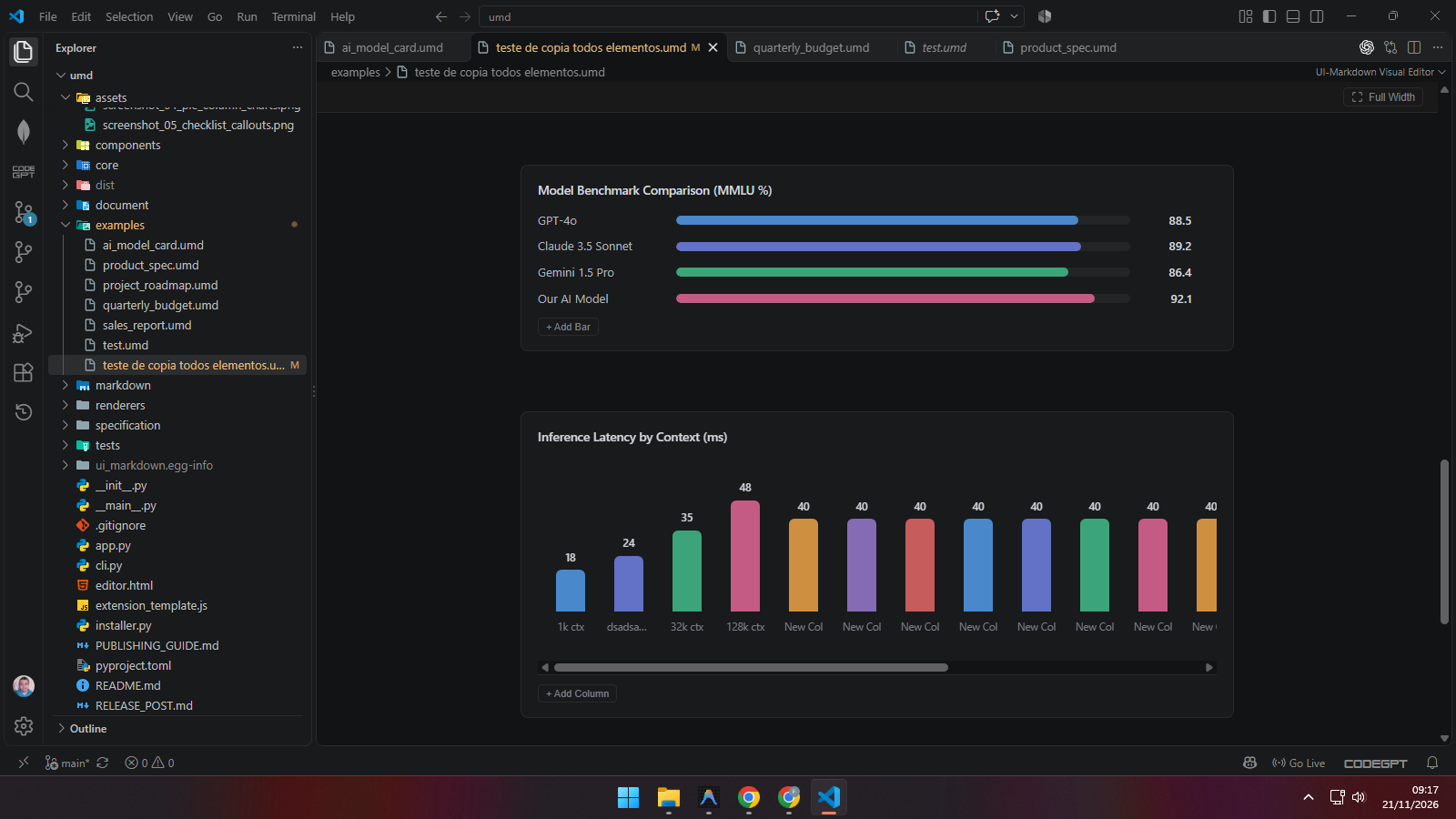
2. Vertical Column & Pie / Donut Charts
Visualize latency curves across context lengths and dataset token distributions with interactive legends:
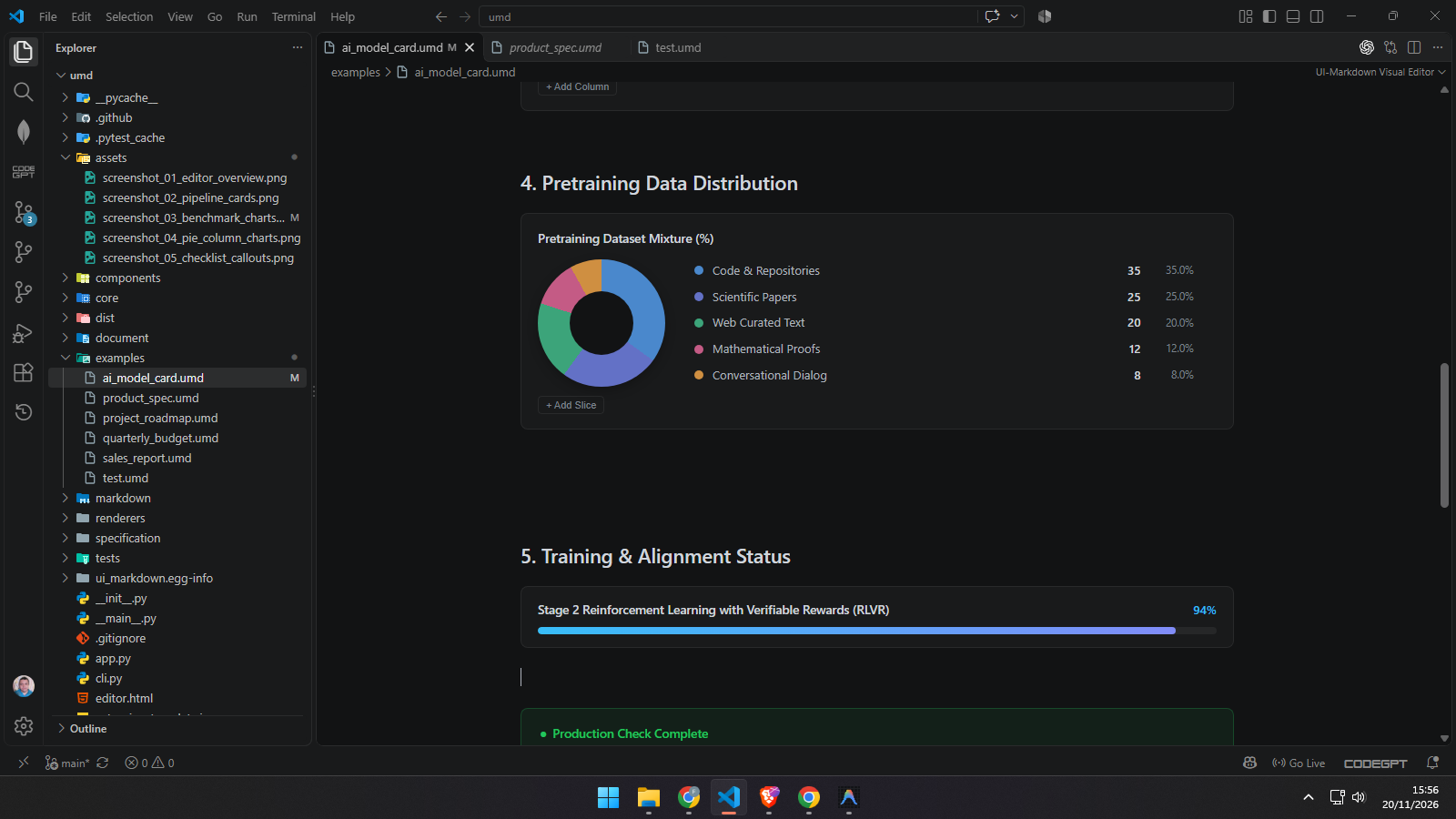
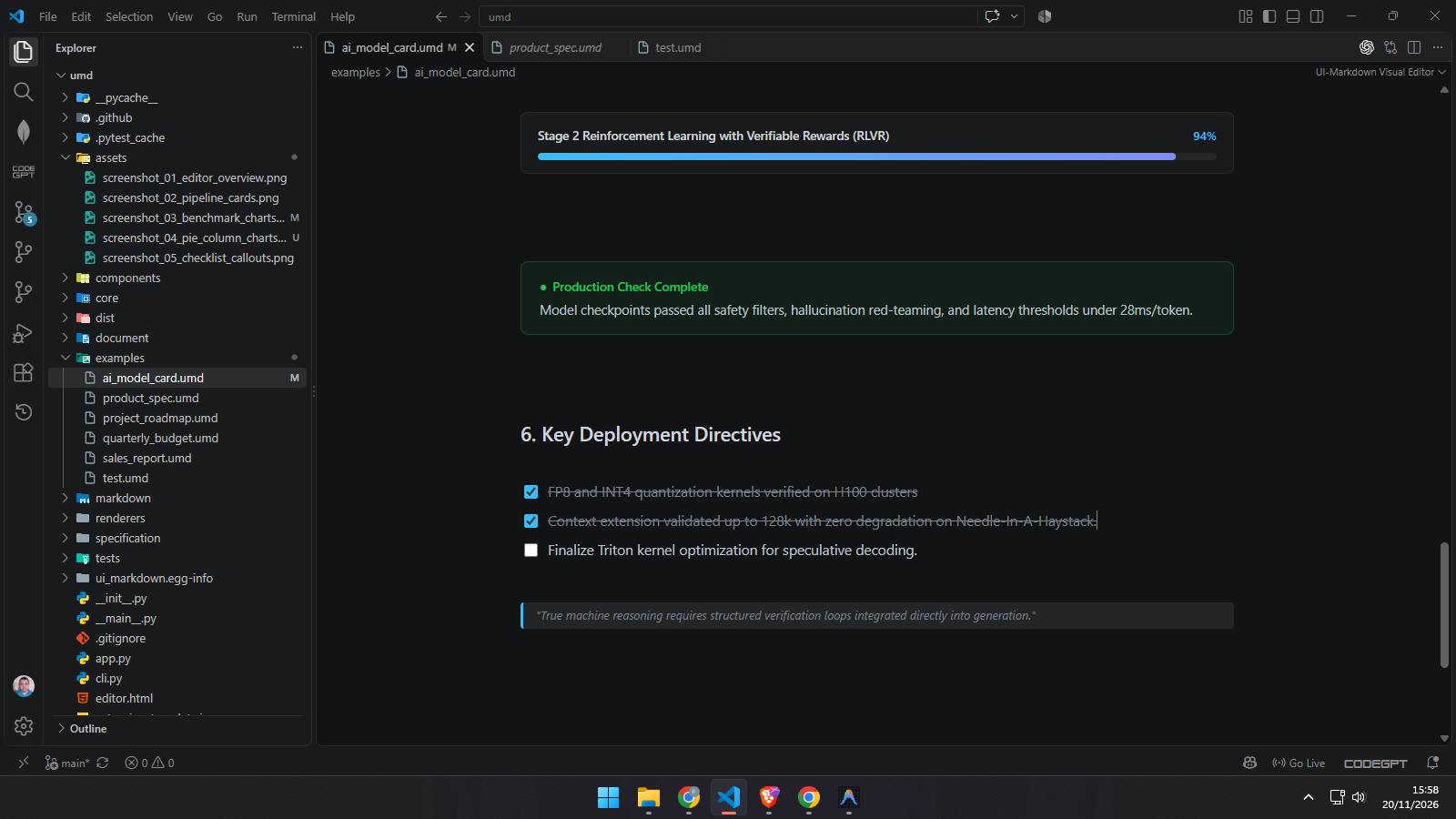
3. Reactive Progress, Callouts & Checklists
Track alignment stages with progress meters, status banners, and interactive task checkboxes:
🚀 Quick Start
1. Installation
Install via pip:
pip install ui-markdown
2. Install the IDE Extension
Activate the visual editor in VS Code and Antigravity IDE with a single command:
umd install
Tip: Reload your IDE (
Ctrl+Shift+P > Developer: Reload Window). Click any.umdfile to open it directly in the Notion-like visual editor!
💻 CLI Commands
The umd CLI provides high-performance document tools:
# Render a .umd document to standalone HTML
umd render document.umd -o document.html

# Validate syntax and check for structural errors
umd check document.umd

# Open the visual editor server
umd edit document.umd

# Re-install or update the IDE extension
umd install
🧩 Syntax & Component Reference
UMD supports all standard CommonMark syntax along with reactive block components:
1. AI & Data Charts
[CHART title="Zero-Shot Reasoning Benchmark Scores (%)" type="bar"]
GPT-4o | 88.5
Claude 3.5 Sonnet | 89.2
DeepSeek-V3 | 88.8
DeepReason-70B (Ours) | 92.4
[/CHART]

[CHART title="Inference Latency by Context Length (ms)" type="column"]
2k Tokens | 14.2
8k Tokens | 22.8
32k Tokens | 41.5
128k Tokens | 104.3
[/CHART]

[CHART title="Pretraining Dataset Mixture (%)" type="pie"]
Code & Repositories | 35
Scientific Papers | 25
Web Curated Text | 20
Mathematical Proofs | 12
Conversational Dialog | 8
[/CHART]
2. Architecture Pipelines
[PIPELINE title="End-to-End Inference Pipeline"]
User Query -> Semantic Tokenizer -> Mixture of Attention Layers -> Tool Calling Router -> Verifier Agent -> Streaming Output
[/PIPELINE]
3. Stat Cards & Columns
[COLUMNS gap="20"]

[CARD title="PARAMETERS"]
70.6 Billion (Dense Decoder-Only)
[/CARD]

[CARD title="CONTEXT WINDOW"]
128,000 tokens
[/CARD]

[CARD title="TARGET MODALITY"]
Code, Math & Multi-Step Reasoning
[/CARD]

[/COLUMNS]
4. Reactive Callouts & Progress
[PROGRESS label="Stage 2 Reinforcement Learning (RLVR)" value="94" max="100" /]

[CALLOUT tone="success" title="Verification Passed"]
All unit benchmarks, safety filters, and latency boundaries passed.
[/CALLOUT]
🐍 Python API
Integrate UMD programmatically into your scripts, CI/CD pipelines, or agent workflows:
from umd import parse, render_document, Document

# 1. Parse UMD text into an AST
doc_text = """
# Model Evaluation
[PROGRESS label="Fine-Tuning" value=95 max=100 /]
"""
result = parse(doc_text)
print(f"Parsed {len(result.root.children)} root nodes.")

# 2. Render to self-contained HTML
html_output = render_document(doc_text, standalone=True)
with open("evaluation.html", "w", encoding="utf-8") as f:
    f.write(html_output)

# 3. Document Object Model editing
doc = Document.from_text(doc_text)
doc.append_paragraph("Evaluation completed successfully.")
print(doc.to_text())
🧪 Testing & Verification
UMD includes a comprehensive test suite covering parser grammar, AST validation, roundtrip persistence, security escaping, and visual rendering:
pytest tests/
Status: 68 passed (100% coverage across editing, parsing, rendering, roundtrip, and security modules).
📄 License
MIT License. Free and open-source for personal, academic, and enterprise software.
1 maintainer

Metadata
1 maintainer
Release files for ui-markdown 0.0.2
For a detailed explanation of source distributions (sdists) and built distributions (wheels), please see the package formats documentation.
Source distribution (sdist)
| File | Size | Uploaded | Provenance | Actions |
|---|---|---|---|---|
| ui_markdown-0.0.2.tar.gz | 65.0 kB | With provenance | Details for ui_markdown-0.0.2.tar.gz |
Built distribution (wheel)
| File | Interpreter | ABI | Platform | Actions Reset |
|---|---|---|---|---|
| ui_markdown-0.0.2-py3-none-any.whl | Python 3 | none | any | Details for ui_markdown-0.0.2-py3-none-any.whl |
Total release size: 131.3 kB
Release files / ui_markdown-0.0.2.tar.gz
| Download URL | ui_markdown-0.0.2.tar.gz |
|---|---|
| Size | 65.0 kB |
| Tags | Source |
|
SHA-256 checksum How to use checksums |
d76c08d4b1658bf6d5dbe3c1190ee5fc3f517909ac486a0fa947476782dd10cd
|
|
BLAKE2b-256 checksum How to use checksums |
8c2dbfa7780120e04d25f1401e761db67e378c1347ee9c14f65ea2179d3978c6
|
| Upload date | |
|
Uploaded using Trusted Publishing? What is trusted publishing? |
Yes |
| Uploaded via |
twine/7.0.0 CPython/3.13.16
|
Provenance
Provenance describes where a file came from. On PyPI, provenance is shared via attestations, which provide a verifiable record of the build or publishing details. View details, limitations and caveats.


PyPI Publish Attestation
PyPI verified that this artifact, at this checksum, originated from the publisher listed below.
Signed by GitHub Actions, verified by PyPI on Nov 20, 2026.
Transparency logRelease files / ui_markdown-0.0.2-py3-none-any.whl
| Download URL | ui_markdown-0.0.2-py3-none-any.whl |
|---|---|
| Size | 66.3 kB |
| Tags | Python 3 |
|
SHA-256 checksum How to use checksums |
6ac19479d15b59774e8820f300174bf5dff1825ab871c45e3719c987a21fda26
|
|
BLAKE2b-256 checksum How to use checksums |
e51e09b682cf16c3baee1081c819eaea2309b841be00ba69a91721b59dde3b8c
|
| Upload date | |
|
Uploaded using Trusted Publishing? What is trusted publishing? |
Yes |
| Uploaded via |
twine/7.0.0 CPython/3.13.16
|
Provenance
Provenance describes where a file came from. On PyPI, provenance is shared via attestations, which provide a verifiable record of the build or publishing details. View details, limitations and caveats.
PyPI Publish Attestation
PyPI verified that this artifact, at this checksum, originated from the publisher listed below.
Signed by GitHub Actions, verified by PyPI on Nov 20, 2026.
Transparency logSecurity for ui-markdown 0.0.2
Provenance
Provenance describes where a file came from. On PyPI, provenance is shared via attestations, which provide a verifiable record of the build or publishing details. View details, limitations and caveats.
Full provenance
Both files in this release have been uploaded with provenance metadata.
Attestation for ui_markdown-0.0.2.tar.gz
PyPI Publish Attestation
PyPI verified that this artifact, at this checksum, originated from the publisher listed below.
Signed by GitHub Actions, verified by PyPI on Nov 20, 2026.
Transparency logA note on package security
PyPI is a repository for distributing packages, not a service for auditing them. While third-party security researchers and our staff do their best to detect and remove malicious packages, PyPI cannot guarantee the quality, security or suitability of any given package.
To learn more about protecting yourself from malicious actors, visit our package security documentation.














