
UI MCP Server



This project initiates at the Power of Europe Hackathon 2025.
Demo
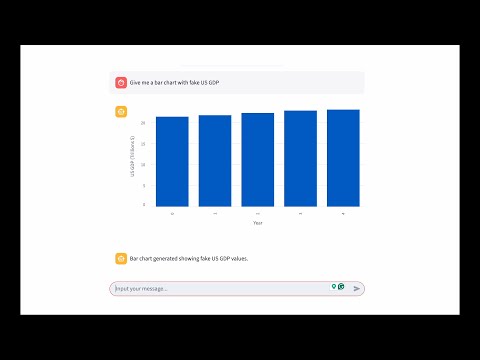
Overview
ui-mcp-server is an MCP server that generates specifications for a range of UI components, containing only essential data to remain framework-agnostic. Unlike existing solutions, ui-mcp-server is data-focused, acquiring and filling data during conversation sessions while leaving rendering entirely to frontend developers (for now).
Features
- Framework-agnostic UI component specifications
- Data-focused approach with conversation session support
- Full developer freedom for rendering and customization
- Compatible with MCP clients like Cursor, Kilo and Claude Desktop
Installation
Claude Desktop
-
Add the server to your Claude Desktop configuration file (
claude_desktop_config.json):{ "mcpServers": { "UI MCP Server": { "command": "full/path/to/uvx", "args": ["ui-mcp-server"] }, // Your existing MCP servers... } }
-
Restart Claude Desktop to load the MCP server.
Kilo
A working configuration looks like below:
{
  "mcpServers": {
    "ui-mcp-server":{
      "command": "full/path/to/ui-mcp-server",
      "args": []
    }
  }
}
We might have missed something as the expected version below didn't work:
{
  "mcpServers": {
    "ui-mcp-server":{
      "command": "full/path/to/uvx",
      "args": ["ui-mcp-server"]
    }
  }
}
Core concepts
- UI-as-a-tool:
ui-mcp-serverprovides tools that can be used to generate UI components. To this end, frequently used UI components are defined as tools, and the data required for each tool is acquired during the conversation session. The data extraction part is taken care of by AI agents using this MCP server. See our Streamlit demo for an example. - Component standardisation: To be agnostic of frontend frameworks,
ui-mcp-serverdefines a standardised component library, which is basically a set of JSON schemas for UI components, with some values are predefined, and others are left to be filled by AI.
Related Projects
- Magic MCP: Generates React components, focusing on development productivity
- MCP UI: Similar concept to this project but with tighter coupling to specific UI implementations. Can't be used as a standalone MCP server.
- shadcn-ui-mcp-server: Similart to MCP UI, a battery-included solution providing shadcn components as source code.
Key Differentiators
Separation of Concerns: ui-mcp-server handles UI types and conversation data exclusively, providing maximum flexibility for developers to customize and render components according to their specific needs and frameworks.
Future work
- Define standardized component libraries for mainstream frameworks (React, Vue, Svelte, etc.)
- Create templates to streamline frontend development workflow
1 maintainer

Metadata
1 maintainer
Release files for ui-mcp-server 0.1.0
For a detailed explanation of source distributions (sdists) and built distributions (wheels), please see the package formats documentation.
Source distribution (sdist)
| File | Size | Uploaded | |
|---|---|---|---|
| ui_mcp_server-0.1.0.tar.gz | 73.0 kB | Details |
Built distribution (wheel)
| File | Interpreter | ABI | Platform | Reset |
|---|---|---|---|---|
| ui_mcp_server-0.1.0-py3-none-any.whl | Python 3 | none | any | Details |
Total release size: 79.2 kB
Release files / ui_mcp_server-0.1.0.tar.gz
| Download URL | ui_mcp_server-0.1.0.tar.gz |
|---|---|
| Size | 73.0 kB |
| Tags | Source |
|
SHA-256 checksum How to use checksums |
cc85dd7623bb40037c50bbbd396695fd9a0f2279e7b901d6156dd52e52f4c456
|
|
BLAKE2b-256 checksum How to use checksums |
50597d1d2755611f1c43c4ef7db569a7a8d2c24439d927299c35f86cfb0a155c
|
| Upload date | |
|
Uploaded using Trusted Publishing? What is trusted publishing? |
Yes |
| Uploaded via |
twine/6.1.0 CPython/3.12.9
|
Provenance
Provenance describes where a file came from. On PyPI, provenance is shared via attestations, which provide a verifiable record of the build or publishing details. View details, limitations and caveats.


PyPI Publish Attestation
PyPI verified that this artifact, at this checksum, originated from the publisher listed below.
Signed by GitHub Actions, verified by PyPI on Jul 27, 2025.
Transparency logRelease files / ui_mcp_server-0.1.0-py3-none-any.whl
| Download URL | ui_mcp_server-0.1.0-py3-none-any.whl |
|---|---|
| Size | 6.2 kB |
| Tags | Python 3 |
|
SHA-256 checksum How to use checksums |
40be233cb8923b6495d5532f8a0575ead6ce5cfdac223eeeeb0bc3b09b3d1faa
|
|
BLAKE2b-256 checksum How to use checksums |
fb303e1c2b897bb9a5542bc81cbbd8925785b2574a3494f843b137b46478e22d
|
| Upload date | |
|
Uploaded using Trusted Publishing? What is trusted publishing? |
Yes |
| Uploaded via |
twine/6.1.0 CPython/3.12.9
|
Provenance
Provenance describes where a file came from. On PyPI, provenance is shared via attestations, which provide a verifiable record of the build or publishing details. View details, limitations and caveats.
PyPI Publish Attestation
PyPI verified that this artifact, at this checksum, originated from the publisher listed below.
Signed by GitHub Actions, verified by PyPI on Jul 27, 2025.
Transparency log













