
说明
python版本uiadmin实现, API接口自动生成管理后台,无需前端参与。
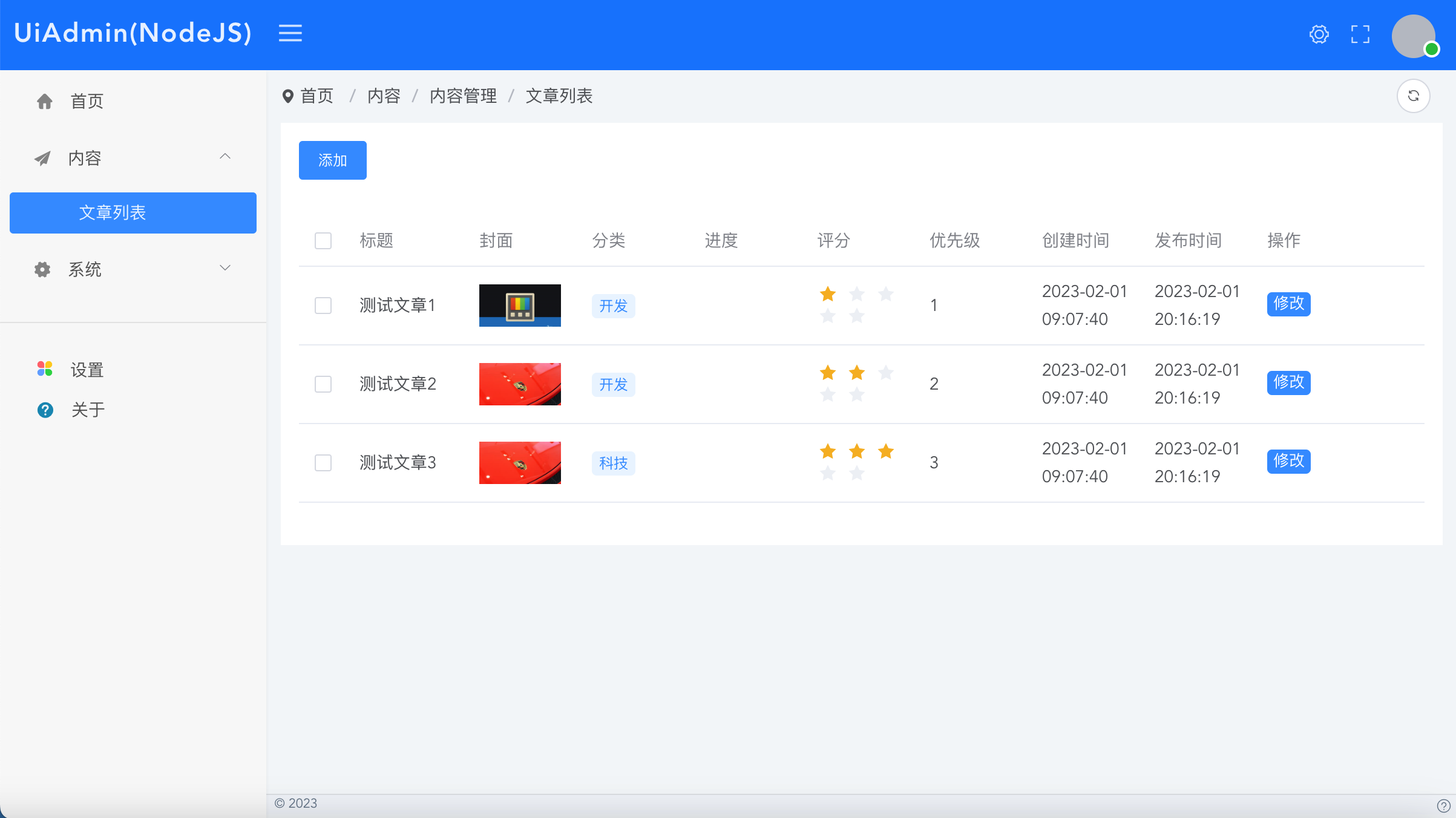
https://pypi.org/project/Uiadmin-FastApi/
Builder文档
https://uiadmin.net/docs/builder
教程
官方脚手架
下载脚手架工程
如果您不想自己搭建项目工程,可以直接使用官方的脚手架。
https://gitee.com/uiadmin/uiadmin/tree/master/back-end-python/
下载后执行
pip install "fastapi[all]"
pip install uiadmin-fastapi
pip freeze >requirements.txt
pip install -r requirements.txt
uvicorn main:app --reload
访问:localhost:8000/xyadmin/ 输入账号admin密码uiadmin登录即可进入管理后台页面
手动创建工程
安装依赖
pip install "fastapi[all]"
pip install uiadmin-fastapi
pip freeze >requirements.txt
pip install -r requirements.txt
增加配置文件
在config/default.yml添加如下内容
uiadmin:
  site:
    # 网站名称
    title: "UiAdmin"
    #正方形logo
    logo: ""
    #带有标题的横logo
    logoTitle: ""
    logoBadge: ""
  system:
    api-version: "1.0.0"
    menu-from: "annotation"
  user:
    user-role:
      - id: 1
        name: super_admin
        title: 超级管理员
        menus: ""
        status: 1
      - id: 2
        name: admin
        title: 管理员
        menus: [
          "/v1/admin/demo/lists"
        ]
        status: 1
    user-list:
      - id: 1
        nickname: "admin"
        username: "admin"
        password: "uiadmin"
        avatar: ""
        roles: "super_admin"
        status: 1
main.py使用
from fastapi import FastAPI
from fastapi.middleware.cors import CORSMiddleware
from starlette.responses import HTMLResponse
# 配置使用https://pypi.org/project/config2/
from config2.config import config
from uiadmin_fastapi.Uiadmin import Uiadmin
from uiadmin_fastapi.utils import jsonres
from uiadmin_fastapi.util.xybuilder.XyBuilderList import XyBuilderList
from uiadmin_fastapi.util.xybuilder.XyBuilderForm import XyBuilderForm

app = FastAPI()

# 跨域
app.add_middleware(
    CORSMiddleware,
    allow_origins=['*'],
    allow_credentials=True,
    allow_methods=["*"],
    allow_headers=["*"],
)

# 调用Uiadmin
uiadmin = Uiadmin(app)

@app.get("/", response_class=HTMLResponse)
def index():
    return "<a href='/xyadmin/'>点击打开后台</a><br><a href='/redoc'>查看接口文档</a>"

# 示例
@Uiadmin.menu_item({"title": "文章列表", "path": "/demo/lists", "pmenu": "/content", "menuType": 1,
  "routeType": "list", "apiSuffix": "", "apiParams": "", "apiMethod": "GET", "sortnum": 0})
@app.get("/api/v1/admin/demo/lists")
async def demo_lists():
    dataList = [
      {
        "id": 1,
        "title": "测试文章1",
        "cate": "开发",
        "cover": "https://ts2.cn.mm.bing.net/th?id=ORMS.11d30098d0f4a79a42c6352014e0f066&pid=Wdp&w=300&h=156&qlt=90&c=1&rs=1&dpr=2&p=0",
        "level": 1,
        "progress": 50,
        "updateTime": "2023-02-01 20:16:19",
        "createTime": "2023-02-01 09:07:40",
        "status": 1
      },
      {
        "id": 2,
        "title": "测试文章2",
        "cate": "开发",
        "cover": "https://ts2.cn.mm.bing.net/th?id=ORMS.ed34ae135a326a834ca9d3379be134d3&pid=Wdp&w=300&h=156&qlt=90&c=1&rs=1&dpr=2&p=0",
        "level": 2,
        "progress": 80,
        "updateTime": "2023-02-01 20:16:19",
        "createTime": "2023-02-01 09:07:40",
        "status": 1
      },
      {
        "id": 3,
        "title": "测试文章3",
        "cate": "科技",
        "cover": "https://ts2.cn.mm.bing.net/th?id=ORMS.ed34ae135a326a834ca9d3379be134d3&pid=Wdp&w=300&h=156&qlt=90&c=1&rs=1&dpr=2&p=0",
        "level": 3,
        "progress": 90,
        "updateTime": "2023-02-01 20:16:19",
        "createTime": "2023-02-01 09:07:40",
        "status": 1
      },
    ]
    xyBuilderlist = XyBuilderList();
    (xyBuilderlist
      .init()
      .addColumn("title", "标题", {
        "type": "text"
      })
      .addColumn("cover", "封面", {
        "type": "image",
      })
      .addColumn("cate", "分类", {
        "type": "tag",
        "prefixType": "dot",
        "options": []
      })
      .addColumn("progress", "进度", {
        "type": "progress"
      })
      .addColumn("level", "评分", {
        "type": "rate"
      })
      .addColumn("level", "优先级", {
        "prefixType": "dot",
        "useOptions": True,
        "options": [
          {"title": "低", "value": 1, "color": "#c6cdd4"},
          {"title": "中", "value": 2, "color": "#0488de"},
          {"title": "高", "value": 3, "color": "#ff9d28"}
        ]
      })
      .addColumn("createTime", "创建时间", {
        "type": "time",
      })
      .addColumn("updateTime", "发布时间", {
        "type": "time",
      })
      .addTopButton("add", "添加", {
        "title": "新增",
        "pageType": "modal",
        "modalType": "form",
        "api": "/v1/admin/demo/add",
        "width": "1000px"
      })
      .addColumn("rightButtonList",  "操作", {
        "type": "rightButtonList",
        "minWidth": "120px"
      })
      .addRightButton("edit", "修改", {
        "title": "修改",
        "pageType": "modal",
        "modalType": "form",
        "api": "/v1/admin/demo/edit",
        "width": "1000px"
      })
      .setDataList(dataList)
      )

    return jsonres({
        "code": 200,
        "msg": "登录成功",
        "data": {
            "listData": xyBuilderlist.getData()
        }
      }
    )

@Uiadmin.menu_item({"title": "文章增加", "path": "/demo/add", "pmenu": "/demo/lists", "menuType": 1,
  "routeType": "form", "apiSuffix": "", "apiParams": "", "apiMethod": "POST", "sortnum": 0})
@app.get("/api/v1/admin/demo/add")
def demo_add():
    xyBuilderForm = XyBuilderForm()
    (xyBuilderForm
      .init()
      .addFormItem("name", "文章标题", "text", "", {})
      .addFormItem("content", "文章内容", "html", "", {})
      .addFormItem("level", "登记", "select", "", {
        "options":[
          {"title": "低", "value": 1},
          {"title": "中", "value": 2},
          {"title": "高", "value": 3},
        ]
      })
      )

    return jsonres({
        "code": 200,
        "msg": "成功",
        "data": {
            "formData": xyBuilderForm.getData()
        }
      }
    )

@Uiadmin.menu_item({"title": "文章修改", "path": "/demo/edit", "pmenu": "/demo/lists", "menuType": 1,
  "routeType": "form", "apiSuffix": "", "apiParams": "", "apiMethod": "POST", "sortnum": 0})
@app.get("/api/v1/admin/demo/edit/{id}")
def demo_edit(id: int):
    xyBuilderForm = XyBuilderForm()
    (xyBuilderForm
      .init()
      .addFormItem("id", "ID", "text", "", {
        "disabled": True
      })
      .addFormItem("name", "文章标题", "text", "", {})
      .addFormItem("content", "文章内容", "html", "", {})
      .addFormItem("level", "登记", "select", "", {
        "options":[
          {"title": "低", "value": 1},
          {"title": "中", "value": 2},
          {"title": "高", "value": 3},
        ]
      })
      .setFormValues({
        "id": id,
        "name": "text",
        "content": "测试",
        "level": 2
      })
      )

    return jsonres({
        "code": 200,
        "msg": "成功",
        "data": {
            "formData": xyBuilderForm.getData()
        }
      }
    )
运行
uvicorn main:app --reload
1 maintainer

Download files
Download the file for your platform. If you're not sure which to choose, learn more about installing packages.
Source Distribution
Uiadmin-FastApi-1.0.3.tar.gz
(10.0 kB
view details)
Built Distribution
Filter files by name, interpreter, ABI, and platform.
If you're not sure about the file name format, learn more about wheel file names.
Copy a direct link to the current filters
File details
Details for the file Uiadmin-FastApi-1.0.3.tar.gz.
File metadata
- Download URL: Uiadmin-FastApi-1.0.3.tar.gz
- Upload date:
- Size: 10.0 kB
- Tags: Source
- Uploaded using Trusted Publishing? No
- Uploaded via:
twine/4.0.2 CPython/3.9.16
File hashes
| Algorithm | Hash digest | |
|---|---|---|
| SHA256 |
04d314fd159991a1d710daf2b2b618b6c475892d7778fc403338ce4518414e85
|
|
| MD5 |
35bcb6747a554312eeba89a71c1454e4
|
|
| BLAKE2b-256 |
8e4ecee9f81690fef5804f23a5ed2696878511f741f0cc7950105d6eec7157f7
|
File details
Details for the file Uiadmin_FastApi-1.0.3-py3-none-any.whl.
File metadata
- Download URL: Uiadmin_FastApi-1.0.3-py3-none-any.whl
- Upload date:
- Size: 12.0 kB
- Tags: Python 3
- Uploaded using Trusted Publishing? No
- Uploaded via:
twine/4.0.2 CPython/3.9.16
File hashes
| Algorithm | Hash digest | |
|---|---|---|
| SHA256 |
1a7d7a82c9fdb09a85606c9744f41eccc8be0c64e91fe736aa0b2ad1401fb0ed
|
|
| MD5 |
a04d71b2ee87eae8914c8f10156b7857
|
|
| BLAKE2b-256 |
743136d9c4fa8ff98da6b6493c7f782963cc5ae298697882ae35919c609033db
|













