
ui-viewer



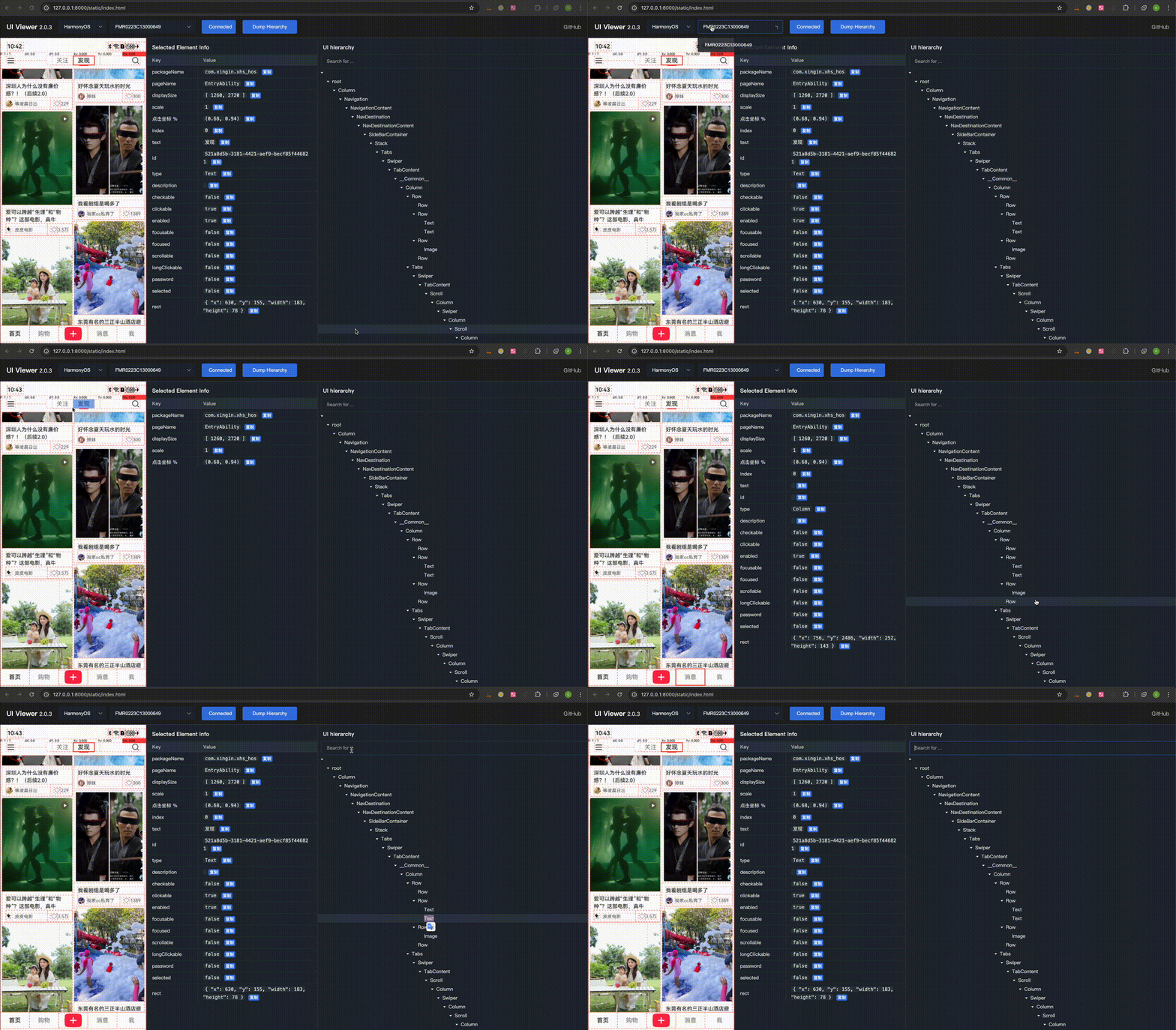
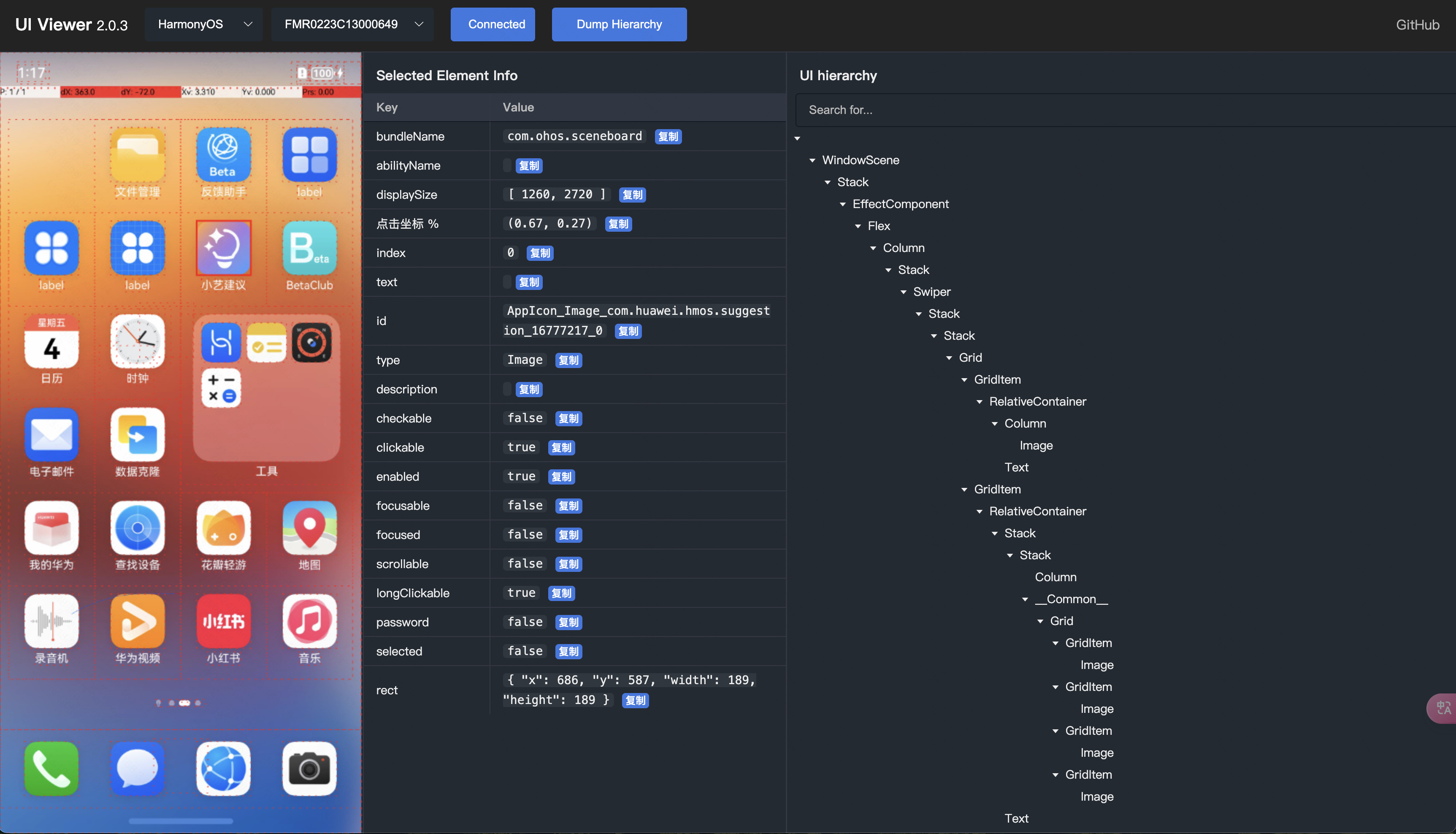
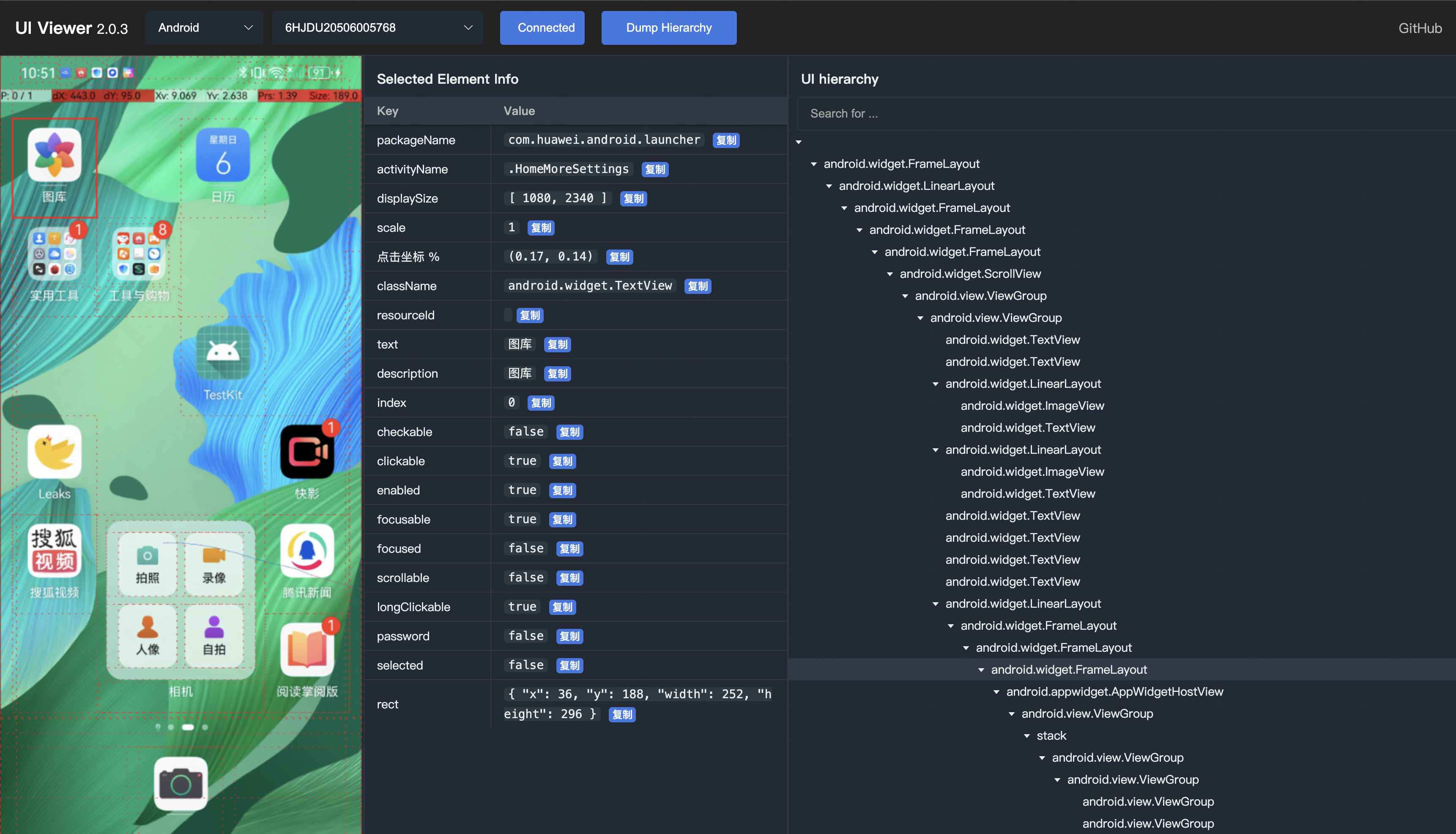
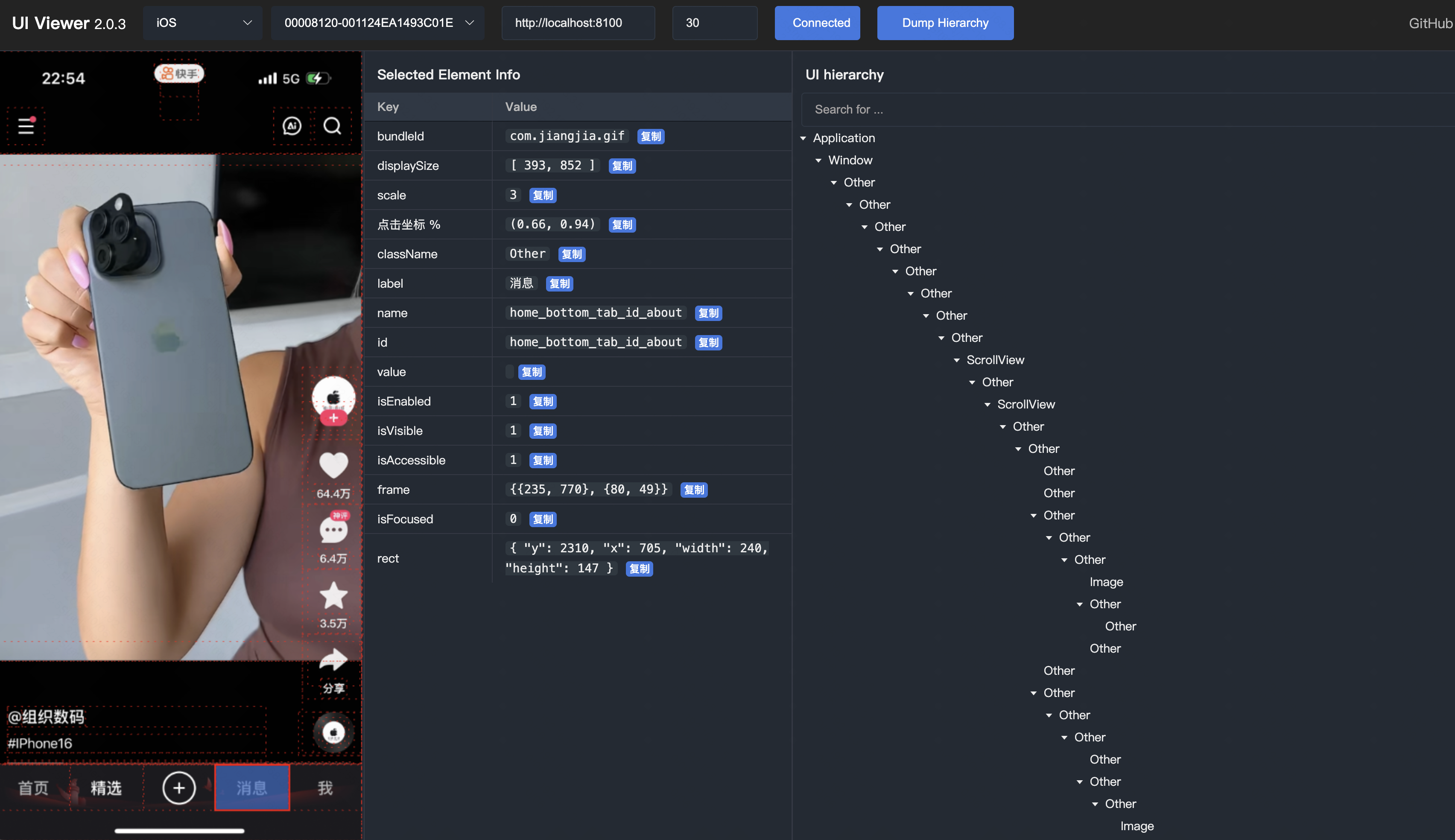
UI hierarchy inspector for Mobile App, supporting Android, iOS, and HarmonyOS NEXT.
Its features include:
- visualize the UI hierarchy via screenshot and tree structure.
- view element properties
- auto generate XPath or XPathLite
- auto generate coordinate percentages.
- and more…
This project is developed using FastAPI and Vue. It starts locally and displays UI hierarchy through web browser.
Installation
- python3.8+
pip3 install -U uiviewer
Run
Run the following command on the terminal. (default port 8000)
uiviewer
# or
python3 -m uiviewer

INFO:     Started server process [46814]
INFO:     Waiting for application startup.
INFO:     Application startup complete.
INFO:     Uvicorn running on http://127.0.0.1:8000 (Press CTRL+C to quit)
INFO:     127.0.0.1:55080 - "GET / HTTP/1.1" 307 Temporary Redirect
INFO:     127.0.0.1:55080 - "GET /static/index.html HTTP/1.1" 200 OK
INFO:     127.0.0.1:55080 - "GET /static/css/style.css HTTP/1.1" 200 OK
INFO:     127.0.0.1:55080 - "GET /static/js/index.js HTTP/1.1" 200 OK
INFO:     127.0.0.1:55080 - "GET /static/js/api.js HTTP/1.1" 200 OK
INFO:     127.0.0.1:55082 - "GET /static/js/utils.js HTTP/1.1" 200 OK
INFO:     127.0.0.1:55082 - "GET /static/js/config.js HTTP/1.1" 200 OK
INFO:     127.0.0.1:55082 - "GET /version HTTP/1.1" 200 OK
And then open the browser to http://localhost:8000
You can also customize port to start the service.
uiviewer -p <PORT>
# or
python3 -m uiviewer -p <PORT>
Environment
If you need to connect to a remote HDC Server or ADB server for remote device debugging, you must set the required environment variables before starting uiviewer.
HarmonyOS
export HDC_SERVER_HOST=127.0.0.1  # Replace with the remote host
export HDC_SERVER_PORT=8710
Android
export ANDROID_ADB_SERVER_HOST=127.0.0.1  # Replace with the remote host
export ANDROID_ADB_SERVER_PORT=5037
Remove Environment Variables, To unset the environment variables:
unset HDC_SERVER_HOST
unset HDC_SERVER_PORT

unset ANDROID_ADB_SERVER_HOST
unset ANDROID_ADB_SERVER_PORT
Tips
-
If you are using a virtual environment, please make sure to activate it before running the command.
-
On iOS, please ensure that WDA is successfully started and wda port forwarding is successful in advance.
- First, Use
xcodeortideviceorgo-iosto launch wda.
tidevice xctest -B <wda_bundle_id>- Second, Use
tideviceoriproxyto forward the wda port,and keep it running.
tidevice relay 8100 8100- And then, To ensure the success of the browser to access
http://localhost:8100/status, return like this:
{ "value": { "build": { "productBundleIdentifier": "com.facebook.WebDriverAgentRunner", "time": "Mar 25 2024 15:17:30" }, ... "state": "success", "ready": true }, "sessionId": null }- Finally, Input the
wdaUrlin the web page, such ashttp://localhost:8100
- First, Use
-
On iOS,WDA can easily freeze when dumping high UI hierarchy. You can reduce the
maxDepthon the web page. The default is 30.
Preview
-
HarmonyOS
-
Android
-
iOS
Relevant
1 maintainer

Metadata
1 maintainer
Release files for uiviewer 1.1.6
For a detailed explanation of source distributions (sdists) and built distributions (wheels), please see the package formats documentation.
Source distribution (sdist)
| File | Size | Uploaded | |
|---|---|---|---|
| uiviewer-1.1.6.tar.gz | 410.5 kB | Details |
Built distribution (wheel)
| File | Interpreter | ABI | Platform | Reset |
|---|---|---|---|---|
| uiviewer-1.1.6-py3-none-any.whl | Python 3 | none | any | Details |
Total release size: 834.0 kB
Release files / uiviewer-1.1.6.tar.gz
| Download URL | uiviewer-1.1.6.tar.gz |
|---|---|
| Size | 410.5 kB |
| Tags | Source |
|
SHA-256 checksum How to use checksums |
753e094c464fb80ffb11e8c4bf14accbbb2aacc171447081545014381a819ab0
|
|
BLAKE2b-256 checksum How to use checksums |
20f7c73570b8b18777094053259da0fb55aebe75fdcde3748153bd698370962f
|
| Upload date | |
|
Uploaded using Trusted Publishing? What is trusted publishing? |
No |
| Uploaded via |
twine/6.0.1 CPython/3.12.8
|
Release files / uiviewer-1.1.6-py3-none-any.whl
| Download URL | uiviewer-1.1.6-py3-none-any.whl |
|---|---|
| Size | 423.6 kB |
| Tags | Python 3 |
|
SHA-256 checksum How to use checksums |
0c549ee7ca6518b2956e5ddb6dd956b82122244717b0e6e39ecd7669c28d9814
|
|
BLAKE2b-256 checksum How to use checksums |
94c4c88e662b6aa76558cf851a03bd8439d0b7db013d685983ff739d101e9d93
|
| Upload date | |
|
Uploaded using Trusted Publishing? What is trusted publishing? |
No |
| Uploaded via |
twine/6.0.1 CPython/3.12.8
|














