
Manage Discord Slash Commands

Project description
ukosnik
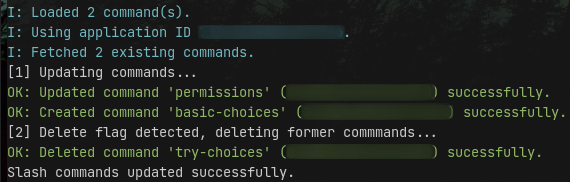
ukosnik is a Python CLI to manage Discord Slash Commands.
Installation
Python 3.6 or higher is required
Run the command python3 -m pip install -U ukosnik to install the CLI.
You may alternatively clone the repository and install the package from local sources.
Usage
The following examples assume the environment variable DISCORD_TOKEN to be set.
To make examples simpler, python3 -m ukosnik is aliased with unosnik, but make sure to use full command path.
Register/update slash commands:
# Register/update commands
ukosnik update config_file.yml

# Same but delete oudated commands
ukosnik update config_file.yml -d

# Register/update guild commands
# (very useful for testing since cache updates instantly)
ukosnik update config_file.yml --guild GUILD_ID
Please note that updating application commands may take up to 1 hour to refresh, this is an expected Discord behavior.
Read more about it here.
To debug commands, it's recommended to use the --guild argument since guild commands update instantly, unlike application-scoped commands.
Note: Providing multiple configuration files to merge is not supported yet but is planned.
Clear all commands:
# Clear all application commands
ukosnik clear

# Clear all commands from a guild
ukosnik clear --guild GUILD_ID
⚠️ No confirmation will be prompted before deleting commands.
Configuration
Configuration documents are pretty straighforward. They can be either a yml or json file.
For now, the only available field in a configuration document is commands. You may provide either an object of commands with the command name as key or a simple list.
To get a better understanding of how you can register commands, take a look at the examples.
Release history Release notifications | RSS feed


Download files
Download the file for your platform. If you're not sure which to choose, learn more about installing packages.
Source Distribution
Built Distribution
Filter files by name, interpreter, ABI, and platform.
If you're not sure about the file name format, learn more about wheel file names.
Copy a direct link to the current filters
File details
Details for the file ukosnik-0.1.1.tar.gz.
File metadata
- Download URL: ukosnik-0.1.1.tar.gz
- Upload date:
- Size: 9.2 kB
- Tags: Source
- Uploaded using Trusted Publishing? No
- Uploaded via: twine/3.4.1 importlib_metadata/4.0.1 pkginfo/1.7.0 requests/2.25.1 requests-toolbelt/0.9.1 tqdm/4.60.0 CPython/3.6.13
File hashes
| Algorithm | Hash digest | |
|---|---|---|
| SHA256 |
76d6438c2e81ca5145efd81fde66e4a4b454602221dccf724d8c9b9ec89d338c
|
|
| MD5 |
825b8a4ac142f6825387d21f3fcef007
|
|
| BLAKE2b-256 |
f017c25b7ddface3d0227b0b926cf031cd510efe110146e36cd75159f059eb82
|
File details
Details for the file ukosnik-0.1.1-py3-none-any.whl.
File metadata
- Download URL: ukosnik-0.1.1-py3-none-any.whl
- Upload date:
- Size: 10.5 kB
- Tags: Python 3
- Uploaded using Trusted Publishing? No
- Uploaded via: twine/3.4.1 importlib_metadata/4.0.1 pkginfo/1.7.0 requests/2.25.1 requests-toolbelt/0.9.1 tqdm/4.60.0 CPython/3.6.13
File hashes
| Algorithm | Hash digest | |
|---|---|---|
| SHA256 |
f443d26a05fe3ae86dfa06706cd09df3008e645f55f2d4407295efbbaa5e3c1a
|
|
| MD5 |
55db95cbbce45924e248b22965d06a1c
|
|
| BLAKE2b-256 |
71574ba953f3d9800e8a27882397696ea86298f3144644170ea1255c7e88b381
|






