
ultimate-virtual-gel
Turn FASTQ read-length data or a restriction digest into a realistic agarose gel image.
Point ultimate-virtual-gel at one FASTQ, several FASTQs, or a plasmid sequence. It will choose a sensible agarose percentage, ladder, and run time, then save the result as a PNG. You can leave those choices on automatic or set them yourself.
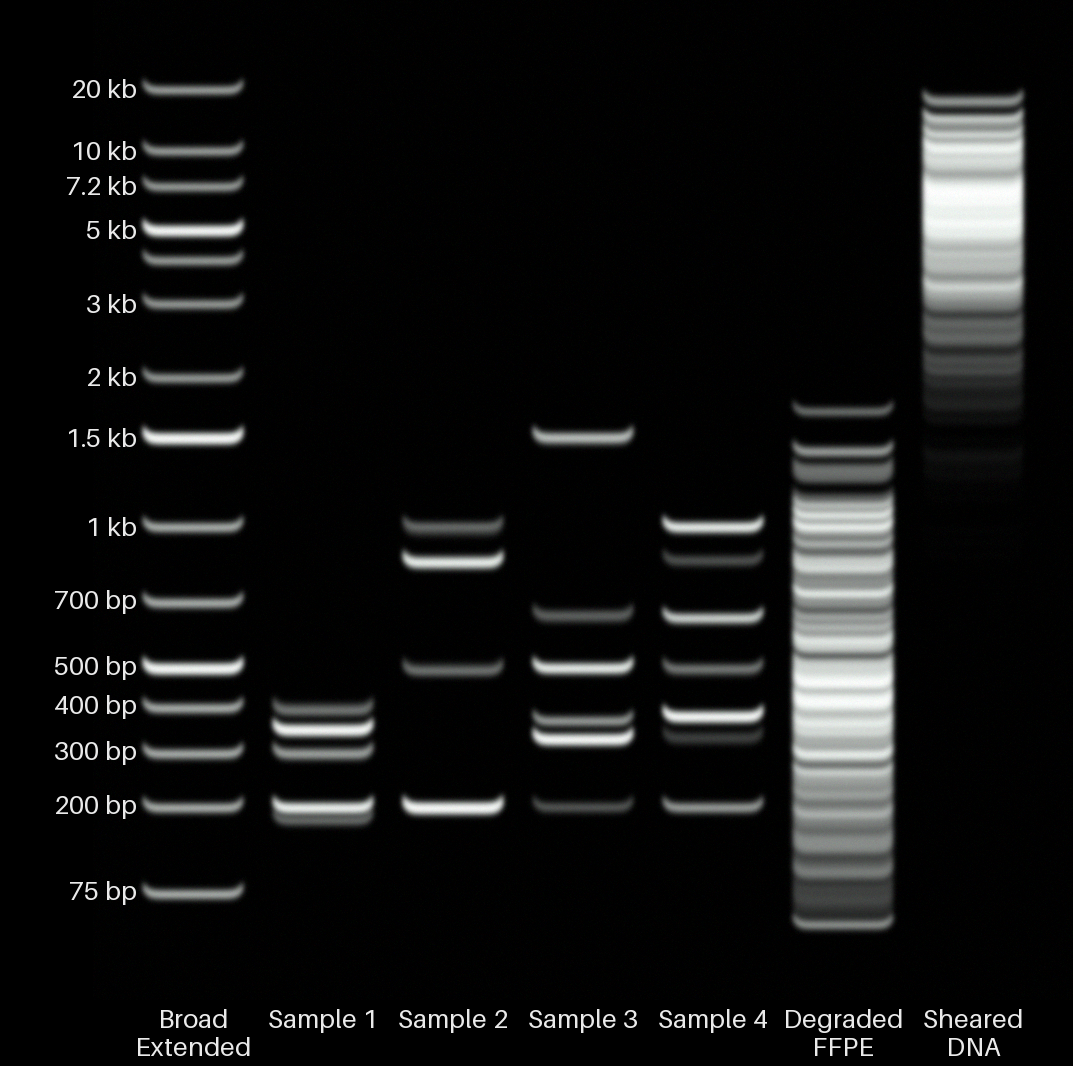
It can:
- put one or more FASTQ files on the same gel;
- simulate complete single, double, and multi-enzyme restriction digests;
- produce a realistic gel photograph or a clean diagram;
- choose a gel and ladder from the sample sizes;
- filter or subsample large FASTQ files; and
- keep runs reproducible with an explicit random seed.
Install
Python 3.10 or newer is required:
python -m pip install ultimate-virtual-gel
To install the latest source checkout instead:
python -m venv .venv
source .venv/bin/activate          # Windows: .venv\Scripts\activate
python -m pip install -e .
This installs the ultimate-virtual-gel command. Check that it works:
ultimate-virtual-gel --help
ultimate-virtual-gel --list-ladders
If the command is not found, activate the virtual environment again. You can also run it directly from the repository:
python scripts/render_fastq.py --help
Make your first gel
ultimate-virtual-gel reads.fastq.gz --output gel.png
That is enough for a basic run. The program examines the read lengths, chooses the gel and ladder, and writes gel.png. It also tells you what it chose and warns when any fragment sizes fall outside the measured calibration range.
There are example FASTQs in the repository, so you can try it immediately:
ultimate-virtual-gel examples/fastq/sheared_genomic_dna.fastq \
  --output sheared_gdna.png
Without --output, the image is saved in the current folder using the FASTQ filename.
What a FASTQ gel shows
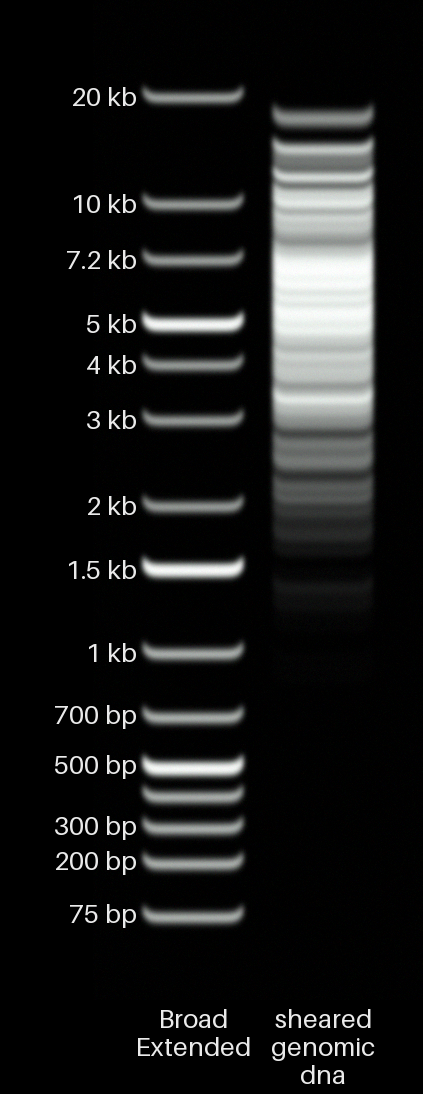
The lane shows the distribution of read lengths in the FASTQ. A file full of similarly sized reads produces a band; a wide range of read lengths produces a smear. Brightness is weighted by the number of bases, so longer reads contribute more DNA than shorter reads.
This is particularly useful for Nanopore and PacBio data. Bear in mind that library preparation and sequencing can favour some fragment sizes or truncate reads, so the FASTQ length distribution may not exactly match the DNA that went into the sequencer.
Put several FASTQs on one gel
For two or three files, add another --extra-fastq for each extra lane:
ultimate-virtual-gel sample_a.fastq.gz \
  --extra-fastq sample_b.fastq.gz \
  --extra-fastq sample_c.fastq.gz \
  --output comparison.png
For a larger gel, it is easier to put the filenames and lane names in a CSV file:
fastq_path,sample_name
~/data/brain.fastq.gz,Healthy brain
data/plasmid.fastq,Plasmid prep
/absolute/path/control.fastq.gz,Control
Then run:
ultimate-virtual-gel --samples-csv samples.csv --output all_samples.png
The rows appear on the gel from left to right, after the ladder. sample_name is optional; if it is blank, the FASTQ filename is used. A relative FASTQ path is read relative to the folder containing the CSV file.
For a single FASTQ, set the lane name directly:
ultimate-virtual-gel reads.fastq --sample-name "Healthy brain" --output brain.png
Simulate a restriction digest
Give the program a FASTA file containing one DNA sequence and add one --enzyme for each enzyme. Digest input is circular by default, which is convenient for plasmids. Add --linear if the FASTA represents linear DNA.
Two nearby sites for the same enzyme
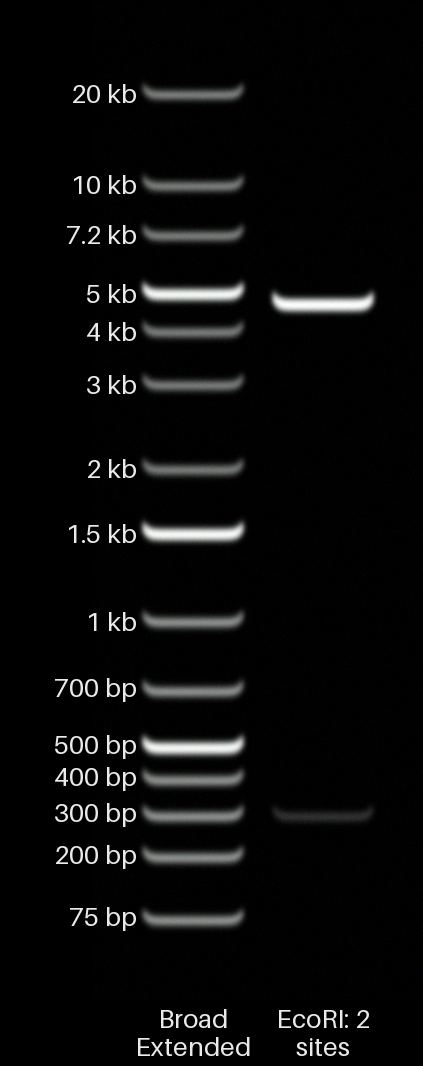
This example is a 5,000 bp circular plasmid with two EcoRI sites exactly 300 bp apart:
ultimate-virtual-gel \
  --digest-fasta examples/fasta/ecori_two_site_5000bp.fasta \
  --enzyme EcoRI \
  --gel-percent 1.0 \
  --output digest_ecori_two_sites.png
A complete digest produces a 4,700 bp fragment and a 300 bp fragment, demonstrating that the same enzyme can cut more than once. Every plasmid contributes one copy of each fragment, but the 300 bp fragment contains much less DNA mass than the 4,700 bp fragment, so its band is correspondingly fainter.
Single digest
ultimate-virtual-gel \
  --digest-fasta examples/fasta/demo_plasmid.fasta \
  --enzyme EcoRI \
  --gel-percent 1.0 \
  --output digest_ecori.png
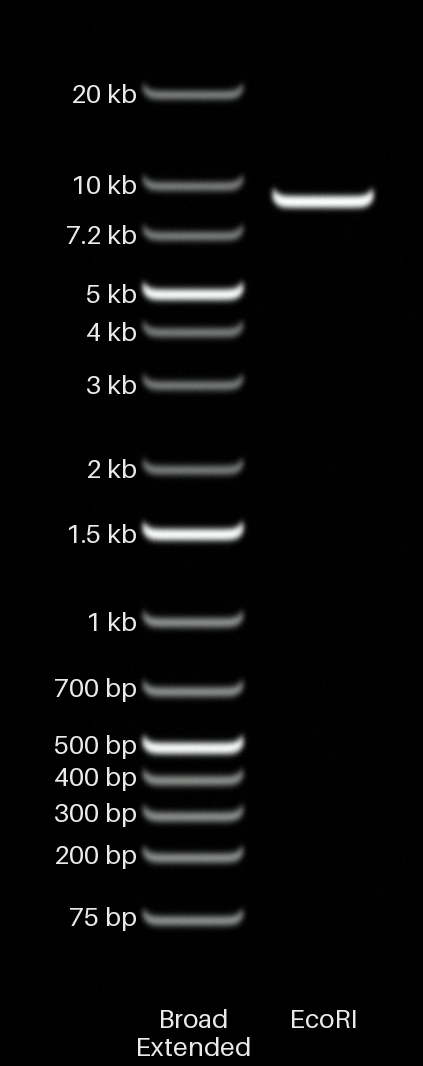
The example plasmid contains one EcoRI site, so the 9,018 bp plasmid becomes one 9,018 bp linear fragment.
Double digest
ultimate-virtual-gel \
  --digest-fasta examples/fasta/demo_plasmid.fasta \
  --enzyme EcoRI \
  --enzyme BamHI \
  --gel-percent 1.0 \
  --output digest_ecori_bamhi.png
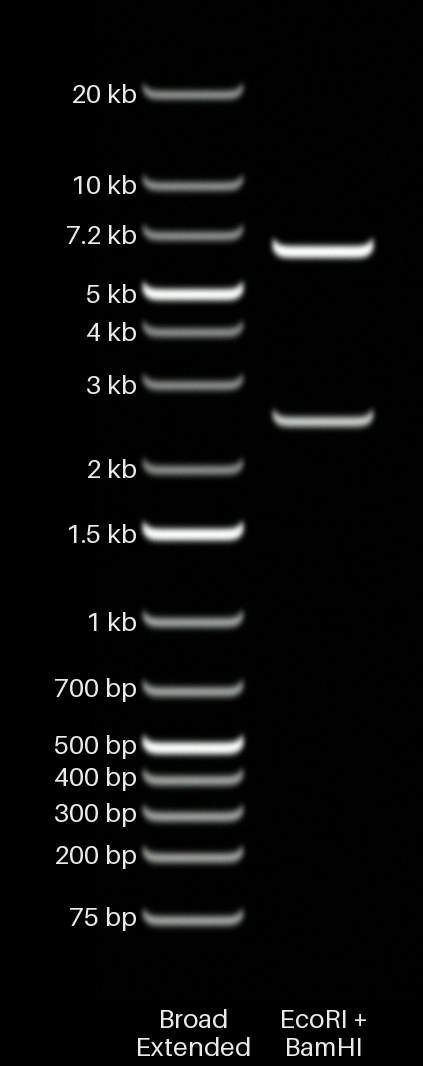
This gives 6,512 bp and 2,506 bp fragments.
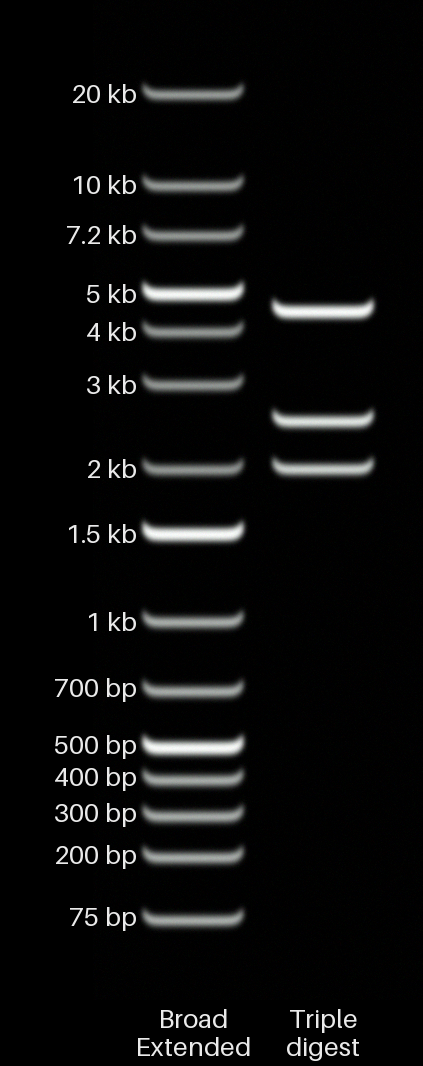
Triple digest
ultimate-virtual-gel \
  --digest-fasta examples/fasta/demo_plasmid.fasta \
  --enzyme EcoRI \
  --enzyme BamHI \
  --enzyme HindIII \
  --gel-percent 1.0 \
  --output digest_triple.png
This gives 4,506 bp, 2,506 bp, and 2,006 bp fragments.
| EcoRI | EcoRI + BamHI | EcoRI + BamHI + HindIII |
|---|---|---|
 |
 |
 |
Current limitation: digestion assumes unmethylated DNA and complete cutting at every recognition site. It does not yet model methylation blocking, partial digestion, star activity, or an enzyme that only cuts some of its sites.
Enzyme names are case-sensitive: use EcoRI, not ecori. The available names come from Biopython's REBASE-based enzyme list. Digests are circular unless you add --linear. --mass-ng sets the total amount of starting DNA loaded in the lane.
Useful options
Choose the gel, ladder, or run time yourself
ultimate-virtual-gel reads.fastq \
  --gel-percent 1.0 \
  --ladder broad-extended \
  --relative-run-time 1.5 \
  --output manual_setup.png
Supported gel percentages are 0.4–4.0%. Run ultimate-virtual-gel --list-ladders to see the ladder names and their usual run-time settings.
Filter or subsample a large FASTQ
ultimate-virtual-gel reads.fastq.gz \
  --min-length 1000 \
  --max-length 100000 \
  --min-quality 10 \
  --subsample 50000 \
  --seed 42 \
  --output filtered.png
Reads are filtered first and subsampled afterwards. Using the same FASTQ and seed selects the same reads again.
Compare lane brightness
By default, every lane is brightened separately so that faint samples remain easy to see. That is good for comparing band shapes, but it means brightness cannot be compared between lanes.
Use --normalization global if you want the same brightness scale across the whole gel:
ultimate-virtual-gel --samples-csv samples.csv \
  --mass-ng 150 \
  --normalization global \
  --output comparable_brightness.png
| Setting | What it does |
|---|---|
per-lane |
Default. Makes the pattern in each lane easy to see, but equal-looking lanes may not contain equal DNA mass. |
global |
Uses one brightness scale for every lane, so relative brightness can be compared. |
none |
Uses the detector output without rescaling it. |
--mass-ng is the amount of DNA assumed for each sample lane. The built-in ladder uses its own specified 500 ng load.
Make a clean diagram
ultimate-virtual-gel reads.fastq --clean --output clean_gel.png
--clean removes gel smiling, glow, grain, and photographic softening. It does not move the bands or change the mass calculations.
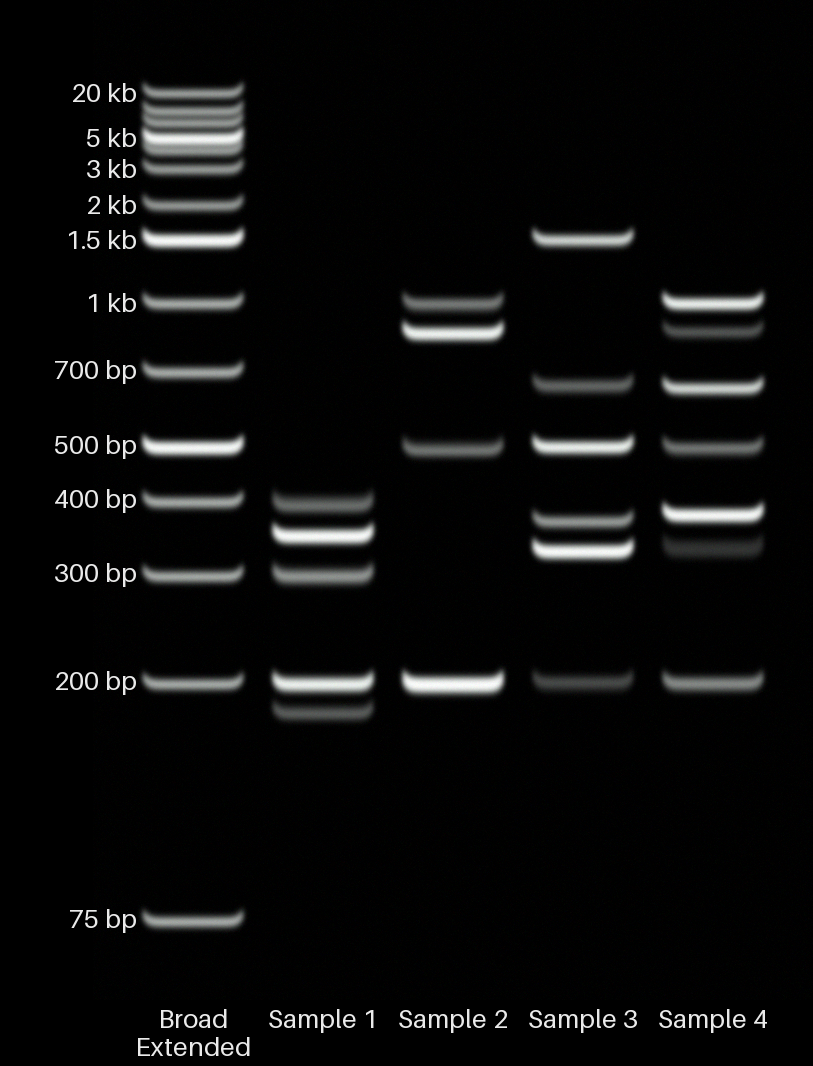
| Normal gel image | Clean diagram (--clean) |
|---|---|
 |
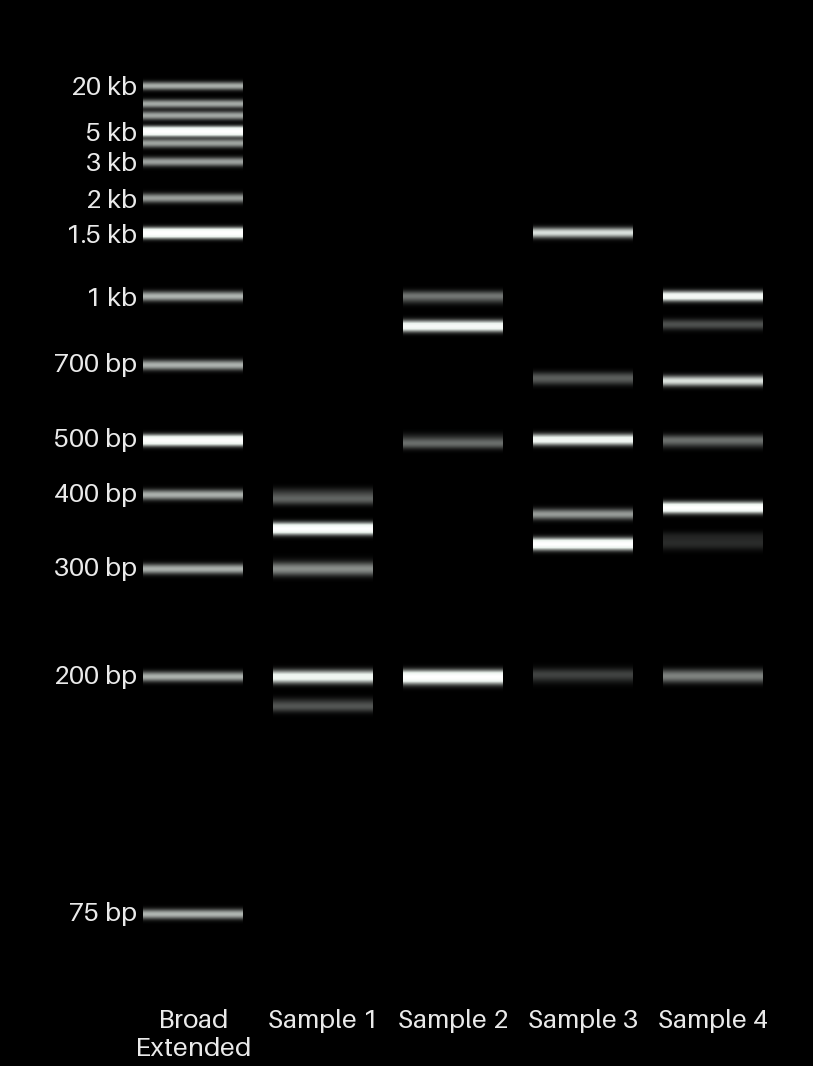 |
Both images use the same samples and calculated band positions. Only the visual treatment is different.
Show the wells and the full gel
ultimate-virtual-gel reads.fastq --no-crop --output full_gel.png
The normal view trims empty space and keeps the useful part of the ladder and sample in frame. --no-crop shows the full gel, including the loading wells.
Command reference
ultimate-virtual-gel FASTQ [options]
ultimate-virtual-gel FASTQ --extra-fastq FASTQ [--extra-fastq FASTQ ...] [options]
ultimate-virtual-gel --samples-csv SAMPLES.csv [options]
ultimate-virtual-gel --digest-fasta SEQUENCE.fasta --enzyme NAME [--enzyme NAME ...] [--linear] [options]
| Option | What it does |
|---|---|
-o, --output PATH |
Sets the output PNG filename. |
--samples-csv PATH |
Reads FASTQ filenames and lane names from a CSV file. |
--extra-fastq PATH |
Adds another FASTQ lane. Repeat it to add more lanes. |
--sample-name TEXT |
Sets the lane name when rendering one FASTQ. |
--digest-fasta PATH |
Reads the DNA sequence to digest from a FASTA file. |
--enzyme NAME |
Adds a restriction enzyme. Repeat it for a double or triple digest. |
--linear |
Treats digest DNA as linear. Digest input is circular by default. |
--circular |
Explicitly treats digest DNA as circular. This is already the default. |
--mass-ng NUMBER |
Sets the DNA loaded in each sample lane. Default: 150 ng. |
--min-length BP, --max-length BP |
Keeps reads within this length range. |
--min-quality Q |
Keeps reads at or above this mean Phred quality. |
--subsample N, --seed N |
Uses at most N reads; the seed makes the selection repeatable. |
--gel-percent NUMBER |
Sets the agarose percentage instead of choosing it automatically. |
--ladder NAME |
Sets the ladder instead of choosing it automatically. |
--relative-run-time NUMBER |
Multiplies the normal migration distance by this amount. |
--normalization per-lane|global|none |
Controls how lane brightness is scaled. |
--clean |
Removes smiling and photographic effects. |
--no-crop |
Shows the complete gel and loading wells. |
--list-ladders |
Lists the built-in ladders. |
The older script name still works:
python scripts/render_fastq.py reads.fastq --output gel.png
It runs the same command and is kept for compatibility with older uses of the project.
What gets chosen automatically?
Unless you override it, the program chooses:
- Agarose percentage. It finds the main size groups in each sample and chooses the gel expected to separate the closest groups. If the sample contains only one main band, it uses the usual working range for that fragment size.
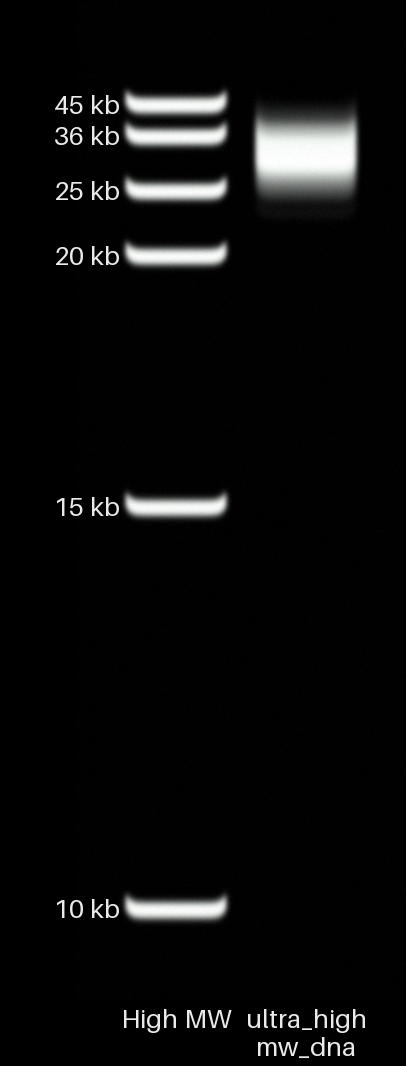
- DNA ladder. Broad Extended is the normal choice. Low Molecular Weight is used for predominantly sub-300 bp samples. High Molecular Weight is used when at least 80% of the sample's DNA mass is above 20 kb.
- Run time. Standard ladders use the normal 1× time. The High Molecular Weight ladder uses 5× so that its large bands have room to separate.
- Brightness. Exposure is set from all lanes together before the requested lane normalization is applied.
- Crop. The image includes the ladder and the middle 98% of every sample lane, with a small margin around them.
The chosen settings are printed before the image is saved. --gel-percent, --ladder, and --relative-run-time can each be changed independently.
How the simulation works
Migration
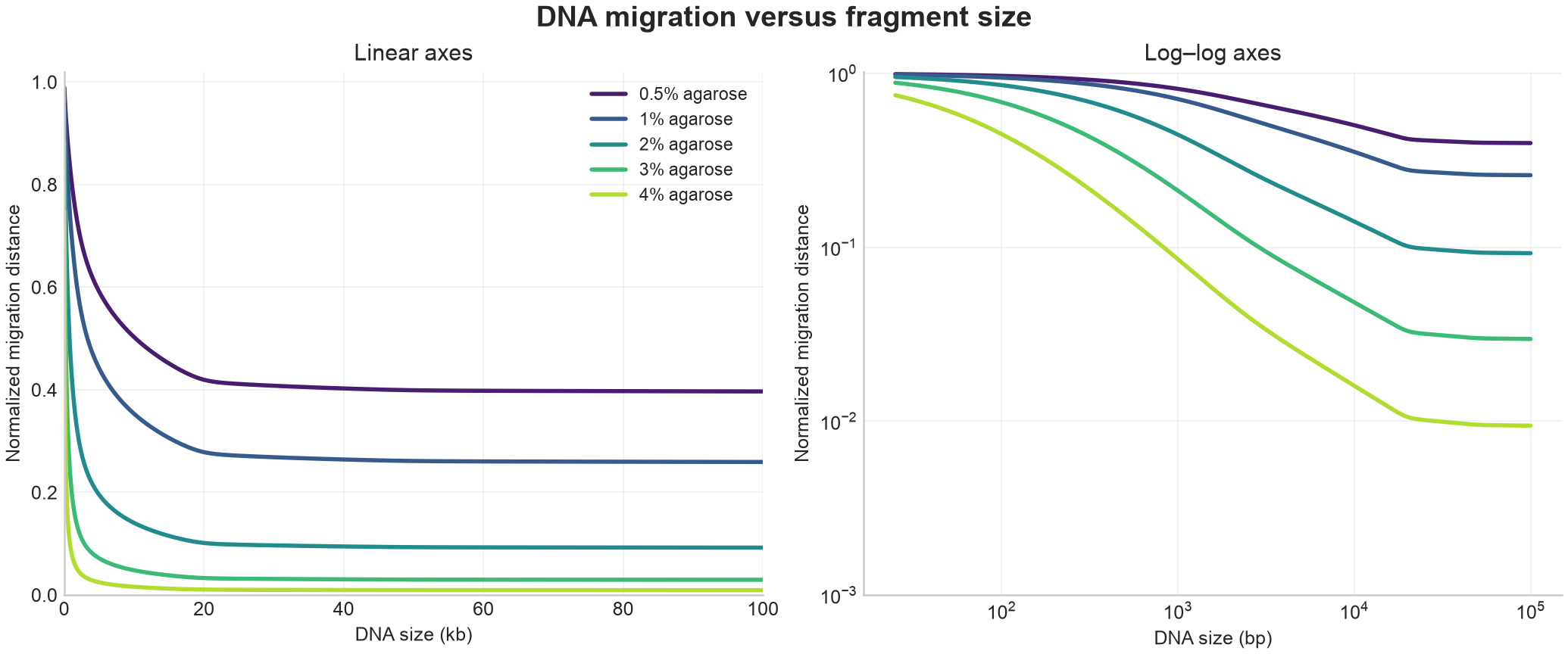
DNA length and gel percentage determine the migration distance. Run time scales that distance directly, while very large DNA is compressed near the wells to reproduce the limited separation normally seen at high molecular weights.
The same migration curve is shown on linear and log–log axes below. Lower-percentage gels move large fragments farther, while higher-percentage gels spread out smaller fragments more strongly.
Band brightness and shape
Brightness is based on DNA mass rather than the number of molecules. Fragments that land in the same place add together before the simulated camera response is applied, so a pile-up can produce a brighter or saturated band.
Bands spread through diffusion and broaden near the wells or at high loading. High-molecular-weight bands are slightly sharper. Both photographic and clean output use the same reduced band thickness so that nearby bands remain distinct. These effects are deliberately simple rather than a claim to model every physical detail of electrophoresis.
Photographic appearance
The default image adds the slight band rounding, fluorescence glow, grain, black level, and gel smiling commonly seen in gel photographs. These are added after migration and brightness have been calculated. --clean removes them without changing the result underneath.
Sizes outside the calibration
DNA outside the measured range is still shown, but its position is a prediction. The command tells you how many fragments were outside the calibration so that you know when to treat the exact position cautiously.
Built-in ladders
| Command name | Size range | Bands | When it is chosen automatically |
|---|---|---|---|
broad-extended |
75–20,000 bp | 15 | Most samples |
broad |
250–10,000 bp | 14 | Manual choice |
low-molecular-weight |
25–766 bp | 11 | Mostly below 300 bp |
high-molecular-weight |
10,000–45,000 bp | 6 | Mostly above 20 kb; 5× run time |
The built-ins use generic names and do not claim affiliation with a ladder manufacturer. Their JSON definitions live in calibration/ladders/, so the band sizes and relative brightness values are easy to inspect or replace.
More examples
Rebuild every example image with:
python scripts/regenerate_readme_renders.py
The same sample on different gels
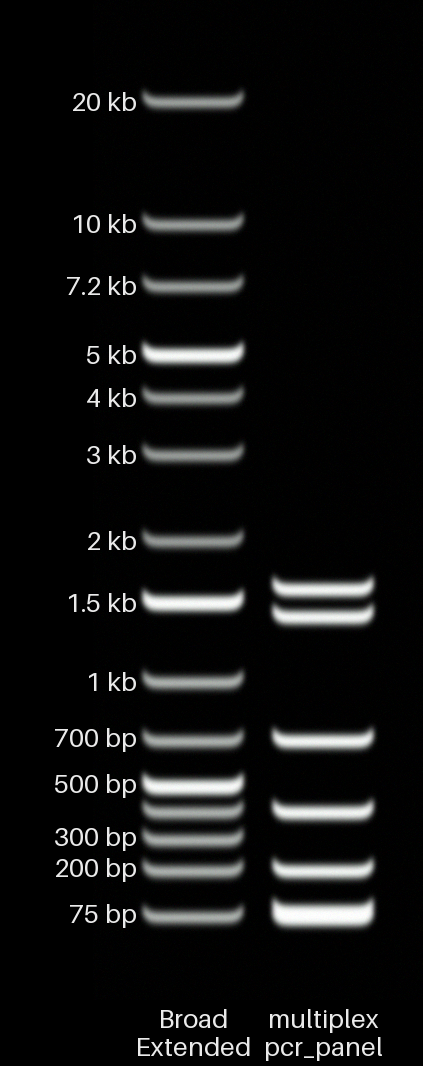
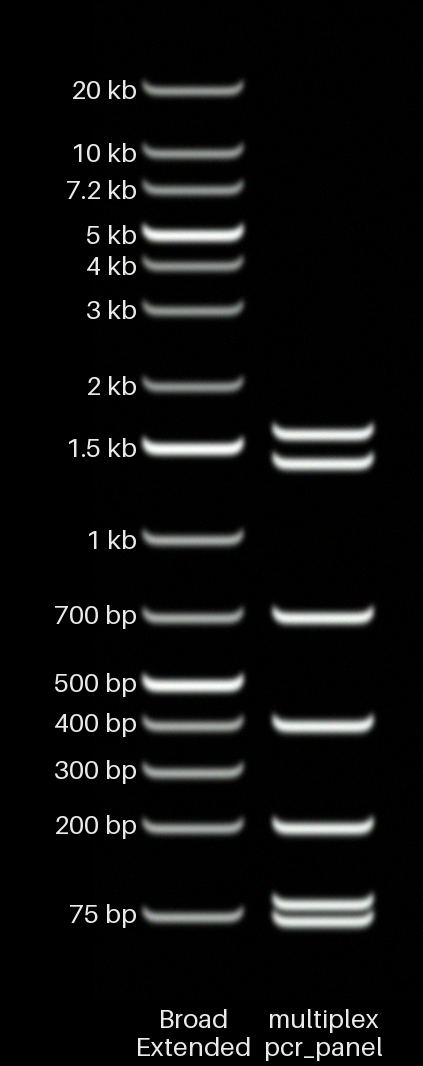
| 0.5% agarose | Automatically chosen 1.5% | 4.0% agarose |
|---|---|---|
 |
 |
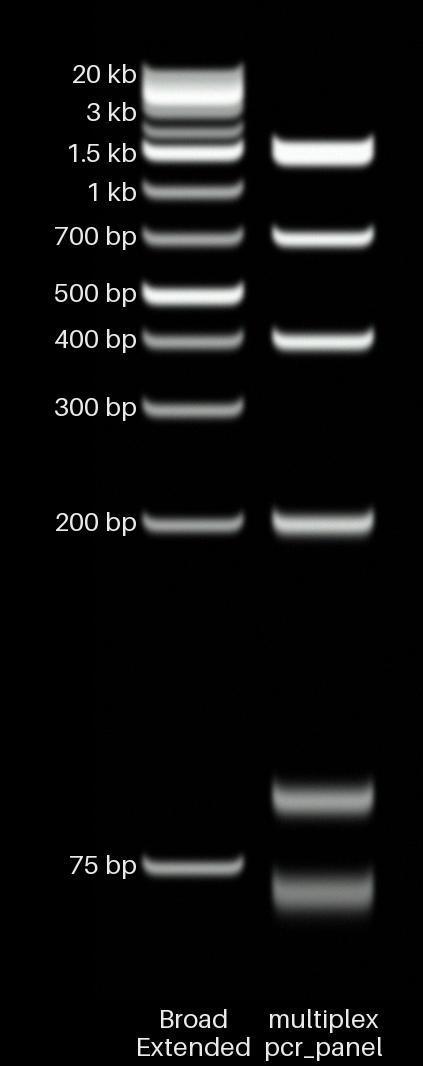 |
This sample contains close pairs at 70/90 bp and 1,400/1,600 bp. The 0.5% gel bunches the small pair together near the bottom; the 4% gel bunches the large pair together near the top. The automatically chosen 1.5% gel is a compromise that gives both pairs useful separation.
Different kinds of sample
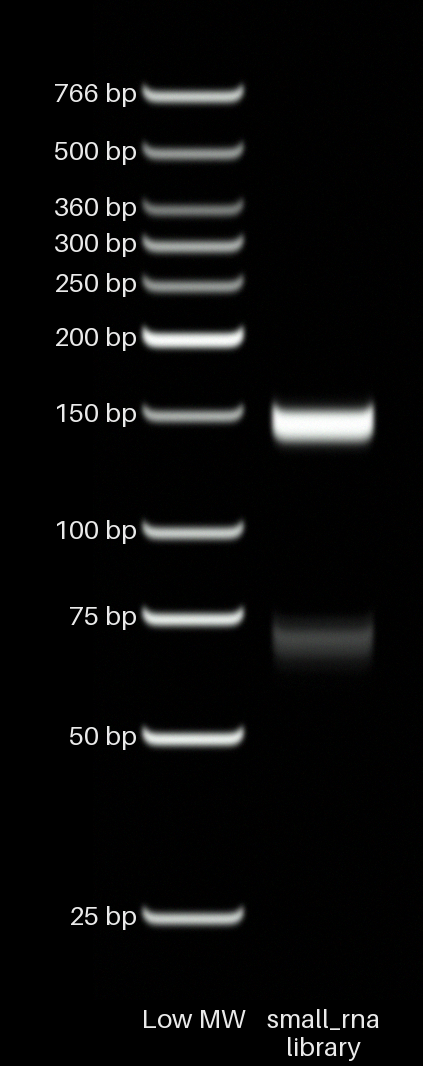
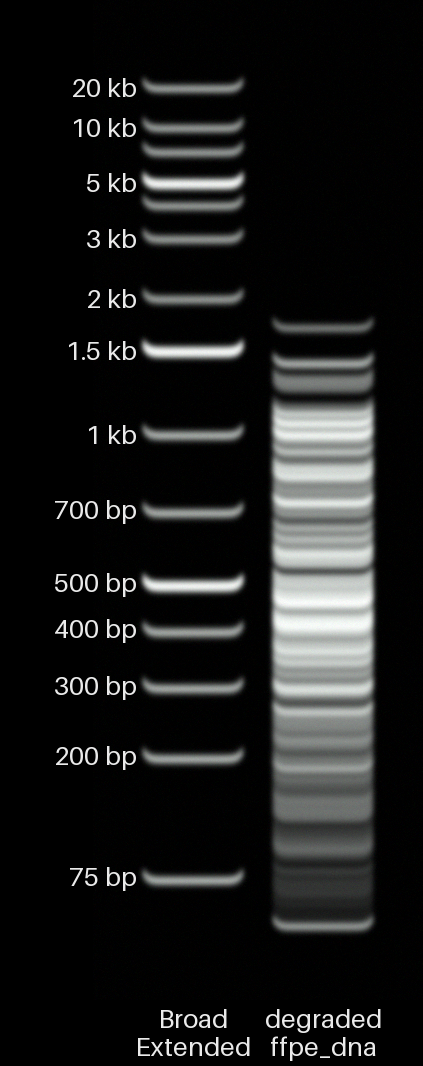
| Small RNA library | Sheared genomic DNA | Degraded FFPE DNA |
|---|---|---|
 |
 |
 |
| Four AAV-like samples | Single 650 bp amplicon | 22–45 kb DNA |
|---|---|---|
|
 |
 |
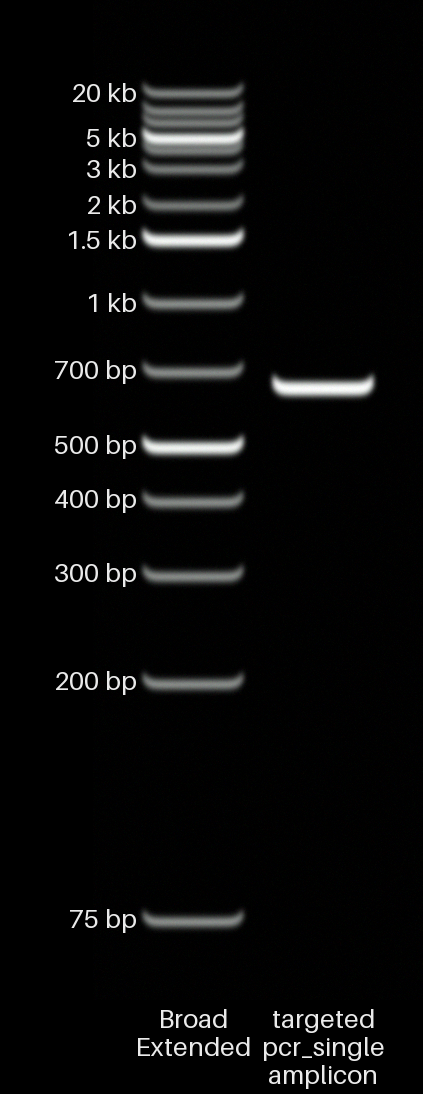
The single-amplicon sample uses 3% agarose because almost every read is about 650 bp. There are no nearby bands for the software to separate, so it chooses from the usual size ranges instead. A 3% gel covers a 650 bp product well; the supported 4% range is aimed at fragments below roughly 500 bp.
Megabase DNA
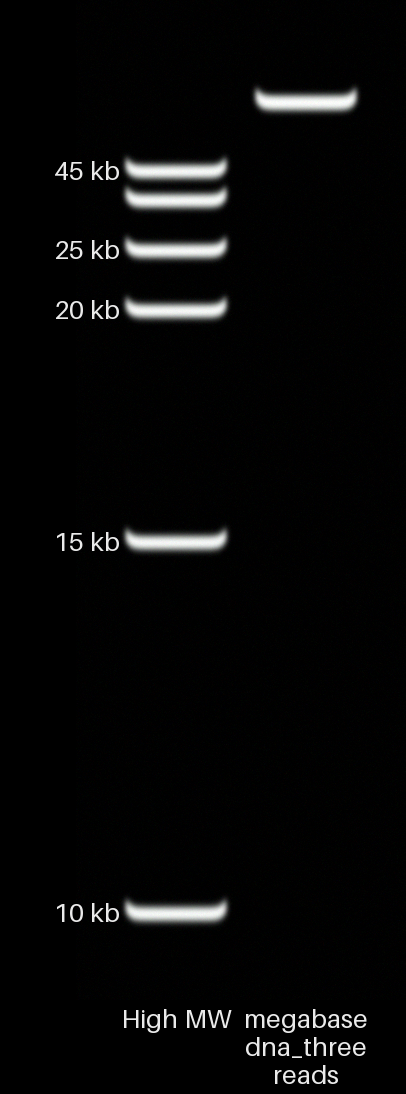
Three reads of 950 kb, 1.00 Mb, and 1.05 Mb form one unresolved band just above the 45 kb ladder band. Very large DNA moves only slightly farther than the largest ladder bands, as it does on a real agarose gel.
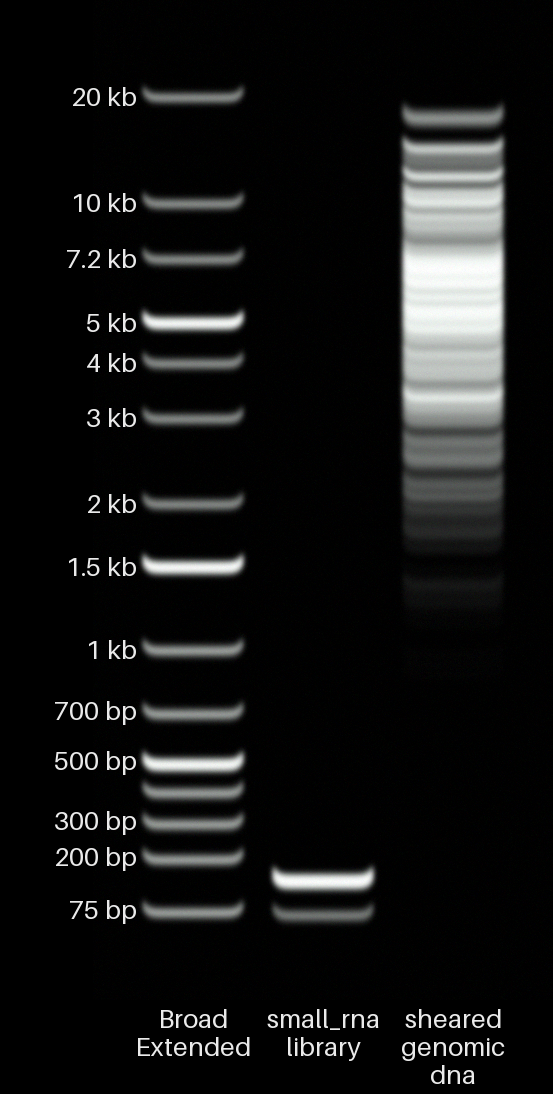
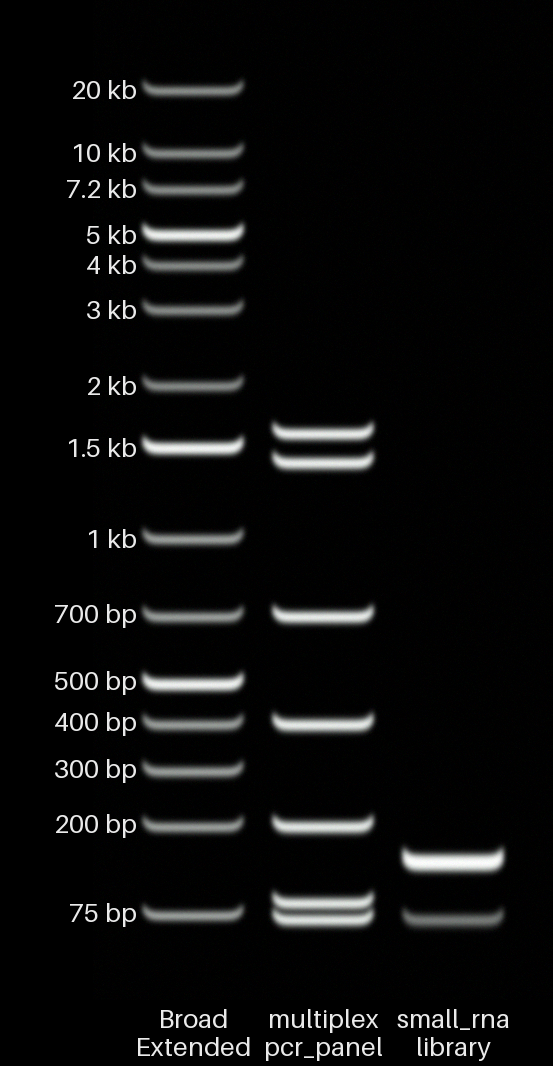
Mixed FASTQs
| Small RNA + sheared genomic DNA | Multiplex PCR + small RNA |
|---|---|
 |
 |
Using fragment tables from Python
The command-line tool accepts FASTQ files and restriction digests. If you already have a table of fragment sizes and abundances, it can be loaded through Python instead.
lane,size,molar_ratio,mass_ratio,label,topology
1,3200,1.0,,vector,linear
1,850,0.4,,insert,linear
2,4500,,1.0,plasmid,supercoiled
from ultimate_virtual_gel.core.parsing.csv_table import group_by_lane, parse_fragment_table

fragments = parse_fragment_table("fragments.csv")
lanes = group_by_lane(fragments)
lane and size (in bp) are required. The optional columns are molar_ratio, mass_ratio, label, and topology. Topology may be linear, nicked, circular, supercoiled, or unknown.
The installed command and project are called ultimate-virtual-gel. Python import names cannot contain hyphens, so Python code uses ultimate_virtual_gel internally.
Troubleshooting
ultimate-virtual-gel: command not found
Activate the virtual environment where you installed it. If that does not help, run python -m pip install -e . again from the repository folder. You can always use python scripts/render_fastq.py from that folder instead.
A large FASTQ is slow or uses too much memory
Use --subsample N --seed N. The program currently keeps the retained reads in memory while it builds the lane.
No reads remain after filtering
Compare --min-length, --max-length, and --min-quality with the input statistics printed by the command. One of the cutoffs has removed every read.
The command reports many fragments outside the calibration
Those fragment sizes are outside the measurements available for that gel. The image can still be useful, but the exact positions are predictions. Try a more suitable gel percentage or ladder, and interpret the positions qualitatively.
A restriction digest gives unexpected fragments
Check that the FASTA contains exactly one sequence and that the enzyme names have the correct capitalization. Digests are circular by default, so add --linear when appropriate. The current model assumes unmethylated DNA and complete digestion.
A filename contains spaces or commas
Quote shell paths that contain spaces: "My sample.fastq". In the sample CSV, put double quotes around any field containing a comma.
Scope
This is useful for visualization, teaching, planning an experiment, and seeing how a known fragment-length distribution might look. It is not a replacement for running a gel, and a FASTQ render should not be treated as a validated measurement of the DNA that was originally in the tube.
Development
Install the development dependencies and run the tests:
python -m pip install -e ".[dev]"
pytest -q
Try the installed command on a small example:
ultimate-virtual-gel examples/fastq/targeted_pcr_single_amplicon.fastq \
  --subsample 50 \
  --clean \
  --output /tmp/ultimate-virtual-gel-smoke.png
Rebuild the README images:
python scripts/regenerate_readme_renders.py
Repository layout
src/ultimate_virtual_gel/core/     migration, mass, parsing, and gel selection
src/ultimate_virtual_gel/render/   image layout, labels, photographic effects, and PNG export
calibration/migration/             migration model data
calibration/ladders/               built-in ladder definitions
examples/fastq/                    example FASTQs
examples/fasta/                    restriction-digest example
examples/renders/                  README images
scripts/                           helper scripts
tests/                             test suite
1 maintainer

Download files
Download the file for your platform. If you're not sure which to choose, learn more about installing packages.
Source Distribution
Built Distribution
Filter files by name, interpreter, ABI, and platform.
If you're not sure about the file name format, learn more about wheel file names.
Copy a direct link to the current filters
File details
Details for the file ultimate_virtual_gel-0.1.0.tar.gz.
File metadata
- Download URL: ultimate_virtual_gel-0.1.0.tar.gz
- Upload date:
- Size: 56.4 kB
- Tags: Source
- Uploaded using Trusted Publishing? No
- Uploaded via:
twine/7.0.0 CPython/3.11.5
File hashes
| Algorithm | Hash digest | |
|---|---|---|
| SHA256 |
49bf48fb1f03c14919815b388cab6b050fcb7eef263e7d244db7c4dc5369d3ab
|
|
| MD5 |
82a994c67ddf8bb01513eb838c6e205b
|
|
| BLAKE2b-256 |
bb700293694b0a59e3f90e9dd3c9d2f8fc9bc738c856a59b0b28fead449104b5
|
File details
Details for the file ultimate_virtual_gel-0.1.0-py3-none-any.whl.
File metadata
- Download URL: ultimate_virtual_gel-0.1.0-py3-none-any.whl
- Upload date:
- Size: 74.3 kB
- Tags: Python 3
- Uploaded using Trusted Publishing? No
- Uploaded via:
twine/7.0.0 CPython/3.11.5
File hashes
| Algorithm | Hash digest | |
|---|---|---|
| SHA256 |
7b1c0116e9a5b0bdb548044bd98553fb94965b836239ce20428613bd6456832f
|
|
| MD5 |
6491a978ccc1d1c7fff1294294619909
|
|
| BLAKE2b-256 |
91047104d623acee5abf1f71599251891126e56927c4854fae34e90205a2e2da
|







