
ultrasphere









Documentation: https://ultrasphere.readthedocs.io
Source Code: https://github.com/ultrasphere-dev/ultrasphere
Vilenkin–Kuznetsov–Smorodinsky (VKS) polyspherical (hyperspherical) coordinates in NumPy / PyTorch
Installation
Install this via pip (or your favourite package manager):
pip install ultrasphere[plot]
Usage
Spherical Coordinates ↔ Cartesian Coordinates
First import the module and create a spherical coordinates object.
>>> import ultrasphere as us
>>> from array_api_compat import numpy as np
>>> from array_api_compat import torch
>>> rng = np.random.default_rng(0)
>>> c = us.create_spherical()
Getting spherical coordinates from cartesian coordinates:
>>> spherical = c.from_cartesian(torch.asarray([1.0, 2.0, 3.0]))
>>> spherical
{'r': tensor(3.7417), 'phi': tensor(1.1071), 'theta': tensor(0.6405)}
Getting cartesian coordinates from spherical coordinates:
>>> c.to_cartesian(spherical)
{0: tensor(1.), 1: tensor(2.0000), 2: tensor(3.)}
Using various VKS polyspherical coordinates
>>> us.create_polar()
SphericalCoordinates(a)
>>> us.create_spherical()
SphericalCoordinates(ba)
>>> us.create_standard(3)
SphericalCoordinates(bba)
>>> us.create_standard_prime(4)
SphericalCoordinates(b'b'b'a)
>>> us.create_hopf(3)
SphericalCoordinates(ccaacaa)
>>> us.create_from_branching_types("cbab'a")
SphericalCoordinates(cbab'a)
>>> us.create_random(10, rng=rng)
SphericalCoordinates(cacccaaaba)
One can convert between Cartesian coordinates and VKS polyspherical coordinates in the same way as above.
The name of the spherical nodes and cartesian nodes can be obtained by:
>>> c = us.create_standard(5)
>>> c.s_nodes
['theta0', 'theta1', 'theta2', 'theta3', 'theta4']
>>> c.s_ndim
5
>>> c.c_nodes
[0, 1, 2, 3, 4, 5]
>>> c.c_ndim
6
"r" is a special node which represents the radius and is not included in s_nodes.
The definition and notation of VKS polyspherical coordinates follows [Cohl2012, Appendix B]. Following sections would also help understand the VKS polyspherical coordinates.
- [Cohl2012] Cohl, H. (2012). Fourier, Gegenbauer and Jacobi Expansions for a Power-Law Fundamental Solution of the Polyharmonic Equation and Polyspherical Addition Theorems. Symmetry, Integrability and Geometry: Methods and Applications (SIGMA), 9. https://doi.org/10.3842/SIGMA.2013.042
Drawing spherical coordinates using rooted trees (Vilenkin's method of trees)
Python
>>> c = us.create_from_branching_types("ccabbab'b'ba")
>>> us.draw(c)
(6.5, 3.5)
CLI
ultrasphere "ccabbab'b'ba"
Output:
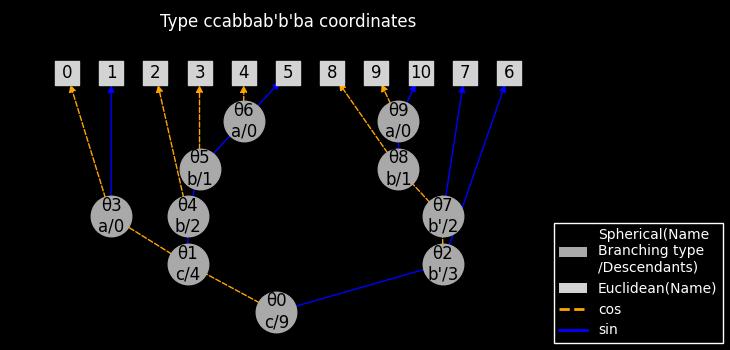
The image shows how Cartesian coordinates (leaf nodes) are calculated from spherical coordinates (internal nodes).
For example, $x_{10}$, corresponding to node 10, is a leaf node which ancestors are [θ0, θ2, θ7, θ8, θ9]. The edges which connect these nodes are named [sin, cos, cos, sin, sin], respectively. Thus, $x_{10}$ is calculated as:
$$ x_{10} = \sin \theta_0 \cos \theta_2 \cos \theta_7 \sin \theta_8 \sin \theta_9 $$
Integration over sphere using spherical coordinates
>>> c = us.create_spherical()
>>> f = lambda spherical: spherical["theta"] ** 2 * spherical["phi"]
>>> np.round(us.integrate(
...     c,
...     f,
...     False, # does not support separation of variables
...     10, # number of quadrature points
...     xp=np # the array namespace
... ), 5)
np.float64(110.02621)
Random sampling
Sampling random points uniformly from the unit ball:
>>> c = us.create_spherical()
>>> points_ball = us.random_ball(c, shape=(), xp=np, rng=rng)
>>> points_ball
array([0.12504754, 0.45095196, 0.32752147])
>>> np.linalg.vector_norm(points_ball)
np.float64(0.5711960026239531)
Sampling random points uniformly from the sphere (does not include interior points):
>>> points_sphere = us.random_ball(c, shape=(), xp=np, surface=True, rng=rng)
>>> points_sphere
array([-0.89670228, -0.44166441,  0.02928439])
>>> np.linalg.vector_norm(points_sphere)
np.float64(1.0)
References
- Barthe, F., Guédon, O., Mendelson, S., & Naor, A. (2005). A probabilistic approach to the geometry of the ? P n -ball. The Annals of Probability, 33. https://doi.org/10.1214/009117904000000874
Contributors ✨
Thanks goes to these wonderful people (emoji key):
This project follows the all-contributors specification. Contributions of any kind welcome!
Credits

This package was created with Copier and the browniebroke/pypackage-template project template.
The code examples in the documentation and docstrings are automatically tested as doctests using Sybil.
1 maintainer

Metadata
1 maintainer
Release files for ultrasphere 2.0.4
For a detailed explanation of source distributions (sdists) and built distributions (wheels), please see the package formats documentation.
Source distribution (sdist)
| File | Size | Uploaded | |
|---|---|---|---|
| ultrasphere-2.0.4.tar.gz | 26.8 kB | Details |
Built distribution (wheel)
| File | Interpreter | ABI | Platform | Reset |
|---|---|---|---|---|
| ultrasphere-2.0.4-py3-none-any.whl | Python 3 | none | any | Details |
Total release size: 50.6 kB
Release files / ultrasphere-2.0.4.tar.gz
| Download URL | ultrasphere-2.0.4.tar.gz |
|---|---|
| Size | 26.8 kB |
| Tags | Source |
|
SHA-256 checksum How to use checksums |
2ee55ffd9ee6dbae56c395c9dbb5874bef1fd1b5b5381be31a33be84480e1e26
|
|
BLAKE2b-256 checksum How to use checksums |
1ef34de10bb786c0cd06cb2b492128b59218de022d9e85b9da24053181ce5124
|
| Upload date | |
|
Uploaded using Trusted Publishing? What is trusted publishing? |
Yes |
| Uploaded via |
twine/6.1.0 CPython/3.13.7
|
Provenance
Provenance describes where a file came from. On PyPI, provenance is shared via attestations, which provide a verifiable record of the build or publishing details. View details, limitations and caveats.


PyPI Publish Attestation
PyPI verified that this artifact, at this checksum, originated from the publisher listed below.
Signed by GitHub Actions, verified by PyPI on Oct 31, 2025.
Transparency logRelease files / ultrasphere-2.0.4-py3-none-any.whl
| Download URL | ultrasphere-2.0.4-py3-none-any.whl |
|---|---|
| Size | 23.8 kB |
| Tags | Python 3 |
|
SHA-256 checksum How to use checksums |
7d6521ec107051498fb2fbf64a29691df0f82dd634c5efaa45946d0c0dbb126b
|
|
BLAKE2b-256 checksum How to use checksums |
e01ccdeb8820a6c517c4e757c7b6f91ce3a78d2c81c64243715cf4147e8844b0
|
| Upload date | |
|
Uploaded using Trusted Publishing? What is trusted publishing? |
Yes |
| Uploaded via |
twine/6.1.0 CPython/3.13.7
|
Provenance
Provenance describes where a file came from. On PyPI, provenance is shared via attestations, which provide a verifiable record of the build or publishing details. View details, limitations and caveats.
PyPI Publish Attestation
PyPI verified that this artifact, at this checksum, originated from the publisher listed below.
Signed by GitHub Actions, verified by PyPI on Oct 31, 2025.
Transparency log













