
                                 _   _ __  __   _
                                | | | |  \/  | /_\
                                | |_| | |\/| |/ _ \
                                 \___/|_|  |___/ \_\
Unified Memory Architecture
UMA is a memory and context runtime SDK for developers building AI agents. It ingests data and exposes six public lane_filter lanes. The planner also uses profile (a semantic-store projection) and optional graph, for eight architectural lane names in total. UMA manages memory only — your application owns prompts, tool use, reasoning, and final responses.
UMA does not generate assistant replies and does not perform agent reasoning. Developers bring their own LLM or agent loop and use UMA strictly for memory management.
🌐 Website: uma.ai-mem-engineering.com
📄 Full docs: uma.ai-mem-engineering.com/docs.html
✨ Why UMA
- 🧠 Six public filter lanes, eight architectural lane names — the public
lane_filtervalues are working memory, raw, semantic, episodic, procedural, and wiki; the planner also uses profile and optional graph - 🪶 Embedded storage by default — SQLite + LanceDB require no separate storage service. Configure a local or remote LLM and embedding provider for model-backed operations.
- 🛡️ Security at the storage boundary — every artifact is owner-scoped, trust-scored, and content-hashed before it touches storage, and injection-scanned at every write.
- 🔍 Evidence-backed retrieval — every fact carries provenance back to source chunks. No silent degradation into "vibes-based" RAG.
- 🏢 Multi-agent, multi-user — every artifact is owned by an agent or a user, and that ownership is enforced in SQL and pushed into the vector engine before the k-nearest cap, not applied by application-layer convention.
🏛️ Architecture
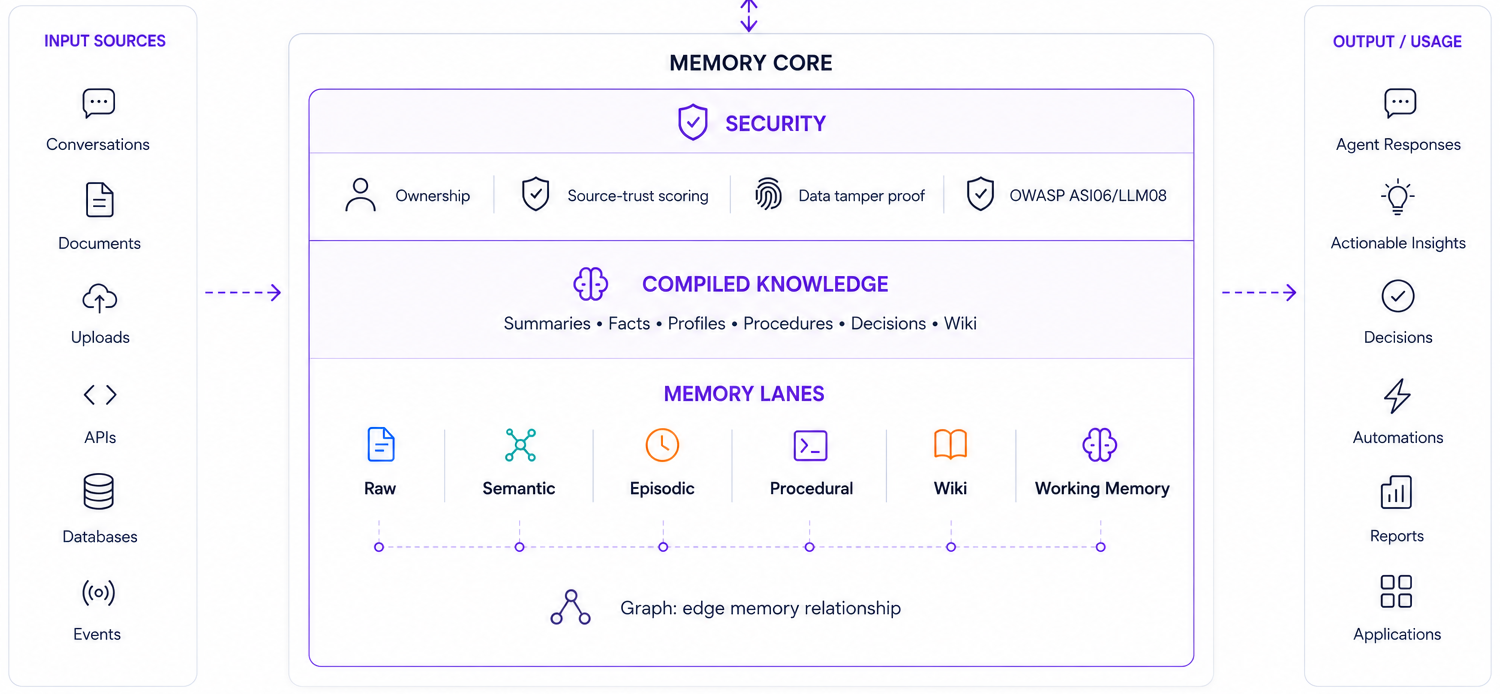
UMA is a thin SDK around three concerns: ingest (data flows in, gets scanned, chunked, embedded), storage (SQLite is authoritative, LanceDB is a rebuildable accelerator), and retrieval (a canonical pipeline through candidate discovery, fusion, trust-aware ranking, and snippet rendering). Every write boundary scans for prompt injection; every read boundary enforces agent/user ownership and filters quarantined records.
For the full architectural model — invariants, pipelines, and the vector isolation contract — see ARCHITECTURE.md.
🛡️ Security
- Isolation — every artifact carries
owner_type/owner_id, enforced on every read. LanceDB pushes the filter into the engine before the k-nearest cap, so one busy owner can't crowd out another. - Injection scanning — every write is scanned. High severity quarantines the artifact; quarantined records are excluded from retrieval in SQL.
scan_user_inputexposes the same scanner as an advisory pre-LLM gate. - Integrity — SHA-256 on every artifact;
verify_integrityre-checks and quarantines on mismatch. - Ingest limits — MIME checks reject executables, size and page caps bound resource use, HTML/Markdown is sanitized.
The scanner is a regex pre-filter, not a classifier: it catches common phrasings and will miss novel or obfuscated ones. Quarantine and isolation are what limit the damage when it does. If you need adversarial-grade filtering, put a classifier in front of UMA.
Threat model, what UMA does not defend against, and the OWASP/ASI mappings: SECURITY.md.
Quickstart
pip install uma-mem
import asyncio

from uma import UMAMemory


async def main():
    # Pass the path to your uma.yaml — any accessible location works.
    # One instance serves every agent and every user in the process.
    memory = UMAMemory.from_yaml("/path/to/your/uma.yaml")

    user_message = "..."   # your inbound turn

    # agent_id and user_id are required on every call.
    # tenant_id is optional and defaults to "default".
    context = await memory.retrieve_context(
        query_text=<user_message>,
        agent_id=<agent-abc>,
        user_id=<user-123>,
        session_id=<session-xyz>,
    )

    reply = await your_llm(context, user_message)   # you own this

    await memory.process_turn(
        agent_id=<agent-abc>,
        user_id=<user-123>,
        user_msg=<user_message>,
        assistant_reply=<reply>,
        session_id=<session-xyz>,
    )


asyncio.run(main())
That's the whole loop. For the full agent integration pattern — pre-LLM injection scanning, error handling, rate limiting — ask your coding assistant (see below).
If a storage adapter needs credentials, uma.yaml also accepts an optional secrets: block; the reference shape lives in .claude/skills/configure.md.
Command-line interface
Installing UMA provides both the uma executable and the equivalent
python -m uma.cli entry point. Global options precede the command:
uma --config /path/to/uma.yaml --format json config validate
--config falls back to UMA_CONFIG, then ./uma.yaml and
./config/uma.yaml. --format accepts text (default) or json.
| Command | Purpose |
|---|---|
uma version |
Show the installed UMA version without loading a runtime. |
uma config validate / config show |
Validate configuration or show it with secret values redacted. |
uma doctor --offline |
Check configuration and local dependencies without creating databases or initializing providers. |
uma doctor / uma health |
Initialize UMA and call health_check(). Verifies initialization, dimensions, stores, vectors, graph state, and that the configured LLM and embedding providers are reachable. UMA requires both to function, so an unreachable provider is reported as an error. |
uma security scan TEXT |
Run the injection scanner. Use exactly one of TEXT, --file, or --stdin. |
uma dev check |
Run predefined quick or full development checks without installing tools or applying fixes. |
uma retrieve context / retrieve memory |
Run agent/user-scoped retrieval and report the retrieval-audit write effect. |
uma ingest document / turn |
Run the corresponding scoped public ingestion API. |
uma audit list / quarantine list |
List records within one resolved tenant or durable-owner scope. |
uma quarantine reinstate / purge |
Mutate exactly one tenant/owner/lane/record target. Purge requires --reason. |
uma index rebuild-vectors / rebuild-derived |
Rebuild all records in one exact tenant/owner/lane scope. |
uma integrity enforce |
Verify one exact record and quarantine it if its stored hash mismatches. |
Request scope uses --tenant, --agent, --user, --session,
--workspace, and --request-id. Durable owner scope is independent and
uses --tenant, --owner-type, and --owner-id. Tenant defaults to
UMA_TENANT_ID, then default; administrative owner scope is never inferred
from request scope.
Reinstate, purge, index rebuilds, and integrity enforcement print the exact
resolved target to stderr and require confirmation. Non-interactive use must
pass --yes. Their JSON results include an effects list describing possible
writes.
MCP client support
UMA ships an MCP server so any MCP-compatible AI client — coding agents, chat
clients, and cloud connectors — can talk to your memory layer. The server is a
thin adapter over UMA's public API; every tool call goes through the same
(tenant_id, user_id) scope resolution as any other caller.
Install with the mcp optional extra:
pip install 'uma-mem[mcp]'                # stdio + HTTP with bearer tokens
pip install 'uma-mem[mcp,oauth]'          # + OAuth 2.1 for ChatGPT
The uma-mcp binary is now on PATH. Point it at your uma.yaml:
uma-mcp                                    # stdio (Claude Code, Codex, ...)
uma-mcp --http --port 3131                 # HTTP + opaque bearer tokens
uma-mcp --http --port 3131 \
        --oauth-issuer https://your-idp/   # HTTP + OAuth 2.1 JWT (ChatGPT)
        --oauth-audience https://your-brain/mcp
Tools exposed: retrieve_context, retrieve_memory, process_turn,
ingest_document, health_check. Every response is well-formed JSON matching
the corresponding uma.common.results model.
Supported clients
| Client | Transport | Doc |
|---|---|---|
| Claude Code | stdio | STDIO_CLIENTS.md |
| Codex | stdio | STDIO_CLIENTS.md |
| Cursor | stdio | STDIO_CLIENTS.md |
| Windsurf | stdio | STDIO_CLIENTS.md |
| Claude Desktop (local bridge) | stdio | STDIO_CLIENTS.md |
| Claude Desktop (remote connector) | HTTP + bearer | DEPLOY.md |
| Claude Cowork | HTTP + bearer | DEPLOY.md |
| Perplexity | HTTP + bearer / OAuth | DEPLOY.md / CHATGPT.md |
| ChatGPT | HTTP + OAuth 2.1 | CHATGPT.md |
Bearer tokens are opaque, SHA-256-hashed in a local SQLite store, and issued
via uma auth create <label> --user USER [--tenant TENANT]. OAuth 2.1 mode
points UMA at any RFC 8414-compliant IdP (Auth0, Microsoft Entra ID, Google,
Okta, Keycloak, Authentik) — UMA acts as a pure resource server per the
current MCP spec direction and never issues tokens itself.
Security posture
Every HTTP request resolves to an explicit (tenant_id, user_id) before it
touches the memory layer — the same DAT invariant every other UMA call
enforces. Tokens are never logged; only their short token_id handle appears
in server logs. Bearer plaintext is shown exactly once at issue time by
uma auth create and is not recoverable from the store. JWT verification
uses PyJWT with an explicit RS256/ES256 algorithm allowlist — HS256 is
rejected to close the algorithm-confusion attack.
Full model in docs/mcp/DEPLOY.md (bearer / cloud
clients) and docs/mcp/CHATGPT.md (OAuth 2.1 recipe
with per-IdP flag sets).
Testing and quality gates
The default suite is hermetic: it uses fake LLM and embedding providers, never contacts a model service, and is safe to run anywhere.
pip install -e '.[dev]'
python -m pytest -q
Model-dependent quality is measured separately by two opt-in gates, so CI never
depends on a model being available. Both require a local Ollama and are skipped
unless RUN_E2E=1 is set.
| Gate | Measures | Published baseline |
|---|---|---|
test_fact_extraction_quality.py |
How much the extractor gets out of a passage | micro precision 0.2500, micro recall 0.3333 |
test_retrieval_quality.py |
Whether retrieve_context returns the right source pages |
r-precision 0.7353, recall@3 0.9118 |
pip install -e '.[dev,e2e]'
RUN_E2E=1 python -m pytest tests/e2e -q -s
Each gate publishes a machine-readable metrics line and enforces thresholds pinned just below its measured baseline, so a regression fails the run without the threshold implying the current number is good. The extraction baseline in particular is low, and it is published as-is.
These numbers are narrow claims. Each covers one small corpus against one
small model — qwen2.5:3b, plus nomic-embed-text for retrieval. Read
tests/e2e/README.md before citing either — it records
the corpora, the gold methodology, and specifically what each metric does and
does not show, including why retrieval recall is near-saturated on a corpus this
size and why fixed-cutoff precision is not reported.
Retrieval and extraction quality are separate from the injection scanner's evaluation status, described under Security by Design above. Neither gate retires that claim.
🤖 Living Docs for AI Assistants
You shouldn't have to read tons of documentation to use UMA. Ask your coding agent instead.
UMA ships nine Agent Skills under .claude/skills/. They're structured markdown files with YAML frontmatter that Claude Code (and any Agent Skills-compatible assistant) automatically loads as context when you ask questions about the project. No setup. No @ mentions. Just ask:
"How do I integrate UMA into my chatbot?" →
agent-loop.mdloads — end-to-end pattern with code
"What happens when a user sends a prompt injection?" →
security.md+quarantine.mdload — full flow from scan to storage
"How do I write a custom vector backend?" →
vector-contract.mdloads — the contract, atomicity, score normalization
"How do I filter by lane?" →
lanes.mdloads — the six public filter lanes plus the profile and optional graph views
"How does fact promotion work?" →
promotion.mdloads — agent profiles, eligibility gates, scope changes, and provenance
"My YAML — can you help me configure Anthropic as the LLM?" →
configure.mdloads — full YAML reference
Other docs:
For the architectural deep dive, see ARCHITECTURE.md. For everything else, ask your assistant.
This repository is licensed under the Apache-2.0 License.
1 maintainer

Metadata
1 maintainer
Release files for uma-mem 0.2.1
For a detailed explanation of source distributions (sdists) and built distributions (wheels), please see the package formats documentation.
Source distribution (sdist)
| File | Size | Uploaded | |
|---|---|---|---|
| uma_mem-0.2.1.tar.gz | 553.8 kB | Details |
Built distribution (wheel)
| File | Interpreter | ABI | Platform | Reset |
|---|---|---|---|---|
| uma_mem-0.2.1-py3-none-any.whl | Python 3 | none | any | Details |
Total release size: 1.0 MB
Release files / uma_mem-0.2.1.tar.gz
| Download URL | uma_mem-0.2.1.tar.gz |
|---|---|
| Size | 553.8 kB |
| Tags | Source |
|
SHA-256 checksum How to use checksums |
c85aac1ddda9abfeef2b5950214c9fb05d43488406ee05021c793b6960203a12
|
|
BLAKE2b-256 checksum How to use checksums |
67bc2f0c608001081330511ab8cdae78ccf2fc6f97d6aa41a1060330547e3330
|
| Upload date | |
|
Uploaded using Trusted Publishing? What is trusted publishing? |
Yes |
| Uploaded via |
twine/7.0.0 CPython/3.13.14
|
Provenance
Provenance describes where a file came from. On PyPI, provenance is shared via attestations, which provide a verifiable record of the build or publishing details. View details, limitations and caveats.


PyPI Publish Attestation
PyPI verified that this artifact, at this checksum, originated from the publisher listed below.
Signed by GitHub Actions, verified by PyPI on Aug 20, 2026.
Transparency logRelease files / uma_mem-0.2.1-py3-none-any.whl
| Download URL | uma_mem-0.2.1-py3-none-any.whl |
|---|---|
| Size | 454.7 kB |
| Tags | Python 3 |
|
SHA-256 checksum How to use checksums |
012f9bea40e2f92315239d661a11044447873b6f1eb7ceb05983631f283d65dc
|
|
BLAKE2b-256 checksum How to use checksums |
e5551798b52647ee6d2b975d00c41d898c839fb37e4df02e71e315c24e3c9173
|
| Upload date | |
|
Uploaded using Trusted Publishing? What is trusted publishing? |
Yes |
| Uploaded via |
twine/7.0.0 CPython/3.13.14
|
Provenance
Provenance describes where a file came from. On PyPI, provenance is shared via attestations, which provide a verifiable record of the build or publishing details. View details, limitations and caveats.
PyPI Publish Attestation
PyPI verified that this artifact, at this checksum, originated from the publisher listed below.
Signed by GitHub Actions, verified by PyPI on Aug 20, 2026.
Transparency log












