
UMAP-JSONL
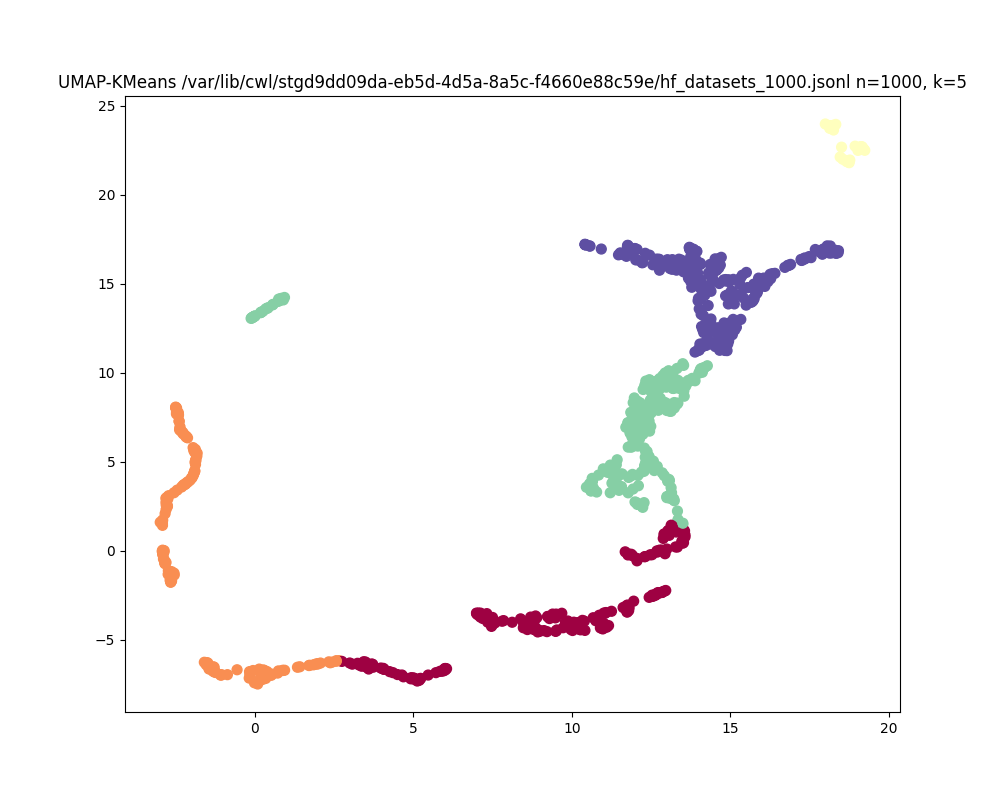
UMAP-JSONL is a command-line tool for generating UMAP plots and KMeans clustering from JSONL data files. This tool leverages UMAP for dimensionality reduction and KMeans for clustering, producing customizable visualizations in PNG format.
Features
- UMAP Visualization: Create 2D UMAP plots from JSONL data.
- KMeans Clustering: Apply KMeans clustering with a configurable number of clusters.
- Customizable Plot Size: Set the figure size for your output plot.
- Flexible Command-Line Interface: Easily configure parameters and specify input/output files.
Installation
You can install UMAP-JSONL using pip:
pip install umap-jsonl
Usage
To generate a UMAP plot with KMeans clustering, use the following command:
umap-jsonl input_file <input_file> --output_file <output_file> --num_results <num_results> --n_neighbors <n_neighbors> --min_dist <min_dist> --n_components <n_components> --n_clusters <n_clusters> --plot_size <width> <height>

Command-Line Arguments

    input_file: Path to the JSONL input file.
    --output_file: Path to the output PNG file (default: output.png).
    --n_neighbors: Number of neighbors for UMAP (default: 15).
    --min_dist: Minimum distance for UMAP (default: 0.1).
    --n_components: Number of components for UMAP (default: 2).
    --n_clusters: Number of clusters for KMeans (default: 3).
    --plot_size: Size of the output plot in inches (default: 8,6). Provide width and height separated by a comma.
Basic usage, provide a .jsonl file as a positional argument
umap-jsonl tests/hf_datasets_100000.jsonl
Advanced usage, set details of umap algorithm, change plot size, etc.
umap-jsonl --input_file data.jsonl --output_file my_plot.png --num_results 10 --n_neighbors 15 --min_dist 0.2 --n_components 2 --n_clusters 4 --plot_size 10 8
Development
To contribute to UMAP-JSONL, clone the repository and install the development dependencies:
git clone https://github.com/david4096/umap-jsonl.git
cd umap-jsonl
pip install -e .
Running Tests
To run tests, use:
python -m unittest discover -s tests
License
This project is licensed under the MIT License - see the LICENSE file for details. Contact
For any questions or issues, please contact David Steinberg at your.email@example.com.
1 maintainer

Metadata
1 maintainer
Release files for umap-jsonl 0.1.0
For a detailed explanation of source distributions (sdists) and built distributions (wheels), please see the package formats documentation.
Source distribution (sdist)
| File | Size | Uploaded | Provenance | |
|---|---|---|---|---|
| umap_jsonl-0.1.0.tar.gz | 4.5 kB | Without provenance | Details |
Built distribution (wheel)
| File | Interpreter | ABI | Platform | Reset |
|---|---|---|---|---|
| umap_jsonl-0.1.0-py3-none-any.whl | Python 3 | none | any | Details |
Total release size: 9.6 kB
Release files / umap_jsonl-0.1.0.tar.gz
| Download URL | umap_jsonl-0.1.0.tar.gz |
|---|---|
| Size | 4.5 kB |
| Tags | Source |
|
SHA-256 checksum How to use checksums |
042d8b776d672b1ee7f3d084a46637086118d4a570e02bc06cfd81b518d0e11a
|
|
BLAKE2b-256 checksum How to use checksums |
3d46f55d877be8a440974bbfe0c66397290bedc7e7a5d95ea77997308985f9b5
|
| Upload date | |
|
Uploaded using Trusted Publishing? What is trusted publishing? |
No |
| Uploaded via |
twine/5.1.1 CPython/3.9.19
|
Release files / umap_jsonl-0.1.0-py3-none-any.whl
| Download URL | umap_jsonl-0.1.0-py3-none-any.whl |
|---|---|
| Size | 5.1 kB |
| Tags | Python 3 |
|
SHA-256 checksum How to use checksums |
67132869aca6d915d9bd19d5e4371c09e8094864ee50b9471c4973aa42b664a4
|
|
BLAKE2b-256 checksum How to use checksums |
3b499e3d5de4b5047cfb7fb0994ca1d2f1024746809d1c68af59afa79396cb18
|
| Upload date | |
|
Uploaded using Trusted Publishing? What is trusted publishing? |
No |
| Uploaded via |
twine/5.1.1 CPython/3.9.19
|
Security for umap-jsonl 0.1.0
Provenance
Provenance describes where a file came from. On PyPI, provenance is shared via attestations, which provide a verifiable record of the build or publishing details. View details, limitations and caveats.
No provenance found
None of the files in this release were uploaded with provenance metadata.
A note on package security
PyPI is a repository for distributing packages, not a service for auditing them. While third-party security researchers and our staff do their best to detect and remove malicious packages, PyPI cannot guarantee the quality, security or suitability of any given package.
To learn more about protecting yourself from malicious actors, visit our package security documentation.













