
umber
umber is a plotting library for Python with a rendering core written in Rust. It draws line, step, scatter, area, stacked area, bar, histogram, box, violin, bubble, error bar, band, stem and reference-line charts, alone or on a grid of panels with shared axes, with careful typography, three built-in themes, and PNG or SVG output.
- Fast on large data. Rendering runs in Rust: a 1,000,000-point line renders to PNG in about 55 ms, and a 100,000-point scatter in about 50 ms (see Performance).
- Explicit. Every option is a typed value (
Color,Size,Dash,TickFormat, …). There are no format strings, no positional style arguments and no silent conversions. - Fails fast, pointing at the problem. Invalid input raises at the call that caused it, with a message, a hint and the offending argument highlighted in the traceback.
- Statically typed. Category and numeric axes are distinct types: calling
baron a numeric axes is reported by pyright and mypy before the code runs. - Bundled fonts. Text in the bundled fonts' coverage looks the same on every machine; other characters fall back to system fonts.
Installation
pip install umber
umber requires Python 3.12 or newer and NumPy 2. Prebuilt wheels are published for Linux (x86_64 and aarch64), macOS (Apple silicon and Intel) and Windows (x64). On other platforms pip builds from source, which needs Rust 1.88 or newer.
Quick start
import numpy as np
import umber as ub

t = np.linspace(0, 10, 1_000)
ub.line(t, np.sin(t), label="sin").title("A first chart").figure.save_png("chart.png")
The quick functions ub.line, ub.scatter, ub.bar and ub.hist create a figure with one axes and return the axes, so the rest of the chart is built by chaining.
Building a figure
import numpy as np
import umber as ub

rng = np.random.default_rng(7)
days = np.arange(60)
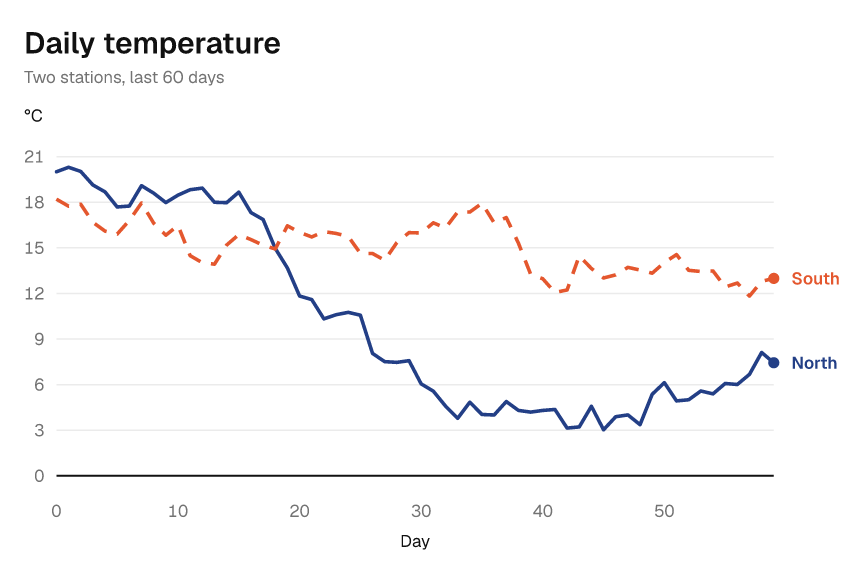
north = 20 + np.cumsum(rng.normal(0, 1, 60))
south = 18 + np.cumsum(rng.normal(0, 1, 60))

fig = ub.Figure(6, 4, theme=ub.Theme.GRAPHITE)  # width and height in inches
ax = fig.add_axes()
ax.title("Daily temperature").subtitle("Two stations, last 60 days")
ax.xlabel("Day").ylabel("°C")
ax.line(days, north, label="North")
ax.line(days, south, label="South", dash=ub.Dash.DASHED)

fig.save_png("temperature.png", dpi=200)
fig.save_svg("temperature.svg")
This is the chart at the top of this page. Data can be a list, a tuple, a NumPy array, or a pandas or polars Series. Missing values (NaN, or nulls in nullable pandas and polars columns) leave a gap.
| Chart | Method |
|---|---|
| Line | ax.line(x, y) |
| Scatter | ax.scatter(x, y, marker=ub.Marker.TRIANGLE, size=ub.Size.times(1.5)) |
| Area | ax.area(x, y) |
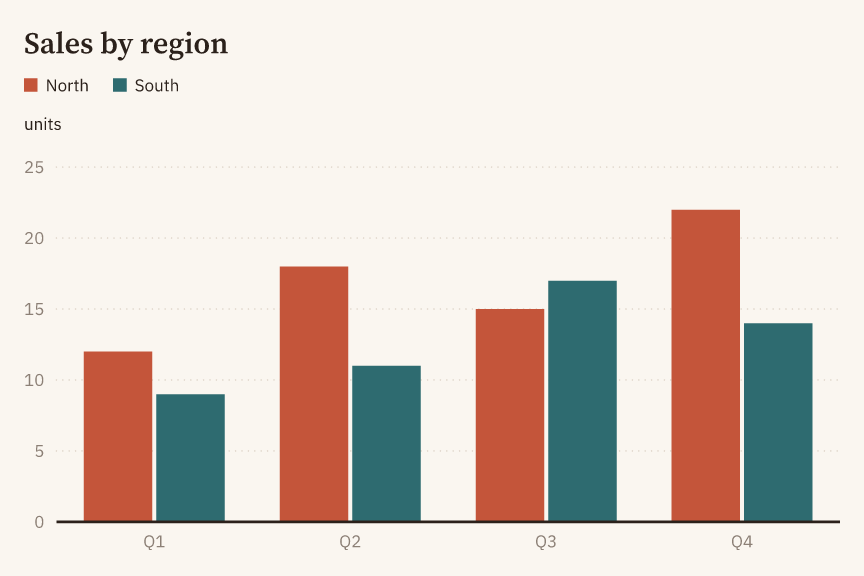
| Bar, grouped, stacked | ax.bar(categories, heights), ax.grouped_bar(categories, series), ax.stacked_bar(categories, series) |
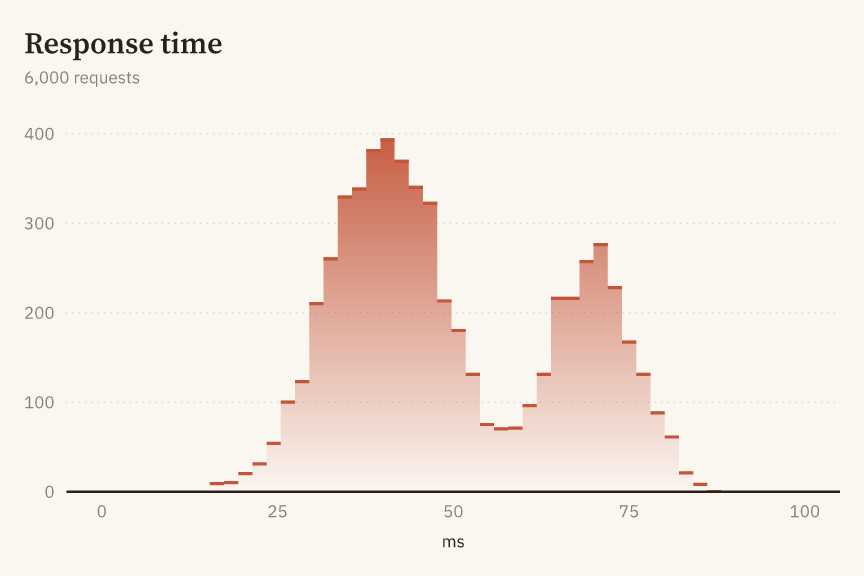
| Histogram | ax.hist(values, bins=30) |
| Step | ax.step(x, y, where=ub.Step.MID) |
| Stacked area | ax.stacked_area(x, [ub.Series("A", a), ub.Series("B", b)]) |
| Box, grouped | ax.box(categories, groups), ax.grouped_box(categories, [ub.Distribution("A", groups)]) |
| Violin, grouped | ax.violin(categories, groups), ax.grouped_violin(categories, distributions) |
| Bubbles | ax.bubbles(x, y, sizes, label="Cities") (adds a size legend) |
| Error bars | ax.y_error_bars(x, low, high), ax.x_error_bars(y, low, high) |
| Band | ax.band(x, low, high) |
| Stem | ax.stem(x, y) |
| Reference lines and spans | ax.hline(y), ax.vline(x), ax.hspan(low, high), ax.vspan(low, high) |
Bar, box and violin charts need a category x axis: fig.add_axes(x=ub.Scale.category()). Log axes use ub.Scale.log(). Limits, ticks and tick label formats are set with xlim, ylim, xticks, xticks_labeled, ytick_format(ub.TickFormat.percent()) and their counterparts on the other axis.
Grids and shared axes
Figure(rows=2, cols=2) declares a grid. Its default width=ub.AUTO and height=ub.AUTO give each column 6 inches and each row 4 inches; an explicit size is for the whole figure. Add panels by their zero-based top-left cell:
import copy
import umber as ub

fig = ub.Figure(rows=2, cols=2, share_x=ub.Share.COL, legend=ub.Legend.MERGED)
fig.title("Station signals").subtitle("Shared time scales")
fig.add_axes(row=0, col=0).line([0, 1, 2], [1, 3, 2], label="North")
fig.add_axes(row=1, col=0).line([0, 1, 2], [2, 1, 3], label="South")
fig.add_axes(row=0, col=1, row_span=2).line([0, 1, 2], [1, 3, 2], label="North")
fig.save_png("subplots.png")

variant = copy.copy(fig)
variant.axes_at(row=0, col=1).title("Comparison")  # the original is unchanged
Share.NONE, Share.ROW, Share.COL and Share.ALL choose which panels share a scale, limits, ticks and tick format. Legend.PER_PANEL keeps a separate legend for each panel instead of the default merged legend. Empty cells remain empty; overlapping panels are refused.
Use fig.axes_at(row=..., col=..., x=..., y=...) to retrieve axes, including those in a copy. The scale kinds and log bases must match creation; for category axes, pass x=ub.Scale.category() to get Axes[str, float]. A spanning panel is found only at its top-left cell. A row or column can be omitted only when that dimension has size 1. Figure.axes has been removed in favor of this typed method.
fig.cells() yields immutable Cell positions in row-major order, occupied or not; fig.cells(n) yields the first n. For example, for cell, values in zip(fig.cells(), datasets): cell.add_axes().line(x, values) adds one panel per dataset. AUTO is a typed sentinel, not None, and only parameters that declare it accept it.
Titles and legends
fig.title(text) and fig.subtitle(text) set text above the whole grid; ax.title(text) and ax.subtitle(text) belong to one panel. Each returns the same object for chaining, and an empty string removes the text. The figure title is 1.5 times the panel title size.
Theme.with_title_align(ub.Align.LEFT) sets title alignment; CENTER and RIGHT are also available. Subtitles follow their title. On a multi-panel figure, the merged legend stays below the figure title and subtitle and follows their alignment, without a separate position setting. To place legends by panel, use Legend.PER_PANEL.
import umber as ub

theme = ub.Theme.PIGMENT.with_title_align(ub.Align.CENTER).with_legend_position(
    ub.LegendPosition.BOTTOM
)
fig = ub.Figure(theme=theme).title("Station signals")
ax = fig.add_axes().line([0, 1, 2], [1, 3, 2], label="North")
ax.legend(ub.LegendStyle.HEADER, position=ub.LegendPosition.RIGHT)
ax.legend(ub.LegendStyle.HEADER, position=ub.AUTO)  # back to the theme's BOTTOM
For single-panel figures and Legend.PER_PANEL, LegendPosition.TOP_LEFT (default) and TOP_RIGHT place a row below the panel title; RIGHT places a column beside the plot; BOTTOM places a row below the x axis title; BEST places the legend inside the plot where it covers the least data. Panel legend positions do not follow title alignment. Omitting position, or passing ub.AUTO, clears a previous override and uses the theme's position; it does not mean BEST. LegendStyle.DIRECT accepts only the default position=ub.AUTO, since its labels sit at line ends. LegendStyle.NONE hides the legend.
Themes
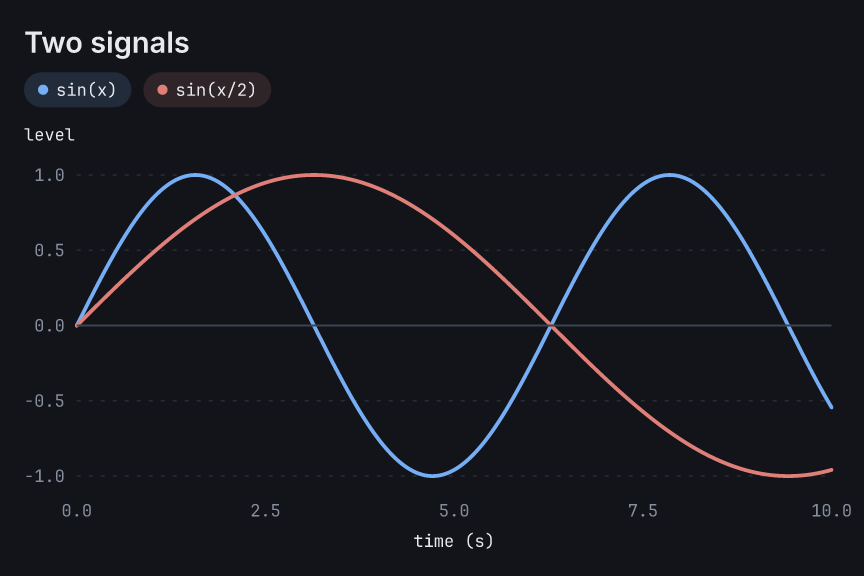
Three themes are built in: Theme.PIGMENT (warm paper, serif titles), Theme.GRAPHITE (neutral, sans-serif) and Theme.MIDNIGHT (dark, monospaced figures). A theme is an immutable value; derive a variant with its with_* methods:
import umber as ub

theme = ub.Theme.MIDNIGHT.with_fill_style(ub.FillStyle.SOLID).with_legend_style(
    ub.LegendStyle.HEADER
)
fig = ub.Figure(theme=theme)
Errors
An error is raised by the call that caused it: umber.DataError for invalid data, umber.StyleError for an invalid option value, umber.UsageError for a call that is not allowed in the current state, and TypeError for a value of the wrong type. The three umber errors derive from umber.UmberError. The traceback points at the argument:
Traceback (most recent call last):
  File "example.py", line 7, in <module>
    ax.line(t, y, label="signal")
    ~~~~~~~^^^^^^^^^^^^^^^^^^^^^^
umber.DataError: Axes.line(): y[2] is inf; values must be finite.
  ax.line(t, y, label="signal")
             ^
hint: use NaN to leave a gap in the line.
TypeError: Axes.line(): color is str; color must be of type Color.
  ax.line([0, 1, 2], [1, 3, 2], color="red")
                                ^^^^^^^^^^^
hint: use Color.hex("#3366B8"), Color.rgb() or a named color such as Color.BLUE.
In a terminal that supports it, the hint and the highlight are shown in color; set NO_COLOR to turn color off or FORCE_COLOR to force it. The same notes appear in Jupyter.
Static typing
The package ships type information (py.typed) and is checked with pyright and mypy in strict mode. Figure().add_axes() is Axes[float, float]; add_axes(x=Scale.category()) is Axes[str, float]. Methods that only make sense on one kind of axis are typed accordingly:
import umber as ub

ax = ub.Figure().add_axes()
ax.bar(["a", "b"], [1, 2])  # pyright and mypy: bar() needs Axes[str, float]
Performance
Medians from the criterion suite in crates/umber-core/benches, 6 × 4 in at 200 dpi, on an Intel Core Ultra 9 290HX running Linux:
| Case | Time |
|---|---|
| 1,000,000-point line → PNG | 53 ms |
| 1,000,000-point line → SVG | 21 ms |
| 100,000-point scatter → PNG | 47 ms |
| Histogram of 1,000,000 values → PNG | 20 ms |
| 4 × 5 grid, one 10,000-point line per panel → PNG | 97 ms |
Lines with sorted numeric x values are downsampled when they have more than four points per pixel column of the plot (counted at a nominal 300 dpi), keeping the first, last, minimum and maximum point in each column, which is visually lossless. Large scatter plots are composited on up to 8 threads; the output is the same for any number of threads.
Rust
The rendering core is published as the umber-core crate and can be used directly from Rust:
use umber_core::{AxisData, Figure, LineOptions, ScaleKind, Theme};

let mut figure = Figure::new(6.0, 4.0, Theme::pigment())?;
figure
    .add_axes(ScaleKind::Linear, ScaleKind::Linear)?
    .title("Signal")
    .line(AxisData::Numbers(vec![0.0, 1.0, 2.0, 3.0]), &[1.0, 3.0, 2.0, 4.0], LineOptions::default())?;
std::fs::write("signal.png", figure.to_png(144)?)?;
Status
umber is at version 0.x. The API is not yet stable and may change or be removed without a deprecation period. More examples are in examples/.
License
Licensed under either of MIT or Apache-2.0, at your option (MIT OR Apache-2.0). Bundled fonts are under the SIL Open Font License 1.1; see crates/umber-core/fonts/LICENSES and crates/umber-core/fonts/MANIFEST.md. Wheels include statically linked Rust dependencies; their licenses are listed in THIRD-PARTY-LICENSES.txt.
1 maintainer

Metadata
1 maintainer
Release files for umber 0.2.0
For a detailed explanation of source distributions (sdists) and built distributions (wheels), please see the package formats documentation.
Source distribution (sdist)
| File | Size | Uploaded | |
|---|---|---|---|
| umber-0.2.0.tar.gz | 1.2 MB | Details |
Built distributions (wheels)
| File | Reset | |||
|---|---|---|---|---|
| umber-0.2.0-cp312-abi3-win_amd64.whl | CPython 3.12 | abi3 | Windows x86-64 | Details |
| umber-0.2.0-cp312-abi3-manylinux_2_17_x86_64.manylinux2014_x86_64.whl | CPython 3.12 | abi3 | Linux glibc 2.17+ x86-64 | Details |
| umber-0.2.0-cp312-abi3-manylinux_2_17_aarch64.manylinux2014_aarch64.whl | CPython 3.12 | abi3 | Linux glibc 2.17+ ARM64 | Details |
| umber-0.2.0-cp312-abi3-macosx_11_0_arm64.whl | CPython 3.12 | abi3 | macOS 11.0+ ARM64 | Details |
| umber-0.2.0-cp312-abi3-macosx_10_12_x86_64.whl | CPython 3.12 | abi3 | macOS 10.12+ x86-64 | Details |
Total release size: 14.8 MB
Release files / umber-0.2.0.tar.gz
| Download URL | umber-0.2.0.tar.gz |
|---|---|
| Size | 1.2 MB |
| Tags | Source |
|
SHA-256 checksum How to use checksums |
1629e615da3f56973ef403e7093c6d902532ccfe0563de4a5a706c6210c4ae0e
|
|
BLAKE2b-256 checksum How to use checksums |
57a332b91a83adadaaabb3f1281eb8477b5bae6600c2192f8309a2001737c013
|
| Upload date | |
|
Uploaded using Trusted Publishing? What is trusted publishing? |
Yes |
| Uploaded via |
twine/7.0.0 CPython/3.13.14
|
Provenance
Provenance describes where a file came from. On PyPI, provenance is shared via attestations, which provide a verifiable record of the build or publishing details. View details, limitations and caveats.


PyPI Publish Attestation
PyPI verified that this artifact, at this checksum, originated from the publisher listed below.
Signed by GitHub Actions, verified by PyPI on Oct 15, 2026.
Transparency logRelease files / umber-0.2.0-cp312-abi3-win_amd64.whl
| Download URL | umber-0.2.0-cp312-abi3-win_amd64.whl |
|---|---|
| Size | 2.3 MB |
| Tags | CPython 3.12 Windows x86-64 abi3 |
|
SHA-256 checksum How to use checksums |
f3f61a251dcfb2f8075947ea805250028abc1698b82d7a152259f630b1700125
|
|
BLAKE2b-256 checksum How to use checksums |
b6e7cc26c1b6ad6d29b6ca4b9b03144844aab0e2d567ef9386071108c405673c
|
| Upload date | |
|
Uploaded using Trusted Publishing? What is trusted publishing? |
Yes |
| Uploaded via |
twine/7.0.0 CPython/3.13.14
|
Provenance
Provenance describes where a file came from. On PyPI, provenance is shared via attestations, which provide a verifiable record of the build or publishing details. View details, limitations and caveats.
PyPI Publish Attestation
PyPI verified that this artifact, at this checksum, originated from the publisher listed below.
Signed by GitHub Actions, verified by PyPI on Oct 15, 2026.
Transparency logRelease files / umber-0.2.0-cp312-abi3-manylinux_2_17_x86_64.manylinux2014_x86_64.whl
| Download URL | umber-0.2.0-cp312-abi3-manylinux_2_17_x86_64.manylinux2014_x86_64.whl |
|---|---|
| Size | 3.2 MB |
| Tags | CPython 3.12 Linux glibc 2.17+ x86-64 abi3 |
|
SHA-256 checksum How to use checksums |
f66e4ffb0d6df9e911fbb277770126e1bad81e2391a5f16f4b7dc08f9b459fbf
|
|
BLAKE2b-256 checksum How to use checksums |
16659b1da89e28d3a6ab68589b781ccef3b55d016ae5b0a39b3a124920356a41
|
| Upload date | |
|
Uploaded using Trusted Publishing? What is trusted publishing? |
Yes |
| Uploaded via |
twine/7.0.0 CPython/3.13.14
|
Provenance
Provenance describes where a file came from. On PyPI, provenance is shared via attestations, which provide a verifiable record of the build or publishing details. View details, limitations and caveats.
PyPI Publish Attestation
PyPI verified that this artifact, at this checksum, originated from the publisher listed below.
Signed by GitHub Actions, verified by PyPI on Oct 15, 2026.
Transparency logRelease files / umber-0.2.0-cp312-abi3-manylinux_2_17_aarch64.manylinux2014_aarch64.whl
| Download URL | umber-0.2.0-cp312-abi3-manylinux_2_17_aarch64.manylinux2014_aarch64.whl |
|---|---|
| Size | 2.7 MB |
| Tags | CPython 3.12 Linux glibc 2.17+ ARM64 abi3 |
|
SHA-256 checksum How to use checksums |
eb59e0a8b5318ccff6458429ec9795ea80203625186999820dfcf76eabc4419c
|
|
BLAKE2b-256 checksum How to use checksums |
aec4a847165150679f0cdb77389711bcdacbe0e431be2afc03da2899066d8c82
|
| Upload date | |
|
Uploaded using Trusted Publishing? What is trusted publishing? |
Yes |
| Uploaded via |
twine/7.0.0 CPython/3.13.14
|
Provenance
Provenance describes where a file came from. On PyPI, provenance is shared via attestations, which provide a verifiable record of the build or publishing details. View details, limitations and caveats.
PyPI Publish Attestation
PyPI verified that this artifact, at this checksum, originated from the publisher listed below.
Signed by GitHub Actions, verified by PyPI on Oct 15, 2026.
Transparency logRelease files / umber-0.2.0-cp312-abi3-macosx_11_0_arm64.whl
| Download URL | umber-0.2.0-cp312-abi3-macosx_11_0_arm64.whl |
|---|---|
| Size | 2.4 MB |
| Tags | CPython 3.12 abi3 macOS 11.0+ ARM64 |
|
SHA-256 checksum How to use checksums |
0edad4f0b5a320d43ef001bc87c77f2db389fe06583ee48eaee55251dfff2f60
|
|
BLAKE2b-256 checksum How to use checksums |
c3fbc5c103a7b5a2984d91251a73eb8b5ed85ccea320f373ed485405a8be80dc
|
| Upload date | |
|
Uploaded using Trusted Publishing? What is trusted publishing? |
Yes |
| Uploaded via |
twine/7.0.0 CPython/3.13.14
|
Provenance
Provenance describes where a file came from. On PyPI, provenance is shared via attestations, which provide a verifiable record of the build or publishing details. View details, limitations and caveats.
PyPI Publish Attestation
PyPI verified that this artifact, at this checksum, originated from the publisher listed below.
Signed by GitHub Actions, verified by PyPI on Oct 15, 2026.
Transparency logRelease files / umber-0.2.0-cp312-abi3-macosx_10_12_x86_64.whl
| Download URL | umber-0.2.0-cp312-abi3-macosx_10_12_x86_64.whl |
|---|---|
| Size | 3.0 MB |
| Tags | CPython 3.12 abi3 macOS 10.12+ x86-64 |
|
SHA-256 checksum How to use checksums |
7162f9534b8096b5c7cd4fe76539aca3d18164cbda3ac86472f190f7d83869d3
|
|
BLAKE2b-256 checksum How to use checksums |
ea0ad3251f33cf7a0fd8697be9dfa561d8bd80dd4fd6756e55cd1d134766417e
|
| Upload date | |
|
Uploaded using Trusted Publishing? What is trusted publishing? |
Yes |
| Uploaded via |
twine/7.0.0 CPython/3.13.14
|
Provenance
Provenance describes where a file came from. On PyPI, provenance is shared via attestations, which provide a verifiable record of the build or publishing details. View details, limitations and caveats.
PyPI Publish Attestation
PyPI verified that this artifact, at this checksum, originated from the publisher listed below.
Signed by GitHub Actions, verified by PyPI on Oct 15, 2026.
Transparency log













