
Local serial communication service based on MCP protocol with built-in Web monitoring

Project description
Umeko Serial MCP




基于 MCP 协议的本地串口通信服务,内置实时 Web 监控面板。
让 AI 助手通过自然语言与你的单片机、嵌入式设备直接对话。

✨ 功能特性
- 🖥️ MCP 支持 — 通过 Model Context Protocol 与 AI 客户端无缝集成
- 🔌 串口控制 — 自动扫描、连接、读写串口设备
- 🌐 Web 监控面板 — 内置 HTTP + WebSocket 双端口服务,浏览器实时旁路监控
🛠️ 可用工具
| 工具 | 说明 |
|---|---|
list_ports |
扫描本机所有可用串口 |
connect_port |
连接指定串口(支持自定义波特率,默认 115200) |
close_port |
显式断开当前串口连接 |
write_data |
向串口写入数据(自动补全换行符) |
read_data |
读取串口缓冲区数据(含用户干预历史) |
start_monitor_ui |
启动 Web 监控面板(默认 HTTP 8080 / WebSocket 8081) |
📦 安装
1. 克隆仓库
git clone https://github.com/umeiko/umeko_serial_mcp.git
cd umeko_serial_mcp
2. 安装依赖
确保已安装 uv:
uv sync
3. 本地运行
# 直接运行源码
uv run start-serial-mcp

# 或者先构建 wheel 再通过 uvx 运行(推荐,避免源码缓存问题)
uv build --wheel
uvx --from . start-serial-mcp
⚠️ 开发注意:
uvx --from .会缓存 wheel 包,修改源码后需先升级pyproject.toml版本号,再执行uv build --wheel,最后重启 MCP 客户端才能生效。
⚙️ 客户端配置
在支持 MCP 的客户端(如 Claude-code、Cursor、Cline 等)的 mcp.json 中添加:
{
  "mcpServers": {
    "serial-mcp": {
      "command": "uvx",
      "args": [
        "--from",
        "/path/to/umeko_serial_mcp",
        "--reinstall",
        "start-serial-mcp"
      ]
    }
  }
}
将
/path/to/umeko_serial_mcp替换为你本地的实际路径。--reinstall可强制刷新缓存。
配置保存并重启客户端后,即可通过自然语言调用串口功能。
🚀 快速开始
使用类似提示词:
请使用串口工具,连接到我的esp32开发板并且测试通信
启动后,AI 会自动执行以下初始化检查:
1. start_monitor_ui    → 启动 Web 面板 http://localhost:8080
2. list_ports          → 发现 /dev/cu.usbmodem101
3. connect_port        → 连接 ESP32(115200)
4. write_data("hello")     → 测试通信
5. read_data()          → 读取串口输入
在浏览器中打开 http://localhost:8080,你可以:
- 🔘 手动控制串口连接/断开
- 💬 实时查看 LLM 与单片机的全部对话
- ✏️ 手动下发命令(旁路干预)
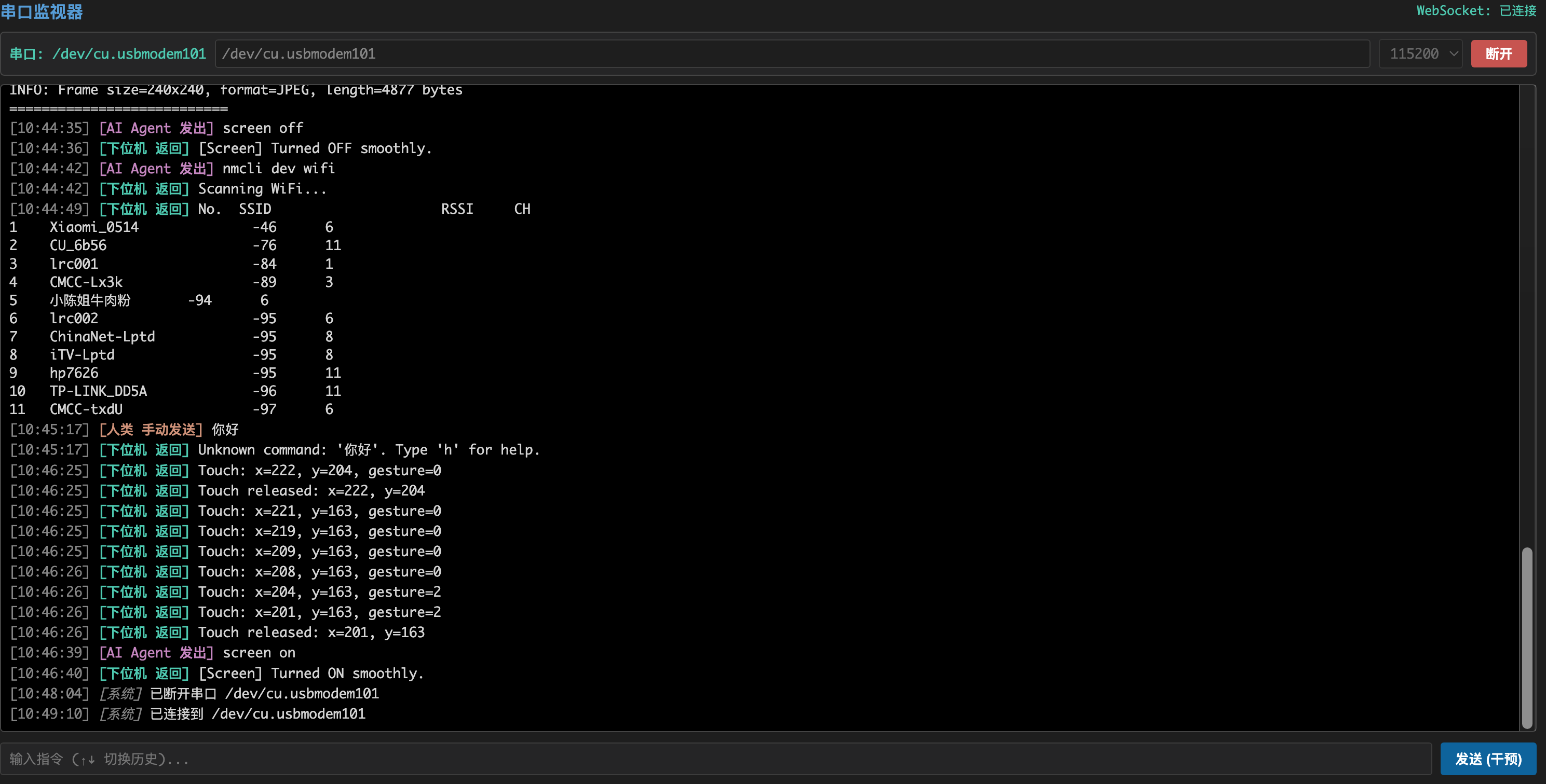
🖥️ Web 监控面板
启动监控服务后,浏览器访问 http://localhost:8080:
- 串口控制面板:状态指示、端口输入、波特率选择、连接/断开按钮
- 实时日志流:用户命令、AI 命令、下位机响应,按时间线展示
- 双向干预:浏览器和 LLM 均可控制串口,状态实时同步
Release history Release notifications | RSS feed

Download files
Download the file for your platform. If you're not sure which to choose, learn more about installing packages.
Source Distributions
Built Distribution
Filter files by name, interpreter, ABI, and platform.
If you're not sure about the file name format, learn more about wheel file names.
Copy a direct link to the current filters
File details
Details for the file umeko_serial_mcp-0.1.3-py3-none-any.whl.
File metadata
- Download URL: umeko_serial_mcp-0.1.3-py3-none-any.whl
- Upload date:
- Size: 11.6 kB
- Tags: Python 3
- Uploaded using Trusted Publishing? No
- Uploaded via: uv/0.9.28 {"installer":{"name":"uv","version":"0.9.28","subcommand":["publish"]},"python":null,"implementation":{"name":null,"version":null},"distro":{"name":"macOS","version":null,"id":null,"libc":null},"system":{"name":null,"release":null},"cpu":null,"openssl_version":null,"setuptools_version":null,"rustc_version":null,"ci":null}
File hashes
| Algorithm | Hash digest | |
|---|---|---|
| SHA256 |
c67e005b040fc111a9550eef11f5a5c43b673c46c3fa7281fc289f9851192b0b
|
|
| MD5 |
fac37c2d104aaf793997b3c53dd7a358
|
|
| BLAKE2b-256 |
222363e1371d63a9022ab7576868e90fdf43287609e715fb9afd6569aaec3325
|






