
umlsequence2
UML Sequence Diagrams Generator, version 2[1] - Commandline tool to generate diagrams as images in various formats (SVG, PNG, JPG, PDF, etc.) from source text files.
- Source code: https://github.com/pbauermeister/umlsequence2
- Package page: https://pypi.org/project/umlsequence2/
[1] This is a pure-Python rewrite of the https://github.com/pbauermeister/umlsequence project, which was itself based on umlgraph (in Java) by Diomidis Spinellis.
Scope
"A sequence diagram or system sequence diagram (SSD) shows process interactions arranged in time sequence in the field of software engineering. It depicts the processes involved and the sequence of messages exchanged between the processes needed to carry out the functionality." -- Wikipedia
Summary
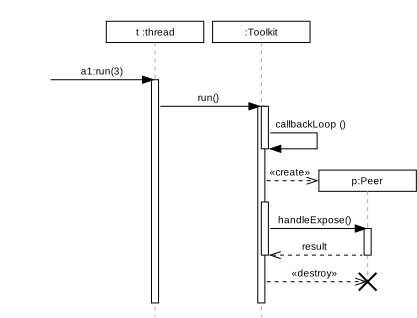
Source text files are in the so-called "umlsequence" syntax.
Umlsequence syntax example:
# objects definitions
E : # External Messages
T : t:thread
O : :Toolkit
P :

# messages and activations
E  -> T+ a1:run(3)
T  -> O+ run()
O        >callbackLoop()

# creation
O+ :> P  p:Peer

# message with response
O- => P  result=handleExpose()

# destruction
O  #> P

# deactivation
T- O-
Syntax
See https://github.com/pbauermeister/umlsequence2/tree/master/doc/README.md.
Examples
See https://github.com/pbauermeister/umlsequence2/tree/master/examples/README.md.
Dependencies
- Python3
- Python libraries: svgwrite, reportlab
Installing via pip3
[sudo] pip3 install umlsequence2
Installation troubleshooting
If you get an error at runtime like:
ModuleNotFoundError: No module named 'reportlab.graphics._renderPM'
you may have to reinstall reportlab:
[sudo] python3 -m pip install --upgrade --force-reinstall reportlab
Usage
umlsequence2 -h says:
usage: umlsequence2 [-h] [--output-file OUTPUT_FILE] [--markdown]
                    [--format FORMAT] [--percent-zoom PERCENT_ZOOM]
                    [--background-color BACKGROUND_COLOR] [--debug]
                    [INPUT_FILE]

UML sequence command-line utility, version 2. (C) Copyright 2021 by Pascal
Bauermeister. Converts a textual UML sequence description into a graphic
file. See https://github.com/pbauermeister/umlsequence2/tree/master/examples
for examples.

positional arguments:
  INPUT_FILE            UML sequence input file; if omitted, stdin is used

optional arguments:
  -h, --help            show this help message and exit
  --output-file OUTPUT_FILE, -o OUTPUT_FILE
                        output file name; pass '-' to use stdout; if omitted,
                        use INPUT_FILE base name with '.svg' extension, or
                        stdout
  --markdown, -m        consider snippets between opening marker:
                        ```umlsequence OUTFILE, and closing marker: ```
  --format FORMAT, -f FORMAT
                        output format: any supported by ImageMagick; default
                        is ps
  --percent-zoom PERCENT_ZOOM, -p PERCENT_ZOOM
                        magnification percentage; default is 100
  --background-color BACKGROUND_COLOR, -b BACKGROUND_COLOR
                        background color name (including 'none' for
                        transparent) in web color notation; see
                        https://developer.mozilla.org/en-
                        US/docs/Web/CSS/color_value for a list of valid
                        names; default is white
  --debug               emits debug messages
  --ACTIVITY-WIDTH FLOAT
                        change ACTIVITY_WIDTH (default 0.2)
  --ACTOR-ASCENT FLOAT  change ACTOR_ASCENT (default 0.25)
  --ACTOR-DESCENT FLOAT
                        change ACTOR_DESCENT (default 0.45)
  --ACTOR-LABEL-Y FLOAT
                        change ACTOR_LABEL_Y (default 0.9)
  --ARROW-HEAD-SIZE FLOAT
                        change ARROW_HEAD_SIZE (default 0.3)
  --COLUMN-SPACING FLOAT
                        change COLUMN_SPACING (default 0.25)
  --COLUMN-WIDTH FLOAT  change COLUMN_WIDTH (default 2.75)
  --CROSS-SIZE FLOAT    change CROSS_SIZE (default 0.5)
  --MESSAGE-SPACING FLOAT
                        change MESSAGE_SPACING (default 0.05)
  --OBJECT-HEIGHT FLOAT
                        change OBJECT_HEIGHT (default 0.6)
  --OBJECT-LABEL-Y FLOAT
                        change OBJECT_LABEL_Y (default 0.4)
  --OBJECT-STEP FLOAT   change OBJECT_STEP (default 0.9)
  --STEP-NORMAL FLOAT   change STEP_NORMAL (default 0.6)
  --STEP-SMALL FLOAT    change STEP_SMALL (default 0.3)
  --TEXT-CHAR-WIDTH FLOAT
                        change TEXT_CHAR_WIDTH (default 0.145)
  --TEXT-DOGEAR FLOAT   change TEXT_DOGEAR (default 0.2)
  --TEXT-HEIGHT FLOAT   change TEXT_HEIGHT (default 0.4)
  --TEXT-MARGIN-X FLOAT
                        change TEXT_MARGIN_X (default 0.2)
  --TEXT-MARGIN-Y FLOAT
                        change TEXT_MARGIN_Y (default 0.15)
1 maintainer

Metadata
1 maintainer
Release files for umlsequence2 2.1.1.post3
For a detailed explanation of source distributions (sdists) and built distributions (wheels), please see the package formats documentation.
Source distribution (sdist)
| File | Size | Uploaded | Provenance | |
|---|---|---|---|---|
| umlsequence2-2.1.1.post3.tar.gz | 17.2 kB | Without provenance | Details |
Release files / umlsequence2-2.1.1.post3.tar.gz
| Download URL | umlsequence2-2.1.1.post3.tar.gz |
|---|---|
| Size | 17.2 kB |
| Tags | Source |
|
SHA-256 checksum How to use checksums |
e7c9cd2b7962c6d8623380ff124f3ec4d2fbae272d35d9b68ff87dab43598ba0
|
|
BLAKE2b-256 checksum How to use checksums |
cf2eea2f7687834772b98c1af52a93b5e0ed81c24cf8c0aad861a7a2ae9b6aac
|
| Upload date | |
|
Uploaded using Trusted Publishing? What is trusted publishing? |
No |
| Uploaded via |
twine/5.1.1 CPython/3.10.12
|
Security for umlsequence2 2.1.1.post3
Provenance
Provenance describes where a file came from. On PyPI, provenance is shared via attestations, which provide a verifiable record of the build or publishing details. View details, limitations and caveats.
No provenance found
None of the files in this release were uploaded with provenance metadata.
A note on package security
PyPI is a repository for distributing packages, not a service for auditing them. While third-party security researchers and our staff do their best to detect and remove malicious packages, PyPI cannot guarantee the quality, security or suitability of any given package.
To learn more about protecting yourself from malicious actors, visit our package security documentation.














