



unbabelizer
unbabelizer is an interactive CLI and TUI (Text User Interface) tool for
managing gettext .po translation files.
It streamlines the localization workflow for Python projects by automating
extraction, translation, review, and compilation of translation files.
Read 👉 Medium Blog Article 👈 to learn more.
Purpose
The main goal of unbabelizer is to simplify and automate the process of
internationalizing Python applications.
It provides a guided interface for developers and translators to:
- Extract translatable strings from source code using
babel. - Automatically translate
.pofiles using translation services. - Review and edit translations interactively.
- Compile
.pofiles into binary.mofiles for deployment. - Manage multiple languages and domains with ease.
- Integrate seamlessly with Babel and polib for robust gettext support.
Supported translation services:
- Google Translate
- Microsoft Translator
- Yandex Translator
- ChatGPT Translation Service
- MyMemory Translator
- Deepl Translator
Demo
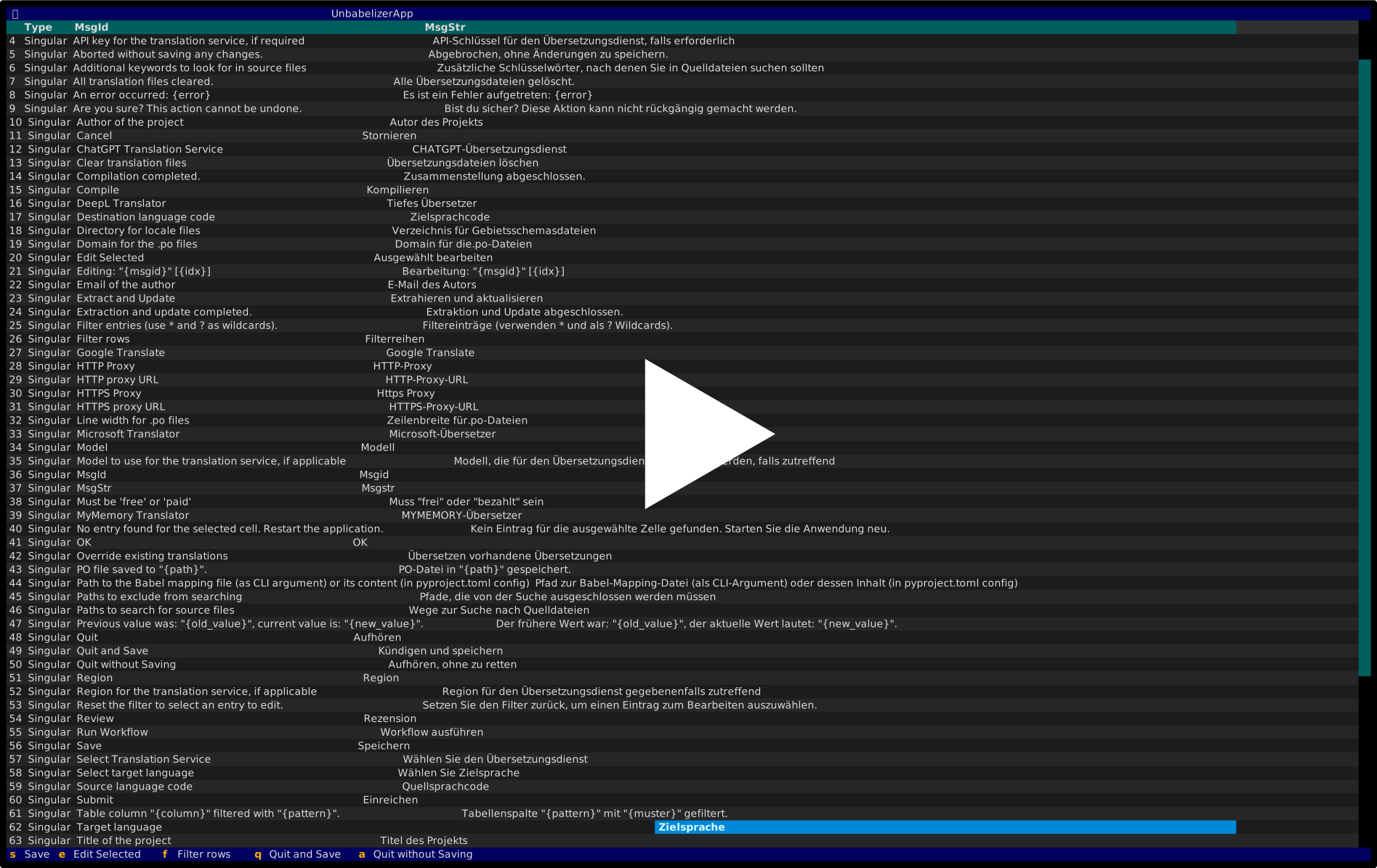
The app is itself available in German language. Simply run
LANG=de unbabelizer
to execute the app in German language.
Features
- Interactive TUI: Edit and review translations in a modern terminal UI powered by Textual.
- Automated Extraction: Find and extract translatable strings from your codebase using Babel.
- Batch Translation: Translate
.pofiles automatically via Google Translate, with support for multiple target languages. - Review Workflow: Step through translations, edit entries, and mark reviewed items.
- Compilation: Compile
.pofiles to.mofor production use. - Configurable: Control all aspects via
pyproject.tomlor CLI arguments. - Exclusion Patterns: Skip files or directories using glob patterns.
- Custom Mapping: Provide custom Babel mapping for source file types.
- Logging: Detailed logging for troubleshooting and auditing translation changes.
Installation
You can install the package via pip:
pip install unbabelizer
Usage
Execute in a directory with a pyproject.toml config file:
unbabelizer
The configuration section in pyproject.toml might look as follows:
[tool.unbabelizer]
# List of destination languages (e.g., German)
dest_lang = ["de"]

# Paths to search for source files
input_paths = ["src"]

# Directory for locale files
locale_dir = "src/unbabelizer/locales"

# Source language code
src_lang = "en"

# Domain for the .po files (default: "messages")
domain = "messages"

# Patterns to exclude from searching (optional)
exclude_patterns = ["tests/*", "docs/*"]

# Content of the Babel mapping file (optional)
mapping_file_content = """
[python: **.py]
encoding = utf-8
"""

# Line width for .po files (optional, default: 120)
line_width = 120

# Translation service specific settings
api_key = "<my-api-key>"
api_key_type = "<free or paid>"
model = "gpt-3.5-turbo"
http_proxy = "http://<my-proxy>"
https_proxy = "https://<my-proxy>"
You can also override these settings using CLI arguments:
unbabelizer \
  --dest-lang de \
  --input-paths src \
  --locale-dir src/unbabelizer/locales \
  --src-lang en \
  --domain messages \
  --exclude-patterns tests/* docs/* \
  --mapping-file "~/mapping_file.txt" \
  --line-width 120
--dest-lang: Destination language(s) (repeat or use multiple values)--input-paths: Source file paths (repeat or use multiple values)--locale-dir: Locale directory--src-lang: Source language code--domain: .po file domain--exclude-patterns: Patterns to exclude (optional)--mapping-file: Babel mapping file (optional)--line-width: Line width for .po files (optional)
Run unbabelizer --help to see all available options.
Settings from the CLI override those in pyproject.toml.
Contributing
Contributions are welcome! Please open an issue or submit a pull request.
License
This project is licensed under the MIT License.
1 maintainer

Download files
Download the file for your platform. If you're not sure which to choose, learn more about installing packages.
Source Distribution
Built Distribution
Filter files by name, interpreter, ABI, and platform.
If you're not sure about the file name format, learn more about wheel file names.
Copy a direct link to the current filters
File details
Details for the file unbabelizer-1.3.0.tar.gz.
File metadata
- Download URL: unbabelizer-1.3.0.tar.gz
- Upload date:
- Size: 54.5 kB
- Tags: Source
- Uploaded using Trusted Publishing? No
- Uploaded via:
twine/6.1.0 CPython/3.13.7
File hashes
| Algorithm | Hash digest | |
|---|---|---|
| SHA256 |
f04f55b68fc6921224d22f2fb547e1acdb9b9d37304b555f6df85e18022f852e
|
|
| MD5 |
b622f18c2a5a080412aa83b7ef5f59bf
|
|
| BLAKE2b-256 |
ce66aa28bb760dc383d611a647d41a4f6f828887db26619c2145c3e5db892fe1
|
File details
Details for the file unbabelizer-1.3.0-py3-none-any.whl.
File metadata
- Download URL: unbabelizer-1.3.0-py3-none-any.whl
- Upload date:
- Size: 67.7 kB
- Tags: Python 3
- Uploaded using Trusted Publishing? No
- Uploaded via:
twine/6.1.0 CPython/3.13.7
File hashes
| Algorithm | Hash digest | |
|---|---|---|
| SHA256 |
0151ba3feef1ac27fc007f20c07d973d393f0c21cb69e18f45ad9db3618493a6
|
|
| MD5 |
a8f762d371769a400c89bf17a9727007
|
|
| BLAKE2b-256 |
0aa1b8302c1946f5fb44dac5478a7e598cf97465d86a0d7de9a45f61b223d48b
|














