
unb-api-py
unb-api-py allows python developers to use the UnbelievaBoat Discord bot API in their own projects! Here's how to get started:
(documentation is coming not-so-soon)
Getting Started
- Install the library
pip install unbapi
- Create an UnbelievaBoat Application at https://unbelievaboat.com/applications and copy the token (keep this secret)
- Import the library, and create an
Applicationobject. Example:
import unbapi

unbapp = unb.Application("put the token here from step 2.")
You've now created an Application object. This allows you to get or fetch a guild object. Here's how to get a guild object:
guild = unbapp.get_guild(guild-id)
This will create PartialGuild object. This allows you to do every action in the guild but doesn't have much information about the app. If you need guild information, such as the name, icon, currency symbol, etc then you should use unbapp.fetch_guild which gives a Guild object. However, fetching information is slower then 'getting' it.
A PartialGuild, or Guild object allows you to do things inside of a guild (as long as you have permission), such as: fetching a user's balance (and changing it), getting store items, adding/removing items from user's inventories, and more. Here's how to do each:
Examples
Check the bot's permissions in a guild
permissions = guild.fetch_permissions()
print(permissions.economy, permissions.items)
Getting a user's balance
user = guild.fetch_user(user-id)
print(user.cash, user.bank, user.total, user.rank)
Updating a user's balance
This example will add 400 cash to their balance, and remove -100 bank from their bank balance.
user.update_balance(cash=400, bank=-100)
Setting a user's balance
This example set the users cash to 1000, and their bank balance to infinity
import math

user.set_balance(cash=1000, bank=math.inf)
Getting a list of all the items in a user's inventory
for item in user.fetch_inventory():
  print(item.name, item.id, item.quantity)
Check how much of an item a user has
user.fetch_item_quantity(item-id)
(check out getting an item ID below)
Add item to user inventory
user.add_item(item-id, quantity=1)
(check out getting an item ID below)
Remove item to user inventory
user.remove_item(item-id, quantity=1)
(check out getting an item ID below)
Get guild leaderboard
for user in user.fetch_leaderboard():
  print(user.id, user.rank, user.total)
Get guild store items
for item in user.fetch_items():
  print(item.name, item.id, item.price)
Delete guild item
item.delete()
Editing guild items will come some time in the future.
Exceptions
The library may raise these exceptions:
unbapiException Base exception for the library
NotFound The resource couldn't be found
InvalidToken The provided token isn't valid
Forbidden The bot can't access this
TypeError For a function that accepts ObjectWithIdAttribute, the provided object doesn't have an id attribute.
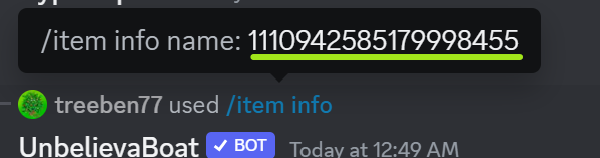
Getting an Item Id
- Use the
/item infocommand from unbelivaboat - Click the blue command text after ' used'
- Copy the long string of numbers in the popup. Example:
1 maintainer

Metadata
1 maintainer
Release files for unbapi 0.1.0
For a detailed explanation of source distributions (sdists) and built distributions (wheels), please see the package formats documentation.
Source distribution (sdist)
| File | Size | Uploaded | |
|---|---|---|---|
| unbapi-0.1.0.tar.gz | 9.3 kB | Details |
Built distribution (wheel)
| File | Interpreter | ABI | Platform | Reset |
|---|---|---|---|---|
| unbapi-0.1.0-py3-none-any.whl | Python 3 | none | any | Details |
Total release size: 20.2 kB
Release files / unbapi-0.1.0.tar.gz
| Download URL | unbapi-0.1.0.tar.gz |
|---|---|
| Size | 9.3 kB |
| Tags | Source |
|
SHA-256 checksum How to use checksums |
2a9ac24d527fcf7e04d89266a1ba6293161340fc65a3ef8905df307d97982b18
|
|
BLAKE2b-256 checksum How to use checksums |
4d72c56e5a946ac8ea6c13ceb55aaf79014ae381bdc9106fdbf3253c1820c221
|
| Upload date | |
|
Uploaded using Trusted Publishing? What is trusted publishing? |
No |
| Uploaded via |
twine/4.0.2 CPython/3.9.16
|
Release files / unbapi-0.1.0-py3-none-any.whl
| Download URL | unbapi-0.1.0-py3-none-any.whl |
|---|---|
| Size | 11.0 kB |
| Tags | Python 3 |
|
SHA-256 checksum How to use checksums |
d91aff8e6a28f32ae1b945a4c6360ae1ca6165e5a08679d727e5cd3bc0a4398e
|
|
BLAKE2b-256 checksum How to use checksums |
1d6790fc048d5dc4d0b3725ea3c285aa275433903dbc08650a24f41b5e3f129c
|
| Upload date | |
|
Uploaded using Trusted Publishing? What is trusted publishing? |
No |
| Uploaded via |
twine/4.0.2 CPython/3.9.16
|













