
🐭 Lungs segmentation in mice CT scans
We provide a neural network model for segmenting the lungs of the mice. The model is based on the U-Net architecture.
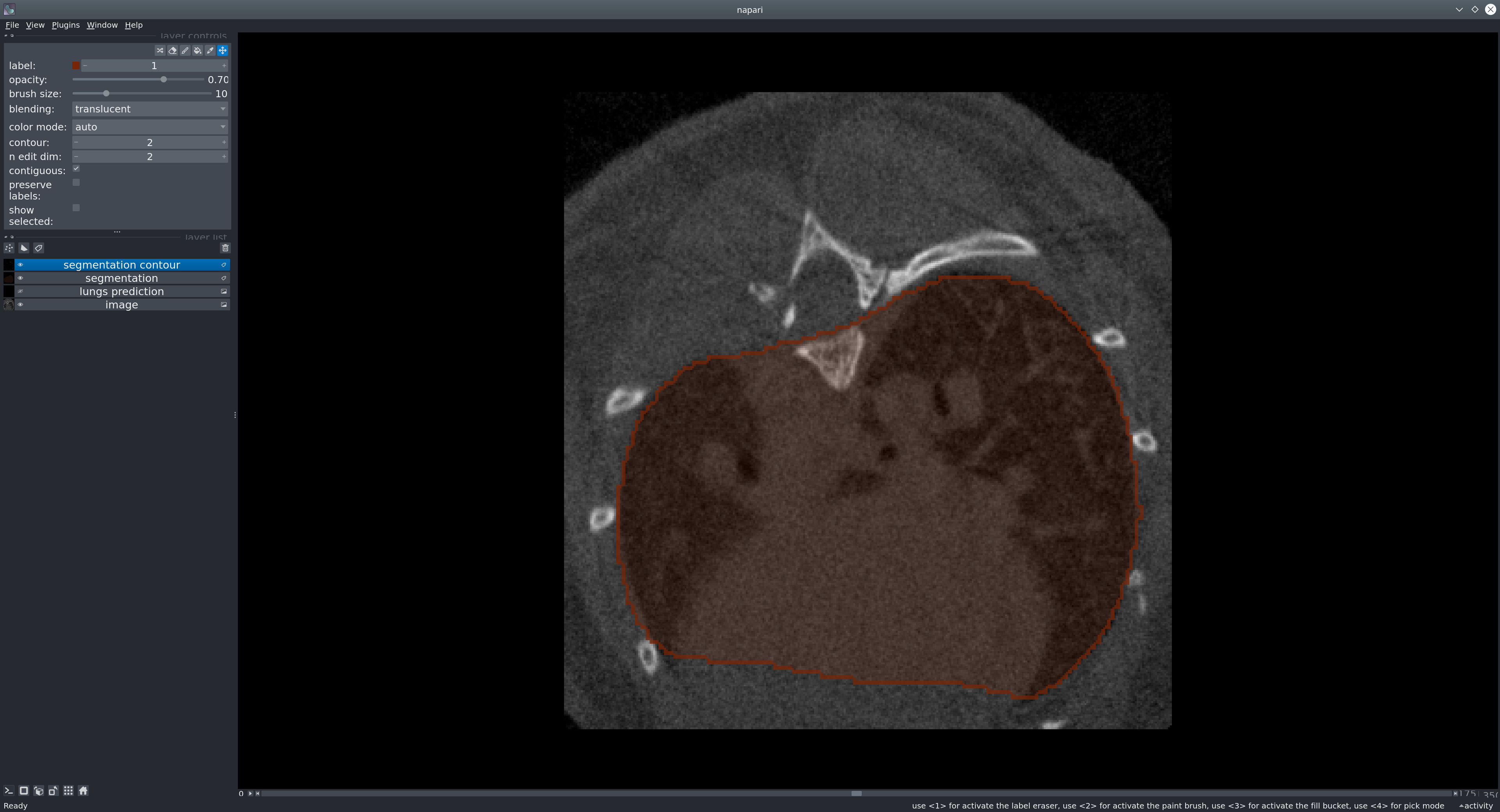
The goal of our tool is to provid a reliable way to segment the lungs in mouse CT scans. The U-net model produces a binary mask representing the segmentation of the lungs.
Try the model
Installation
We recommend performing the installation in a clean Python environment.
The code requires python>=3.9, as well as pytorch>=2.0. Please install Pytorch first and separately following the instructions for your platform on pytorch.org.
Install unet_lungs_segmentation using pip after you've installed Pytorch:
pip install unet_lungs_segmentation
or clone the repository and install with:
git clone https://github.com/qchapp/lungs-segmentation.git
pip install -e .
Models
The model weights (~1 GB) will be automatically downloaded from Hugging Face.
Usage in Napari
Napari is a multi-dimensional image viewer for python. To use our model in Napari, start the viewer with
napari
To open an image, use File > Open files or drag-and-drop an image into the viewer window. If you want to open medical image formats such as NIFTI directly, consider installing the napari-medical-image-formats plugin.
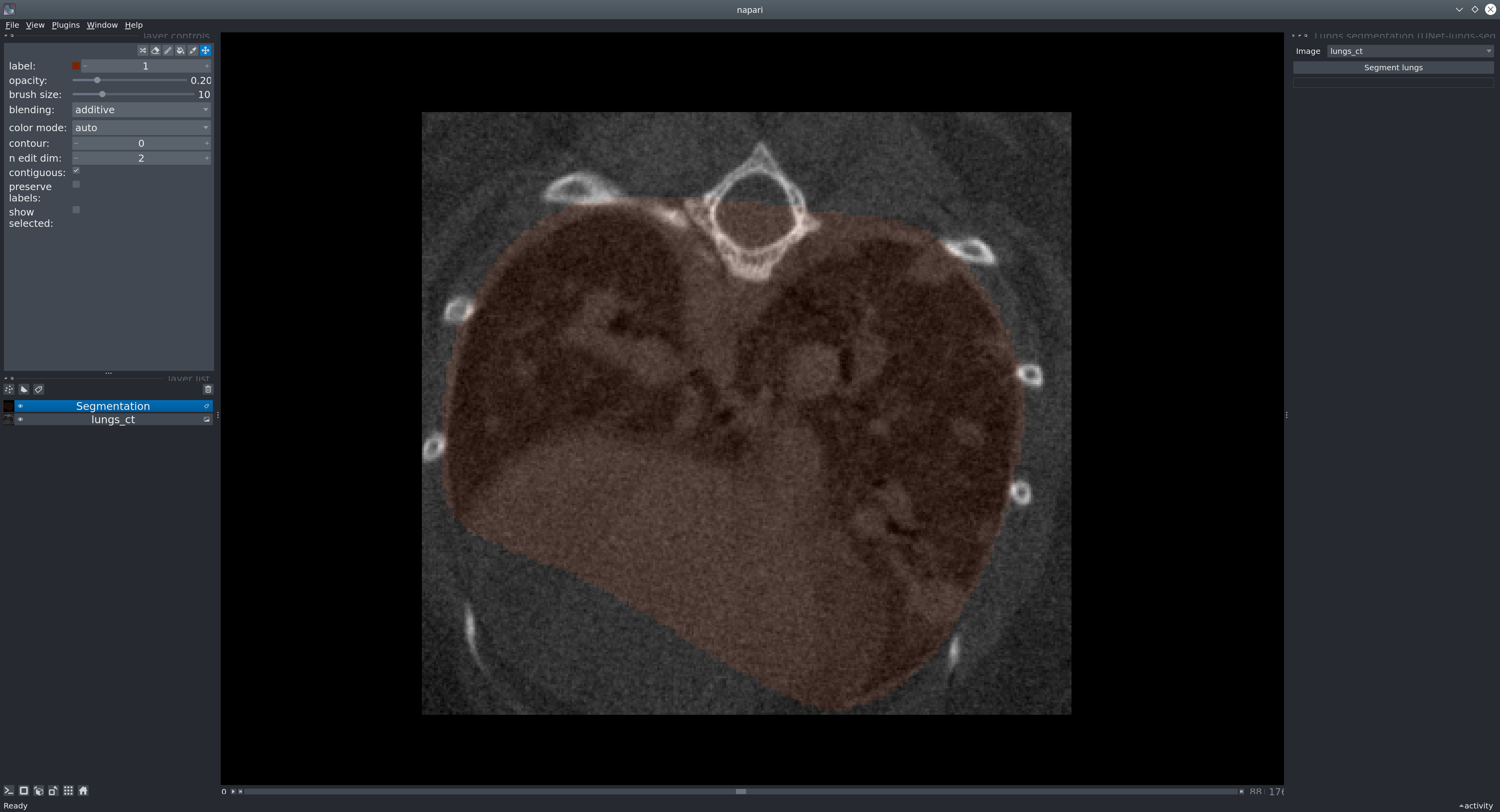
Sample data: To test the model, you can run it on our provided sample image. In Napari, open the image from File > Open Sample > Mouse lung CT scan.
Next, in the menu bar select Plugins > Lungs segmentation (unet_lungs_segmentation). Select an image and run it by pressing the "Segment lungs" button.
Usage as a library
You can run a model in just a few lines of code to produce a segmentation mask from an image (represented as a numpy array).
from unet_lungs_segmentation import LungsPredict

lungs_predict = LungsPredict()
mask = lungs_predict.segment_lungs(your_image)
or if you want to apply a specific threshold (float between 0 and 1):
mask = lungs_predict.segment_lungs(your_image, threshold)
Usage as a CLI
Run inference on an image from the command-line. For example:
uls_predict_image -i /path/to/folder/image_001.tif [-t <threshold>]
The <threshold> will be applied to the predicted image in order to have a binary mask. A default threshold of 0.5 will be applied if none is given. Should be a float between 0 and 1.
The command will save the segmentation next to the image:
folder/
    ├── image_001.tif
    ├── image_001_mask.tif
Run inference in batch on all images in a folder:
uls_predict_folder -i /path/to/folder/ [-t <threshold>]
Will produce:
folder/
    ├── image_001.tif
    ├── image_001_mask.tif
    ├── image_002.tif
    ├── image_002_mask.tif
Dataset
Our model was trained using a dataset of 355 images coming from 17 different experiments, 2 different scanners and validated on 62 images.
Issues
If you encounter any problems, please fill an issue along with a detailed description.
License
This model is licensed under the BSD-3 license.
Carbon footprint of this project
As per the online tool Green algorithms, the footprint of training this model was estimated to be around 584 g CO2e.
1 maintainer

Metadata
1 maintainer
Release files for unet-lungs-segmentation 1.0.9
For a detailed explanation of source distributions (sdists) and built distributions (wheels), please see the package formats documentation.
Source distribution (sdist)
| File | Size | Uploaded | Provenance | Actions |
|---|---|---|---|---|
| unet_lungs_segmentation-1.0.9.tar.gz | 10.3 kB | Without provenance | Details for unet_lungs_segmentation-1.0.9.tar.gz |
Built distribution (wheel)
| File | Interpreter | ABI | Platform | Actions Reset |
|---|---|---|---|---|
| unet_lungs_segmentation-1.0.9-py3-none-any.whl | Python 3 | none | any | Details for unet_lungs_segmentation-1.0.9-py3-none-any.whl |
Total release size: 20.1 kB
Release files / unet_lungs_segmentation-1.0.9.tar.gz
| Download URL | unet_lungs_segmentation-1.0.9.tar.gz |
|---|---|
| Size | 10.3 kB |
| Tags | Source |
|
SHA-256 checksum How to use checksums |
e10c889f52858228ddd1b35fd3e05b0ea24fd36c66775be6c6c59d08676d2e69
|
|
BLAKE2b-256 checksum How to use checksums |
81c77533d469e453a714aa78479f1d791c00ed937bc77c5075d12c150026ecf6
|
| Upload date | |
|
Uploaded using Trusted Publishing? What is trusted publishing? |
No |
| Uploaded via |
twine/6.1.0 CPython/3.10.0
|
Release files / unet_lungs_segmentation-1.0.9-py3-none-any.whl
| Download URL | unet_lungs_segmentation-1.0.9-py3-none-any.whl |
|---|---|
| Size | 9.7 kB |
| Tags | Python 3 |
|
SHA-256 checksum How to use checksums |
4694e772e9448d89d282c25b19c21975fa333b7f507af7d48c0140ef4e564b2e
|
|
BLAKE2b-256 checksum How to use checksums |
a713456578a08bfbf3087176c389a9d218e4716484a3094dc7027457349506fa
|
| Upload date | |
|
Uploaded using Trusted Publishing? What is trusted publishing? |
No |
| Uploaded via |
twine/6.1.0 CPython/3.10.0
|
Security for unet-lungs-segmentation 1.0.9
Provenance
Provenance describes where a file came from. On PyPI, provenance is shared via attestations, which provide a verifiable record of the build or publishing details. View details, limitations and caveats.
No provenance found
None of the files in this release were uploaded with provenance metadata.
A note on package security
PyPI is a repository for distributing packages, not a service for auditing them. While third-party security researchers and our staff do their best to detect and remove malicious packages, PyPI cannot guarantee the quality, security or suitability of any given package.
To learn more about protecting yourself from malicious actors, visit our package security documentation.














