

Membase
One memory. Every AI. Only yours.
Teach it once. Every AI remembers.



Website · Docs · Web app · Discord · X
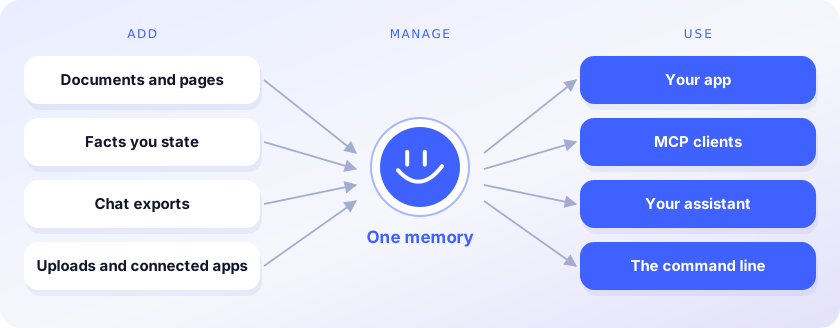
Membase is the memory layer for AI agents. It keeps one memory for everything you and your agents know, and every AI you use reads it. You stop re-explaining yourself each time you switch models or tools.
- Add. Facts, documents, web pages and chat exports from Claude or ChatGPT go into one memory.
- Manage. Containers keep projects apart; search it, ask it questions, forget what should go.
- Use. Your code, Claude Code, Cursor, Codex and ChatGPT read the same memory through the SDK or MCP.
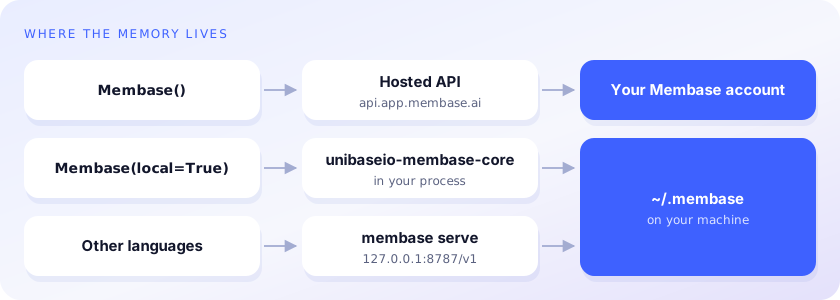
This repository is the developer side: Python and TypeScript clients, the membase command line
and an MCP server. The memory lives in your Membase account, which the
web app and browser extension also fill, or on your machine with
unibaseio-membase[local].
Write once, read from any AI
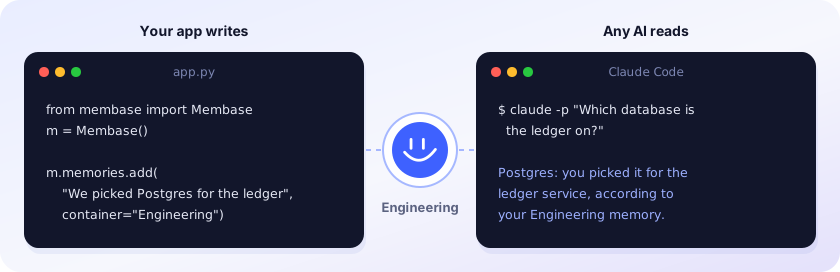
Recordings: Python SDK (57 s) · Claude Code (1 min 33 s). The answer above is illustrative.
Accuracy

93.1% on LoCoMo, 92.6% on LongMemEval_S and 92.2% on DMR, using about 3× fewer tokens than the full history on LoCoMo and 11× fewer on LongMemEval_S. Method and results: membase.ai/research
Quickstart
pip install unibaseio-membase              # hosted · Python 3.10+ · needs MEMBASE_API_KEY
pip install 'unibaseio-membase[local]'     # local  · Python 3.12 or 3.13 · needs OPENAI_API_KEY
npm install @unibaseio/membase              # TypeScript · Node 18+
npm install -g @unibaseio/membase-cli       # the `membase` command (hosted) without Python
from membase import Membase

m = Membase()                    # hosted
# m = Membase(local=True)        # local, in ~/.membase

m.memories.add("We picked Postgres for the ledger service.", container="Engineering")
m.search("what database is the ledger on?")
m.add("Design notes …", container="Engineering", custom_id="design-1")   # a document
m.ask("Which database did we choose for the ledger?")
Every method, its REST route and MCP tool, and the access it needs: SDK reference.
The Python package is unibaseio-membase (import membase); membase on PyPI is unrelated.
Command line
membase --local add "We picked Postgres for the ledger" --container Engineering
membase --local search "what did we pick for the ledger?"
membase --local ask "Which database is the ledger on?"
membase --local import ~/Downloads/claude-export.json     # Claude, ChatGPT, markdown or JSON chats
membase --local agent ingest trace.json --agent coder
membase --local agent search "fix flaky deploy" --agent coder
Without --local (or --store DIR, both before the command) commands use the hosted API; agent,
import and serve need unibaseio-membase[local].
MCP
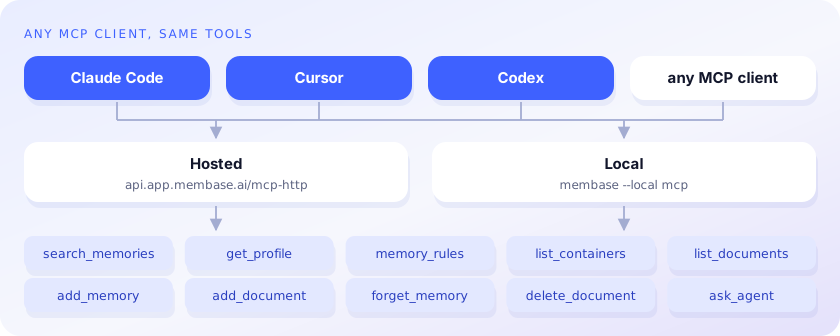
claude mcp add membase -- membase --local mcp                                   # local
claude mcp add --transport http membase https://api.app.membase.ai/mcp-http \
  --header "Authorization: Bearer $MEMBASE_API_KEY"                             # hosted
Hosted without the header, the connection signs you in and is read-only. Setup for Claude, ChatGPT, Cursor, Codex and other clients: Connect your AI.
Docs
- SDK reference: methods, REST routes, MCP tools, access levels
- Memory operations: containers, documents, memories, profile, ask
- Authentication: keys and what each one can reach
- Connect your AI: per-client MCP setup
- Local engine: what it stores,
membase serve, settings
License
Copyright © 2026 Unibase. All rights reserved. Proprietary; see
LICENSE. unibaseio-membase[local] also
installs unibaseio-membase-core, the compiled engine, under its own Unibase license.
1 maintainer

Metadata
1 maintainer
Release files for unibaseio-membase 0.3.1
For a detailed explanation of source distributions (sdists) and built distributions (wheels), please see the package formats documentation.
Source distribution (sdist)
| File | Size | Uploaded | |
|---|---|---|---|
| unibaseio_membase-0.3.1.tar.gz | 24.6 kB | Details |
Built distribution (wheel)
| File | Interpreter | ABI | Platform | Reset |
|---|---|---|---|---|
| unibaseio_membase-0.3.1-py3-none-any.whl | Python 3 | none | any | Details |
Total release size: 55.5 kB
Release files / unibaseio_membase-0.3.1.tar.gz
| Download URL | unibaseio_membase-0.3.1.tar.gz |
|---|---|
| Size | 24.6 kB |
| Tags | Source |
|
SHA-256 checksum How to use checksums |
a376c8cf0729e2380ffda8297537df613aef8a8edb44f2446570efae56a86168
|
|
BLAKE2b-256 checksum How to use checksums |
90330f60ec4c247dd241ed17d53bebec9c00fb6275d2f7621351d10716989f90
|
| Upload date | |
|
Uploaded using Trusted Publishing? What is trusted publishing? |
No |
| Uploaded via |
twine/7.0.0 CPython/3.13.12
|
Release files / unibaseio_membase-0.3.1-py3-none-any.whl
| Download URL | unibaseio_membase-0.3.1-py3-none-any.whl |
|---|---|
| Size | 30.9 kB |
| Tags | Python 3 |
|
SHA-256 checksum How to use checksums |
0ab0b0840e573e09a0b635f0549e1e6497a0bd1ebea37f261032510911a3e612
|
|
BLAKE2b-256 checksum How to use checksums |
3529438ceac3509c3492615b41bc9c6942d79f19dc4e16e9c638497471721b88
|
| Upload date | |
|
Uploaded using Trusted Publishing? What is trusted publishing? |
No |
| Uploaded via |
twine/7.0.0 CPython/3.13.12
|














