
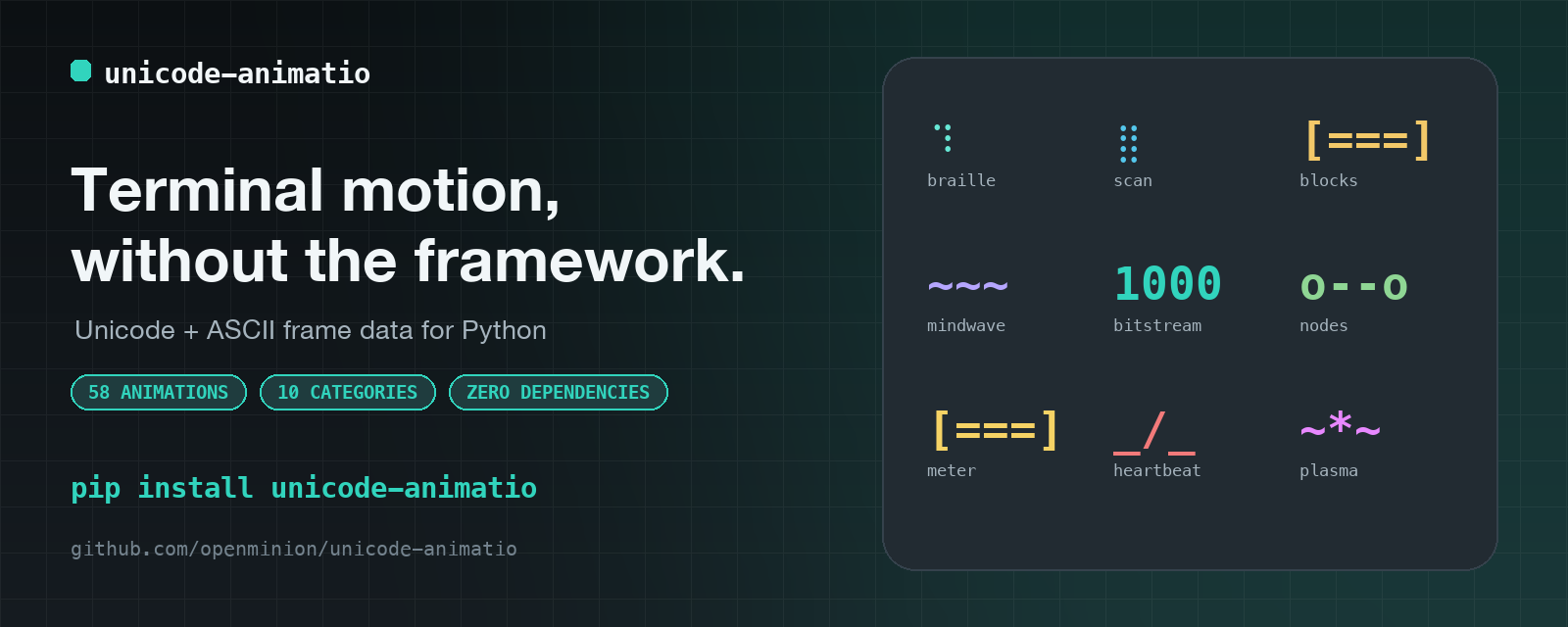
Unicode Animatio
Lightweight Unicode and ASCII terminal animation data for Python.
GitHub · PyPI · Website · Docs · X




Unicode Animatio packages deterministic animation frames and timing for terminals and other text renderers. It has no runtime dependencies and does not take ownership of colors, labels, layout, progress, or task state.
The distribution and CLI name is unicode-animatio. The Python import root is
unicode_animations.
Read This First
- Read At a Glance for the package naming and renderer boundary.
- Follow Install and Quick Start to read animation frames and render a first spinner.
- Use Python Examples for braille grids, provider integration, and category lookup.
- Use Preview Every Animation before choosing a preset.
- Read Development before changing the package.
Trust and Brand Safety
- Official GitHub: https://github.com/openminion/unicode-animatio
- Official website: https://www.openminion.com
- Official X account: https://x.com/OpenMinion
Unicode Animatio has no official token, coin, NFT, airdrop, staking program, treasury product, or investment offering. Any claim otherwise is unauthorized and should be treated as a scam.
At a Glance
| Distribution | unicode-animatio |
| Import root | unicode_animations |
| Maturity | Beta |
| Python | 3.9+ |
| Catalog | 58 animations across 10 categories |
| Runtime dependencies | None |
| Not the claim | Progress tracking, task orchestration, or framework rendering |
Common Commands
python3 -m pip install unicode-animatio
unicode-animatio --list
unicode-animatio --categories
unicode-animatio --search graph --json
unicode-animatio --show edgepulse
unicode-animatio --version
unicode-animatio helix
unicode-animatio --web --port 8765
Install
Install from PyPI:
python3 -m pip install unicode-animatio
For a source checkout:
python3 -m pip install -e ".[dev]"
Quick Start
Animation records contain immutable frames plus an interval in
milliseconds:
from unicode_animations import spinners

spinner = spinners["braille"]
print(spinner.frames)
print(spinner.interval)
The host application owns rendering. A minimal terminal loop looks like this:
from itertools import cycle, islice
import sys
import time

from unicode_animations import spinners

spinner = spinners["braille"]

for frame in islice(cycle(spinner.frames), 30):
    sys.stdout.write(f"\r{frame} Working...")
    sys.stdout.flush()
    time.sleep(spinner.interval / 1000)

sys.stdout.write("\n")
This example stops after 30 frames. A real renderer should also handle cancellation, cursor cleanup, reduced-motion preferences, and non-interactive output.
Python Examples
Build a braille frame
Use make_grid to create a dot grid and grid_to_braille to convert it to
Unicode braille cells:
from unicode_animations import grid_to_braille, make_grid

grid = make_grid(rows=4, cols=4)
grid[0][0] = True
grid[1][1] = True

print(grid_to_braille(grid))
The compatibility aliases makeGrid and gridToBraille remain available, but
new code should use the snake-case names.
Use the provider boundary
Use the provider boundary when the consumer should not depend on the catalog implementation:
from unicode_animations import get_provider

provider = get_provider()
animation = provider.get("helix")
wide_animation = provider.get("helix", length=3)
metadata = provider.describe("helix")

print(provider.provider_id)
print(animation.frames)
print(animation.interval_ms)
print(metadata.tags)
length repeats each frame in sync, so a host can request a wider animation
without combining independently phased indicators. It defaults to 1 and
does not change the frame count or interval.
The provider exposes structural animation records with frames, interval_ms,
category, tags, frame count, width hints, motion hints, and usage descriptions.
This is the preferred boundary for plugin hosts and applications that may swap
animation providers.
get_provider() is the framework-neutral Python integration surface. The
installed openminion.cli.animation_providers entry point adds automatic
discovery specifically for OpenMinion. Other hosts do not share that
entry-point protocol; they should map their own lifecycle events to a selected
preset and render its raw frames.
Browse by category
Use the category API when an application wants to offer a constrained preset picker:
from unicode_animations import (
    SPINNER_CATEGORIES,
    metadata_for_spinner,
    search_spinner_names,
    spinner_names_for_category,
)

print(spinner_names_for_category("graph"))
print(SPINNER_CATEGORIES["edgepulse"])
print(search_spinner_names("knowledge", category="graph"))
print(metadata_for_spinner("edgepulse").description)
spinner_names_for_category() returns canonical preset names.
SPINNER_CATEGORIES maps each preset name to its category.
search_spinner_names() searches preset names, categories, and tags in catalog
order.
Preview Every Animation
The preview tools are the fastest way to understand the catalog. They render the raw records but are not application UI frameworks.
| Command | What it does |
|---|---|
unicode-animatio --list |
Lists every preset with its category and timing |
unicode-animatio --categories |
Lists the available categories |
unicode-animatio --list --category graph |
Lists only graph presets |
unicode-animatio --search knowledge --category graph |
Searches names, categories, and tags |
unicode-animatio --show edgepulse |
Shows one preset with integration metadata |
unicode-animatio --version |
Prints the installed package version |
unicode-animatio --list --category graph --json |
Prints machine-readable metadata |
unicode-animatio |
Cycles through the full catalog in a terminal |
unicode-animatio helix |
Runs one preset until interrupted |
unicode-animatio --web |
Opens the local browser gallery |
unicode-animatio-web |
Starts the browser gallery server directly |
Terminal preview
Discover presets:
unicode-animatio --list
unicode-animatio --categories
unicode-animatio --list --category graph
unicode-animatio --search knowledge --category graph
unicode-animatio --show edgepulse
unicode-animatio --show edgepulse --json
Cycle through all animations or run one by name:
unicode-animatio
unicode-animatio helix
unicode-animatio edgepulse
The preview respects terminal color capability by default. Override it when testing a renderer:
unicode-animatio helix --color auto --foreground gray
Press Ctrl+C to stop a running terminal preview.
Browser preview
Open the local gallery through either command:
unicode-animatio --web
unicode-animatio-web --port 8765
The browser gallery includes category chips, search, theme toggle, reduced-motion toggle, a selected-preset details panel, and a copyable provider snippet for host integration. It starts from the operating system's color and reduced-motion preferences, remembers explicit choices, supports arrow-key preset selection, shows live filter-result counts, and announces copy and search status to assistive technology.
For a remote development machine:
unicode-animatio --web --host 0.0.0.0 --port 8765 --no-open
Binding to 0.0.0.0 exposes the preview server to the machine's network. Use
that option only on a trusted development network.
Source-checkout terminal demo
The repository includes a longer Python API demo that can cycle through the catalog or focus on one preset:
python examples/terminal_demo.py
python examples/terminal_demo.py --seconds-per-spinner 2 --loops 2
python examples/terminal_demo.py helix
python examples/terminal_demo.py --list
This script is part of the source checkout; it is not installed as a console command.
What Unicode Animatio Provides
- immutable animation frame data and millisecond timing
- canonical animation names, categories, metadata, and searchable tags
- braille-grid helpers:
make_gridandgrid_to_braille - compatibility aliases:
makeGridandgridToBraille - a structural provider entry point for host applications
- a terminal preview CLI:
unicode-animatio - a local browser preview CLI:
unicode-animatio-web - a PEP 561 type marker and typed public API
What Unicode Animatio Does Not Provide
- terminal UI or async rendering frameworks
- progress bars, task orchestration, or job-state tracking
- renderer colors, backgrounds, labels, or layout
- provider-level reduced-motion or accessibility policy beyond metadata hints; the bundled browser preview manages only its own presentation preferences
- hosted demos or remote APIs
- framework-specific Rich, Textual, or Typer adapters
The host renderer owns presentation and accessibility. The package returns raw frames and timing only.
Available animations
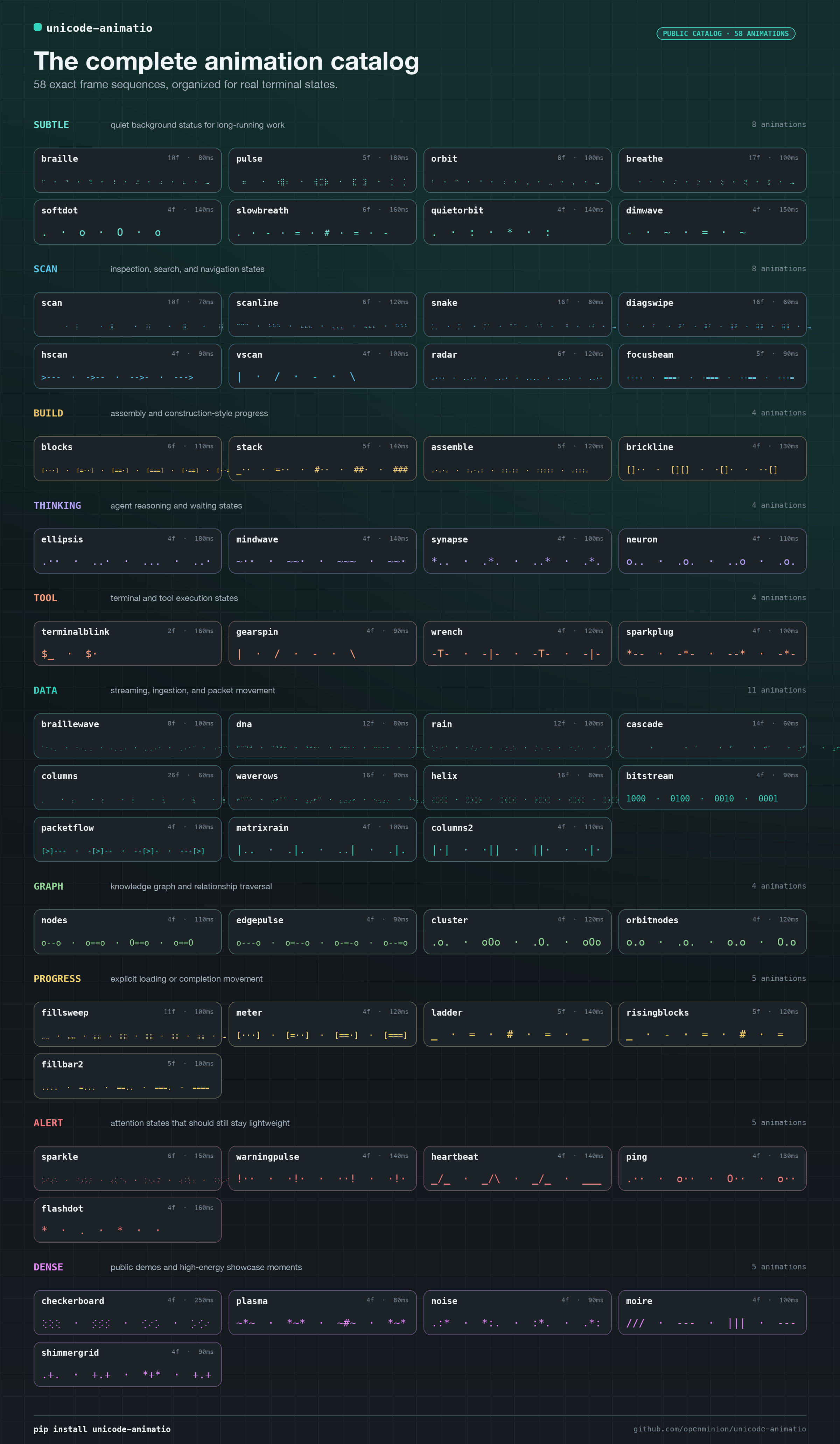
The catalog currently contains 58 deterministic animations:
Prefer a visual overview? Expand the complete catalog poster below.
Visual catalog poster — click to expand (58 animations across 10 categories)
| Category | Presets |
|---|---|
subtle |
braille, pulse, orbit, breathe, softdot, slowbreath, quietorbit, dimwave |
scan |
scan, scanline, snake, diagswipe, hscan, vscan, radar, focusbeam |
build |
blocks, stack, assemble, brickline |
thinking |
ellipsis, mindwave, synapse, neuron |
tool |
terminalblink, gearspin, wrench, sparkplug |
data |
braillewave, dna, rain, cascade, columns, waverows, helix, bitstream, packetflow, matrixrain, columns2 |
graph |
nodes, edgepulse, cluster, orbitnodes |
progress |
fillsweep, meter, ladder, risingblocks, fillbar2 |
alert |
sparkle, warningpulse, heartbeat, ping, flashdot |
dense |
checkerboard, plasma, noise, moire, shimmergrid |
Representative first frames show the range of the catalog. The browser and terminal previews show the complete frame sequences.
| Preset | Category | First frame | Interval |
|---|---|---|---|
braille |
subtle |
⠋ |
80 ms |
focusbeam |
scan |
---- |
90 ms |
synapse |
thinking |
*.. |
100 ms |
terminalblink |
tool |
$_ |
160 ms |
packetflow |
data |
[>]--- |
100 ms |
edgepulse |
graph |
o---o |
90 ms |
meter |
progress |
[ ] |
120 ms |
shimmergrid |
dense |
.+. |
90 ms |
Choosing a Preset
| Category | Good fit |
|---|---|
subtle |
Calm background activity |
scan |
Indexing, searching, or retrieval |
build |
Assembly and compilation |
thinking |
Model or reasoning activity |
tool |
Command and tool execution |
data |
Streaming and data movement |
graph |
Relation traversal and knowledge graphs |
progress |
Steady forward motion |
alert |
Short attention states |
dense |
High-energy or diagnostic displays |
Inspect exact names and timing rather than selecting from memory:
unicode-animatio --categories
unicode-animatio --list --category data
unicode-animatio --search stream
unicode-animatio packetflow
For public-facing previews, start with edgepulse, packetflow, helix,
synapse, focusbeam, and shimmergrid. They show graph traversal, data
movement, thinking, inspection, and high-energy showcase states without needing
an application renderer.
Development
make dev-install
make hooks-install
make check
Use make release-check before publishing or changing the documented public
surface.
Docs and Release
docs/README.md: package documentation mapdocs/getting-started.md: package usage and contributor bootstrapdocs/source-tree-owner-map.md: code owners and package layoutAPI_COMPATIBILITY.md: public names and provider contractRELEASING.md: release and publish flow
Questions and bug reports belong in GitHub Issues.
Community
License and Brand-use Boundary
- Source code license: MIT
- Brand/trademark grant: none
The license grants rights to use, modify, and redistribute the code. It does not grant rights to present a fork, clone, token, website, or social account as the official Unicode Animatio or OpenMinion project or imply affiliation or endorsement.
1 maintainer

Metadata
1 maintainer
Release files for unicode-animatio 0.0.11
For a detailed explanation of source distributions (sdists) and built distributions (wheels), please see the package formats documentation.
Source distribution (sdist)
| File | Size | Uploaded | Provenance | |
|---|---|---|---|---|
| unicode_animatio-0.0.11.tar.gz | 504.9 kB | With provenance | Details |
Built distribution (wheel)
| File | Interpreter | ABI | Platform | Reset |
|---|---|---|---|---|
| unicode_animatio-0.0.11-py3-none-any.whl | Python 3 | none | any | Details |
Total release size: 530.9 kB
Release files / unicode_animatio-0.0.11.tar.gz
| Download URL | unicode_animatio-0.0.11.tar.gz |
|---|---|
| Size | 504.9 kB |
| Tags | Source |
|
SHA-256 checksum How to use checksums |
aed2c49eaa1a150a84b662e12f4867c5b4c4d4575c2945ee9cd2918222203bac
|
|
BLAKE2b-256 checksum How to use checksums |
a9d4736b7bf0994746398486990d582f04ac5763762f1833f9e31420dee9eb92
|
| Upload date | |
|
Uploaded using Trusted Publishing? What is trusted publishing? |
Yes |
| Uploaded via |
twine/7.0.0 CPython/3.13.14
|
Provenance
Provenance describes where a file came from. On PyPI, provenance is shared via attestations, which provide a verifiable record of the build or publishing details. View details, limitations and caveats.


PyPI Publish Attestation
PyPI verified that this artifact, at this checksum, originated from the publisher listed below.
Signed by GitHub Actions, verified by PyPI on Oct 1, 2026.
Transparency logRelease files / unicode_animatio-0.0.11-py3-none-any.whl
| Download URL | unicode_animatio-0.0.11-py3-none-any.whl |
|---|---|
| Size | 26.0 kB |
| Tags | Python 3 |
|
SHA-256 checksum How to use checksums |
edf35eacc06cf9d9c9e241654a2140d8a75afc561bb549712f53f8030d5cdfc3
|
|
BLAKE2b-256 checksum How to use checksums |
caac54f0b7181a58c165913a3271e147d90e33df6f0b645fa73408f0b8a6d830
|
| Upload date | |
|
Uploaded using Trusted Publishing? What is trusted publishing? |
Yes |
| Uploaded via |
twine/7.0.0 CPython/3.13.14
|
Provenance
Provenance describes where a file came from. On PyPI, provenance is shared via attestations, which provide a verifiable record of the build or publishing details. View details, limitations and caveats.
PyPI Publish Attestation
PyPI verified that this artifact, at this checksum, originated from the publisher listed below.
Signed by GitHub Actions, verified by PyPI on Oct 1, 2026.
Transparency logSecurity for unicode-animatio 0.0.11
Provenance
Provenance describes where a file came from. On PyPI, provenance is shared via attestations, which provide a verifiable record of the build or publishing details. View details, limitations and caveats.
Full provenance
All 2 files in this release have been uploaded with provenance metadata.
Attestation for unicode_animatio-0.0.11.tar.gz
PyPI Publish Attestation
PyPI verified that this artifact, at this checksum, originated from the publisher listed below.
Signed by GitHub Actions, verified by PyPI on Oct 1, 2026.
Transparency logA note on package security
PyPI is a repository for distributing packages, not a service for auditing them. While third-party security researchers and our staff do their best to detect and remove malicious packages, PyPI cannot guarantee the quality, security or suitability of any given package.














