



Installing
Full install (recommended):
We’ve created an easy installation script that will install all pre-requisites and get your Unicorn HAT HD up and running with minimal efforts. To run it, fire up Terminal which you’ll find in Menu -> Accessories -> Terminal on your Raspberry Pi desktop, as illustrated below:
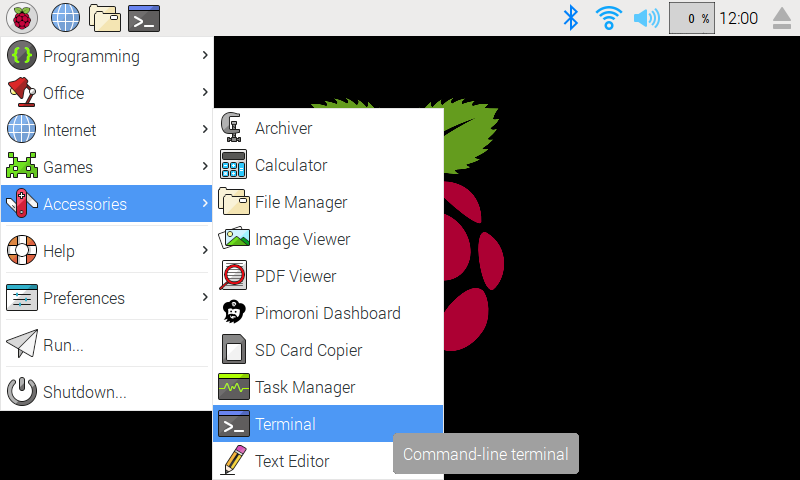
Finding the terminal
In the new terminal window type the command exactly as it appears below (check for typos) and follow the on-screen instructions:
curl https://get.pimoroni.com/unicornhathd | bashIf you choose to download examples you’ll find them in /home/pi/Pimoroni/unicornhathd/. To prototype and try out your code without having to deploy it onto a Raspberry Pi every time, you can use the Unicorn HAT simulator to run a mock Unicorn HAT on your computer.
Manual install:
SPI needs to be enabled to communicate with the Unicorn Hat HD. If the SPI on your Pi is not enabled or you are unsure if it is:
sudo raspi-config nonint do_spi 0
sudo reboot
Library install for Python 3:
sudo apt-get install python3-pip python3-dev python3-spidev
sudo pip3 install unicornhathd
Library install for Python 2:
sudo apt-get install python-pip python-dev python-spidev
sudo pip install unicornhathd
Development:
If you want to contribute, or like living on the edge of your seat by having the latest code, you should clone this repository, cd to the library directory, and run:
sudo apt-get install python-dev python-setuptools
sudo python3 setup.py install
(or sudo python setup.py install whichever your primary Python environment may be)
In all cases you will have to enable the SPI bus.
Documentation & Support
Guides and tutorials - https://learn.pimoroni.com/unicorn-hat-hd
Function reference - http://docs.pimoroni.com/unicornhathd/
GPIO Pinout - http://pinout.xyz/pinout/unicorn_hat_hd
Get help - http://forums.pimoroni.com/c/support
0.0.4
Added support for display addressing (for Ubercorn)
0.0.3
Deferred IO setup until first call to show
Changed sys.exit to ImportError for warning about missing dependencies
0.0.2
Tweaked Python package MANIFEST
0.0.1
Initial release
1 maintainer

Release files for unicornhathd 0.0.4
For a detailed explanation of source distributions (sdists) and built distributions (wheels), please see the package formats documentation.
Source distribution (sdist)
| File | Size | Uploaded | |
|---|---|---|---|
| unicornhathd-0.0.4.tar.gz | 5.8 kB | Details |
Built distributions (wheels)
| File | Interpreter | ABI | Platform | Reset |
|---|---|---|---|---|
| unicornhathd-0.0.4-py3-none-any.whl | Python 3 | none | any | Details |
| unicornhathd-0.0.4-py2-none-any.whl | Python 2 | none | any | Details |
Total release size: 17.9 kB
Release files / unicornhathd-0.0.4.tar.gz
| Download URL | unicornhathd-0.0.4.tar.gz |
|---|---|
| Size | 5.8 kB |
| Tags | Source |
|
SHA-256 checksum How to use checksums |
41cbb1ca198f723e4b443522ee3b6d90aedac4bbc154d4e161afd349fe354615
|
|
BLAKE2b-256 checksum How to use checksums |
cf473f61447cffe68e40232eca3b3f1ec69296b21c1ead1f03dc99d08fa140c7
|
| Upload date | |
|
Uploaded using Trusted Publishing? What is trusted publishing? |
No |
| Uploaded via |
twine/1.11.0 pkginfo/1.4.2 requests/2.19.1 setuptools/40.2.0 requests-toolbelt/0.8.0 tqdm/4.25.0 CPython/2.7.9
|
Release files / unicornhathd-0.0.4-py3-none-any.whl
| Download URL | unicornhathd-0.0.4-py3-none-any.whl |
|---|---|
| Size | 4.9 kB |
| Tags | Python 3 |
|
SHA-256 checksum How to use checksums |
a59451840b2ddef11f436c313288b349dfef9c8314af6474aa2474277761ed8c
|
|
BLAKE2b-256 checksum How to use checksums |
e3513429b84a5b7a88396cf87f693c815da47a8f1b8c6f198ce57a54840bc6a8
|
| Upload date | |
|
Uploaded using Trusted Publishing? What is trusted publishing? |
No |
| Uploaded via |
twine/1.11.0 pkginfo/1.4.2 requests/2.19.1 setuptools/40.2.0 requests-toolbelt/0.8.0 tqdm/4.25.0 CPython/2.7.9
|
Release files / unicornhathd-0.0.4-py2-none-any.whl
| Download URL | unicornhathd-0.0.4-py2-none-any.whl |
|---|---|
| Size | 7.2 kB |
| Tags | Python 2 |
|
SHA-256 checksum How to use checksums |
8ad71678954b9c26a989115c118d73e5cfdf5ad33e10c31282409c62dbb5711f
|
|
BLAKE2b-256 checksum How to use checksums |
003773019ac3b0cb8e5af1326b9cf352178d2f4f89081a90520a3087047a7b91
|
| Upload date | |
|
Uploaded using Trusted Publishing? What is trusted publishing? |
No |
| Uploaded via |
twine/1.11.0 pkginfo/1.4.2 requests/2.19.1 setuptools/40.2.0 requests-toolbelt/0.8.0 tqdm/4.25.0 CPython/2.7.9
|














