
UniFi Fabric MCP Server


Manage your entire UniFi network remotely from any AI assistant, through the UniFi Fabric API in Ubiquiti's cloud. Nothing to install on your network, no controller login. 786 tools across Site Manager, Network, Protect, InnerSpace and more, read-only if you want.
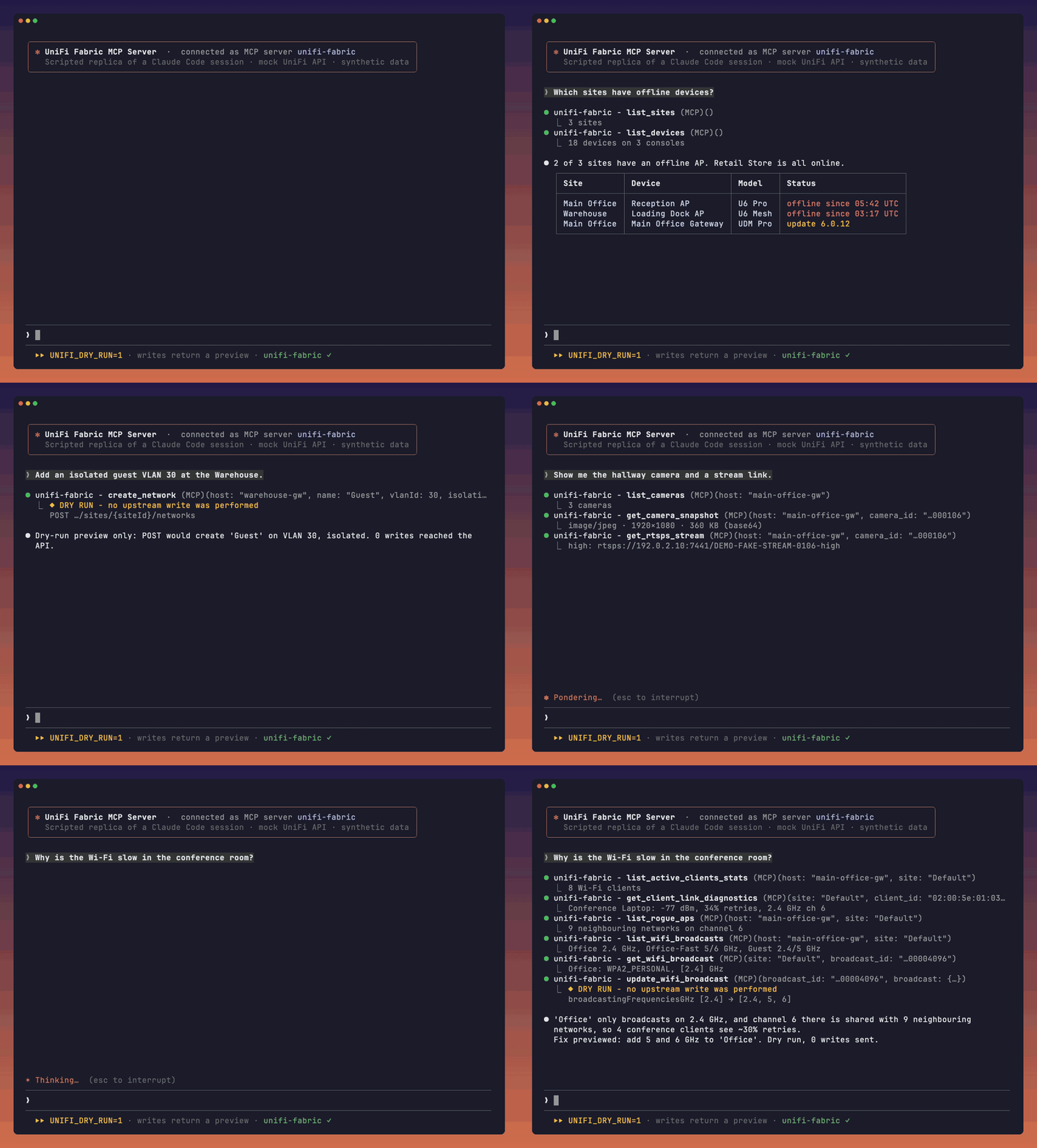
Scripted replica of a Claude Code session: real MCP tool calls to this server against a mock UniFi API with synthetic data, writes in dry-run mode (how it's made and how to reproduce it).
| How it connects | |
|---|---|
| Runs on | Your machine, with your own UniFi API key |
| Talks to | The UniFi Fabric API in Ubiquiti's cloud (api.ui.com), and nothing else |
| Needs | No SSH, no controller access, nothing on your LAN |
By default the client sees 5 discovery meta-tools that reach every tool; see Discovery mode.
Why this server
- Remote management through the UniFi Fabric API in Ubiquiti's cloud.
- 786 tools across Site Manager, Network, Protect, InnerSpace, Mobility and Carrier Fabric.
- Discovery mode advertises 5 tools in about 5 KB while reaching the full catalog; full mode uses about 1454 KB.
- Pass-through tools preserve upstream fields by default; projections and summaries are documented. Configured server secrets are masked and data-secret redaction is optional.
- Choose read-only mode, dry-run previews, redaction and audit logging.
- Every tool runs in CI against a simulated upstream.
- Works with MCP clients and is MIT licensed. See MSP setup and demos.
Contents: Quick Start · Safety · Read-only mode · Examples · Clients · Tools · Configuration · Troubleshooting · Contributing
Disclaimer: This project is not affiliated with, endorsed by, or sponsored by Ubiquiti Inc. UniFi is a trademark of Ubiquiti Inc.
The canonical console command is unifi-fabric-mcp. The MCP Registry also launches the
equivalent unifi-fabric-mcp-server console alias, matching the PyPI package identifier.
Quick Start
- Get a UniFi API key. Enable Site Manager and Network scopes at minimum, plus Protect for cameras.
- In Claude Code, run
/plugin marketplace add swkstudios/unifi-fabric-mcp-serverand then/plugin install unifi-fabric@unifi-fabric. The plugin requires uv and prompts for the key. - Ask: "List my UniFi sites and the devices in each one."
Choose your client
Local stdio setups use uv; Docker deployments need Docker instead. Set UNIFI_API_KEY in your environment before using the CLI commands. Configuration files may store keys in plain text; keep them private.
| Client or distribution | Setup |
|---|---|
| Claude Code plugin | /plugin marketplace add swkstudios/unifi-fabric-mcp-server, then /plugin install unifi-fabric@unifi-fabric |
| Claude Code MCP | claude mcp add unifi-fabric -e UNIFI_API_KEY="$UNIFI_API_KEY" -- uvx --from unifi-fabric-mcp-server==0.7.0 unifi-fabric-mcp |
| Claude Desktop | Download the .mcpb from the latest release and double-click it; details |
| Codex | codex mcp add unifi-fabric --env UNIFI_API_KEY="$UNIFI_API_KEY" -- uvx --from unifi-fabric-mcp-server==0.7.0 unifi-fabric-mcp |
| Antigravity CLI | agy mcp add unifi-fabric -- uvx --from unifi-fabric-mcp-server==0.7.0 unifi-fabric-mcp; IDE setup |
| Gemini CLI | gemini extensions install https://github.com/swkstudios/unifi-fabric-mcp-server |
| VS Code and Cursor | Other client setup |
| ChatGPT | Self-hosted HTTPS and OAuth |
| Other MCP clients | stdio / HTTP |
| uvx | uvx --from unifi-fabric-mcp-server==0.7.0 unifi-fabric-mcp |
| pipx | pipx install unifi-fabric-mcp-server==0.7.0 |
| pip | pip install unifi-fabric-mcp-server==0.7.0 |
| Docker | docker pull ghcr.io/swkstudios/unifi-fabric-mcp-server:0.7.0; deployment |
| MCP Registry | io.github.swkstudios/unifi-fabric-mcp-server |
Get Your API Key
- Sign in to UniFi Site Manager with your Ubiquiti account
- Select your organization from the dropdown (top-left)
- In the left sidebar, click API Keys
- Click Create New API Key and give it a descriptive name
- Select the API Scope — enable Site Manager and Network at minimum (add Protect if managing cameras)
- Under Sites, choose which sites the key can access (or select all)
- Copy the key immediately — it won't be shown again
Note: These are UniFi Site Manager API keys that authenticate against the UniFi Fabric API in Ubiquiti's cloud (
api.ui.com). Your consoles must be adopted to your UI.com account and connected to Ubiquiti's cloud for the key to discover them. See the API Docs for more details.
Safety controls you set
Always on: Every read tool is marked read-only and every write tool is marked destructive, derived from code and checked by tests. Supporting clients can use these hints to distinguish reads from writes. Use your client permission settings to ask before a write. The server masks its own UniFi API key when UniFi echoes it, and in errors and logs. A dry-run preview can echo a key that the caller supplied in the request body. The optional confirm argument is accepted and ignored; it is not an approval control. In discovery mode, all writes go through call_write_tool; choosing "do not ask again" for it may approve every later write.
Full access is the default because the server exists to manage your network. To start cautiously, turn on read-only mode first. These switches are opt-in and off by default; set them in the client server environment:
| Setting | What it does |
|---|---|
UNIFI_READ_ONLY=1 |
Hides write and action tools from the catalog and refuses them if called. See Read-only mode. |
UNIFI_REDACT_SECRETS=1 |
Data secrets such as Wi-Fi passwords are returned as UniFi sends them unless this is on; it masks documented credential fields in responses. See Credential redaction. |
UNIFI_DRY_RUN=1 |
Returns a preview of every write instead of sending it. See Dry-run. |
UNIFI_AUDIT_LOG=/path |
Appends one line per write attempt to a local file. See Audit log. |
Read-only mode
Set UNIFI_READ_ONLY=1 to hide write and action tools and refuse calls before they reach UniFi. Reads remain available. Turn on the Claude Code plugin Read-only mode option, add the variable to a client configuration or pass -e UNIFI_READ_ONLY=1 to Docker. Remove it or turn the plugin option off and restart to enable writes again.
For example, with Claude Code:
export UNIFI_API_KEY="your-api-key-here"
claude mcp add unifi-fabric -e UNIFI_API_KEY="$UNIFI_API_KEY" -e UNIFI_READ_ONLY=1 -- uvx --from unifi-fabric-mcp-server==0.7.0 unifi-fabric-mcp
The command stores the key in Claude Code's MCP configuration in plain text; keep it private. See read-only details for accepted values, selection order and per-area flags.
Example Prompts
Copy-paste these into Claude Code or any MCP client after connecting:
Show me a summary of all devices and clients across my sites.
Are there any offline devices? List them with their site names.
Create a firewall policy that blocks traffic from the guest VLAN to the server VLAN.
List all firewall policies and show their current ordering.
Get the RTSPS stream URLs for cameras in the main office.
How many clients are connected to each site right now?
Sample Tool Output
When you ask the MCP server a question, it executes tools and returns structured data. Here is get_fleet_summary on a single console with one site and five devices (output from a sanitized recorded response; it returns counts only, no records):
{
  "hosts": 1,
  "sites": 1,
  "devices": {
    "total": 5,
    "byStatus": {
      "online": 5
    },
    "byType": {
      "protect": 3,
      "network": 2
    }
  },
  "_key_label": null
}
With several API keys configured, the summary also carries _key_labels (the labels of the keys that answered), _keyTotals (each answering key's share of the counts, summing to the totals), and errors for a key that failed; incomplete / incompleteReason appear when a list stopped at the opt-in UNIFI_PAGINATE_MAX_PAGES cap.
Set up your client
The Quick Start table links here. Every option runs the server on your own machine with your own UniFi API key; nothing goes through a hosted service, and requests go from your machine to api.ui.com only.
Install as a Claude Code plugin
The plugins/claude/ folder is a Claude Code plugin. It runs this server locally through uvx with the API key you enter when you enable it (kept in Claude Code's secure credential storage), and it has optional Read-only mode and Tool mode settings. Nothing goes through a hosted service: requests go from your machine to api.ui.com only. It works in Claude Code (terminal, IDE extensions and the desktop Code tab). Claude Desktop chat runs local servers configured through claude_desktop_config.json; see Use with Claude Desktop. The claude.ai web and mobile chat clients do not run local MCP servers. See the plugin README for what it runs, where data goes, and example prompts, and PRIVACY.md for the privacy policy.
Install it from this repository's marketplace (Claude Code 2.1.275 or later installs in one step):
/plugin marketplace add swkstudios/unifi-fabric-mcp-server
/plugin install unifi-fabric@unifi-fabric
Claude Code asks for your API key, Read-only mode and Tool mode (discovery by default) when you enable it. Or try it for one session from a checkout:
claude --plugin-dir ./plugins/claude
Without the plugin, register the server directly with claude mcp add as shown in Safety defaults or Track A.
Use with Claude Desktop
Claude Desktop chat runs local MCP servers from its config file (macOS and Windows; not claude.ai on the web or mobile). Open it with Settings > Developer > Edit Config:
- macOS:
~/Library/Application Support/Claude/claude_desktop_config.json - Windows:
%APPDATA%\Claude\claude_desktop_config.json
{
  "mcpServers": {
    "unifi-fabric": {
      "command": "/absolute/path/to/uvx",
      "args": ["--from", "unifi-fabric-mcp-server==0.7.0", "unifi-fabric-mcp"],
      "env": { "UNIFI_API_KEY": "your-api-key-here" }
    }
  }
}
Replace /absolute/path/to/uvx with the output of which uvx (macOS) or where uvx (Windows): an app started from the Dock or Start menu may not see ~/.local/bin or other shell PATH entries. Add "UNIFI_READ_ONLY": "1" to env to hide and refuse every write and action tool. Then quit Claude Desktop completely and start it again. The key sits in this file in plain text, so keep the file private.
On macOS or Windows you can instead install the Claude Desktop extension bundle (.mcpb), built from plugins/claude-desktop/: Claude Desktop asks for the key at install time and keeps it in its secure storage. See the bundle README.
Use with OpenAI Codex
The Codex CLI, the Codex IDE extension and the ChatGPT desktop app share ~/.codex/config.toml, so one setup serves all three. ChatGPT on the web cannot start local servers; see Use with ChatGPT (self-hosted).
Recommended: forward the key from your environment (nothing stored). Add this to ~/.codex/config.toml:
[mcp_servers.unifi-fabric]
command = "uvx"
args = ["--from", "unifi-fabric-mcp-server==0.7.0", "unifi-fabric-mcp"]
env_vars = ["UNIFI_API_KEY", "UNIFI_READ_ONLY"]   # forwarded from the environment Codex starts in
Then start Codex from a shell that has the key (the read keeps it out of your shell history):
printf 'UniFi API key: '; read -rs UNIFI_API_KEY; echo; export UNIFI_API_KEY
export UNIFI_READ_ONLY=1   # optional: read-only mode
codex
One-liner (stores the key in config.toml in plain text):
printf 'UniFi API key: '; read -rs UNIFI_API_KEY; echo
codex mcp add unifi-fabric --env UNIFI_API_KEY="$UNIFI_API_KEY" -- uvx --from unifi-fabric-mcp-server==0.7.0 unifi-fabric-mcp
Add --env UNIFI_READ_ONLY=1 for read-only mode. codex mcp list shows the server.
ChatGPT desktop app: it reads the same config.toml, and its servers are listed under Settings > MCP servers (Add server for a new one, then Restart). An app started from the Dock or Finder does not see variables exported in a terminal, so env_vars forwarding only works when Codex starts from a shell; for the desktop app, give the key with the one-liner above (or an env = { UNIFI_API_KEY = "your-api-key-here" } line in the [mcp_servers.unifi-fabric] table).
Codex plugin: this repository is also a Codex plugin marketplace (plugins/codex/). The plugin stores no key; it forwards UNIFI_API_KEY, UNIFI_READ_ONLY and UNIFI_TOOL_MODE from the environment Codex starts in:
codex plugin marketplace add swkstudios/unifi-fabric-mcp-server
codex plugin add unifi-fabric@unifi-fabric
With no key in the environment the server exits at startup and Codex lists no unifi-fabric tools; a wrong key returns the upstream HTTP 401 on the first tool call.
Use with Google Antigravity
Antigravity starts local servers with the environment of the shell that started agy, and it does not expand ${VAR} in env values. Keep the key out of config files by exporting it before you start agy:
printf 'UniFi API key: '; read -rs UNIFI_API_KEY; echo; export UNIFI_API_KEY
export UNIFI_READ_ONLY=1   # optional: read-only mode
agy mcp add unifi-fabric -- uvx --from unifi-fabric-mcp-server==0.7.0 unifi-fabric-mcp
agy
Or install the plugin from a checkout of this repository; it uses the same exported key:
agy plugin install ./plugins/antigravity
Antigravity 2.0 and the Antigravity IDE read the same ~/.gemini/config, but when started from the Dock they do not see variables exported in a terminal. For them, store the key in the config instead (in plain text, in ~/.gemini/config/mcp_config.json):
agy mcp add --env UNIFI_API_KEY="$UNIFI_API_KEY" unifi-fabric -- uvx --from unifi-fabric-mcp-server==0.7.0 unifi-fabric-mcp
Without a key the server exits at startup and Antigravity lists no unifi-fabric tools; a wrong key returns the upstream HTTP 401 on the first tool call. See the plugin README.
Use with Gemini CLI
Google replaced the consumer Gemini CLI with Antigravity; Gemini CLI remains available to Enterprise and API-key users. This repository's root gemini-extension.json makes it a Gemini CLI extension that prompts at install time for your API key (stored in the system keychain) and the optional Read-only mode and Tool mode settings:
gemini extensions install https://github.com/swkstudios/unifi-fabric-mcp-server
We have checked the manifest against the extension reference but have not run it in Gemini CLI. Antigravity's agy plugin import also reads this manifest.
Use with ChatGPT (self-hosted)
ChatGPT on the web and in its apps only connects to remote MCP servers over HTTPS, signed in with OAuth 2.1; it cannot start a local server or send an API key. You can still use this server with ChatGPT by hosting your own instance in OAuth mode behind your own identity provider and adding it as a custom MCP server. Never put this write-capable server on a public URL without authentication. The self-hosted ChatGPT guide has the prerequisites, steps, a known limitation and a security checklist; that setup has not been tested end to end with ChatGPT.
A listing in the ChatGPT app directory would need a hosted service run by us. We do not run one, so there is no directory listing.
Track A — Local (stdio)
Install from PyPI and run the server locally. The MCP client launches it as a subprocess over stdio. Requires Python 3.12+ (or uv, which fetches a suitable Python for you).
export UNIFI_API_KEY="your-api-key-here"
uvx --from unifi-fabric-mcp-server==0.7.0 unifi-fabric-mcp
Or install it once in an isolated environment:
pipx install unifi-fabric-mcp-server==0.7.0
unifi-fabric-mcp
Or use a virtual environment you manage:
python3 -m venv .venv
.venv/bin/python -m pip install unifi-fabric-mcp-server==0.7.0
.venv/bin/unifi-fabric-mcp
For Claude Code, put this in .mcp.json at your project root (Claude Code asks you to approve it on first use). To register the server for all your projects, use claude mcp add --scope user unifi-fabric -e UNIFI_API_KEY=… -- uvx --from unifi-fabric-mcp-server==0.7.0 unifi-fabric-mcp; Claude Code stores that configuration in ~/.claude.json. Supported locations are documented by Claude Code.
{
  "mcpServers": {
    "unifi-fabric": {
      "command": "uvx",
      "args": ["--from", "unifi-fabric-mcp-server==0.7.0", "unifi-fabric-mcp"],
      "env": { "UNIFI_API_KEY": "your-api-key-here" }
    }
  }
}
If you installed with pipx or pip instead, use "command": "unifi-fabric-mcp" and omit args.
PATH note: A bare
"command": "unifi-fabric-mcp"only resolves if it is on the MCP client'sPATH. Many MCP clients do not inherit the shell's virtual environment. Useuvxas above, the absolute path to the installed binary (for example/path/to/.venv/bin/unifi-fabric-mcp), or install globally withpipx install unifi-fabric-mcp-server==0.7.0oruv tool install unifi-fabric-mcp-server==0.7.0.
Homebrew: a Homebrew formula is planned, but there is no tap yet; follow issue #24.
Verify it works: When launched by the client the server exits immediately if UNIFI_API_KEY is absent or empty; an incorrect key will not prevent startup but will cause tool calls to fail with an authentication error. A successful start produces no output on stdio (the client communicates over stdin/stdout).
Track B — Docker (HTTP)
See Docker HTTP setup and verification.
Track C — From source (development)
git clone https://github.com/swkstudios/unifi-fabric-mcp-server.git
cd unifi-fabric-mcp-server
python3 -m venv .venv && source .venv/bin/activate
pip install -e .          # -e is editable/dev mode
export UNIFI_API_KEY="your-api-key-here"
unifi-fabric-mcp
Agent skills
The skills/ folder holds six workflow skills: firewall zone and policy audit,
network or VLAN change, device and client troubleshooting, Protect camera and event review,
Wi-Fi radio change, and site health report. Each tells the agent which tools to call and in
which order: reads first, the exact change shown to you, the tool's own dry-run preview where it
has one, the write, then a read-back. The Claude Code plugin loads them; for Claude Desktop,
Codex, Gemini CLI and Antigravity see docs/AGENT-SKILLS.md.
About this server
What is UniFi Fabric? Ubiquiti spells it "UniFi Fabrics" and describes it as: "UniFi Fabrics transforms Site Manager into a single control plane built for unlimited scale of sites and users." (Ubiquiti, Introducing UniFi Fabrics, 2026-01-12). Watch Ubiquiti's own video, Introducing: UniFi Fabrics, or read The New Site Manager - Now Official.
This is an MCP (Model Context Protocol) server that exposes the UniFi Site Manager API as tools for AI assistants. Built with FastMCP, it works with Claude Code, Codex, Antigravity, Gemini CLI, Cline and other MCP clients.
Highlights:
- 786 tools across Fleet, Network, Firewall, Protect, VPN, InnerSpace, History, and more
- Faithful pass-through by default: tools return complete upstream payloads, including credential fields (WLAN passphrases, RADIUS secrets, API tokens), GPS coordinates, and Protect recognition data. The one change always made is that the server's own configured secrets (its API keys,
MCP_BEARER_TOKEN,MCP_TLS_KEY_PASSWORD) are replaced by***wherever an upstream response echoes them. Mask credential fields with the opt-inUNIFI_REDACT_SECRETS, or refuse all writes withUNIFI_READ_ONLY - Configurable authentication:
none(loopback/dev) /bearer(LAN/VPN) /oauth(resource-server, JWT-verified via JWKS) - Configurable TLS: plain HTTP / in-server HTTPS (
https) / mutual TLS (mtls) - Stdio transport for local use;
streamable-http/ssefor containerized deployments - Stateless, cloud-first design — connects to
api.ui.comvia the UniFi Site Manager API; no direct controller access required
Architecture
flowchart LR
    A[AI Assistant<br/>MCP Client] -->|MCP protocol<br/>stdio / HTTP| B[UniFi Fabric<br/>MCP Server]
    B -->|HTTPS<br/>API key auth| C[api.ui.com<br/>UniFi Site Manager]
    C -->|Cloud Connector<br/>Proxy| D[UDM / UDR / UCG<br/>Consoles]
    D --- E[Devices & Clients]
    D --- F[Protect NVRs]
What is MCP?
Model Context Protocol (MCP) is an open standard that enables large language models (LLMs) and AI assistants to securely interact with external systems and tools. Instead of asking the AI to make manual API calls or describe steps, MCP allows the AI to:
- Execute commands and operations directly in external systems
- Query data and retrieve real-time information
- Automate complex workflows through natural conversation
This UniFi Fabric MCP server bridges UniFi's network management API with AI assistants, enabling you to control your network infrastructure through conversation.
Use Cases
- Network Operations: Monitor fleet health, manage sites, and troubleshoot devices using natural language
- Security Management: Create and update firewall policies, manage ACLs, and configure DNS policies without manual API calls
- MSP Operations: Manage multiple UniFi consoles and organizations with a single AI interface
- Device Management: Monitor and control cameras, sensors, and other Protect devices across your infrastructure
- Automation: Build AI-powered workflows for routine network tasks and compliance audits
- Placement snapshots: Read a structured snapshot of console, device and floor-plan placement for maps and dashboards; see Placement snapshots.
Compatibility and coverage
Verification status
| Evidence | Result |
|---|---|
| Every tool runs in CI against a simulated upstream | 786 tools |
| Live-tested on a real console | 380 of 786 passed on build cde04b5c1520, 2026-10-28 |
| Live write tools passed | 114 on that build and date |
The live run also recorded failures and untested tools. Later focused tests exercised fixes on different builds; they do not constitute a new full sweep. See coverage and limitations for evidence and scope.
Available Tools
The server exposes 786 tools organized by domain for managing UniFi infrastructure. The following counts are domain tools available in full mode or through discovery search; discovery mode advertises meta-tools in tools/list.
| Product | Tools |
|---|---|
| Site Manager and fleet | 19 |
| Network | 484 |
| Protect | 227 |
| InnerSpace | 32 |
| Mobility | 8 |
| Carrier Fabric | 11 |
| Generic connector relay | 5 |
Show all domains
| Domain | Domain tools available | Purpose |
|---|---|---|
| Fleet & Aggregation | 5 | Cross-console device and client listing and search, fleet summary, configured API keys |
| Site Manager | 14 | Cloud Site Manager reads: hosts, sites, devices, ISP metrics queries, SD-WAN configs and status, cross-site health summary, site comparison, search and inventory |
| Site Management | 3 | Site create, rename and delete |
| Network & VLAN | 38 | Application info, local sites, networks and VLANs, LAGs and MC-LAG domains, switch stacks, WiFi broadcasts, WAN interfaces, port profiles (create, delete) and port-profile VLAN tagging, AP groups, Matter nodes (commission, rename, remove) and Thread networks |
| Controller Administration | 17 | Controller backups and restore, site-configuration import, test email, remote access, SSO, own admin profile, system parameters, support files, firmware checks and cache |
| Insights & Diagnostics | 45 | Controller and site dashboards, anomalies, warnings, observability, UPS, device models and fingerprints, SSL inspection, IPS signatures, system-log settings, packet capture, ping tests, IP and Thread topology |
| Switching, Power & Routing | 40 | Energy-saving policies, PoE power supervisors, port history and MAC tables, wireless links, BGP and OSPF, global network settings, mDNS, VLAN planning, loop detection, MC-LAG and switch stacks |
| Wi-Fi & Radio | 25 | WLAN configs and groups, channel plan, rogue APs, Radio AI, WiFi connectivity and stats, spectrum and quick scans, WiFiman settings, WAN-over-WiFi |
| Mobile & WAN | 20 | LTE / 5G and eSIM management, APN profiles, SIM PIN, mobile data usage, WAN load balancing, WAN SLAs, gateway routes |
| ProAV, Sandbox & Digital Twin | 18 | ProAV matrix, snapshots and groups, TV-wall calibration, Shadow Mode, test configurations, digital-twin layouts, 5G topology, multicast insights |
| Device Management | 55 | Device control, adoption and forget, stats, actions, location, tagging, per-radio reads and updates, SSH sessions, switch-port and counter commands, config clone, PDU outlets, UPS and battery, replacement, rolling-upgrade planning |
| Clients & Guests | 43 | Client listing, stats, blocking, reconnection, forgetting, names, notes, fixed-IP reservations, guest authorization and access, DHCP leases and options, client insights, traffic controls and hotspot settings, user (bandwidth) groups and client group assignment |
| NAT, QoS & Traffic Shaping | 21 | NAT rules, QoS rules, content filters, traffic statistics and flows, application traffic rates, PoE info, topology snapshot |
| DNS & Traffic | 31 | DNS policies, traffic rules, matching lists, routes, routing entries, static routes, dynamic DNS (create, delete), DPI app/category catalogue |
| Firewall | 24 | Policies, zones, ACL rules, rule ordering, classic firewall rule and group reads |
| Network Policy & DPI | 18 | Policy-engine rules, members groups, app blocks, previews, predefined policies, zone matrix, DPI reset |
| Port Forwarding | 4 | List, create, update, delete port forwards |
| VPN | 42 | VPN servers, site-to-site tunnels, RADIUS profiles, VPN clients, static DNS records, DoH servers, IPsec, WireGuard users, Teleport invitations, site VPNs, RADIUS profile update and delete |
| Hotspot | 11 | Voucher CRUD, operator management, billing package reads |
| Settings & Monitoring | 5 | Controller settings read/write, scheduled-task reads |
| Utilities | 10 | Country lookup, device tags, local user reads and updates, RADIUS account reads and writes |
| Protect | 133 | Cameras, sensors, lights, chimes, liveviews, PTZ, snapshots, historical events, bounded-window live-stream collectors (events + device changes), arm profiles, sirens, fobs, relays, speakers, bridges, link stations, alarm hubs, Protect users, ULP users, application metadata, POS overlay ingestion, private camera zones/image/audio/recording/tracking, NVR settings, video/timelapse exports and device lifecycle |
| Protect Events & Cases | 15 | Event details, event media, favorites, investigations (cases) and case assets, case export, temporary stream URLs |
| Protect Automation & Backup | 21 | Automations and their history, notification receivers, backups and restore, cloud archive, UniFi Video import |
| Protect PTZ & Doorbell | 17 | PTZ moves, presets and patrols, camera shortcuts, calibration, doorbell ringtone test and credential (NFC card, fingerprint) enrollment |
| Protect Recognition & Search | 23 | Face/vehicle recognition groups (reads and writes), image recognition, detection search and statistics, AI false-positive reports |
| Protect Users & Assets | 18 | Device tags, user groups, Protect users and notifications, device passwords, Protect files, ringtones and liveviews |
| InnerSpace | 31 | Project geometry/summary, placed devices, floor plans, placed APs/switches, unplaced inventory, plan asset download, plan and project edits, doors, health, backups and support dumps |
| Mobility | 8 | Workspace/admin/device/client reads and guarded device name / LAN-DHCP / wireless writes for UMR mobile routers |
| Carrier / ISP Fabric | 11 | Org-scoped subscriber management (4 reads, 7 guarded writes); not testable against the maintainer's live hardware; hermetic/spec-conformance tested only |
| Connector Relay | 5 | Guarded escape hatch to relay GET/POST/PUT/PATCH/DELETE to console routes without a typed wrapper |
| Statistics, History & Logs | 14 | Site and device statistics, client sessions and link diagnostics, historical stats, known clients, system log by class, network events, IPS/IDS threat events |
| Placement Snapshot | 1 | Read-only bounded topology and placement snapshot for floor-plan and map consumers (get_unifi_placement_snapshot); runs with any connector-write setting |
The domain groupings above are illustrative and each tool is counted once. For the full tool reference — including all 786 tool names, parameter tables, and descriptions — see docs/TOOLS.md. MCP clients can also query the server directly: tools/list lists every tool with UNIFI_TOOL_MODE=full; in the default discovery mode it lists the five meta-tools, and search_tools / describe_tool return the names and schemas (Discovery mode).
Every tool parameter carries a description (in tools/list in full mode, or from describe_tool in discovery mode) that says where its value comes from (for example, firewall zone ids from list_firewall_zones_proxy) and whether it is a Network or a Protect id; write tools also document their request body (a spec-derived shape, or an explicit free-form note). Worked examples for the longer workflows are in docs/TOOL-USAGE.md. Read tools are annotated readOnlyHint: true and destructiveHint: false; every write, action, delete and connector-relay tool (including fabric_connector_get, which can reach a state-changing GET route) is annotated readOnlyHint: false and destructiveHint: true (annotation semantics).
If a call is missing a required argument, passes an unknown one, or sends the wrong type, the error names each parameter, repeats its description, lists the valid parameters and shows the tool's example call (a tool whose description has none shows the shape of a call with its required arguments instead), for example:
Invalid arguments for tool 'get_firewall_policy':
- policy_id: missing required argument. Firewall policy UUID. Get it from list_firewall_policies (data[].id). ...
Valid parameters: host (required), site (required), policy_id (required).
Example call: {"host": "my-console", "site": "Default", "policy_id": "3fa85f64-..."}
Errors from the UniFi API itself are returned with their real request path and complete body. The server's own configured secrets are always replaced by *** in them; credential fields are masked only under the opt-in UNIFI_REDACT_SECRETS.
InnerSpace
InnerSpace is UniFi's spatial/floor-plan application. This server covers all six endpoints of the official, GET-only UniFi InnerSpace Integration API (v1.3.23), reached through the Site Manager cloud connector (…/proxy/innerspace/integration/v1/*):
| Tool | Endpoint | Returns |
|---|---|---|
get_innerspace_project |
/v1/project |
full project geometry (shapes, plans, products) |
get_innerspace_summary |
/v1/project |
structural inventory: shape/plan/product counts, per-plan scale |
list_innerspace_devices |
/v1/project |
placed device shapes with position/rotation |
list_innerspace_floor_plans |
/v1/floor_plans |
floor plans with ppm scale, image asset paths, dimensions |
list_innerspace_access_points |
/v1/access_points |
placed APs (position, mounting height, azimuth) |
list_innerspace_switches |
/v1/switches |
placed switches (position, status) |
list_innerspace_inventory |
/v1/inventory |
devices known to the project but not yet placed |
get_innerspace_asset |
/v1/assets/{planId}/{filename} |
floor-plan image, complete, base64 inline (no size cap; metadata_only=true returns the same keys with image_base64: null) |
Note: get_innerspace_asset returns the whole asset in one response (the base64 text is about 4/3 the image size). Use metadata_only=true to check size_bytes first if response size matters to your client.
The official Integration API is read-only: it exposes no create/update/save endpoint. Writes go through the internal /proxy/innerspace/api routes.
The typed InnerSpace read tools use the public Integration API; get_innerspace_project, get_innerspace_summary and list_innerspace_devices fall back to the internal /api/project route when the connector refuses the integration route, and get_innerspace_project uses it when user_email or site_id is given. The internal-route tools add five reads (doors, stats, uCore manifest and status, health) and 18 write tools (plans, plan assets and maps, project, wall and attenuation types, shape transforms and imports, backup export and import, support dump, storage clean-up); UNIFI_ENABLE_INNERSPACE_WRITE governs them (enabled by default; set it to a false value to refuse them).
Placement snapshots
Consume get_unifi_placement_snapshot for a bounded, 3D
placement/topology snapshot suited to floor-plan, map, and dashboard consumers. It returns a projection, not whole upstream bodies (as the summary tools such as get_fleet_summary and get_innerspace_summary return server-computed counts rather than records): a read-only, closed unifi.placement-snapshot/v1 field selection with provenance and a
120-second freshness contract. Its strings are the upstream values verbatim, including
device mac / ip and the floor-plan asset URLs. Withholding is opt-in: with
UNIFI_REDACT_SECRETS on, URLs, IP / MAC addresses and credential-marker text are left
out, counted under _withheld, and _withheld_how_to_obtain says where to read each
value (with it off, _withheld is never present). Records schema v1 cannot represent
are counted in either mode under _unprojected, with _unprojected_how_to_obtain
naming the verbatim read tool. It runs with any connector-write setting (it never writes); a
dedicated publisher deployment may still choose UNIFI_ENABLE_CONNECTOR_WRITE=0.
For a scheduled publisher, unifi-fabric-mcp placement-snapshot --host <console> writes one
snapshot as JSON to stdout. Before scheduling it, run
unifi-fabric-mcp placement-snapshot-preflight --host <console>: it checks the four
required logical capabilities through their existing GET-only collectors and reports
each source capability name and a coarse outcome, plus the complete error text for a
failed one; no successful response payload is included. Collector resolution or
pagination can issue more than four HTTP requests; the gate is intentionally about
complete source capability, not a fixed request count.
Generic Fabric Connector Relay (guarded)
Ubiquiti's official Network Cloud Connector (and the Site Manager v1.0.0 OpenAPI) document a generic method relay family — GET | POST | PUT | PATCH | DELETE /v1/connector/consoles/{id}/*path — that forwards a request through Fabric to a console's /proxy/<path> surface. The typed console tools (Network, Protect, InnerSpace) ride that connector. The Site Manager reads of hosts, sites, devices, ISP metrics and SD-WAN configs, and the Mobility and Carrier Fabric tools, call their api.ui.com cloud routes directly (/v1/hosts, /v1/sites, /v1/devices, /v1/isp-metrics/..., /v1/sd-wan-configs, /v1/mobility/..., /v1/carrier/...) without the connector. The fabric_connector_* family exposes the relay directly, as a guarded escape hatch for a controller-supported route that has no typed wrapper yet (a per-device Classic REST config route, a legacy InnerSpace save route, etc.). Verb references: Connector PUT, Connector PATCH (documented against Network app v10.6.106), and the Site Manager v1.0.0 OpenAPI.
| Tool | Availability |
|---|---|
fabric_connector_get |
Read; available by default and under every write opt-out. A known state-changing GET route (Protect camera enable-control / disable-control) is a write: it follows the same opt-outs, read-only mode and dry-run as the mutation tools (no confirm) |
fabric_connector_post |
Mutation — writes enabled by default; opt out with UNIFI_ENABLE_CONNECTOR_WRITE=0. confirm is accepted and ignored |
fabric_connector_put |
Mutation — writes enabled by default; opt out with UNIFI_ENABLE_CONNECTOR_WRITE=0. confirm is accepted and ignored |
fabric_connector_patch |
Mutation — writes enabled by default; opt out with UNIFI_ENABLE_CONNECTOR_WRITE=0. confirm is accepted and ignored |
fabric_connector_delete |
Mutation — writes enabled by default; opt out with UNIFI_ENABLE_CONNECTOR_WRITE=0. confirm is accepted and ignored |
path is the relay-relative application path after /proxy/ — e.g. network/integration/v1/sites, network/api/s/{site}/rest/device/{id}, or innerspace/api/shapes/{id}. Use the {site} (slug) or {site_id} (UUID) placeholder for the site segment; the server resolves the site through the Registry and substitutes its slug or UUID, and the result reports the path as sent, substituted site included, under resolvedPath. Like path, resolvedPath is relative to the console's /proxy/: the console id (resolved from host) and the API key are never part of either.
Guards (all enforced, none optional):
- Registry-only identity —
host(name/id) resolves to the owning API key + host id;{site}/{site_id}are substituted from the Registry. - Route classes (a route-to-area map, not a capability cap): Network
integration/v1, Network Classicapi/s/{site}/rest|cmd|stat(and every other Classic route), Networkv2/api, Protectintegration/v1andapi, InnerSpaceintegration/v1andapi, Accessintegration/v1andapieach map to arouteClass, so a per-area write opt-out binds the relay as it binds that area's typed tools. Any other valid path (for exampletalk/...,connect/...,drive/...) relays withrouteClass: "unclassified": a GET always, and a mutation unless a per-area write opt-out (UNIFI_ENABLE_NETWORK_WRITE,UNIFI_PROTECT_MUTATIONS_ENABLED,UNIFI_ENABLE_MOBILITY_WRITE,UNIFI_ENABLE_CARRIER_FABRIC_WRITE,UNIFI_ENABLE_INNERSPACE_WRITE) is active. Its area cannot be proven, so while one is set the mutation is refused, naming the active variable(s). - Positive-charset path validation —
..,%-encoding, backslash, whitespace, control characters,//empty segments, and a URL scheme (://) are rejected before any network call. - Mutation gating (read + write on by default) — an ordinary GET read is always available. A known state-changing GET route (Protect camera
enable-control/disable-control) is a write:UNIFI_ENABLE_CONNECTOR_WRITE, the Protect opt-out,UNIFI_READ_ONLYandUNIFI_DRY_RUNapply to it as to a mutation, and it is sent once. Connector writes are enabled by default; a deployment opts out by settingUNIFI_ENABLE_CONNECTOR_WRITE=0(see Enabling / disabling connector writes). When opted out, a mutation is refused before the console is touched. Theconfirmargument is accepted for compatibility but is ignored. - Area opt-outs apply to the relay — a relayed mutation on a
network/route is refused before the console is touched whenUNIFI_ENABLE_NETWORK_WRITEopts Network out, one on aprotect/route whenUNIFI_PROTECT_MUTATIONS_ENABLEDopts Protect out, and one on aninnerspace/route whenUNIFI_ENABLE_INNERSPACE_WRITEopts InnerSpace out, exactly as the typed write tools of those areas are; the Mobility and Carrier Fabric opt-outs are honoured the same way for any relay route of their area (both live on Site Manager cloud routes the console relay does not reach). The refusal names the variable. - No 429 auto-retry on a write — a relayed POST/PUT/PATCH/DELETE is sent once and an HTTP 429 is raised with the upstream body (the server-wide retry rule: only a read via GET is retried; a relayed GET of a state-changing route, the Protect camera enable-control or disable-control, is sent once too), because the relay cannot tell a physical action (a siren, a relay output, a Classic
cmd) from a settings write and a retry can repeat it. The read-before / read-after GETs keep the GET retry. - Read-before / write / read-after — for PUT/PATCH/DELETE the resource is read before and after the write (
readBefore/readAfter), and the no-op verdict compares only what the write requests (_no_op_verdictinsrc/unifi_fabric/tools/connector.py). A PUT/PATCH with a JSON object body isnoOp: truewhen the write and both reads answered 2xx and every leaf the body names holds the same value (type-strict) before and after; unrequested siblings never count, so an unchanged requestedenabledbeside a changedupdatedAtis stillnoOp: true. A requested leaf that differs, appears or disappears isnoOp: false; a requested leaf absent from both reads, or a read that is not one JSON object, isnoOp: nullwithnoOpReason. A body-less write, a non-object body, or an empty object ({}) falls back to comparing the two whole reads, so a change only toupdatedAtmakes an empty-object PATCHnoOp: false. A Classicrest/device/<_id>write reads the site'sstat/devicelist narrowed to that device and compares only the fields the body writes (noOpBasis). A DELETE isnoOp: false,changed: trueonly when the read-after answers 404; one still readable afterwards isnoOp: null("deletion not confirmed").noOpis null when it cannot be told (a rejected write, a failed or non-2xx read:readAfterError), andchangedis present only beside a non-nullnoOp. - Classic
meta.rcerrors — a Classic route (network/api/...) reports its outcome in the body: HTTP 200 withmeta.rcother than"ok"(e.g.{"meta": {"rc": "error", "msg": "api.err.Invalid"}, "data": []}) is a rejected request. The relay reports it the way it reports any upstream error status, without raising:statusandbodystay verbatim and the result gains_classicRcError(the reason,meta.msgincluded); the write then has nonoOp/changedverdict. AreadBefore/readAfteranswered that way carries the same marker and never counts as a successful read. - Scope guard — an optional
scope(device/site/global) is cross-checked against the path so a site-global setting route (e.g.global_switch.stp_version) cannot be driven by a device-scoped request. - Verbatim bodies + audit — the relayed upstream body is returned unchanged, except that the server's own configured secrets (its API keys,
MCP_BEARER_TOKEN,MCP_TLS_KEY_PASSWORD) are always replaced by***if the body echoes them (credential fields are masked only when the operator opts in withUNIFI_REDACT_SECRETS, which covers this relay like every tool); every relayed body carries the upstreamcontentType. JSON is returned decoded and any other text exactly as received (decoded in its declared charset, such as latin-1), underbody. A binary body (a non-text Content-Type such asimage/jpegorapplication/octet-stream, or bytes that do not decode in the declared charset, UTF-8 when none) is returned the way the typed binary tools return bytes: complete, with no size cap, base64-encoded underbodyBase64withsizeBytes, andbodynull. The same applies to the write responses and toreadBefore/readAfter. A 3xx is never followed: its response headers (Locationincluded; credentials and cookies excluded) come back underheaders, on the write and onreadBefore/readAfter. Bodies are never logged; every mutation attempt is written to a structured audit line (console, site, method, path, confirm, outcome, status) that never contains the API key. - Dry-run — under
UNIFI_DRY_RUNa relayed mutation is not sent: the result'sstatusis"dry_run"(never an HTTP status) andbodyis the preview, and the audit line saysoutcome=dry_runwith no status.
Read-only mode details
Show technical details
UNIFI_READ_ONLY is a single, global, opt-in switch that makes the whole server read-only. It is off by default — unset (or a false value) means read + write is on and behaviour is byte-identical to a build without the switch.
-
Default — writes ENABLED. With the variable unset, every tool works as usual.
-
To enable read-only — set the variable to a truthy value (
1/true/yes/on/t/y, case-insensitive) in the environment of the process that starts the server:- Claude Code plugin: turn on the plugin's Read-only mode option.
- Other local (stdio) clients: add
UNIFI_READ_ONLYto the server'senvblock in the client configuration, or pass-e UNIFI_READ_ONLY=1toclaude mcp addor--env UNIFI_READ_ONLY=1tocodex mcp add. Antigravity reads it from the shell that starts the client; Codex does so only when the variable is listed in the server'senv_vars(as in the Codex setup). - Docker Compose: set it in the service's
environment:block, then recreate the container (if a sidecar shares this server's network namespace, restart the whole compose group together, as for the connector-write flag below), as in this service fragment:
services:
  unifi-fabric-mcp:
    environment:
      UNIFI_READ_ONLY: "1"   # hide and refuse every write/action tool; reads still work
- To return to read + write — local install: unset
UNIFI_READ_ONLYin the client config'senv(or turn off the plugin's Read-only mode option) and restart the server; Docker: remove the variable or set it to a falsey value (0/false/no/off/f/n, case-insensitive), then recreate the container.
When enabled, write/action tools are hidden from tools/list and from discovery search, descriptions and family counts at startup; a client that calls a hidden write by name still receives the audited read-only refusal. This includes the discovery call_write_tool dispatcher; the read discovery meta-tools stay available. Filters compose in order: tool-family allowlist, tool-family opt-out list, API-source disable list, read-only selection, then the per-area write opt-outs, using the tools' derived annotations. Every write/action tool across all areas — Network create/update/delete, device and client actions, Protect, the generic connector relay, Carrier Fabric, Mobility, port-profiles, and vouchers — is refused before any upstream call, and the refusal names the variable and its value, says where to unset it, and points back to this section. Read tools are unaffected, including the allowlisted read-POST queries (the Network v2 traffic-flows query, Classic stat/session and stat/report, and the ISP-metrics query) and the four Classic read commands (cmd/firmware with list-available or list-cached, cmd/backup with list-backups, cmd/devmgr with speedtest-status). A fabric_connector_get call to a known state-changing GET route (Protect camera enable-control / disable-control) is a write and is refused.
This switch is independent of the per-area write flags (UNIFI_ENABLE_CONNECTOR_WRITE, UNIFI_ENABLE_NETWORK_WRITE, UNIFI_ENABLE_CARRIER_FABRIC_WRITE, UNIFI_ENABLE_MOBILITY_WRITE, UNIFI_ENABLE_INNERSPACE_WRITE, UNIFI_PROTECT_MUTATIONS_ENABLED): a write is refused if either read-only mode is on or the relevant area flag opts out. Read-only mode and an area opt-out both win over UNIFI_DRY_RUN: a refused write returns the refusal, never a dry-run preview.
Accepted values (case-insensitive): unset / 0 / false / no / off / f / n → read + write on; 1 / true / yes / on / t / y → read-only. Any other value fails startup, naming the variable.
Enabling / disabling connector writes
Connector writes and each area's writes are enabled by default.
The switches are UNIFI_ENABLE_NETWORK_WRITE, UNIFI_PROTECT_MUTATIONS_ENABLED, UNIFI_ENABLE_MOBILITY_WRITE, UNIFI_ENABLE_CARRIER_FABRIC_WRITE, UNIFI_ENABLE_INNERSPACE_WRITE, UNIFI_ENABLE_CONNECTOR_WRITE.
To make one read-only, set it to 0 in the server's environment: the service's environment: block of the docker-compose file that deploys this server (then recreate the container, restarting the whole compose group if a sidecar shares its network namespace), or for a local install the client's server env block or a shell export before the client starts (Codex forwards only the variables listed in the server’s env_vars; the Codex plugin forwards UNIFI_API_KEY, UNIFI_READ_ONLY and UNIFI_TOOL_MODE only). At startup an opted-out area's write tools are hidden from tools/list and from discovery search, descriptions and family counts, so a client sees only tools it can call. A client that calls a hidden write by name still gets the refusal, which names the variable and its current value, and the refusal is audited. confirm is accepted and ignored. What each switch governs (including a fabric_connector_get of a state-changing route), the accepted spellings and an example: docs/CONFIGURATION.md.
Each switch hides the write tools of its families: the Network switch covers network, firewall, devices, clients, vpn, hotspot and statistics, and the connector switch covers the relay's write tools and the typed tools it also governs (listed in docs/CONFIGURATION.md). Tool counts at 0.7.0 are the same in full mode and in discovery search:
| Setting | Write tools hidden | Tools listed |
|---|---|---|
| none (default) | 0 | 786 |
UNIFI_ENABLE_NETWORK_WRITE=0 |
283 | 503 |
UNIFI_PROTECT_MUTATIONS_ENABLED=0 |
142 | 644 |
UNIFI_ENABLE_MOBILITY_WRITE=0 |
3 | 783 |
UNIFI_ENABLE_CARRIER_FABRIC_WRITE=0 |
7 | 779 |
UNIFI_ENABLE_INNERSPACE_WRITE=0 |
18 | 768 |
UNIFI_ENABLE_CONNECTOR_WRITE=0 |
19 | 767 |
UNIFI_READ_ONLY=1 |
457 | 329 |
A 4xx/5xx from the relay is returned as status (not raised), so an invalid-ID probe surfaces its own reachability status. Undocumented legacy routes remain experimental until persistence and rollback are proven against a live console.
Live decision-closing probe procedures (documented; each is deferred to a maintenance window and is covered only by hermetic tests in this repo, never run live here):
- InnerSpace save route.
PATCH innerspace/api/shapes/00000000-0000-0000-0000-000000000000with an empty/invalid body. Expect a 4xx (400/404/405/422= route/method reachability evidence). A 200/204 is an immediate stop condition — do not use a real shape ID and do not issue a collection create/delete. Only after the route + schema are confirmed: one low-stakes reversible shape update, read back, restore the exact original shape, verify persistence on a fresh read. A 401/403 on the legacy namespace is auth/namespace gating, not a write path. - Per-device STP/PoE config. Read the target switch via
network/api/s/{site}/rest/device/{id}(scopedevice), probe with the exact current value first (a same-value write →noOp: true), then change only that switch's STP priority (or a harmless empty-port field), read back via/stat/device(the controller has no GET on/rest/device; the relay's own read-before/read-after usestat/devicefor this route), then restore the original value and verify. Globalglobal_switch.stp_versionis site-wide — the scope guard refuses it for adevice-scoped request; keep it to a separately named site-wide path.
Mobility
The UniFi Mobility API (https://api.ui.com/v1/mobility/...) manages UMR mobile
routers through a workspace-based identity model that is deliberately kept separate
from the console host/site resolution used elsewhere — a Mobility workspace is not a
UniFi console, so these tools take a workspace_id (and device_id) directly and never
touch the host/site registry. They ride the same Fabric / Site Manager API key (with
optional key_label selection); a missing Mobility scope or an unavailable subscription
surfaces as the upstream error verbatim.
| Tool | Endpoint | Returns / Effect |
|---|---|---|
list_mobility_workspaces |
GET /v1/mobility/workspaces |
workspaces visible to the key |
list_mobility_admins |
GET .../workspaces/{id}/admins |
workspace admins + mobility permissions |
list_mobility_devices |
GET .../workspaces/{id}/devices |
UMR device summaries (paginated) |
get_mobility_device |
GET .../devices/{id} |
full device detail |
list_mobility_clients |
GET .../devices/{id}/clients |
clients on a device (paginated) |
update_mobility_device_name |
PUT .../devices/{id} |
rename device (guarded) |
update_mobility_device_network |
PUT .../devices/{id}/network |
LAN/DHCP settings (guarded, partial) |
update_mobility_device_wireless |
PUT .../devices/{id}/wireless |
WiFi SSID + password (guarded) |
The three PUT writes are guarded: read-before, no-op detection against observable device state, an environment capability flag (UNIFI_ENABLE_MOBILITY_WRITE, enabled by default; set it to 0 for a read-only Mobility deployment), and a read-after verification. The confirm argument is accepted and ignored. The network endpoint is documented as a partial update and the tool sends only the fields you pass. The Mobility getting-started page describes PUT as full replacement, so if the console applies replacement, LAN/DHCP fields you did not send can be reset. The name and wireless writes send the full documented body.
Port profiles and VLAN auto-exclusion
Creating a network makes UniFi silently exclude it from every custom-tagged port profile, which
blackholes the new VLAN on those uplinks. create_network returns a D12_AUTO_EXCLUSION warning
naming each profile, and allow_network_on_port_profile / exclude_network_on_port_profile fix or
undo it. The full explanation and remediation are in
Tool usage details.
Optional opt-in features
These settings are optional. Each one except discovery mode is off by default, and unset it
changes nothing. Discovery mode is the default tool mode; set UNIFI_TOOL_MODE=full for the
full catalog. All are configured through the UNIFI_* environment family, set in the environment of the process that starts the server (the client's server env block, a shell export, or a Compose service's environment: block). The YAML snippets below show the Compose form; set the same variable in your client's env block when you run the server with uvx.
Tool-family allowlist (UNIFI_TOOL_FAMILIES)
Some MCP clients cap how many tools a server may advertise, and some operators only use
a subset of product areas. Set UNIFI_TOOL_FAMILIES to a list of families to advertise
only those families, or UNIFI_DISABLED_TOOL_FAMILIES to a list of families to leave
out; every other tool stays registered. The opt-out list is applied after the allowlist.
Tools outside the selection are de-registered at startup (never removed from the
implementation). Unset (the default) registers every family — no family is ever off
by default. Separate names with commas and/or whitespace, in any letter case
("network, protect", "network protect" and "Network,PROTECT" are the same).
Catalog size. With every family registered, full mode advertises 786 tools and its
tools/list response is roughly 1454 KB of JSON; default discovery mode advertises five meta-tools. In full mode every tool carries its full description
and parameter docs; the 40 pinned-spec request bodies add their top-level fields and a
compact outline of the nested ones (72,208 bytes of compact JSON in all). A client that loads
the whole catalog into a model's context pays that cost on every session. Trimming to the families you use shrinks it
proportionally, for example (0.7.0; the UTF-8 JSON-RPC response to tools/list, 1 KB = 1000 bytes):
See measured family catalog sizes.
    environment:
      UNIFI_TOOL_FAMILIES: "network,protect"   # advertise only these families
      # or: UNIFI_DISABLED_TOOL_FAMILIES: "protect innerspace"   # all but these
There are 13 families; firewall is assigned by route. The families, what each covers and their tool counts are listed in docs/CONFIGURATION.md.
An unknown name, including a family name from an earlier release, fails fast at startup with the list of the 13 valid families rather than silently advertising nothing.
Discovery mode (default)
Discovery mode keeps the initial catalog small while retaining access to every selected domain tool. UNIFI_TOOL_MODE=discovery is the default. Set UNIFI_TOOL_MODE=full to advertise every domain tool with its complete description and input schema, preserving the previous tool surface. Discovery changes how clients find tools; no tool is removed or capped.
| Meta-tool | What it returns or does |
|---|---|
search_tools(query, family?, writes?, limit?) |
Ranked matches over tool names, descriptions, parameter names and descriptions, with family synonyms. limit defaults to 10; pass any positive integer, or null for every match (there is no hard cap). {"query":"","limit":null} returns every enabled domain tool. Family and read/write filters narrow the results. |
describe_tool(name) |
The exact MCP tools/list entry the named tool has in full mode (the tool schema itself, not wrapped), including descriptions, inputSchema, annotations and metadata. annotations.readOnlyHint is a tool-level default; a connector GET to a recognized state-changing route is classified and handled as a write at call time. |
call_read_tool(name, arguments) |
Invoke a registered read tool; refuses write tools with instructions to use call_write_tool. Annotated read-only. |
call_write_tool(name, arguments) |
Invoke a registered tool through the same middleware; annotated destructive-capable. |
list_tool_families() |
Available families and their tool counts. The search tool description also includes a compact family catalog with counts. |
UNIFI_TOOL_FAMILIES and UNIFI_DISABLED_TOOL_FAMILIES select available families before
mode selection. Leave them unset to retain every family. With UNIFI_READ_ONLY=1 or an
area write opt-out, the hidden write tools are left out of search, descriptions and the
family counts as well. Calls use the same registered functions and middleware, preserving
validation, dry-run, per-area opt-outs, UNIFI_READ_ONLY, audit and secret scrubbing.
The advertised tools/list is stable across connections.
Claude Code and Codex already defer tool loading, so some users prefer full with their native discovery.
Behind an MCP gateway, discovery registers the five meta-tools under the gateway's prefix (for example <prefix>-search-tools);
the name inside each wrapper stays the raw tool name, such as list_hosts. Pin full when the gateway must register every
domain tool individually (for example per-tool allow-lists). Empty or whitespace-only UNIFI_TOOL_MODE uses the default; invalid values fail startup with an error naming UNIFI_TOOL_MODE and the valid choices (discovery, full).
To turn discovery off:
    environment:
      UNIFI_TOOL_MODE: "full"
      # Optional: UNIFI_TOOL_FAMILIES: "network,protect"
- Call
search_tools, for example{"query":"firewall policies","writes":false}, or{"query":"","limit":null}for everything. - Call
describe_toolfor the selected name and read its required arguments. - Call
call_read_toolwith that name and arguments, for example{"name":"list_firewall_policies","arguments":{"host":"console.example","site":"default"}}. Use host/site choices returned by your own server. Usecall_write_toolfor writes.
See measured discovery and full catalog sizes.
API-source selection (UNIFI_DISABLE_API_SOURCES)
Every tool is classified by the upstream API it calls, as <app>/<source>/<access>:
the app (network, protect, innerspace, site_manager, mobility,
carrier_fabric, console, relay for the generic connector relay, server for tools
that make no upstream request), the source (official for a published Ubiquiti API, or a
private surface of that app: network/private.classic, network/private.v2,
network/private.other, protect/private, innerspace/private, console/private), and
read or write. The class is derived from
each tool's routes, carried in its unifi/apiSource metadata, and listed in
docs/TOOLS.md.
Set UNIFI_DISABLE_API_SOURCES to comma-separated selectors to leave every covered tool
unregistered. A selector can name any level: an app (network), an app's private group
(network/private), one surface (network/private.classic), an access level within either
(network/private/write, protect/write), or every app (*/write, */private). A tool
that calls a disabled private surface is disabled even when its own class is official.
Unset (the default) enables every source. An unknown or repeated selector fails fast at
startup and lists the valid values. UNIFI_READ_ONLY is separate and works as before.
The generic fabric_connector_* tools are classified as relay/generic, can reach any
route (including private APIs), and are not disabled by */private. To disable these
relays, select relay or */generic. */read and relay/read also remove fabric_connector_get (class relay/generic/read, the only GET relay), and */write keeps it. A write selector (*/write, protect/write) therefore leaves the Protect camera enable-control and disable-control GET routes reachable through fabric_connector_get; to block them, use UNIFI_READ_ONLY, UNIFI_ENABLE_CONNECTOR_WRITE=0 or the relay selector. API-source selection does not restrict the routes
an enabled relay can reach. */local selects tools that make no upstream request.
    environment:
      UNIFI_DISABLE_API_SOURCES: "network/private.classic,protect/private"
Dry-run preview for all writes (UNIFI_DRY_RUN)
Set UNIFI_DRY_RUN to a truthy value to make every write/action tool — across all
product areas (network, Protect, hotspot, device management, clients, Carrier Fabric,
Mobility, port profiles, settings, the connector relay, ...) — return a clearly-labeled
preview (status: "dry_run", dryRun: true, sent: false, with preview: {method, path, params, body}, where params is
the query string the write would carry, or null) of the intended mutation and perform
no upstream write. This
is enforced at the shared HTTP chokepoint: a request is treated as a write when its method
is PUT/PATCH/DELETE, when it is a GET to a known state-changing route (the Protect camera
enable-control / disable-control routes), or when it is a POST other than the read-only
POSTs, which still execute normally. The read-only POSTs are the four query routes on the
read-POST allowlist (the Network v2 .../v2/api/site/<site>/traffic-flows query, the Network
Classic .../api/s/<site>/stat/session and .../stat/report/<interval>.<scope> queries, and Site Manager
/v1/isp-metrics/{interval}/query) and four Classic read commands, each a read only with
exactly its one-field body: .../cmd/firmware with {"cmd": "list-available"} or
{"cmd": "list-cached"}, .../cmd/backup with {"cmd": "list-backups"} and
.../cmd/devmgr with {"cmd": "speedtest-status"}. Any other POST, a relayed POST
included, is a write: previewed under dry-run and audited. Read-only mode and an area write opt-out win over dry-run: a refused write returns the refusal, not a preview. Default off: writes execute as usual and the request path is byte-identical.
Tools that verify their write (update_setting's silent-no-op check, the Protect, Mobility and Carrier Fabric read-before / write / read-after flows, and the connector relay's read-after) return the preview without verifying: nothing was written, so there is nothing to verify. update_setting returns the preview itself; the others return status: "dry_run" with the read-before (Protect before, Mobility device, Carrier Fabric subscriber) and the preview under response. The connector relay returns the preview under body and the read-before under readBefore. This holds when the change is already applied too: under dry-run the no-op short-circuit never stands in for the preview, so the result always shows what would be sent. A multipart upload (upload_protect_file) previews its parts under preview.multipart (field, filename, contentType, sizeBytes), never the file content.
Preview credential masking is opt-in under UNIFI_REDACT_SECRETS. When enabled,
credential-named fields in its body and params (password, passphrase,
x_passphrase, psk, x_psk, x_private_key, secret, token, ... — the list in
Credential redaction) are shown as ***REDACTED***.
With the default setting off, the preview contains the caller's values unchanged except
that configured server secrets are always replaced with ***, including in the preview's
path, body, query parameters and multipart metadata.
(A bare key field is not masked: in Classic settings bodies it is the setting group's name.) The connector relay's dry-run result says
status: "dry_run", never an HTTP status.
No dry-run result claims that a write happened. Delete tools return {status: "dry_run", deleted: false, message, response} (never deleted: true), Protect writes and actions
return status: "dry_run" (never created / triggered), a multi-MAC forget_device
returns {status: "dry_run", byMac, errors} with each MAC's preview (no forgotten), and
the port-profile writes (update_port_profile, allow_network_on_port_profile,
exclude_network_on_port_profile) return the bare preview with none of their additive
keys and no follow-up read.
    environment:
      UNIFI_DRY_RUN: "1"   # preview every write, never execute them
Optional audit log (UNIFI_AUDIT_LOG)
Audit logging is best-effort: a file I/O failure warns and the call continues. Point UNIFI_AUDIT_LOG at a file path to append a structured record for every write attempt (all tools, via the same shared chokepoint): timestamp (UTC), HTTP method, resolved path, outcome and upstream status, plus tool, resolvedHost, resolvedSite and duration_ms when known. A write refused before it is sent is recorded as outcome=refused. Its reason names the gate (UNIFI_READ_ONLY, an area opt-out variable or UNIFI_ENABLE_CONNECTOR_WRITE, empty_update / required_body_fields), or for any other refusal (an argument check, an unknown id, relay validation) it is the refusal message. A refusal made before the request is resolved has no method or path (- in text, null in JSON). Other outcomes include dry_run, error and rate_limited. UNIFI_AUDIT_LOG_FORMAT selects text (default, key=value line) or json (one JSON object per line); any other value fails startup listing the two. Unset (the default) writes no audit file. The request body and the API key value are never recorded. Container deployments may use UNIFI_AUDIT_LOG=/dev/stderr; use a persistent writable directory when audit history must survive container replacement.
    environment:
      UNIFI_AUDIT_LOG: "/var/log/unifi-fabric/audit.log"
      UNIFI_AUDIT_LOG_FORMAT: "json"
Future and unsupported tools
API surfaces that are deliberately absent from the current tool set, and why (single-site gateways, unavailable Classic routes, Access, the Protect WebSocket subscription) are listed in docs/COVERAGE.md.
Configuration
Everything is configured with environment variables, set in your client's server env block, a shell export, or a Docker or Compose environment: block. The full reference is docs/CONFIGURATION.md; the settings most people touch:
| Variable | Default | What it does |
|---|---|---|
UNIFI_API_KEY |
required unless UNIFI_API_KEYS is set |
Your UniFi Site Manager API key (Get Your API Key). |
UNIFI_API_KEYS |
unset | JSON list of keys for multi-console MSP setups; when set, UNIFI_API_KEY is ignored (Multi-key setup). |
UNIFI_TOOL_MODE |
discovery |
discovery advertises five meta-tools that search and call the domain tools; full advertises every tool (details). |
UNIFI_READ_ONLY |
off | Hide write and action tools from the catalog and refuse them if called (Read-only mode). |
UNIFI_REDACT_SECRETS |
off | Mask credential fields in responses (details). |
UNIFI_DRY_RUN |
off | Preview every write instead of sending it (details). |
UNIFI_AUDIT_LOG |
off | Append a record of every write attempt to a file (details). |
UNIFI_TOOL_FAMILIES |
all | Advertise only some product families (details). |
UNIFI_DISABLED_TOOL_FAMILIES |
none | Leave some product families out (details). |
UNIFI_PAGINATE_MAX_PAGES |
unlimited | Cap how many pages a list call drains (details). |
UNIFI_LOG_LEVEL |
INFO |
Log verbosity (logs go to stderr only). |
FASTMCP_TRANSPORT |
stdio locally, streamable-http in the image |
stdio, streamable-http or sse (transports). |
MCP_AUTH_MODE |
unset: bearer if MCP_BEARER_TOKEN is set, otherwise no auth |
HTTP transports: bearer (with MCP_BEARER_TOKEN) or oauth (AUTH-TLS.md). |
MCP_BEARER_TOKEN |
unset | The shared token for bearer mode; generate it with openssl rand -hex 32 (Track B). |
MCP_ALLOWED_ORIGINS |
loopback and the MCP_OAUTH_BASE_URL origin |
Comma-separated browser origins the HTTP transports also accept; any other Origin gets 403 (details). |
MCP_ALLOWED_HOSTS |
unset | Comma-separated Host values accepted besides loopback; setting it checks Host on every bind address (details). |
MCP_HOST_ORIGIN_PROTECTION |
on | off turns the Host and Origin checks off. |
MCP_OAUTH_WRITE_SCOPE |
unset | oauth mode: the scope a token needs to call write tools (details). |
HTTP deployments add authentication and TLS: docs/AUTH-TLS.md covers bearer tokens and the auth by TLS matrix, docs/AUTH-OAUTH.md the OAuth resource-server mode and docs/TLS.md certificates and mTLS.
Pagination, filtering and retries
See pagination, filtering and retries, with full pagination and retry details.
Troubleshooting
Common Setup Issues
"ModuleNotFoundError: No module named 'unifi_fabric'"
- Ensure the package is installed in the active environment:
pip install unifi-fabric-mcp-server==0.7.0(orpip install -e .in a source checkout) - Verify your Python version is 3.12+:
python3 --version - Try
pip install --upgrade pipand reinstall if using an older pip version
"command not found: unifi-fabric-mcp"
- The entry point is only available after installation:
pipx install unifi-fabric-mcp-server==0.7.0(orpip install -e .in a source checkout), or run it on demand withuvx --from unifi-fabric-mcp-server==0.7.0 unifi-fabric-mcp - For local development, install the source checkout first:
python3 -m pip install -e ., then rununifi-fabric-mcp - Check that your virtual environment is activated:
source .venv/bin/activate
A detached docker compose up of a stdio server exits with code 0
- A stdio server needs a client on stdin/stdout. Configure your MCP client to spawn it instead: see Override Transport in Docker Compose
Docker fails to start with "exit code 1"
- Exit code 1 at startup means a configuration error: a missing key ("UNIFI_API_KEY is not set") or a malformed setting ("invalid configuration: "), printed on stderr. Read it with
docker logs <container-id> - Startup makes no upstream call, so an unreachable
api.ui.comor a rejected key does not stop the server; it shows up on the first tool call
Environment Variable Misconfiguration
"401 Unauthorized" or "Invalid API key"
- Verify your
UNIFI_API_KEYis correct — copy it directly from UniFi Site Manager API Keys (left sidebar) - API keys expire or may be regenerated; if recently created, use the new key
- Ensure no trailing whitespace in the env var:
export UNIFI_API_KEY="key-here"(not"key-here "). Startup rejects a key holding whitespace, naming the variable
"UNIFI_API_KEYS" JSON parse error
- Use proper JSON formatting:
[{"key": "...", "label": "..."}, ...] - Escape quotes correctly in shell:
export UNIFI_API_KEYS='[{"key":"your-key"}]'(single quotes) - In a Docker
--env-file, write the value without surrounding quotes: the Docker CLI keeps them literally and they break JSON parsing. Composeenv_file:removes surrounding quotes, but an unquoted line works with both (details) - Validate locally after setting the variable:
python3 -c 'import json, os; json.loads(os.environ["UNIFI_API_KEYS"]); print("Valid JSON")'. Keep API keys out of online validators and public issue reports
"Base URL is incorrect" or "api.ui.com not found"
- The default base URL is
https://api.ui.com— do not change this unless you have a private Ubiquiti API endpoint - If you must override, set
UNIFI_API_BASE_URL="https://your-custom-endpoint.com" - It must be an absolute
http(s)URL with a host and no credentials, query or fragment; startup rejects anything else, naming the variable. A trailing slash is ignored
Connection Errors
"Connection refused" or "Cannot connect to api.ui.com"
- Check your internet connection:
ping api.ui.com - Verify your firewall/proxy allows outbound HTTPS (port 443)
- Behind an outbound proxy, set
HTTPS_PROXYin the server's environment - The server makes requests to
https://api.ui.com/v1/— ensure this endpoint is reachable
"Certificate verification failed" or "SSL: CERTIFICATE_VERIFY_FAILED"
- This typically occurs behind corporate proxies with MITM certificate injection
- The UniFi API client trusts the certifi bundle, not the system trust store; keep it current with
pip install --upgrade certifi - For a corporate CA, set
SSL_CERT_FILEto a PEM bundle that contains it (orSSL_CERT_DIRto a directory of them); importing it into the system trust store has no effect - Certificate verification of the UniFi API cannot be turned off
"Request timeout" or "socket timeout"
- UniFi requests have no application elapsed-time deadline. The deprecated
UNIFI_REQUEST_TIMEOUT_SECONDSsetting has been removed; delete it from deployment configuration before upgrading. - A timeout reported by a proxy, peer, or transport remains a network failure; inspect that source and connection progress rather than increasing a local cap.
- Check if
api.ui.comis experiencing an outage: status.ui.com - If using Docker, ensure the container has network connectivity:
docker run --network host ...
"No hosts found" or "Site not found"
- Your API key must have access to the sites you're querying. Verify in UniFi Site Manager by opening API Keys, then the key, then Sites
- Which sites a key sees is set on the key in Site Manager (its Sites selection).
is_org_keyinUNIFI_API_KEYSis only a label the server reports back; it does not change access - If you just created the key or changed site permissions, wait 1-2 minutes for propagation and retry. The server also caches host and site lists for
UNIFI_CACHE_TTL_SECONDS(default 900 s), and a not-found lookup does not refresh them: restart the server, or wait up to 15 minutes
Errors you may see
"HTTP 403" from a tool call — The key lacks the scope for that product. Edit the key in UniFi Site Manager (API Keys) and enable Site Manager, Network, and Protect as needed. The error carries a hint naming the key and pointing at Get Your API Key.
"refused: the server is in read-only mode" — UNIFI_READ_ONLY is set. Unset it (or turn off the plugin's Read-only mode) in the configuration that starts the server, and restart the server to allow writes. See Read-only mode.
ambiguous site '<name>' / ambiguous host '<name>' — Several sites or consoles share that name. Pass the id from list_sites / list_hosts instead.
cannot resolve '<name>' unambiguously — The site or console list is incomplete, because a page cap (UNIFI_PAGINATE_MAX_PAGES) stopped it or the list drain stopped short, so another object with that name may exist. Use the exact id (unsetting the cap helps only in the first case).
Classic API error from <METHOD> <path>: HTTP 200 with meta.rc 'error' (meta.msg 'api.err.…') — The Network controller rejected the request in its Classic response body although the HTTP status was 200. Every typed tool treats that as an upstream error and quotes the complete body (meta and data); meta.msg names the controller's reason (an invalid value, an unknown object).
Server starts but no tools appear (Codex, Antigravity) — Usually the server did not start: the key was not in the environment of the process that launched the client, so it exited with "UNIFI_API_KEY is not set" on stderr. Export UNIFI_API_KEY and restart the client. Seeing only five tools is normal: that is discovery mode.
Getting Help
- Check developer.ui.com for API documentation and latest firmware compatibility
- Search existing GitHub issues for your problem
- Include the following in bug reports:
- Tool name and parameters you were using
- Full error message (redact your API key and sensitive IPs)
- Server version (
unifi-fabric-mcp --version) - Python version (
python3 --version) and OS - Docker image tag (if applicable)
- Relevant env vars (without secrets)
Development
# Install dev dependencies
pip install -e ".[dev]"

# Run the tests (hermetic: with UNIFI_API_KEY set, live tests run too)
env -u UNIFI_API_KEY -u UNIFI_API_KEYS pytest

# Live read-only integration tests:
#   UNIFI_API_KEY=<key> UNIFI_TEST_HOST=<host> UNIFI_TEST_SITE=<site> pytest -m 'integration and not mutating'
# Tests marked mutating change the console (create VLAN 3999, rename a camera, move PTZ, start talkback).

# Lint
ruff check src/ tests/
ruff format --check src/ tests/
Docker Deployment
See Docker deployment details for image pinning and stateless operation.
Verify the image
Release images are signed with Cosign and carry an SBOM and provenance attestation; see Verify the image.
Get involved
- Request an endpoint.
- Join GitHub Discussions.
- See the roadmap.
Contributing
We welcome contributions. See CONTRIBUTING.md for setup instructions, branch naming, commit conventions, CI gates, testing requirements, and the changelog rule. Everyone taking part follows the Code of Conduct. For security vulnerabilities, see SECURITY.md — do not open a public issue.
License
MIT. See LICENSE for details.
1 maintainer

Metadata
1 maintainer
Release files for unifi-fabric-mcp-server 0.7.0
For a detailed explanation of source distributions (sdists) and built distributions (wheels), please see the package formats documentation.
Source distribution (sdist)
| File | Size | Uploaded | Provenance | Actions |
|---|---|---|---|---|
| unifi_fabric_mcp_server-0.7.0.tar.gz | 917.3 kB | With provenance | Details for unifi_fabric_mcp_server-0.7.0.tar.gz |
Built distribution (wheel)
| File | Interpreter | ABI | Platform | Actions Reset |
|---|---|---|---|---|
| unifi_fabric_mcp_server-0.7.0-py3-none-any.whl | Python 3 | none | any | Details for unifi_fabric_mcp_server-0.7.0-py3-none-any.whl |
Total release size: 1.9 MB
Release files / unifi_fabric_mcp_server-0.7.0.tar.gz
| Download URL | unifi_fabric_mcp_server-0.7.0.tar.gz |
|---|---|
| Size | 917.3 kB |
| Tags | Source |
|
SHA-256 checksum How to use checksums |
1aafc836caad075408bfdc2efffb13ddd73b9b1ec967b532d1883b8077603c58
|
|
BLAKE2b-256 checksum How to use checksums |
69190f5c6a4e373e2a4839a49cb2b3b37290dc58cbf376530ead888b67034b4a
|
| Upload date | |
|
Uploaded using Trusted Publishing? What is trusted publishing? |
Yes |
| Uploaded via |
twine/7.0.0 CPython/3.13.14
|
Provenance
Provenance describes where a file came from. On PyPI, provenance is shared via attestations, which provide a verifiable record of the build or publishing details. View details, limitations and caveats.


PyPI Publish Attestation
PyPI verified that this artifact, at this checksum, originated from the publisher listed below.
Signed by GitHub Actions, verified by PyPI on Nov 2, 2026.
Transparency logRelease files / unifi_fabric_mcp_server-0.7.0-py3-none-any.whl
| Download URL | unifi_fabric_mcp_server-0.7.0-py3-none-any.whl |
|---|---|
| Size | 966.5 kB |
| Tags | Python 3 |
|
SHA-256 checksum How to use checksums |
89ed0a3fee797b719ee2a0b66987e44a4f46d695e9866d1a7a3c9fddeee2ba0e
|
|
BLAKE2b-256 checksum How to use checksums |
851a13a96fd77f3cf001ad526ffef5181f94aa440d53afd57c3503cfda00da89
|
| Upload date | |
|
Uploaded using Trusted Publishing? What is trusted publishing? |
Yes |
| Uploaded via |
twine/7.0.0 CPython/3.13.14
|
Provenance
Provenance describes where a file came from. On PyPI, provenance is shared via attestations, which provide a verifiable record of the build or publishing details. View details, limitations and caveats.
PyPI Publish Attestation
PyPI verified that this artifact, at this checksum, originated from the publisher listed below.
Signed by GitHub Actions, verified by PyPI on Nov 2, 2026.
Transparency logSecurity for unifi-fabric-mcp-server 0.7.0
Provenance
Provenance describes where a file came from. On PyPI, provenance is shared via attestations, which provide a verifiable record of the build or publishing details. View details, limitations and caveats.
Full provenance
All 2 files in this release have been uploaded with provenance metadata.
Attestation for unifi_fabric_mcp_server-0.7.0.tar.gz
PyPI Publish Attestation
PyPI verified that this artifact, at this checksum, originated from the publisher listed below.
Signed by GitHub Actions, verified by PyPI on Nov 2, 2026.
Transparency logA note on package security
PyPI is a repository for distributing packages, not a service for auditing them. While third-party security researchers and our staff do their best to detect and remove malicious packages, PyPI cannot guarantee the quality, security or suitability of any given package.
To learn more about protecting yourself from malicious actors, visit our package security documentation.













