
unified_respondd
This queries the API of a WiFi controller to get the current status of the Accesspoints and sends the information via the respondd protocol. Thus it can be picked up by yanic and other respondd queriers and shown on Freifunk maps.
It replaces the former unifi_respondd, omada_respondd and uisp_respondd. Supported controllers (backends):
| Backend | Controller |
|---|---|
unifi |
UniFi Network controller |
omada |
TP-Link Omada controller |
uisp |
UISP (airFiber, airMAX, … links) |
flowchart TD
    main{"respondd_main"} --> backend("backend: unifi, omada, uisp")
    main --> client("respondd_client")
    backend -->|"REST API"| controller("controller")
    client -->|"subscribe"| multicast("multicast")
    client -->|"send per interval / on multicast request"| unicast("unicast")
    yanic{"yanic"} -->|"request metrics"| multicast
    unicast -->|"receive"| yanic
Installation
Install the package together with the dependencies of your backend, e.g. into /opt/unified-respondd:
python3 -m venv /opt/unified-respondd
/opt/unified-respondd/bin/pip install 'unified_respondd[unifi]'
Use [omada] or [uisp] for the other backends, several extras can be combined ([unifi,omada,uisp]). Pin the version for reproducible deployments, e.g. 'unified_respondd[unifi]==0.1.0'. The development version can be installed from git: pip install 'unified_respondd[unifi] @ git+https://github.com/freifunkMUC/unified_respondd'.
Running ./respondd.py from a checkout (after pip install -r requirements.txt) keeps working for existing deployments.
Dependencies
- Python 3.10 or newer,
pyyamlanddataclasses-json unifi:pyunifi,geopy,requestsomada:geopy,requests(the Omada API client is vendored)uisp:requests- The controller API and, for
unifiandomada, the meshviewernodelistto look up the offloaders - For
unifiandomada: SNMP locations that aren't coordinates are geocoded via Nominatim (OpenStreetMap)
Configuration
Set backend in the config file. It defaults to unifi, so existing unifi_respondd configs work unchanged. See examples/ for a config per backend.
The config file is looked up in this order:
UNIFIED_RESPONDD_CONFIG_FILE, then the legacyUNIFI_RESPONDD_CONFIG_FILE./unified_respondd.yaml, then the legacy./unifi_respondd.yaml
Keys of all backends:
| Key | Description |
|---|---|
backend |
unifi (default), omada or uisp |
multicast_enabled |
Answer multicast requests (true) or send per interval via unicast (false) |
multicast_address, multicast_port |
Multicast group to join, e.g. ff05::2:1001 and 1001 |
unicast_address, unicast_port |
Where to send the data in unicast mode |
interface |
Interface to bind to |
verbose |
Log more details |
logging_config |
Optional logging dictConfig |
fallback_domain |
Optional domain if no offloader is found (default <backend>_respondd_fallback) |
unknown_location |
APs without a location (0/0): report them at 0/0 (default), omit the location so they are listed but not shown on the map, or skip them |
Keys of the backends:
| Key | unifi |
omada |
uisp |
|---|---|---|---|
controller_url |
host, e.g. unifi.lan |
URL with port, e.g. https://omada.lan:8043 |
API base URL, e.g. https://uisp.lan/nms/api/v2.1 |
controller_port |
✓ | – | – |
username, password |
✓ | ✓ | – |
token |
– | – | ✓ |
version |
✓ (e.g. v5, UDMP-unifiOS) |
– | – |
ssl_verify |
✓ | ✓ | – |
ssid_regex |
✓ | ✓ | – |
offloader_mac, nodelist |
✓ | ✓ | – |
With skip, links of other nodes to a skipped AP still show up in their neighbours.
Several controllers
One instance can query several controllers, each with its own backend and credentials. List them under controllers, the respondd keys stay at the top level:
unknown_location: report     # default of all controllers
controllers:
  - name: omada              # optional, used in the logs
    backend: omada
    controller_url: https://omada.lan:8043
    username: omada
    password: omada
    # … further omada keys
    unknown_location: omit   # per controller
  - backend: uisp
    controller_url: https://uisp.lan/nms/api/v2.1
    token: t-o-k-en
multicast_enabled: false
# … further respondd keys
A controller that can't be queried is logged and skipped, the others are reported as usual. Keys shared by several controllers can be reused with a YAML anchor, see examples/multi.yaml. A config without controllers is a single controller with its keys at the top level.
unifi and omada only report APs broadcasting an SSID that matches ssid_regex. uisp reports all connected devices except those with Router in their name, the neighbours come from the UISP data links.
Running
systemd
examples/unified-respondd@.service is a template unit, one instance per controller:
install -m 0600 unifi.yaml /etc/unified-respondd/unifi.yaml
systemctl enable --now unified-respondd@unifi
The unit runs as an unprivileged DynamicUser and gets the config via LoadCredential, which needs systemd 247 or newer. The unit file explains the alternative for older systemd.
To run several controllers on one host, either use one instance with a controllers list or one instance per controller. In multicast mode only one instance can bind the multicast port, so there all controllers have to be in one instance.
For OpenWrt there is a procd script in examples/unified-respondd.init.d.
Testing against a controller
--dry-run queries the controller once, prints the respondd data per node as JSON and exits without sending anything:
UNIFIED_RESPONDD_CONFIG_FILE=/etc/unified-respondd/unifi.yaml unified-respondd --dry-run
It exits with 1 if a controller couldn't be queried, the data of the other controllers is printed anyway.
Operations
- Logging: Everything is logged to stderr, with systemd to the journal:
journalctl -u unified-respondd@unifi. Failed controller or nodelist requests are logged asERROR, with several controllers asCould not fetch the APs of controller <name>. The query is retried in the next interval. The default level isINFO, the sent data (including the contact fields) is only logged atDEBUG. The format and level can be changed withlogging_config. - Monitoring: systemd restarts the service if it exits (
Restart=always). HTTP requests time out after 30 seconds, also those of pyunifi and the Omada client, so a hanging controller doesn't block the service. In multicast mode the controllers are queried at most every 30 seconds, requests in between are answered from that query, and malformed requests are ignored.unified-respondd --dry-runcan be used as a check, it fails if a controller is unreachable. Whether the nodes are current can be seen on the map or in yanic. - Rollback: Install the previous version (
pip install 'unified_respondd[…]==<version>', see the release history, or check out the previous tag) and restart the service. When migrating fromomada_responddoruisp_respondd, keep the old installation and leavecontroller_portin the config until the new service runs fine: the old versions require it and ignore the newbackendkey.
Migrating
From unifi_respondd
Nothing to change, the config and respondd.py keep working. Optionally add backend: unifi and rename the config to unified_respondd.yaml.
From omada_respondd
- Install
unified_respondd[omada](orpip install -r requirements.txtin a checkout). - Add
backend: omadato the config.controller_portis no longer used, the port is part ofcontroller_url. - Rename
OMADA_respondd.yamltounified_respondd.yamlor pointUNIFIED_RESPONDD_CONFIG_FILEto it.OMADA_RESPONDD_CONFIG_FILEis not read anymore. - Check the output with
--dry-run, then restart the service.
Behaviour changes compared to omada_respondd:
- APs whose Freifunk SSID is disabled (
ssidEnabled: false) are no longer reported. - APs without an SNMP location are reported (with the location from the controller, or 0/0).
- The uplink neighbour MAC is lowercase, so it matches the node MAC.
- One login per query for all sites, followed by a logout.
- A failing site or AP is skipped and logged instead of aborting the whole query.
From uisp_respondd
- Install
unified_respondd[uisp](orpip install -r requirements.txtin a checkout). - Add
backend: uispto the config.controller_portis no longer used.controller_urlis the API base URL without/devices, e.g.https://uisp.example.org/nms/api/v2.1. - Rename
uisp_respondd.yamltounified_respondd.yamlor pointUNIFIED_RESPONDD_CONFIG_FILEto it.UISP_RESPONDD_CONFIG_FILEis not read anymore. - Check the output with
--dry-run, then restart the service.
Behaviour changes compared to uisp_respondd:
- The firmware base is
UISPinstead ofUniFi. fallback_domainsets the domain of the devices (defaultuisp_respondd_fallback).- The data links are fetched once per query instead of once per device.
- Requests time out after 30 seconds, failed requests are logged.
- The statistics contain
gateway*: nullandwireless: [], the nodeinfoowner.contact: nulland devices without a link an empty neighbour list, like the other backends.
Controller setup
Linking an Offloader to a Site by MAC Address
To link an offloader to your site (unifi and omada), specify the MAC address of the offloader in your YAML configuration file. This enables unified_respondd to identify the offloader device and mark it correctly on the map. The key is the name of the site in the controller.
- Open your YAML configuration file (e.g.,
unified_respondd.yaml). - Add or find the section for offloader settings. (Sectionname
offloader_mac) - Insert the MAC address of your offloader device like this:
offloader_mac:
    SiteName: 00:00:00:00:00:00
- Save the YAML file.
- Restart the service to apply the changes.
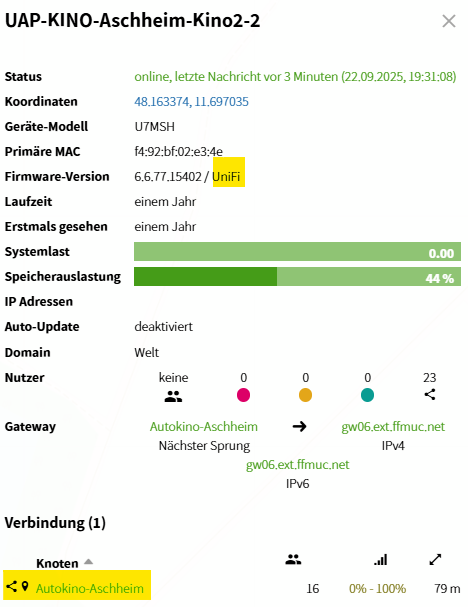
Setting Location for UniFi Devices
To set the GPS location of each UniFi Access Point (AP):
- Open the UniFi Controller web interface.
- Go to the Devices section.
- Select the Access Point you want to configure.
- Click on Settings for that AP.
- Under SNMP, enter the GPS coordinates as latitude and longitude separated by a comma in the Location field, e.g.,
48.1351, 11.5820. - Save your changes.
This sets the location for the AP, helping with accurate device placement on Freifunk maps.
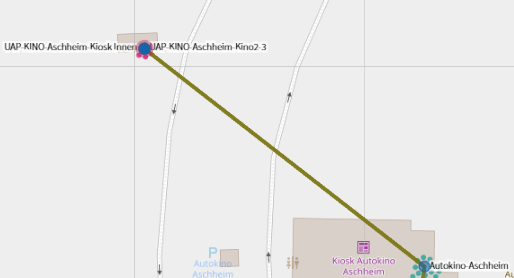
Setting Contact Information for UniFi Devices
To set contact information for each UniFi Access Point (AP):
- Open the UniFi Controller web interface.
- Go to the Devices section.
- Select the Access Point you want to configure.
- Click on Settings for that AP.
- Under SNMP, enter contact details (email, phone, etc.) in the Contact field.
- Save your changes.
This free-text field helps identify device ownership or provides general contact info which is shown on the Freifunk maps.
Setting Location for Omada Devices
To set the GPS location of each Omada Access Point (AP):
- Open the Omada Controller web interface.
- Go to the Devices section.
- Select the Access Point you want to configure.
- Click on Config for that AP.
- Under Services, enter the GPS coordinates as latitude and longitude separated by a comma in the Location field under SNMP, e.g.,
48.1351, 11.5820. - Save your changes.
If the SNMP location is empty, the location configured for the AP in the controller is used.
Setting Contact Information for Omada Devices
To set contact information for each Omada Access Point (AP):
- Open the Omada Controller web interface.
- Go to the Devices section.
- Select the Access Point you want to configure.
- Click on Config for that AP.
- Under Services, enter contact details (email, phone, etc.) in the Contact field under SNMP.
- Save your changes.
UISP
The location of a device is taken from UISP. The neighbours are the links configured in UISP.
Development
pip install -r requirements-dev.txt -e '.[unifi,omada,uisp]'
pytest
ruff check . && ruff format --check .
A new backend is a module in src/unified_respondd/backends/ implementing the Backend protocol from backends/__init__.py (a ControllerConfig dataclass and get_infos(cfg) returning model.Accesspoints) and registered in BACKENDS there. A test checks every registered backend against the protocol.
Security
The CI checks the pinned dependencies for known vulnerabilities with pip-audit and the code with bandit, on every push and pull request and weekly for new advisories. Dependabot keeps the dependencies and GitHub Actions up to date. Please report vulnerabilities privately to the maintainers instead of opening a public issue.
Ownership
Maintained by @freifunkMUC/firmware. Please report issues and send pull requests on GitHub.
Metadata
Release files for unified-respondd 0.2.0
For a detailed explanation of source distributions (sdists) and built distributions (wheels), please see the package formats documentation.
Source distribution (sdist)
| File | Size | Uploaded | Provenance | Actions |
|---|---|---|---|---|
| unified_respondd-0.2.0.tar.gz | 66.1 kB | With provenance | Details for unified_respondd-0.2.0.tar.gz |
Built distribution (wheel)
| File | Interpreter | ABI | Platform | Actions Reset |
|---|---|---|---|---|
| unified_respondd-0.2.0-py3-none-any.whl | Python 3 | none | any | Details for unified_respondd-0.2.0-py3-none-any.whl |
Total release size: 113.9 kB
Release files / unified_respondd-0.2.0.tar.gz
| Download URL | unified_respondd-0.2.0.tar.gz |
|---|---|
| Size | 66.1 kB |
| Tags | Source |
|
SHA-256 checksum How to use checksums |
376fc7d70661ee1825eda7236ddc0e32b60ef3026f38c79e4f14a1507e84db7a
|
|
BLAKE2b-256 checksum How to use checksums |
c46823f899d0a2dfd3dc77e6d3d69974cb51a94b9b7c9f9ec8fec5fbbc99d062
|
| Upload date | |
|
Uploaded using Trusted Publishing? What is trusted publishing? |
Yes |
| Uploaded via |
twine/7.0.0 CPython/3.13.14
|
Provenance
Provenance describes where a file came from. On PyPI, provenance is shared via attestations, which provide a verifiable record of the build or publishing details. View details, limitations and caveats.


PyPI Publish Attestation
PyPI verified that this artifact, at this checksum, originated from the publisher listed below.
Signed by GitHub Actions, verified by PyPI on Sep 29, 2026.
Transparency logRelease files / unified_respondd-0.2.0-py3-none-any.whl
| Download URL | unified_respondd-0.2.0-py3-none-any.whl |
|---|---|
| Size | 47.8 kB |
| Tags | Python 3 |
|
SHA-256 checksum How to use checksums |
06b060e1a8c3f095b3854bdb3d6d0648c70e95364d4d373d6c1c422e691b4526
|
|
BLAKE2b-256 checksum How to use checksums |
f41cea78a9673942c77fd63cfbf685e1ddd55b2d36aecc98c32a41497b2c4964
|
| Upload date | |
|
Uploaded using Trusted Publishing? What is trusted publishing? |
Yes |
| Uploaded via |
twine/7.0.0 CPython/3.13.14
|
Provenance
Provenance describes where a file came from. On PyPI, provenance is shared via attestations, which provide a verifiable record of the build or publishing details. View details, limitations and caveats.
PyPI Publish Attestation
PyPI verified that this artifact, at this checksum, originated from the publisher listed below.
Signed by GitHub Actions, verified by PyPI on Sep 29, 2026.
Transparency logSecurity for unified-respondd 0.2.0
Provenance
Provenance describes where a file came from. On PyPI, provenance is shared via attestations, which provide a verifiable record of the build or publishing details. View details, limitations and caveats.
Full provenance
Both files in this release have been uploaded with provenance metadata.
Attestation for unified_respondd-0.2.0.tar.gz
PyPI Publish Attestation
PyPI verified that this artifact, at this checksum, originated from the publisher listed below.
Signed by GitHub Actions, verified by PyPI on Sep 29, 2026.
Transparency logA note on package security
PyPI is a repository for distributing packages, not a service for auditing them. While third-party security researchers and our staff do their best to detect and remove malicious packages, PyPI cannot guarantee the quality, security or suitability of any given package.
To learn more about protecting yourself from malicious actors, visit our package security documentation.














