

One API. Multiple engines. Zero friction.





UniOCR is a unified, multilingual OCR abstraction layer that wraps best-in-class OCR engines behind a single, clean interface. Throw any image or PDF at it — get back structured text, Markdown, and layout blocks — regardless of which engine runs under the hood.
Built for developers, AI agents, and automation pipelines (n8n, Dify, Telegram bots, etc.).
✨ Key Features
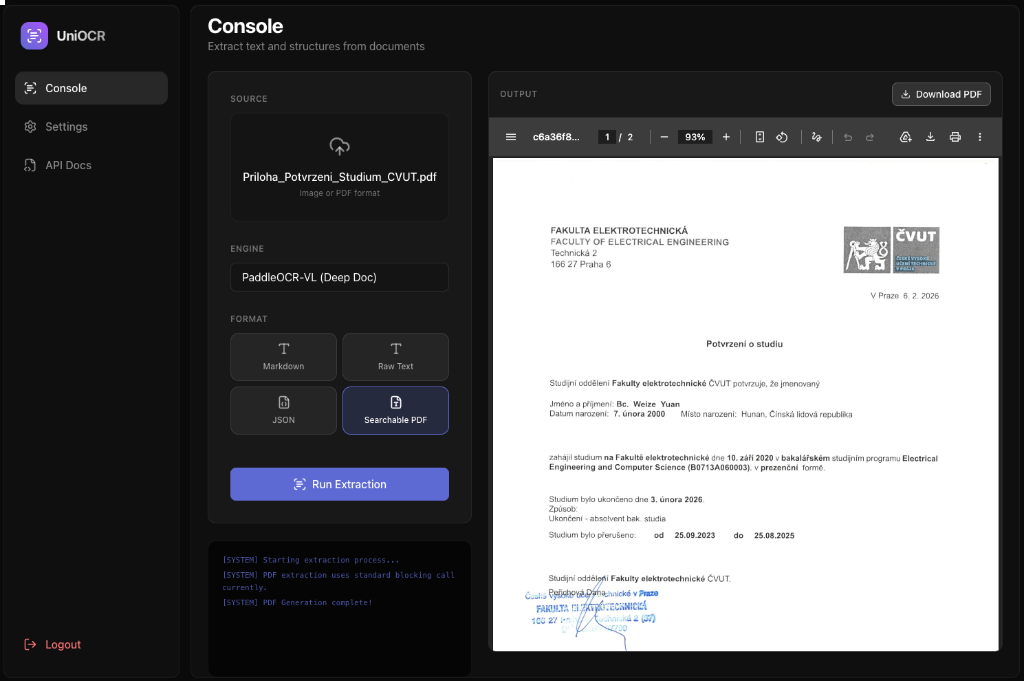
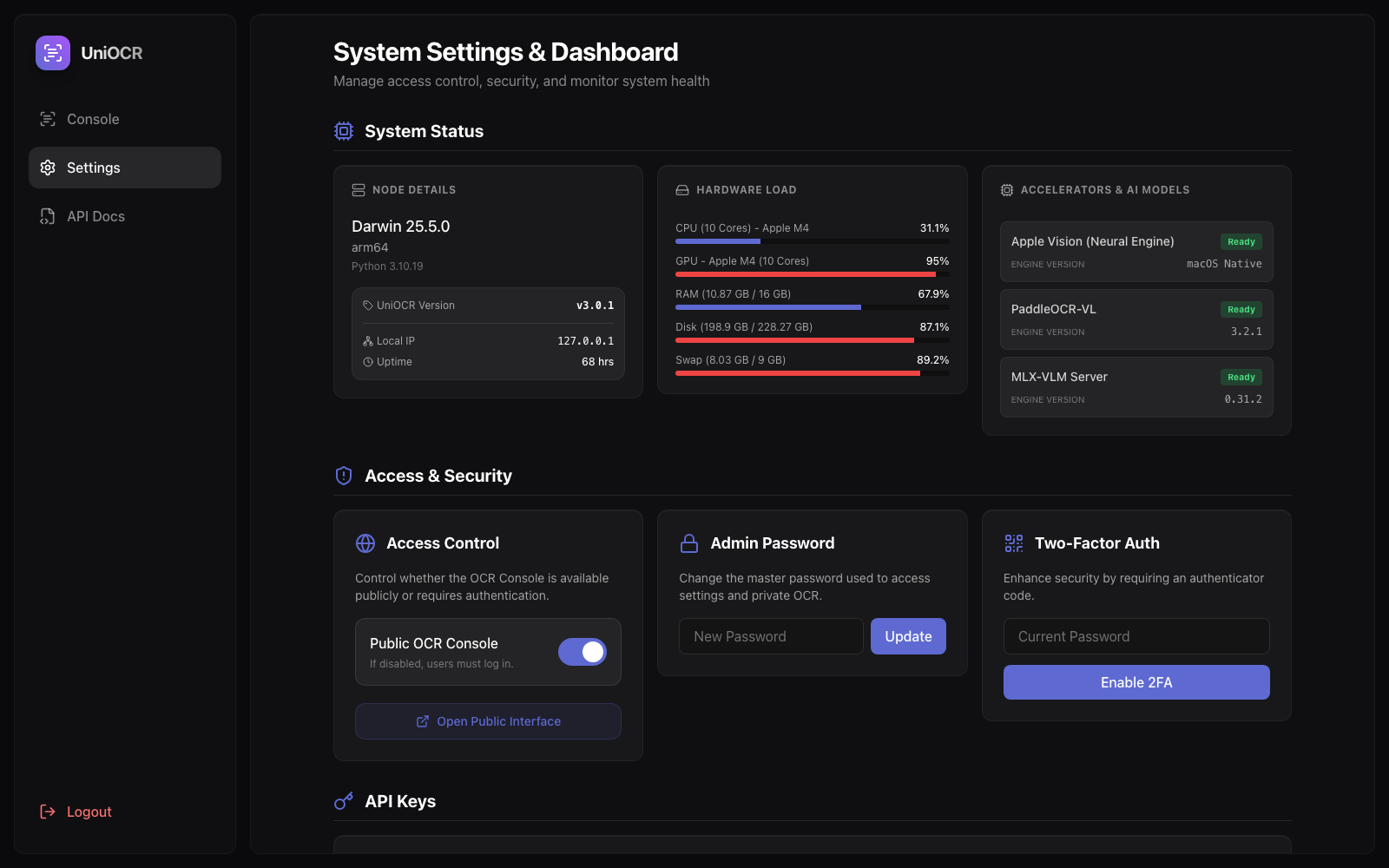
- 🖥️ Stunning Enterprise Dashboard — A fully re-engineered Glassmorphism Web UI featuring an interactive OCR playground, API generator, and live system monitoring.
- 📊 Geek-Level Hardware Radar — Real-time backend polling of physical sensor data: CPU/GPU frequencies, RAM/Swap allocation, Apple Neural Engine status, and active AI model library versions.
- 🔐 Military-Grade Security — Built-in local SQLite persistence. Full support for 2FA (TOTP), Admin master passwords, and one-click toggles between public/private API access.
- 🔑 Seamless API Key Management — Issue and revoke API Tokens directly from the UI, with auto-generated ready-to-use
curlsnippets for instant integration testing. - 🔌 Pluggable Engines — PaddleOCR-VL (deep document AI) and Apple Vision (native macOS) with automatic priority fallback.
- ⚡ Zero-Config Acceleration — Auto-detects Apple Silicon → launches MLX-VLM → offloads to Neural Engine (NPU).
- 🚀 Zero-Delay Smart Cache (LRU) — Instantaneous format switching (TXT, JSON, MD, PDF download/preview) for recent files without re-running the neural network.
- 🐳 Docker Ready — Single-command deployment via Docker Compose for production-grade frontend & backend.
🚀 Quick Start
Option 1: pip install
# Core only (lightweight)
pip install uniocr

# With PaddleOCR-VL (powerful document AI, ~1.8 GB model download on first run)
pip install "uniocr[paddle]"

# With Apple Vision (macOS only, uses built-in system OCR)
pip install "uniocr[apple]"

# Everything (Recommended for Dashboard & API)
pip install "uniocr[all]"
Option 2: Docker (recommended for servers)
# Use Docker Compose (pulls and runs all components instantly)
curl -O https://raw.githubusercontent.com/yuanweize/uni-ocr/master/docker-compose.yml
docker compose up -d

# Check it's running
curl http://localhost:8000/health
📖 Usage
Python SDK
from uniocr import UniOCR

ocr = UniOCR(engine="auto")          # Auto-selects best available engine
doc = ocr.extract("invoice.pdf")

print(doc.text)                       # Plain text
print(doc.markdown)                   # Structured Markdown
print(doc.to_dict())                  # JSON-serialisable dict
CLI
# Start the full Web UI Console & API server
uniocr serve --port 8000

# Extract text (outputs Markdown by default)
uniocr extract document.pdf -o result.md

# Generate a Searchable PDF
uniocr extract input_image.jpg -o output_searchable.pdf
REST API & Dashboard Console
Start the server:
uniocr serve --port 8000
- Web UI Console:
http://localhost:8000/ - System Settings & Radar:
http://localhost:8000/settings - Interactive API Docs:
http://localhost:8000/docs
Endpoints
| Method | Endpoint | Description |
|---|---|---|
GET |
/health |
Health check & engine list |
POST |
/extract |
Extract text from uploaded file (JSON/Markdown) |
POST |
/extract/pdf |
Extract text and return a Searchable PDF file |
POST |
/extract/url |
Extract text from URL |
(If Public API Access is disabled, these endpoints require an Authorization: Bearer <API_KEY> header).
🐳 Docker Build
git clone https://github.com/yuanweize/uni-ocr.git
cd uni-ocr
docker compose up -d --build
🔧 Engine Priority
| Priority | Engine | Best for | Speed |
|---|---|---|---|
| 1 | PaddleOCR-VL + MLX-VLM | Complex layouts, tables, formulas, 109 languages | ⚡⚡ |
| 2 | PaddleOCR-VL (CPU) | Same capabilities, without MLX acceleration | ⚡ |
| 3 | Apple Vision | Simple text, macOS only, instant | ⚡⚡⚡ |
Apple Silicon users: when
mlx-vlmis installed, UniOCR automatically starts an MLX-VLM server for Neural Engine acceleration. No configuration needed.
📄 License
MIT © 2026 Weize Yuan
1 maintainer

Download files
Download the file for your platform. If you're not sure which to choose, learn more about installing packages.
Source Distribution
Built Distribution
Filter files by name, interpreter, ABI, and platform.
If you're not sure about the file name format, learn more about wheel file names.
Copy a direct link to the current filters
File details
Details for the file uniocr-3.1.0.tar.gz.
File metadata
- Download URL: uniocr-3.1.0.tar.gz
- Upload date:
- Size: 208.7 kB
- Tags: Source
- Uploaded using Trusted Publishing? Yes
- Uploaded via:
twine/6.1.0 CPython/3.13.12
File hashes
| Algorithm | Hash digest | |
|---|---|---|
| SHA256 |
ec20edca321d967e97c9ecea13a0fdc5a17a7e0929e3770cb23aeba1e05b4682
|
|
| MD5 |
4bbacea950c6c8f09dcfedf8b427543e
|
|
| BLAKE2b-256 |
cb25e3783b5ee39072b66fd53a0efd6eca8647e7ed6f95881c2b272fc6b2ebd6
|
Provenance
The following attestation bundles were made for uniocr-3.1.0.tar.gz:
Publisher:
publish.yml on yuanweize/uni-ocr
-
Statement:
-
Statement type:
https://in-toto.io/Statement/v1 -
Predicate type:
https://docs.pypi.org/attestations/publish/v1 -
Subject name:
uniocr-3.1.0.tar.gz -
Subject digest:
ec20edca321d967e97c9ecea13a0fdc5a17a7e0929e3770cb23aeba1e05b4682 - Sigstore transparency entry: 1941223659
- Sigstore integration time:
-
Permalink:
yuanweize/uni-ocr@ba0f8c7295c3b3baa6b02980daae3c2d4029e1d0 -
Branch / Tag:
refs/tags/v3.1.0 - Owner: https://github.com/yuanweize
-
Access:
public
-
Token Issuer:
https://token.actions.githubusercontent.com -
Runner Environment:
github-hosted -
Publication workflow:
publish.yml@ba0f8c7295c3b3baa6b02980daae3c2d4029e1d0 -
Trigger Event:
push
-
Statement type:
File details
Details for the file uniocr-3.1.0-py3-none-any.whl.
File metadata
- Download URL: uniocr-3.1.0-py3-none-any.whl
- Upload date:
- Size: 221.1 kB
- Tags: Python 3
- Uploaded using Trusted Publishing? Yes
- Uploaded via:
twine/6.1.0 CPython/3.13.12
File hashes
| Algorithm | Hash digest | |
|---|---|---|
| SHA256 |
0fbea1bf51544d70df5c113b7e4d9e1ce5a50d262fd992bf15ddcb013d7f6e4b
|
|
| MD5 |
3a37f6f46f78f1b47e18e88a86348adb
|
|
| BLAKE2b-256 |
57edddc98904b8eba53e01adb855a6bfbd9fddc47a8fe7d08574b3b4c2573697
|
Provenance
The following attestation bundles were made for uniocr-3.1.0-py3-none-any.whl:
Publisher:
publish.yml on yuanweize/uni-ocr
-
Statement:
-
Statement type:
https://in-toto.io/Statement/v1 -
Predicate type:
https://docs.pypi.org/attestations/publish/v1 -
Subject name:
uniocr-3.1.0-py3-none-any.whl -
Subject digest:
0fbea1bf51544d70df5c113b7e4d9e1ce5a50d262fd992bf15ddcb013d7f6e4b - Sigstore transparency entry: 1941223807
- Sigstore integration time:
-
Permalink:
yuanweize/uni-ocr@ba0f8c7295c3b3baa6b02980daae3c2d4029e1d0 -
Branch / Tag:
refs/tags/v3.1.0 - Owner: https://github.com/yuanweize
-
Access:
public
-
Token Issuer:
https://token.actions.githubusercontent.com -
Runner Environment:
github-hosted -
Publication workflow:
publish.yml@ba0f8c7295c3b3baa6b02980daae3c2d4029e1d0 -
Trigger Event:
push
-
Statement type:







