# UniqueBible
A cross-platform & offline bible application, integrated with high-quality resources and unique features.
[](https://youtu.be/NuTUhAD-zCk)
[Click to listen audio overview](https://youtu.be/NuTUhAD-zCk)
<b>Platforms:</b> <a href=”https://github.com/eliranwong/UniqueBible/wiki/Install-on-Windows”>Windows 10</a>, <a href=”https://github.com/eliranwong/wsl2/blob/master/bible_apps/desktop.md”>Windows WSL2</a>, <a href=”https://github.com/eliranwong/UniqueBible/wiki/Install-on-macOS”>macOS [Sierra+]</a> and <a href=”https://github.com/eliranwong/UniqueBible/wiki/Install-on-Linux”>Linux</a> (Arch, Debian, Ubuntu & Mint), <a href=”https://github.com/eliranwong/UniqueBible/wiki/Install-on-Chrome-OS”>Chrome OS</a> (Debian 10), <a href=”https://github.com/eliranwong/UniqueBible/wiki/Android-iOS-Version”>Android / iOS</a>
# Resources
After downloading, all resources are available for offline use.
## Standard modules
[Bibles](https://github.com/eliranwong/UniqueBible/wiki/Bible-Modules) - includes Hebrew & Greek resources
[Commentaries](https://github.com/eliranwong/UniqueBible/wiki/Commentary-Modules)
[Dictionaries](https://github.com/eliranwong/UniqueBible/wiki/Dictionaries)
[Encyclopedias](https://github.com/eliranwong/UniqueBible/wiki/Encyclopedias)
[Bible Topics](https://github.com/eliranwong/UniqueBible/wiki/Bible-Topics)
Lexicons
Cross References
Treasury of Scripture Knowledge
Discourse Analysis
Harmonies and Parallels
Bible Promises
Timelines
Bible Characters and Locations
## GitHub modules
[UBA Bibles](https://github.com/otseng/UniqueBible_Bibles)
[UBA Commentaries](https://github.com/darrelwright/UniqueBible_Commentaries)
[UBA Books](https://github.com/darrelwright/UniqueBible_Books)
[UBA Maps-Charts](https://github.com/darrelwright/UniqueBible_Maps-Charts)
[UBA PDF](https://github.com/otseng/UniqueBible_PDF)
[UBA EPUB](https://github.com/otseng/UniqueBible_EPUB)
[UBA Hymn Lyrics](https://github.com/otseng/UniqueBible_Hymn_Lyrics)
[UBA Devotionals](https://github.com/otseng/UniqueBible_Devotionals)
# User Interface
Unique Bible App can <a href=”https://github.com/eliranwong/UniqueBible/wiki/UBA-Run-Modes”>run in different modes</a>, both online and offline, for examples:
> <a href=”https://github.com/eliranwong/UniqueBible/wiki/Command-Line-Interface”>GUI mode</a> - a Qt-based Multi-Window Desktop Application, designed to run UBA on Windows, macOS, Linux, ChromeOS
> <a href=”https://github.com/eliranwong/UniqueBible/wiki/Web-Version-%5Bavailable-OFFLINE%5D”>Http-server</a> - a web server that supports regular browsing and APIs, e.g. <a href=”https://bible.gospelchurch.uk”>https://bible.gospelchurch.uk</a>
> <a href=”https://github.com/eliranwong/UniqueBible/wiki/Terminal-Mode”>Terminal mode</a> - the quickest way to run UBA; the most comprehensive in terms of feature coverage; all platforms supported; local or via ssh
> <a href=”https://github.com/eliranwong/UniqueBible/wiki/UBA-Run-Modes”>other modes …</a>
# AI Features
AI Features have been integrated into UniqueBible App. Five backends are supported: 1. OpenAI / ChatGPT 2. Google AI / Gemini 3. X AI / Grok 4. Grok Cloud API 5. Mistral AI API.
# Development Team
Eliran Wong (https://github.com/eliranwong)
Oliver Tseng (https://github.com/otseng)
<a href=”https://github.com/eliranwong/UniqueBible/wiki/Translators”>Program Interface Translators</a>
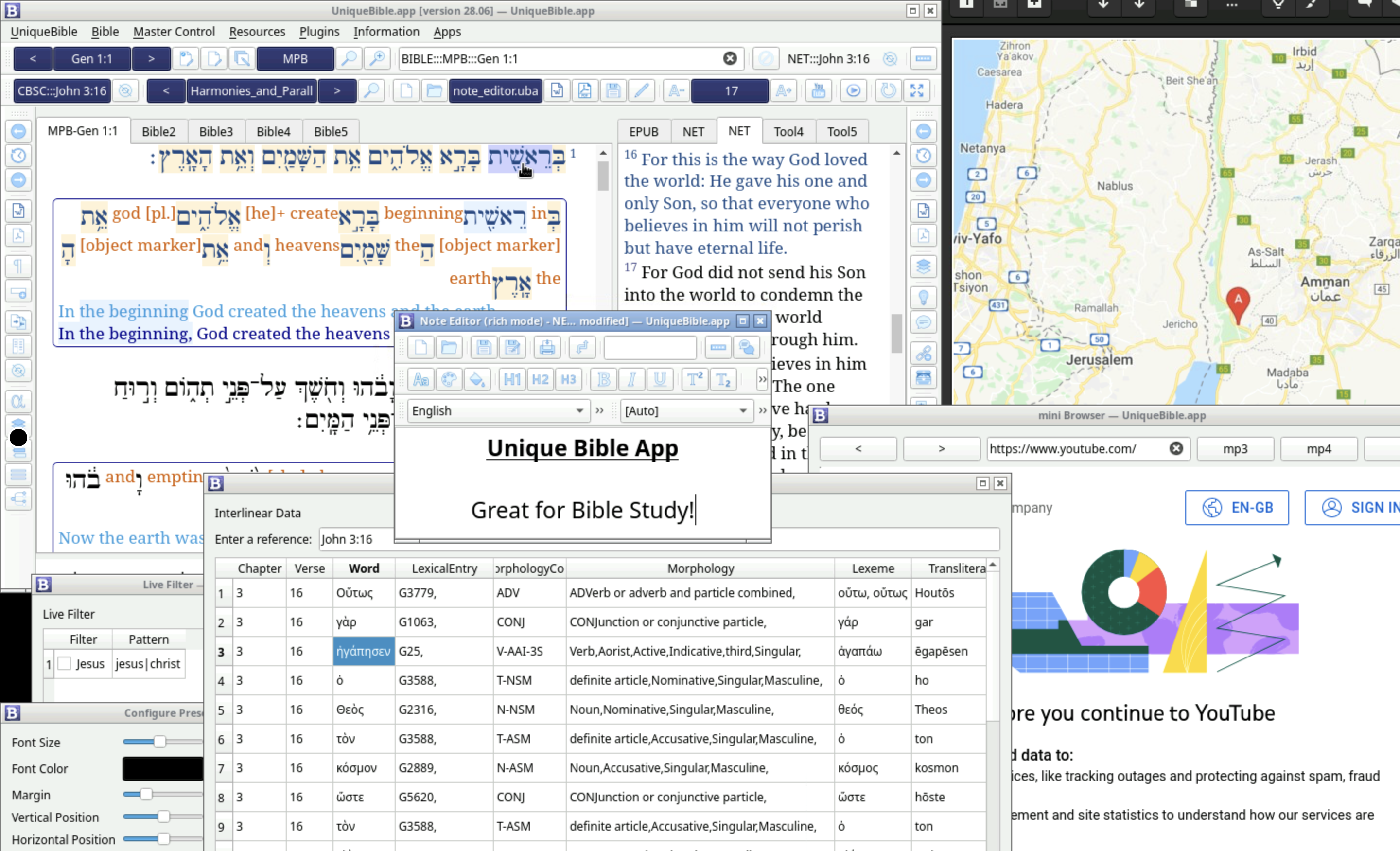
# Screenshot:
<img width=”1440” alt=”Screenshot 2022-02-18 at 19 09 09” src=”https://user-images.githubusercontent.com/25262722/154747249-adf94293-eaab-43aa-9461-04d4d688b3d1.png”>
# Quick Start
Python 3.8+ required!
To install:
> pip install uniquebible
To run GUI mode:
> uniquebible
More about installation at https://github.com/eliranwong/UniqueBible/wiki/Installation
More about running modes at https://github.com/eliranwong/UniqueBible/wiki/UBA-Run-Modes
# Features, instructions and how-tos
[Wiki](https://github.com/eliranwong/UniqueBible/wiki)
# Help, discussion and support
[Discussions](https://github.com/eliranwong/UniqueBible/discussions)
# Feature requests, issues and bug reporting
[Issues](https://github.com/eliranwong/UniqueBible/issues)
# Donations:
Please consider a donation via our PayPal account: <a href=”https://www.paypal.me/MarvelBible”>https://www.paypal.me/MarvelBible</a>
1 maintainer

Metadata
1 maintainer
Release files for uniquebible 0.2.28
For a detailed explanation of source distributions (sdists) and built distributions (wheels), please see the package formats documentation.
Source distribution (sdist)
| File | Size | Uploaded | Provenance | |
|---|---|---|---|---|
| uniquebible-0.2.28.tar.gz | 74.2 MB | Without provenance | Details |
Built distribution (wheel)
| File | Interpreter | ABI | Platform | Reset |
|---|---|---|---|---|
| uniquebible-0.2.28-py3-none-any.whl | Python 3 | none | any | Details |
Total release size: 149.8 MB
Release files / uniquebible-0.2.28.tar.gz
| Download URL | uniquebible-0.2.28.tar.gz |
|---|---|
| Size | 74.2 MB |
| Tags | Source |
|
SHA-256 checksum How to use checksums |
1553c8a5cfa8fc27785b071fb9c988bcbb800b0fb1de5e332cb043dcc39ae5c5
|
|
BLAKE2b-256 checksum How to use checksums |
ffd00dfa0ca10266d88d9f9f66acf29f580d5303d8641bc0196d268b1c1819b1
|
| Upload date | |
|
Uploaded using Trusted Publishing? What is trusted publishing? |
No |
| Uploaded via |
twine/5.0.0 CPython/3.12.3
|
Release files / uniquebible-0.2.28-py3-none-any.whl
| Download URL | uniquebible-0.2.28-py3-none-any.whl |
|---|---|
| Size | 75.6 MB |
| Tags | Python 3 |
|
SHA-256 checksum How to use checksums |
e965d3e4fef778132923d2257fa58e3376bebdc6e29bff2549b79901cd584ea3
|
|
BLAKE2b-256 checksum How to use checksums |
6f7c6fb82d4c2e746608f3a71c61a12309bb650f4a7bf83a17a78dcdd995c9ce
|
| Upload date | |
|
Uploaded using Trusted Publishing? What is trusted publishing? |
No |
| Uploaded via |
twine/5.0.0 CPython/3.12.3
|
Security for uniquebible 0.2.28
Provenance
Provenance describes where a file came from. On PyPI, provenance is shared via attestations, which provide a verifiable record of the build or publishing details. View details, limitations and caveats.
No provenance found
None of the files in this release were uploaded with provenance metadata.
A note on package security
PyPI is a repository for distributing packages, not a service for auditing them. While third-party security researchers and our staff do their best to detect and remove malicious packages, PyPI cannot guarantee the quality, security or suitability of any given package.
To learn more about protecting yourself from malicious actors, visit our package security documentation.















](https://youtu.be/NuTUhAD-zCk)