
uniquechat
Choose a Hugging Face model in your browser, attach a file, and chat on your computer. Once the package and model files are downloaded, the AI can work without internet.
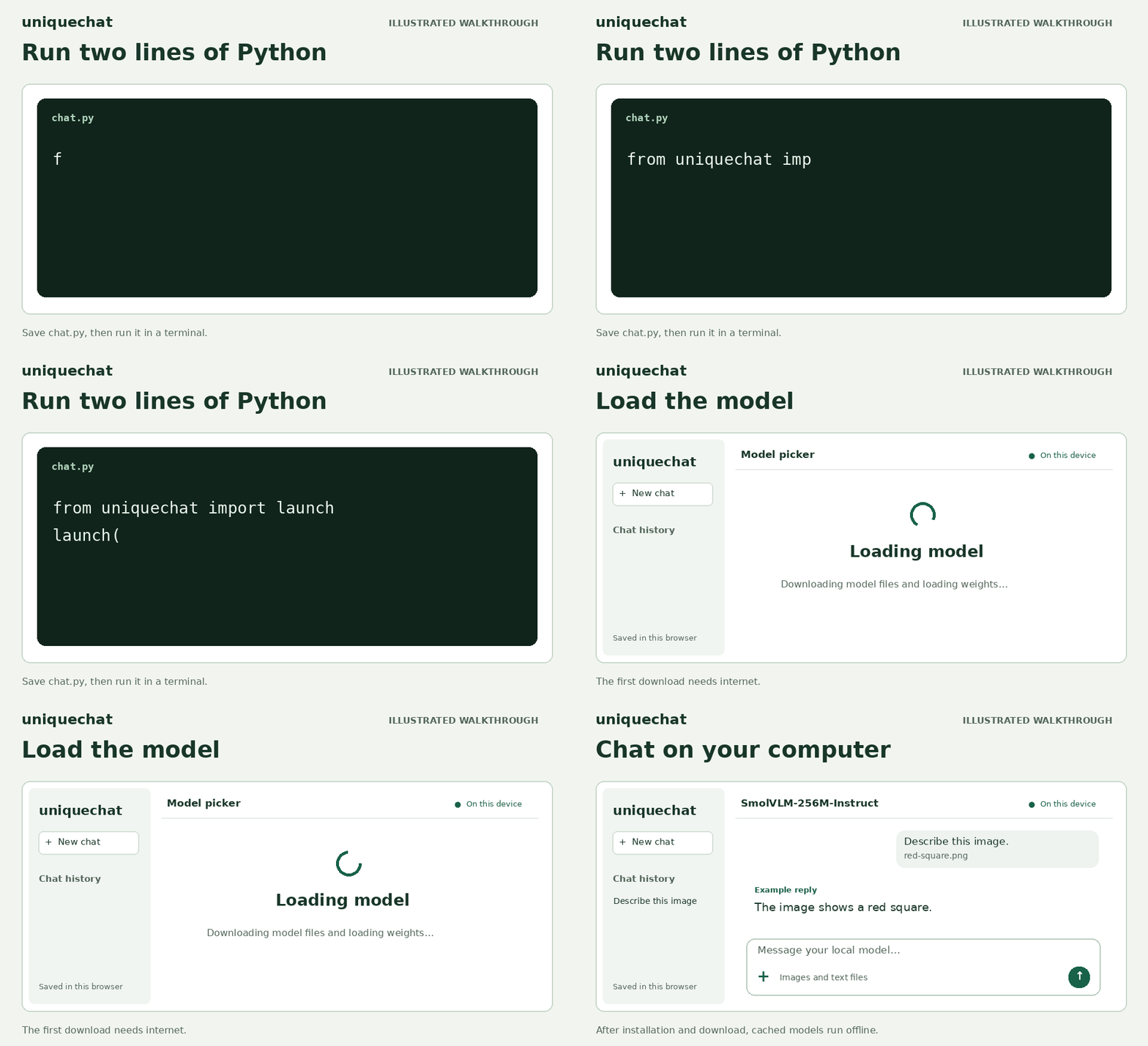
The animation illustrates the interaction with an example reply. An offline copy is included in docs/quickstart.gif.
Run it
Use Python 3.10–3.13 in a virtual environment. From an extracted source checkout, install with python -m pip install .. For a downloaded wheel, use python -m pip install uniquechat-0.1.0-py3-none-any.whl. After publication on PyPI, the install command is python -m pip install uniquechat.
Save this as chat.py and run python chat.py:
from uniquechat import launch
launch()
Select a model and click Load model. The first load needs internet for any missing files and can take several minutes. The chat opens when the model is ready. Type a question, or use the + button and then send your prompt. Choose + New chat to start again or switch models. Previous chats appear in the sidebar, saved with their attachments in this browser on this device. Stop the local server with Ctrl+C.
| Starter model | Inputs | Approximate weight download |
|---|---|---|
| HuggingFaceTB/SmolLM2-135M-Instruct | Text and UTF-8 documents | 270 MB |
| HuggingFaceTB/SmolVLM-256M-Instruct | Text, UTF-8 documents and images | 510 MB |
Text files can be TXT, Markdown, CSV or JSON. Supported images are PNG, JPEG and WebP. Attach up to three files per message. Text files must fit the model's context window, even when smaller than the 32 KiB upload limit. Images are limited to 8 MiB and 16 megapixels each. Model weights, installed dependencies and runtime memory have separate space requirements.
Run offline
Download a model by loading it once while online. On the same computer, using the same Hugging Face cache, run:
from uniquechat import launch
launch(offline=True)
Choose your downloaded model. Offline mode loads model files from the cache and reports missing files. Chat generation runs on your CPU or available CUDA GPU. Prompts and attachments are processed on your computer. The browser connects to a loopback server. The first package installation and model download require internet unless their files have already been supplied locally.
Skip the picker
from uniquechat import launch
launch("HuggingFaceTB/SmolVLM-256M-Instruct")
From a terminal, use uniquechat or uniquechat --offline HuggingFaceTB/SmolLM2-135M-Instruct. You can enter other Transformers causal chat model IDs with built-in chat templates and safetensors weights. Image chat support targets Idefics3 and SmolVLM. Custom model code, GGUF files and image generation models are outside this version's scope.
Maintainer release
Register a pending PyPI Trusted Publisher for project uniquechat, owner Unique50101, repository uniquechat, workflow release.yml, environment pypi. Push a version tag matching the package metadata, such as v0.1.0. The workflow builds the wheel and source archive, installs the wheel, generates a reply with both starter models using cached weights, uploads to PyPI, and attaches the distributions to a GitHub Release. Manual workflow runs verify the package without publishing.
Run the GitHub Packages container
Run this command and open http://127.0.0.1:7860 in Chrome. The named volume keeps downloaded models between runs.
docker run --rm -p 127.0.0.1:7860:7860 -v uniquechat-models:/cache ghcr.io/unique50101/uniquechat:0.1.0
1 maintainer

Metadata
1 maintainer
Release files for uniquechat 0.1.0
For a detailed explanation of source distributions (sdists) and built distributions (wheels), please see the package formats documentation.
Source distribution (sdist)
| File | Size | Uploaded | Provenance | Actions |
|---|---|---|---|---|
| uniquechat-0.1.0.tar.gz | 210.8 kB | With provenance | Details for uniquechat-0.1.0.tar.gz |
Built distribution (wheel)
| File | Interpreter | ABI | Platform | Actions Reset |
|---|---|---|---|---|
| uniquechat-0.1.0-py3-none-any.whl | Python 3 | none | any | Details for uniquechat-0.1.0-py3-none-any.whl |
Total release size: 224.3 kB
Release files / uniquechat-0.1.0.tar.gz
| Download URL | uniquechat-0.1.0.tar.gz |
|---|---|
| Size | 210.8 kB |
| Tags | Source |
|
SHA-256 checksum How to use checksums |
952b94779a576b4ddef58adc99274dae1ed5b0422533c4e80da95df16d920866
|
|
BLAKE2b-256 checksum How to use checksums |
7bdc11a1529d742beb6a60d74d594d97b637bb6d0db980a57f3c90e34ee327f5
|
| Upload date | |
|
Uploaded using Trusted Publishing? What is trusted publishing? |
Yes |
| Uploaded via |
twine/7.0.0 CPython/3.13.16
|
Provenance
Provenance describes where a file came from. On PyPI, provenance is shared via attestations, which provide a verifiable record of the build or publishing details. View details, limitations and caveats.


PyPI Publish Attestation
PyPI verified that this artifact, at this checksum, originated from the publisher listed below.
Signed by GitHub Actions, verified by PyPI on Nov 26, 2026.
Transparency logRelease files / uniquechat-0.1.0-py3-none-any.whl
| Download URL | uniquechat-0.1.0-py3-none-any.whl |
|---|---|
| Size | 13.4 kB |
| Tags | Python 3 |
|
SHA-256 checksum How to use checksums |
d53d4837dae7b7b1a4d66d4c8340dd4a130319422d067b4919568cb338ae8166
|
|
BLAKE2b-256 checksum How to use checksums |
874b56fde5dcc1829f16aecfac9264453839b25ad7c6fafc5fbfd5498b67a178
|
| Upload date | |
|
Uploaded using Trusted Publishing? What is trusted publishing? |
Yes |
| Uploaded via |
twine/7.0.0 CPython/3.13.16
|
Provenance
Provenance describes where a file came from. On PyPI, provenance is shared via attestations, which provide a verifiable record of the build or publishing details. View details, limitations and caveats.
PyPI Publish Attestation
PyPI verified that this artifact, at this checksum, originated from the publisher listed below.
Signed by GitHub Actions, verified by PyPI on Nov 26, 2026.
Transparency logSecurity for uniquechat 0.1.0
Provenance
Provenance describes where a file came from. On PyPI, provenance is shared via attestations, which provide a verifiable record of the build or publishing details. View details, limitations and caveats.
Full provenance
Both files in this release have been uploaded with provenance metadata.
Attestation for uniquechat-0.1.0.tar.gz
PyPI Publish Attestation
PyPI verified that this artifact, at this checksum, originated from the publisher listed below.
Signed by GitHub Actions, verified by PyPI on Nov 26, 2026.
Transparency logA note on package security
PyPI is a repository for distributing packages, not a service for auditing them. While third-party security researchers and our staff do their best to detect and remove malicious packages, PyPI cannot guarantee the quality, security or suitability of any given package.
To learn more about protecting yourself from malicious actors, visit our package security documentation.














