
Open source project to build a unit tests generator in Python.
Verified details
These details have been verified by PyPIProject links
GitHub Statistics
Maintainers

Project description
🛡️ Unit-Tests-Generator
Autonomous, Graph-RAG-Driven Test Engineering for Python.


Unit-Tests-Generator is an intelligent agentic tool that automates the entire pytest lifecycle. Unlike static template generators, it leverages an in-memory knowledge graph of your codebase and RAG to produce context-aware, executable, and validated test suites.
The system operates through a multi-stage pipeline:
-
Codebase Graphing: Maps your repository into an in-memory graph to understand cross-file dependencies and type definitions.
-
Contextual RAG: Retrieves relevant context from the graph for the LLM, ensuring the generated tests understand your project's unique patterns.
-
Inference & Guardrails: Generates test cases via LLM API, filtered through strict structural and security guardrails.
-
Validation: Automatically executes the generated tests.
-
Persistence: Only tests that pass execution and are committed to your
/testsdirectory.
⚠️ Security Warning
This tool executes code generated by Large Language Models (LLMs) directly on your local machine.
-
No Guarantees: LLMs can occasionally produce hallucinations, including insecure code patterns or unintended system commands.
-
Sandboxing: It is highly recommended to run these tests within a Docker container or a virtual machine to isolate your host system from the execution environment.
-
Liability: By using this package, you acknowledge that you are responsible for the code executed on your machine. The maintainers are not liable for any damage or data loss resulting from LLM-generated scripts.
🚀 Quick Start
# Install the package
pip install unit-tests-generator

# --- Examples with different providers ---
# OpenRouter: Free LLM with
utgen -s src/ -t tests/ --base-url https://openrouter.ai/api/v1 -m openrouter/arcee-ai/trinity-large-preview:free

# OpenAI: Responses API with auto_chain
utgen -s src/ -t tests/ --model openai/gpt-4o --llm-extra '{"api": "responses", "auto_chain": true}'

# Antrophic: Claude with extended thinking
utgen -s src/ -t tests/ --model anthropic/claude-sonnet-4 --llm-extra '{"thinking": {"type": "enabled", "budget_tokens": 5000}}'
Setting up your LLM
Api key required as environment variable:
# .env file

# --- Examples with different providers ---
OPENROUTER_API_KEY = ""
# or
OPENAI_API_KEY = ""
# or
ANTHROPIC_API_KEY = ""
- LLM providers supported by CrewAI: https://docs.crewai.com/en/concepts/llms.
- OpenRouter free models: https://openrouter.ai/models?order=pricing-low-to-high.
Table of Contents
Usage
utgen is designed to be simple and terminal-first. Once installed, you can generate tests by pointing the tool to your source code and specifying an output directory.
CLI Arguments
| Flag | Shortcut | Description | Required | Default |
|---|---|---|---|---|
--src_path |
-s |
Path to the directory containing your source code. | Yes | — |
--test_path |
-t |
Path to the directory where generated tests will be saved. | Yes | — |
--graph_path |
-g |
Path to export graph data. | No | None |
--overwrite |
-o |
If provided, regenerates tests even if the file already exists in the test directory. | No | False |
--model |
-m |
The LLM model to use (CrewAI/LiteLLM format). | No | openai/gpt-4o |
--temperature |
— | Sampling temperature for the model. | No | 0.3 |
--max-tokens |
— | The maximum number of tokens to generate. | No | 4096 |
--base-url |
— | Custom API endpoint for the LLM provider. | No | None |
--llm-extra |
— | A JSON string for additional LLM provider parameters. | No | None |
--help |
— | Show the help message and exit. | No | — |
By default, utgen skips files that already have a corresponding test file in the output directory and don't export the repository graph:
utgen -s src/ -t tests/
Export graph:
utgen -s src/ -t tests/ -g data/
To ignore existing test files and regenerate everything from scratch:
utgen -s src/ -t tests/ -o
Examples
Upload repo.graphml to https://lite.gephi.org/.
- This repository:
- Code coverage:
- Example for repository https://github.com/ArnauFabregat/probability_estimation
- Code coverage:
- Example for repository
- Code coverage
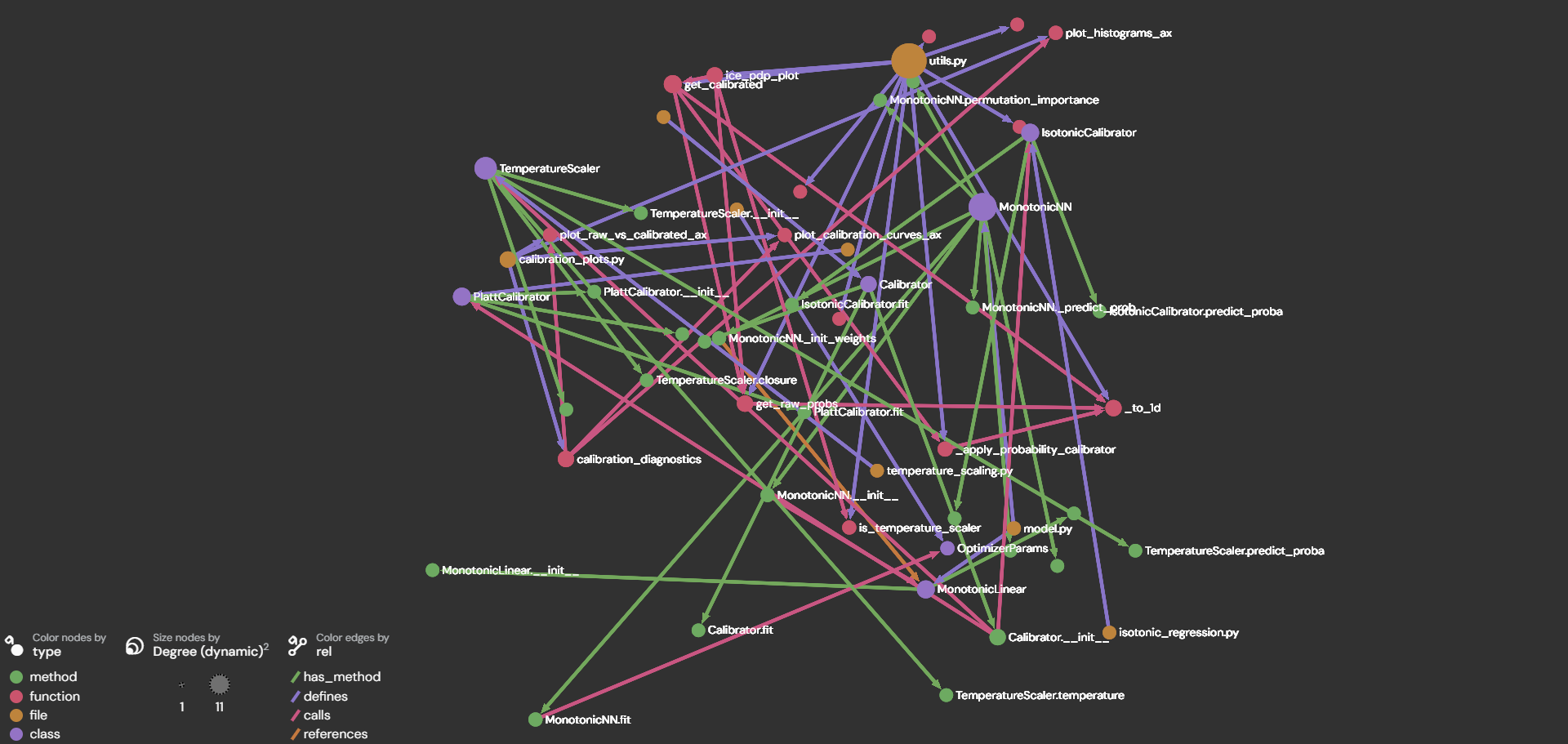
Graph structure
To extract relevant context, the graph needs:
🟢 Nodes for:
- Files
- Classes
- Functions
- Methods
- Nested functions
Fields:
- id: canonical ID (e.g., file::...::class::Calibrator / ...::method::Calibrator.fit)
- type: "file" | "class" | "method" | "function" | "nested_function"
- name: symbol name ("Calibrator", "fit", etc.)
- file: file path
- signature: normalized function/method signature "def fit(self, probs, y) -> None"
- docstring: (trimmed) docstring
- source: actual source code of the node
➡️ Edges for:
- defines (file → symbol, function → nested function)
- has_method (class → method)
- calls (function/method → called symbol)
- references (function/method → referenced symbol)
Fields:
- src: source node id
- dst: destination node id
- rel: "defines" | "has_method" | "references" | "calls"
🧠 Prompt template
TBD
Code Quality & Documentation
Pre-commit Hooks
This project uses pre-commit hooks to enforce code quality standards automatically before each commit. The following hooks are configured:
- Formatting & File Integrity:
trailing-whitespace,end-of-file-fixer,check-yaml,check-toml - Code Linting & Formatting:
ruff-check,ruff-format - Type Checking:
mypy
Pre-commit hooks are automatically installed during virtual environment setup (uv sync).
- To run them for modified (staged) files:
uv run pre-commit run
- To run them for the entire repository:
uv run pre-commit run --all-files
Unit Testing
Unit tests ensure code reliability and prevent regressions. Tests are written using pytest and should cover critical functionality.
To run all tests:
uv run pytest
To run tests with coverage:
uv run pytest --cov
Virtual Environment
Create a new virtualenv with the project's dependencies
Install the project's virtual environment and set it as your project's Python interpreter. This will also install the project's current dependencies.
Open a terminal in VSCode, then execute the following commands:
-
Install UV: Python package and project manager:
- On Mac OSX / Linux:
curl -LsSf https://astral.sh/uv/install.sh | sh - On Windows [In Powershell]:
powershell -ExecutionPolicy ByPass -c "irm https://astral.sh/uv/install.ps1 | iex"
- On Mac OSX / Linux:
-
[optional] To create virtual environment from scratch with
uv: Working on projects -
If the environment already exists, install the virtual environment. It will be installed in the project's root, under a new directory named
.venv:uv syncuv sync --group dev --group dashboard --group testto install all the dependency groups
-
Activate the new virtual environment:
- On Mac OSX / Linux:
source .venv/bin/activate - On Windows [In Powershell]:
.venv\Scripts\activate
- On Mac OSX / Linux:
-
Configure / install pre-commit hooks:
- Pre-commit is a tool that helps us keep the repository complying with certain formatting and style standards, using the
hooksconfigured in the.pre-commit-config.yamlfile. - Previously installed with
uv sync.
- Pre-commit is a tool that helps us keep the repository complying with certain formatting and style standards, using the
Checking if the project's virtual environment is active
All commands listed here assume the project's virtual env is active.
To ensure so, execute the following command, and ensure it points to: {project_root}/.venv/bin/python:
- On Mac OSX / Linux:
which python - On Windows / Mac OSX / Linux:
python -c "import sys; import os; print(os.path.abspath(sys.executable))"
If not active, execute the following to activate:
- On Mac OSX / Linux:
source .venv/bin/activate - On Windows [In Powershell]:
.venv\Scripts\activate
Alternatively, you can also run any command using the prefix uv run and uv will make sure that it uses the virtual env's Python executable.
Updating the project's dependencies
Adding new dependencies
In order to avoid potential version conflicts, we should use uv's dependency manager to add new libraries additional to the project's current dependenies. Open a terminal in VSCode and execute the following commands:
uv add {dependency}e.g.uv add pandas
This command will update the project's files pyproject.toml and uv.lock automatically, which are the ones ensuring all developers and environments have the exact same dependencies.
Updating your virtual env with dependencies recently added or removed from the project
Open a terminal in VSCode and execute the following command:
uv sync
License
MIT. See LICENSE for more information.
TODO
- Complete readme Examples section
- Study the possibility to run the tests in docker isolated environment for safety
- Add the remaining guardrails: not allow to write files from test_*.py
Project details
Verified details
These details have been verified by PyPIProject links
GitHub Statistics
Maintainers


Download files
Download the file for your platform. If you're not sure which to choose, learn more about installing packages.
Source Distribution
Built Distribution
Filter files by name, interpreter, ABI, and platform.
If you're not sure about the file name format, learn more about wheel file names.
Copy a direct link to the current filters
File details
Details for the file unit_tests_generator-0.2.2.tar.gz.
File metadata
- Download URL: unit_tests_generator-0.2.2.tar.gz
- Upload date:
- Size: 21.5 kB
- Tags: Source
- Uploaded using Trusted Publishing? Yes
- Uploaded via: twine/6.1.0 CPython/3.13.7
File hashes
| Algorithm | Hash digest | |
|---|---|---|
| SHA256 |
1ff722a6e371d6a96dc5a9dd34cc64c7402f50ad46158e2343b64c9c806449f6
|
|
| MD5 |
32f948c7ce390a48be26eb7e9bfdc27f
|
|
| BLAKE2b-256 |
78347eea6dbbf8cbbcf989b49a89c39e05ec90cb6e81076deee4a69946ea8559
|
Provenance
The following attestation bundles were made for unit_tests_generator-0.2.2.tar.gz:
Publisher:
publish.yml on ArnauFabregat/unit-tests-generator
-
Statement:
-
Statement type:
https://in-toto.io/Statement/v1 -
Predicate type:
https://docs.pypi.org/attestations/publish/v1 -
Subject name:
unit_tests_generator-0.2.2.tar.gz -
Subject digest:
1ff722a6e371d6a96dc5a9dd34cc64c7402f50ad46158e2343b64c9c806449f6 - Sigstore transparency entry: 1165556182
- Sigstore integration time:
-
Permalink:
ArnauFabregat/unit-tests-generator@5161da301129f6bdb894ed872e4df6ea3b54dde6 -
Branch / Tag:
refs/tags/v0.2.2 - Owner: https://github.com/ArnauFabregat
-
Access:
public
-
Token Issuer:
https://token.actions.githubusercontent.com -
Runner Environment:
github-hosted -
Publication workflow:
publish.yml@5161da301129f6bdb894ed872e4df6ea3b54dde6 -
Trigger Event:
release
-
Statement type:
File details
Details for the file unit_tests_generator-0.2.2-py3-none-any.whl.
File metadata
- Download URL: unit_tests_generator-0.2.2-py3-none-any.whl
- Upload date:
- Size: 25.5 kB
- Tags: Python 3
- Uploaded using Trusted Publishing? Yes
- Uploaded via: twine/6.1.0 CPython/3.13.7
File hashes
| Algorithm | Hash digest | |
|---|---|---|
| SHA256 |
0cc4dcf6910fd693fde9c63698b02e7d781aa8cc8522a756f4294594224278c3
|
|
| MD5 |
e1bd77203b120638412bd9417c6670b2
|
|
| BLAKE2b-256 |
795b47f74f8b1f3e60b50440608bbfd6d042cdf877056ad472c39c878d58fd49
|
Provenance
The following attestation bundles were made for unit_tests_generator-0.2.2-py3-none-any.whl:
Publisher:
publish.yml on ArnauFabregat/unit-tests-generator
-
Statement:
-
Statement type:
https://in-toto.io/Statement/v1 -
Predicate type:
https://docs.pypi.org/attestations/publish/v1 -
Subject name:
unit_tests_generator-0.2.2-py3-none-any.whl -
Subject digest:
0cc4dcf6910fd693fde9c63698b02e7d781aa8cc8522a756f4294594224278c3 - Sigstore transparency entry: 1165556236
- Sigstore integration time:
-
Permalink:
ArnauFabregat/unit-tests-generator@5161da301129f6bdb894ed872e4df6ea3b54dde6 -
Branch / Tag:
refs/tags/v0.2.2 - Owner: https://github.com/ArnauFabregat
-
Access:
public
-
Token Issuer:
https://token.actions.githubusercontent.com -
Runner Environment:
github-hosted -
Publication workflow:
publish.yml@5161da301129f6bdb894ed872e4df6ea3b54dde6 -
Trigger Event:
release
-
Statement type:






