
unitx



Write physical formulas with units and constants in Python.
unitx provides unit conversion, dimensional checks, exact unit algebra,
and type hints for scalar calculations, with optional NumPy integration.
Install
Python 3.12 or later, with no mandatory runtime dependencies:
pip install unitx
If NumPy 2.1 or later is already installed, the same package works with arrays. To install NumPy alongside unitx, use:
pip install 'unitx[numpy]'
Calculate with units
Import ready-to-use units from si and physical constants from SI:
>>> from unitx.si import SI, si
>>> distance = 3 * si.m
>>> duration = 2 * si.s
>>> speed = distance / duration
>>> print(speed)
1.5 m/s
>>> print(speed.to(si.cm / si.s))
150.0 cm/s
>>> print(SI.c)
299792458 m/s
>>> rest_energy = (SI.me * SI.c**2).to(si.MeV)
>>> round(float(rest_energy.value), 6)
0.510999
Addition aligns compatible units; multiplication, division and powers combine
them. Incompatible conversions and arithmetic raise DimensionError.
Use strings when units come from data or configuration:
>>> from unitx import Quantity, Unit
>>> length = Quantity(1, 'm') + Quantity(50, 'cm')
>>> print(length)
3/2 m
>>> length.value_in('cm')
Fraction(150, 1)
>>> Quantity(1, 'm') == Quantity(100, 'cm')
True
>>> Unit('m') == Unit('cm')
False
.value is the stored magnitude in .unit; .to(unit) returns a new
quantity, and .value_in(unit) returns only the converted magnitude.
Unit scales and rational exponents retain exact structure. Numerical results
follow the magnitude's domain: Fraction supports rational arithmetic,
Decimal follows its context, and float calculations can round.
Use .isclose() for approximate comparisons.
Temperatures and logarithmic readings
Use @ for an absolute coordinate reading and * for a linear difference:
>>> difference = 20 * si.degC  # A temperature difference of 20 degrees
>>> room = 20 @ si.degC  # A reading of 20 degrees Celsius
>>> difference.value_in(si.K)
20
>>> room.value_in(si.K)
Fraction(5863, 20)
>>> print(room.to(si.degF))
68 °F
>>> print(room + 5 * si.K)
25 °C
>>> (30 @ si.degC) - room == 10 * si.K
True
>>> (30 @ si.dBm).to_quantity(si.W) == 1 * si.W
True
Points are AffineQuantity objects; differences are Quantity objects.
Multiplying by si.degC constructs a difference; use @ or the explicit
AffineQuantity(20, si.degC) constructor for an absolute reading.
Adding two points raises TypeError; subtract them to obtain a difference.
Use .to_quantity() to turn a point into an ordinary physical quantity for
further arithmetic. Read the point and difference guide
for temperature, dBm/dBW/dBV, and logarithmic ratio rules.
Mathematical functions and time
>>> from unitx import math, pi, time
>>> math.sqrt(9 * si.m**2)
Quantity(3.0, Unit('m'))
>>> math.sin(90 * si.deg).value
1.0
>>> math.sin(pi / 2).value
1.0
>>> start = time.perf_counter()
>>> elapsed = time.perf_counter() - start
>>> isinstance(elapsed.value, int) and elapsed.unit == si.ns
True
unitx.math checks units for roots, trigonometry, exponentials, logarithms,
hypot, and atan2. unitx.time returns AffineQuantity[int] clock readings
in nanoseconds; subtract readings from the same clock to obtain a Quantity
duration. It also adapts durations to sleep and datetime.timedelta, and
converts aware datetime objects to and from Unix time points with
time.from_datetime() / time.to_datetime().
Readings do not carry clock, process, or thread identities; mixing clock
contexts is not detected.
See standard-library enhancements
for the supported functions, numerical backends, and clock semantics.
Work with NumPy
One Quantity wraps a whole array with one unit:
import numpy as np

from unitx import Quantity
from unitx.si import si

positions = Quantity(np.array([1.0, 2.0, 3.0]), si.m)
velocity = positions / (2 * si.s)
mean_velocity = np.mean(velocity)
assert mean_velocity == 1 * si.m / si.s
np.testing.assert_allclose(velocity.value_in(si.cm / si.s), [50, 100, 150])
NumPy handles broadcasting and numerical kernels; unitx checks and combines units. Comparisons return boolean masks. Supported reductions, integration, gradients, and output buffers follow the NumPy support matrix. Array assignment and augmented arithmetic preserve the destination unit and dtype.
Exact unit algebra preserves the scale 1/100 for centimetres to metres.
Applying that scale to a numerical array follows NumPy's dtype, rounding, and
overflow rules; it does not turn the array into exact rational numbers:
from fractions import Fraction

exact = Quantity(1, 'cm').value_in('m')
approximate = Quantity(np.array([1.0]), 'cm').value_in('m')
assert exact == Fraction(1, 100)
assert Fraction(float(approximate[0])) != exact  # Binary float approximates 1/100
Use .value or .value_in(unit) at plotting and external-library boundaries.
np.asarray(quantity) and np.array(quantity) raise TypeError to prevent
implicit unit removal. NumPy's type stubs do not describe every wrapped
operation; see the typing guide.
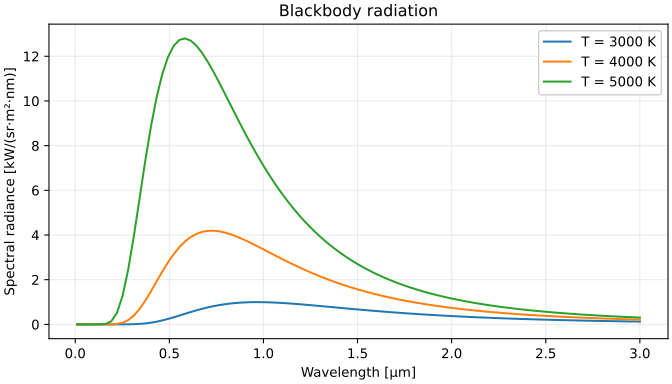
The physics notebooks cover blackbody radiation, damped motion, wave-packet spreading, attenuation, and measurement uncertainty.
Blackbody radiation
Install plotting support with pip install 'unitx[numpy]' matplotlib, then run
this complete example. Planck's formula keeps units and constants throughout;
NumPy broadcasts the wavelength column against three temperatures. Convert the
spectral radiance to a readable display unit before plotting:
import numpy as np
from matplotlib import pyplot as plt

from unitx.si import SI, si

wavelength = np.linspace(0.01, 3, 100)[:, None] * si.um
temperature = np.array([3000, 4000, 5000]) * si.K
exponent = SI.h * SI.c / (wavelength * SI.kB * temperature)
radiance = 2 * SI.h * SI.c**2 / (wavelength**5 * np.expm1(exponent))
radiance = radiance.to('kW/sr/m2/nm')

fig, ax = plt.subplots(figsize=(7, 4), layout='constrained')
ax.plot(wavelength.value, radiance.value)
ax.set(
    xlabel=f'Wavelength [{wavelength.unit}]',
    ylabel=f'Spectral radiance [{radiance.unit}]',
    title='Blackbody radiation',
)
ax.legend([f'T = {value}' for value in temperature], framealpha=1)
ax.grid(True, alpha=0.25)
plt.show()
Read more
Start at the documentation index, or go directly to a topic:
| Topic | Guide |
|---|---|
| Construction, arithmetic, conversion and unit expressions | Units and quantities |
| Ready-to-use units, constants and spelling conventions | Catalogue |
| Exact extra scales and process-local registration | Custom units |
| Fraction, Decimal, equality, powers and tolerances | Scalar numerical behavior |
| Notebook, text, LaTeX, HTML and siunitx output | Display and formatting |
| Version changes | Migration and changelog |
This README describes the current source tree. Public APIs may change during the 0.x series; consult a release's matching tag for its documentation. Development and release checks are described in the contributing guide.
Licensed under the MIT License.
1 maintainer

Metadata
1 maintainer
Release files for unitx 0.13.2
For a detailed explanation of source distributions (sdists) and built distributions (wheels), please see the package formats documentation.
Source distribution (sdist)
| File | Size | Uploaded | Provenance | |
|---|---|---|---|---|
| unitx-0.13.2.tar.gz | 250.9 kB | With provenance | Details |
Built distribution (wheel)
| File | Interpreter | ABI | Platform | Reset |
|---|---|---|---|---|
| unitx-0.13.2-py3-none-any.whl | Python 3 | none | any | Details |
Total release size: 340.4 kB
Release files / unitx-0.13.2.tar.gz
| Download URL | unitx-0.13.2.tar.gz |
|---|---|
| Size | 250.9 kB |
| Tags | Source |
|
SHA-256 checksum How to use checksums |
56954e05ea0806ecf18350999291603eacff12fb0d82da2eb39e8e83c40bb22b
|
|
BLAKE2b-256 checksum How to use checksums |
dc888387b847f421d9edafebf05a3f37ad7984c0ed866a4fdf0f1bcbf433bb02
|
| Upload date | |
|
Uploaded using Trusted Publishing? What is trusted publishing? |
Yes |
| Uploaded via |
twine/7.0.0 CPython/3.13.16
|
Provenance
Provenance describes where a file came from. On PyPI, provenance is shared via attestations, which provide a verifiable record of the build or publishing details. View details, limitations and caveats.


PyPI Publish Attestation
PyPI verified that this artifact, at this checksum, originated from the publisher listed below.
Signed by GitHub Actions, verified by PyPI on Oct 22, 2026.
Transparency logRelease files / unitx-0.13.2-py3-none-any.whl
| Download URL | unitx-0.13.2-py3-none-any.whl |
|---|---|
| Size | 89.5 kB |
| Tags | Python 3 |
|
SHA-256 checksum How to use checksums |
305d4620ce16e3a75b20987d77a806418d61bd514fdf61e7010482224116665e
|
|
BLAKE2b-256 checksum How to use checksums |
5dddd8cd1ae05289a4f0cd1446a8ca626927aa04b21cddc99e220fcee0283a31
|
| Upload date | |
|
Uploaded using Trusted Publishing? What is trusted publishing? |
Yes |
| Uploaded via |
twine/7.0.0 CPython/3.13.16
|
Provenance
Provenance describes where a file came from. On PyPI, provenance is shared via attestations, which provide a verifiable record of the build or publishing details. View details, limitations and caveats.
PyPI Publish Attestation
PyPI verified that this artifact, at this checksum, originated from the publisher listed below.
Signed by GitHub Actions, verified by PyPI on Oct 22, 2026.
Transparency logSecurity for unitx 0.13.2
Provenance
Provenance describes where a file came from. On PyPI, provenance is shared via attestations, which provide a verifiable record of the build or publishing details. View details, limitations and caveats.
Full provenance
All 2 files in this release have been uploaded with provenance metadata.
Attestation for unitx-0.13.2.tar.gz
PyPI Publish Attestation
PyPI verified that this artifact, at this checksum, originated from the publisher listed below.
Signed by GitHub Actions, verified by PyPI on Oct 22, 2026.
Transparency logA note on package security
PyPI is a repository for distributing packages, not a service for auditing them. While third-party security researchers and our staff do their best to detect and remove malicious packages, PyPI cannot guarantee the quality, security or suitability of any given package.














