
unity-api-mcp







MCP server that gives AI agents accurate Unity API documentation. Prevents hallucinated signatures, wrong namespaces, and deprecated API usage.
Supports Unity 2022 LTS, 2023, and Unity 6 with separate databases for each version. Works with Claude Code, Cursor, Windsurf, or any MCP-compatible AI tool. No Unity installation required.
Quick Start
Add to your MCP config (.mcp.json, mcp.json, or your tool's MCP settings), setting UNITY_VERSION to match your project:
{
  "mcpServers": {
    "unity-api": {
      "command": "uvx",
      "args": ["unity-api-mcp"],
      "env": {
        "UNITY_VERSION": "2022"
      }
    }
  }
}
Valid values: "2022", "2023", "6", or a Unity 6 stream like "6000.3".
On first run the server downloads the correct database (~18-24 MB) to ~/.unity-api-mcp/.
How It Works
- Version detection. The server figures out which Unity version to serve:
| Priority | Source | Example |
|---|---|---|
| 1 | UNITY_VERSION env var |
"2022", "6", "6000.3", or "6000.3.8f1" |
| 2 | UNITY_PROJECT_PATH |
Reads ProjectSettings/ProjectVersion.txt, maps 2022.3.62f1 to "2022", 6000.3.8f1 to "6000.3" |
| 3 | Default | "6" |
-
Database download. If the database for that version isn't cached locally, it downloads from GitHub. Unity 6 minor streams (
6000.0,6000.3,6000.5, …) get their own per-stream database, falling back to the generic6database when a stream database isn't published. Cached databases are freshness-checked against the release on startup, so weekly rebuilds reach existing installs automatically. -
Serve. All tool calls query the version-specific SQLite database. Every query returns in <15ms.
Each version has its own database with the correct signatures, deprecation warnings, and member lists for that release.
Tools
| Tool | Purpose | Example |
|---|---|---|
search_unity_api |
Find APIs by keyword | "Tilemap SetTile", "async load scene" |
get_method_signature |
Exact signatures with all overloads | UnityEngine.Physics.Raycast |
get_namespace |
Resolve using directives |
"SceneManager" -> using UnityEngine.SceneManagement; |
get_class_reference |
Full class reference card | "InputAction" -> all methods/fields/properties |
get_deprecation_warnings |
Check if an API is obsolete | "WWW" -> Use UnityWebRequest instead |
Coverage
All UnityEngine and UnityEditor modules, plus packages parsed from C# source: Input System, Addressables, uGUI, TextMeshPro, AI Navigation, and Netcode.
| Version | Records | Deprecated | Modules | Size |
|---|---|---|---|---|
| Unity 2022 LTS | 32,000 | 442 | 86 XML + packages | 18 MB |
| Unity 2023 | 31,387 | 436 | 92 XML | 18 MB |
| Unity 6 (per minor stream) | ~42,500 | ~516 | 139 XML + packages | 24 MB |
Unity 6 databases are rebuilt automatically every week per active minor stream (see .github/workflows/detect-unity-release.yml), so new patch releases are covered within days.
Does not cover third-party assets (DOTween, VContainer, Newtonsoft.Json). For those, rely on project source.
Benchmarks
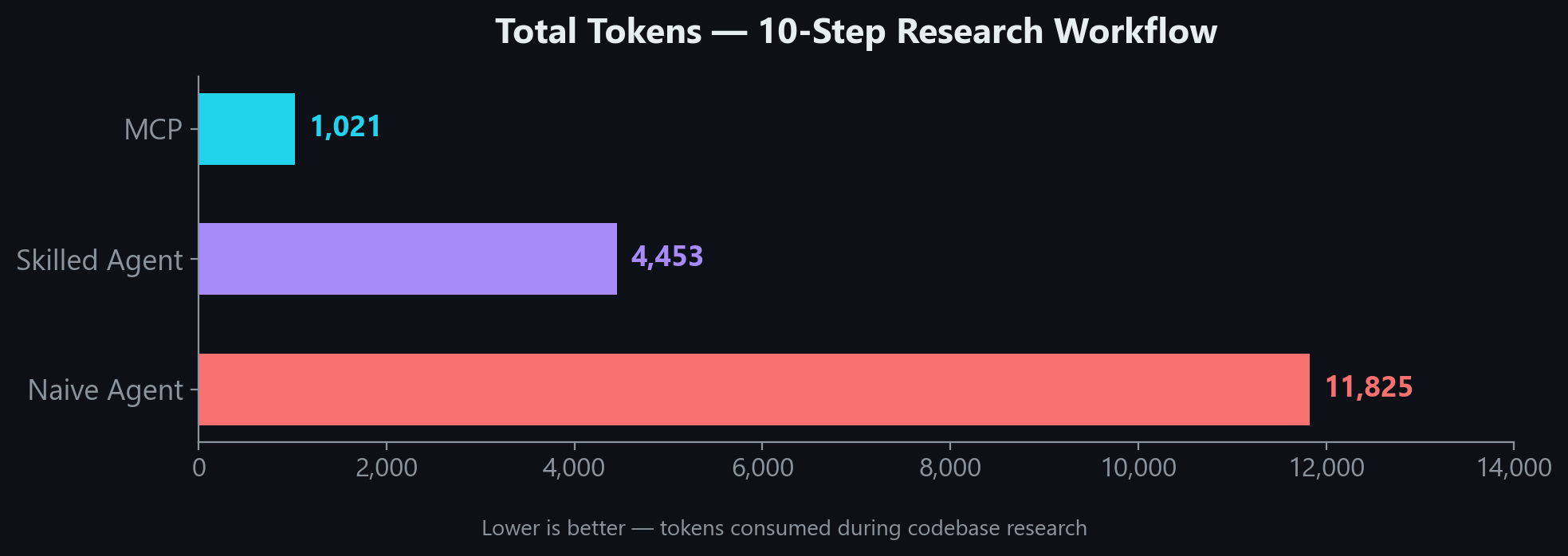
In a 10-step research workflow, MCP uses 4x fewer tokens than a skilled agent and 11x fewer than a naive agent:
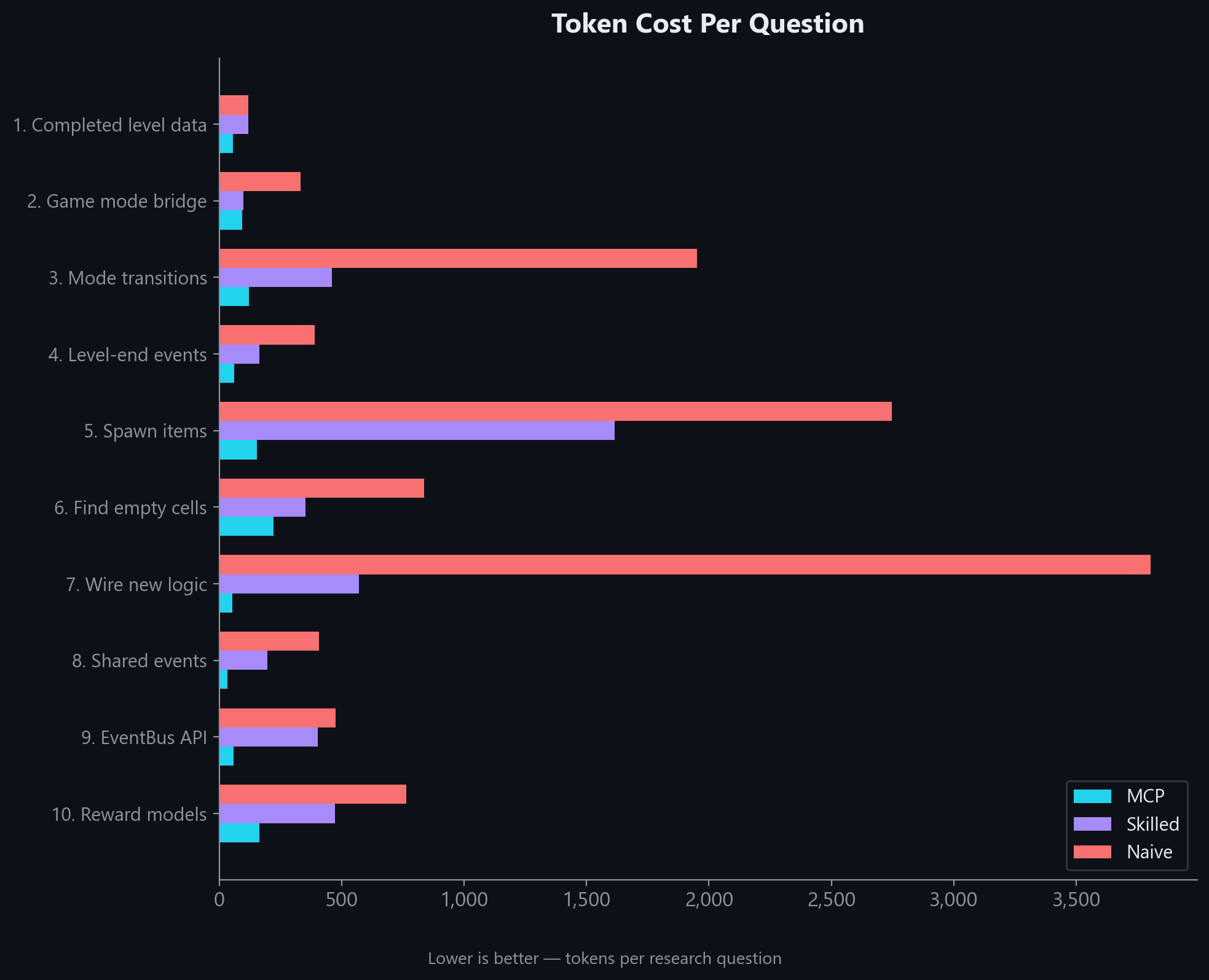
The gap holds across every question type. MCP wins on simple lookups and complex multi-part research alike:
Even in a realistic hybrid workflow where MCP results are followed up with targeted file reads, it still uses 54% fewer tokens than a skilled agent working without MCP:
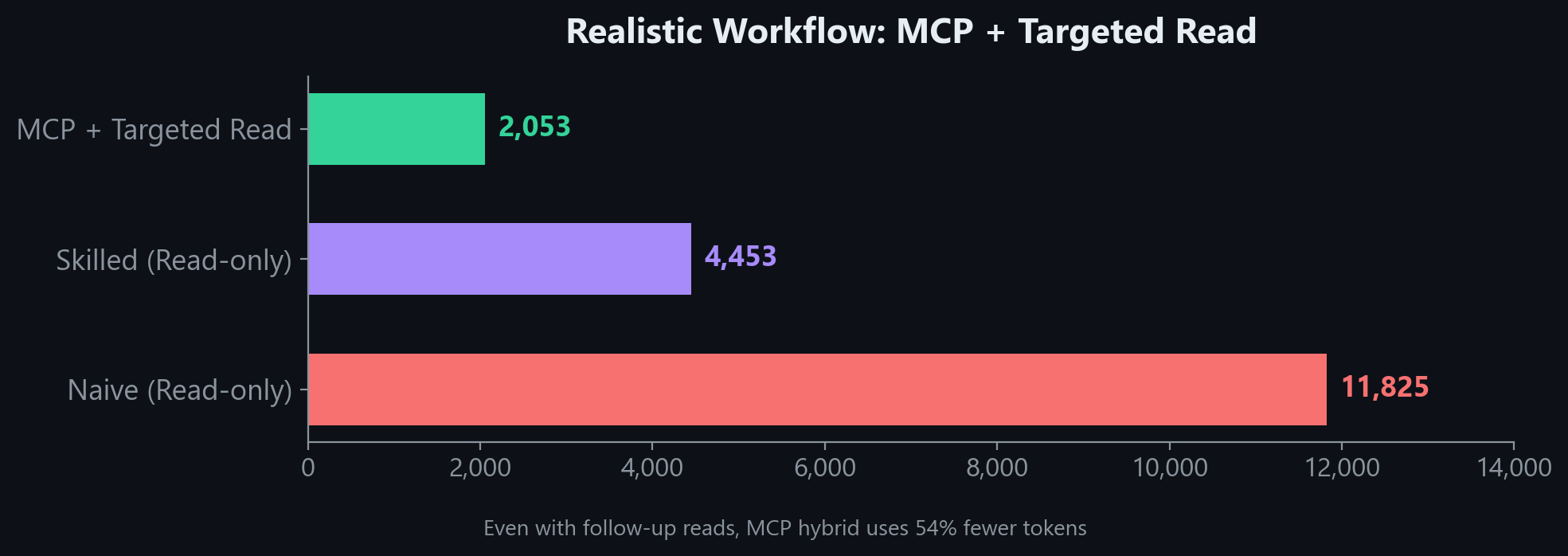
"Without MCP" estimates assume full file reads. A skilled agent with good tooling may use fewer tokens than shown. What MCP guarantees is a correct, structured answer in 1 call every time.
Per-question breakdown
Accuracy
| Test | Result |
|---|---|
| Search top-1 relevance (12 common queries) | 100% |
| Namespace resolution (6 key classes) | 100% |
| Key class coverage (17 common Unity classes) | 94% (16/17) |
Ranking uses BM25 with tuned column weights (member name 10x, class name 5x) plus core namespace boosting to ensure Object.Instantiate ranks above niche APIs like InstantiationParameters.Instantiate.
CLAUDE.md Snippet
Add this to your project's CLAUDE.md (or equivalent instructions file). This step is important. Without it, the AI has the tools but won't know when to reach for them.
## Unity API Lookup (unity-api MCP)

Use the `unity-api` MCP tools to verify Unity API usage instead of guessing. **Do not hallucinate signatures.**

| When | Tool | Example |
|------|------|---------|
| Unsure about a method's parameters or return type | `get_method_signature` | `get_method_signature("UnityEngine.Tilemaps.Tilemap.SetTile")` |
| Need the `using` directive for a type | `get_namespace` | `get_namespace("SceneManager")` |
| Want to see all members on a class | `get_class_reference` | `get_class_reference("InputAction")` |
| Searching for an API by keyword | `search_unity_api` | `search_unity_api("async load scene")` |
| Checking if an API is deprecated | `get_deprecation_warnings` | `get_deprecation_warnings("FindObjectOfType")` |

**Rules:**
- Before writing a Unity API call you haven't used in this conversation, verify the signature with `get_method_signature`
- Before adding a `using` directive, verify with `get_namespace` if unsure
- Covers: all UnityEngine/UnityEditor modules, Input System, Addressables
- Does NOT cover: DOTween, VContainer, Newtonsoft.Json (third-party)
Setup Details
Auto-detect version from project path
Instead of setting UNITY_VERSION, you can point to your Unity project. The server reads ProjectSettings/ProjectVersion.txt automatically:
{
  "mcpServers": {
    "unity-api": {
      "command": "uvx",
      "args": ["unity-api-mcp"],
      "env": {
        "UNITY_PROJECT_PATH": "/path/to/your/unity-project"
      }
    }
  }
}
Alternative installation methods
Using pip install:
pip install unity-api-mcp
{
  "mcpServers": {
    "unity-api": {
      "command": "unity-api-mcp",
      "args": [],
      "env": {
        "UNITY_VERSION": "2022"
      }
    }
  }
}
Environment variables
| Variable | Purpose | Example |
|---|---|---|
UNITY_VERSION |
Unity version to serve | 2022, 2023, 6, or 6000.3.8f1 |
UNITY_PROJECT_PATH |
Auto-detect version from project | F:/Unity Projects/my-project |
UNITY_INSTALL_PATH |
Override Unity install path (for ingest only) |
D:/Unity/6000.3.8f1 |
Building databases locally
If you want to build a database from your own Unity installation instead of downloading:
# Install with ingest dependencies
pip install unity-api-mcp[ingest]

# Build for a specific version
python -m unity_api_mcp.ingest --unity-version 6 --unity-install "D:/Unity/6000.3.8f1" --project "F:/Unity Projects/MyProject"
python -m unity_api_mcp.ingest --unity-version 2022 --unity-install "D:/Unity/2022.3.62f1"
python -m unity_api_mcp.ingest --unity-version 2023 --unity-install "D:/Unity/2023.1.22f1"
Databases are written to ~/.unity-api-mcp/unity_docs_{version}.db by default.
AI-Assisted Setup
If an AI agent is setting this up for you:
Add
unity-api-mcpto my MCP config usinguvxwithUNITY_VERSIONset to match my project, append the CLAUDE.md snippet from the README, and verify withget_namespace("SceneManager").
Project structure
unity-api-mcp/
├── src/unity_api_mcp/
│   ├── server.py          # MCP server (5 tools)
│   ├── db.py              # SQLite + FTS5 database layer
│   ├── version.py         # Version detection + DB download
│   ├── xml_parser.py      # Parse Unity XML IntelliSense files
│   ├── cs_doc_parser.py   # Parse C# doc comments from package source
│   ├── unity_paths.py     # Locate Unity install + package dirs
│   └── ingest.py          # CLI ingestion pipeline
└── pyproject.toml
Databases are stored in ~/.unity-api-mcp/ (downloaded on first run).
Troubleshooting
| Problem | Fix |
|---|---|
| "Could not download Unity X database" | Check internet connection. Or build locally: python -m unity_api_mcp.ingest --unity-version 2022 |
| Wrong API version being served | Set UNITY_VERSION explicitly. Check stderr: unity-api-mcp: serving Unity <version> API docs |
| Server won't start | Check python --version (needs 3.10+). Check path: which unity-api-mcp or where unity-api-mcp |
| Third-party packages return no results | DOTween, VContainer, Newtonsoft.Json are not indexed (third-party, not Unity packages) |
See Also
unreal-api-mcp — Same concept for Unreal Engine (C++). Covers UE 5.5, 5.6, and 5.7.
Contact
Need a custom MCP server for your engine or framework? I build MCP tools that cut token waste and prevent hallucinations for AI-assisted game development. If you want something similar for your team's stack, reach out.
License
1 maintainer

Download files
Download the file for your platform. If you're not sure which to choose, learn more about installing packages.
Source Distribution
Built Distribution
Filter files by name, interpreter, ABI, and platform.
If you're not sure about the file name format, learn more about wheel file names.
Copy a direct link to the current filters
File details
Details for the file unity_api_mcp-2.1.0.tar.gz.
File metadata
- Download URL: unity_api_mcp-2.1.0.tar.gz
- Upload date:
- Size: 314.1 kB
- Tags: Source
- Uploaded using Trusted Publishing? Yes
- Uploaded via:
twine/6.1.0 CPython/3.13.14
File hashes
| Algorithm | Hash digest | |
|---|---|---|
| SHA256 |
bc4f0d1dec40d21b5e34ac8d7c6992eb0d116c341e8ef63383b1385695d34252
|
|
| MD5 |
984f069fdfdb9b047c8b661b213cba2c
|
|
| BLAKE2b-256 |
fe7aacec268a4caa20cc2ae92e4de910c0311515487c77f516b1bd0be6dd280f
|
Provenance
The following attestation bundles were made for unity_api_mcp-2.1.0.tar.gz:
Publisher:
publish.yml on Codeturion/unity-api-mcp
-
Statement:
-
Statement type:
https://in-toto.io/Statement/v1 -
Predicate type:
https://docs.pypi.org/attestations/publish/v1 -
Subject name:
unity_api_mcp-2.1.0.tar.gz -
Subject digest:
bc4f0d1dec40d21b5e34ac8d7c6992eb0d116c341e8ef63383b1385695d34252 - Sigstore transparency entry: 2201641475
- Sigstore integration time:
-
Permalink:
Codeturion/unity-api-mcp@7314690fc50c263f456e58d8a1beb5ee4d29480a -
Branch / Tag:
refs/tags/v2.1.0 - Owner: https://github.com/Codeturion
-
Access:
public
-
Token Issuer:
https://token.actions.githubusercontent.com -
Runner Environment:
github-hosted -
Publication workflow:
publish.yml@7314690fc50c263f456e58d8a1beb5ee4d29480a -
Trigger Event:
release
-
Statement type:
File details
Details for the file unity_api_mcp-2.1.0-py3-none-any.whl.
File metadata
- Download URL: unity_api_mcp-2.1.0-py3-none-any.whl
- Upload date:
- Size: 25.7 kB
- Tags: Python 3
- Uploaded using Trusted Publishing? Yes
- Uploaded via:
twine/6.1.0 CPython/3.13.14
File hashes
| Algorithm | Hash digest | |
|---|---|---|
| SHA256 |
5950cb33aad79f6b66537b689c487b082532acd3e30367b1b074c2ed922e8765
|
|
| MD5 |
3130e26a63282f19492c104c087b9db8
|
|
| BLAKE2b-256 |
bb4224ed07886bd491d396b02d5efd958184861e861fa6c3a1fc74ff3e713ed5
|
Provenance
The following attestation bundles were made for unity_api_mcp-2.1.0-py3-none-any.whl:
Publisher:
publish.yml on Codeturion/unity-api-mcp
-
Statement:
-
Statement type:
https://in-toto.io/Statement/v1 -
Predicate type:
https://docs.pypi.org/attestations/publish/v1 -
Subject name:
unity_api_mcp-2.1.0-py3-none-any.whl -
Subject digest:
5950cb33aad79f6b66537b689c487b082532acd3e30367b1b074c2ed922e8765 - Sigstore transparency entry: 2201641774
- Sigstore integration time:
-
Permalink:
Codeturion/unity-api-mcp@7314690fc50c263f456e58d8a1beb5ee4d29480a -
Branch / Tag:
refs/tags/v2.1.0 - Owner: https://github.com/Codeturion
-
Access:
public
-
Token Issuer:
https://token.actions.githubusercontent.com -
Runner Environment:
github-hosted -
Publication workflow:
publish.yml@7314690fc50c263f456e58d8a1beb5ee4d29480a -
Trigger Event:
release
-
Statement type:














